
Dynamics GP Has Been the Backbone of Manufacturing Operations for Years
For many manufacturers, Dynamics GP is far more than an accounting system. It supports critical business functions, including inventory management, procurement, production planning, cost accounting, warehouse operations, and financial management.
Over the years, and often decades, manufacturers have customized Dynamics GP to reflect the realities of their operations. Processes have been refined, integrations have been built, and teams have developed workflows that rely heavily on the system.
This deep operational integration explains why manufacturers often approach a Dynamics GP to Business Central migration differently than other organizations.
While distributors, professional services firms, and other Dynamics GP customers may see a relatively straightforward path to modernization, manufacturers face a more complex reality. Their ERP environments are often tightly connected to production processes, supply chains, inventory management, and operational performance.
As Microsoft continues investing in cloud-based ERP innovation through Dynamics 365 Business Central, manufacturing leaders are increasingly evaluating what that shift means for their organizations.
The challenge is not determining whether Dynamics GP still works today.
For most manufacturers, it does.
The real question is whether it will continue to support the business objectives, technology initiatives, and competitive requirements that will define success over the next decade.
Table of Contents
Why Are Manufacturers More Hesitant Than Other GP Customers to Move to Business Central?
What Does Microsoft's Dynamics GP Roadmap Mean for Manufacturing Companies?
Can Manufacturers Stay on GP Safely, and for How Long?
What Are the Biggest Risks of Delaying ERP Modernization?
How Should Manufacturers Evaluate Hosted GP Versus Business Central?
Should Manufacturers Move from Dynamics GP to Business Central?
Frequently Asked Questions
Why Are Manufacturers More Hesitant Than Other GP Customers to Move to Business Central?
Having spent time in manufacturing environments myself, I've learned that ERP decisions are rarely technology decisions. They're production decisions. Every change gets evaluated through the lens of operational continuity.
Unlike businesses that primarily rely on ERP systems for financial management, manufacturers depend on ERP platforms to support:
- Production planning and scheduling
- Bills of materials (BOMs)
- Routings and work centers
- Inventory and warehouse management
- Cost accounting
- Quality management processes
- Procurement and supply chain coordination
- Shop floor operations
Over time, many manufacturers have invested heavily in customizations and third-party solutions that extend Dynamics GP beyond its original capabilities.
As a result, one question consistently arises:
Will Business Central support the way we run our business today?
This concern is valid.
A manufacturing ERP system is rarely just software. It represents years of operational knowledge, process optimization, and institutional expertise.
I recently spoke with a manufacturer whose scheduling process depended on a series of custom GP workflows that had evolved over more than a decade.
Their concern wasn't whether Business Central could replace Dynamics GP.
Their concern was whether it could support the operational habits, planning processes, and production routines the business had built around it.
That's a common theme in manufacturing. ERP systems often become deeply embedded in day-to-day operations, making modernization as much an operational decision as a technology decision.
Manufacturing executives often worry that modernization could require:
- Rebuilding critical integrations
- Replacing customized functionality
- Retraining users
- Disrupting production workflows
- Introducing unnecessary operational risk
For manufacturers, hesitation is not about resisting change.
It is about protecting operational continuity while preparing for the future.
What Does Microsoft’s Dynamics GP Roadmap Mean for Manufacturing Companies?
One reason ERP modernization discussions have become more urgent is Microsoft’s continued focus on cloud-first business applications.
While Dynamics GP remains supported, Microsoft’s innovation investments are increasingly concentrated on Dynamics 365 Business Central, Power Platform, Microsoft Fabric, Copilot, and the broader Microsoft cloud ecosystem.
Understanding the Microsoft Dynamics GP roadmap is now a critical component of long-term ERP planning.
This distinction is important because support and innovation are not the same thing.
An ERP platform can remain fully supported while gradually becoming disconnected from emerging technologies and modern business capabilities.
Manufacturers evaluating their long-term ERP strategy should therefore consider more than support timelines. They should evaluate how future initiatives align with Microsoft’s technology roadmap.
Key considerations include:
Talent Availability
As fewer organizations implement new Dynamics GP systems, experienced GP consultants, developers, and administrators may become increasingly difficult to find.
Technology Integration
Modern Microsoft technologies, including AI-powered Copilot capabilities, Power BI, Power Automate, and cloud services, are increasingly optimized for Business Central.
Microsoft’s manufacturing technology strategy also emphasizes AI, industrial data integration, automation, and connected operations delivered through cloud platforms.
Software Ecosystem Evolution
Many ISVs and technology vendors are directing product development toward cloud ERP environments rather than traditional on-premises systems.
Long-Term Strategic Planning
Manufacturers making ERP decisions today must consider where the business will be in five to ten years, not simply where it is today.
The Microsoft Dynamics GP roadmap provides continued support for existing customers while clearly signaling Microsoft’s long-term direction toward cloud ERP innovation.
The question is no longer whether Dynamics GP can support current operations.
The question is whether it can support future transformation initiatives as effectively as modern cloud ERP platforms.
Can Manufacturers Stay on GP Safely, and for How Long?
For many organizations, the answer is yes.
A stable Dynamics GP environment can continue operating successfully for years when properly maintained and supported.
However, the long-term viability of remaining on GP depends on several factors.
Infrastructure Readiness
Organizations with secure, well-maintained infrastructure may have greater flexibility in determining modernization timelines.
Customization Complexity
Highly customized environments often require careful evaluation to ensure long-term maintainability and supportability.
Regulatory Requirements
Manufacturers operating in highly regulated industries may face evolving compliance and cybersecurity requirements that influence technology decisions.
Growth Objectives
Companies pursuing acquisitions, expansion, automation, advanced analytics, or digital transformation initiatives may encounter limitations sooner than organizations focused primarily on maintaining existing operations.
The risk is not that Dynamics GP will suddenly stop functioning.
While Microsoft has not announced an immediate Dynamics GP end-of-life, manufacturers should recognize that support timelines and innovation roadmaps are distinct considerations.
The larger concern is whether remaining on GP continues to align with the organization’s long-term strategic goals.
What Are the Biggest Risks of Delaying ERP Modernization?
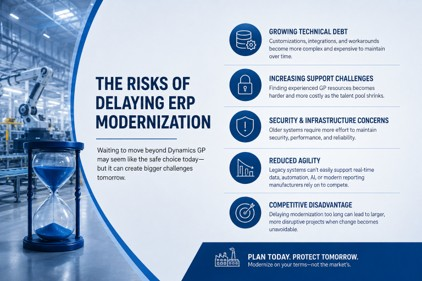
Many organizations assume that delaying ERP modernization reduces risk.
In reality, postponing modernization often shifts risk rather than eliminating it.
Several challenges tend to increase over time.
Growing Technical Debt
During a recent ERP assessment, a leadership team came to an important realization.
Their biggest challenge wasn't Dynamics GP itself.
It was the growing number of spreadsheets, manual workarounds, disconnected applications, and shadow processes that had developed around the ERP system over time.
In many cases, technical debt isn't created by the ERP platform alone. It's the result of years of incremental fixes designed to compensate for evolving business requirements.
Years of customizations, integrations, and workarounds create complexity that becomes increasingly difficult and expensive to maintain.
As technical debt grows, organizations often spend more time maintaining legacy processes and less time investing in innovation.
Increasing Support Challenges
As the pool of experienced Dynamics GP resources shrinks, maintaining specialized environments may require greater investment.
Security and Infrastructure Demands
Older systems often require additional effort to maintain modern security, reliability, and performance standards.
Reduced Agility
Today’s manufacturers increasingly rely on:
- Real-time analytics
- Cloud collaboration
- Process automation
- AI-driven insights
- Connected business applications
Legacy environments can make these initiatives more difficult to implement and scale.
Competitive Pressure
Organizations that postpone ERP modernization for manufacturers for too long often face larger, more disruptive projects later when change becomes unavoidable.
The objective is not modernization for its own sake.
The objective is to reduce risk, increase agility, and position the business for future growth.
How Should Manufacturers Evaluate Hosted GP Versus Business Central?
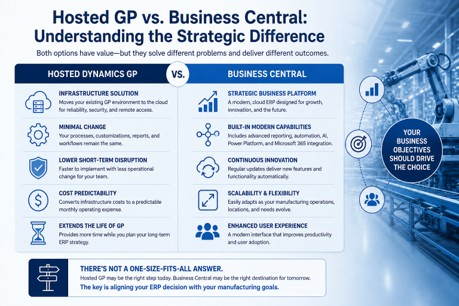
One of the most important decisions manufacturers face today is whether to move Dynamics GP to a hosted environment or migrate to Business Central.
Although these options are often discussed together, they solve different business challenges.
Hosted GP
Hosted GP moves an existing Dynamics GP environment to cloud infrastructure while preserving the current application.
Benefits often include:
- Reduced on-premises infrastructure management
- Improved remote accessibility
- Enhanced disaster recovery
- Extended life of existing investments
- Lower short-term disruption
For organizations seeking operational continuity, hosted GP can be an attractive option.
One CFO described hosted GP to me as "buying time." The organization wasn't ready for a full ERP transformation, but it needed to address aging infrastructure, improve remote accessibility, and reduce the burden of maintaining on-premises systems.
That perspective highlights an important distinction.
Hosted GP can solve infrastructure challenges relatively quickly, but it does not necessarily address the broader modernization opportunities many manufacturers are evaluating.
However, it is important to recognize that hosted GP is primarily an infrastructure strategy, not necessarily a Dynamics GP migration strategy.
The underlying ERP platform remains Dynamics GP.
Business Central
Business Central represents a broader transformation of the ERP platform itself.
Potential benefits include:
- Continuous cloud updates
- Modern user experience
- Native Microsoft ecosystem integration
- Advanced reporting and analytics
- Greater scalability
- Access to AI-enabled capabilities
Many executives evaluating Business Central manufacturing capabilities are also looking for stronger analytics, improved automation, and greater flexibility to support future growth.
However, achieving these benefits typically requires more organizational change, planning, and process evaluation.
The Strategic Question
Rather than asking:
“Which option is less expensive?”
Manufacturing leaders should ask:
“Which option best supports our business goals over the next five to ten years?”
For some organizations, hosted GP may provide an effective transitional strategy.
For others, a Dynamics GP-to-Business Central strategy for manufacturers may offer a stronger long-term foundation for growth and innovation.
The right answer depends on operational requirements, business objectives, risk tolerance, budget, and organizational readiness.
Should Manufacturers Move from Dynamics GP to Business Central?
There is no universal answer.
Some manufacturers are excellent candidates for Business Central today.
Others may benefit from a phased modernization approach that includes hosted GP, infrastructure improvements, process optimization, or organizational preparation before a full ERP migration.
The most successful ERP initiatives begin with business strategy, not software selection.
Manufacturing leaders should evaluate:
- Current operational challenges
- Future growth plans
- Technology roadmap requirements
- Existing customizations
- Integration dependencies
- Internal resource availability
- Change management readiness
The goal is not simply to replace Dynamics GP.
The goal is to establish an ERP foundation that supports long-term business success.
When approached strategically, a Dynamics GP-to-Business Central initiative for manufacturers becomes less about software replacement and more about enabling business transformation.
The Bottom Line
Manufacturers have legitimate reasons to approach ERP modernization cautiously.
Their environments are more complex, their operational risks are higher, and the consequences of disruption can be significant.
However, delaying the conversation indefinitely is not a strategy.
Microsoft’s ERP roadmap, evolving technology expectations, increasing technical debt, and growing competitive pressures are prompting manufacturers to evaluate their options more carefully than ever.
Whether the path forward involves hosted Dynamics GP, Business Central manufacturing solutions, or a phased ERP modernization strategy for manufacturers, the most important step is understanding the business implications before making a technology decision.
Organizations that begin planning today will have far more flexibility than those forced to react later.
Ready to Evaluate Your ERP Future?
If you’re currently running Dynamics GP and wondering what your next move should be, start with a strategic assessment rather than a software demo.
At Liberty Grove Software, we help manufacturers evaluate their ERP landscape, understand modernization risks, and build practical roadmaps that align technology decisions with business goals.
Schedule a Dynamics GP Modernization Assessment with Liberty Grove Software and gain a clear understanding of your options, risks, and opportunities before making your next ERP decision.
Frequently Asked Questions
Is Dynamics GP being discontinued?
Microsoft continues to support Dynamics GP and provide updates. However, Microsoft’s primary ERP innovation investments are focused on Dynamics 365 Business Central and cloud-based technologies.
What is replacing Dynamics GP?
For most small and mid-sized organizations, Dynamics 365 Business Central is considered Microsoft’s strategic successor ERP platform.
Should manufacturers move from GP to Business Central?
It depends on operational complexity, existing customizations, growth plans, and modernization goals. Every manufacturer should conduct a strategic assessment before making a migration decision.
Can Business Central handle manufacturing?
Yes. Business Central includes native manufacturing functionality and supports make-to-stock, make-to-order, and other production processes. The suitability depends on operational complexity and specific business requirements.
Is Business Central better than Dynamics GP?
Neither platform is universally better. The right choice depends on business goals, technology strategy, scalability requirements, and future growth plans.
How difficult is it to migrate from GP to Business Central?
Migration complexity varies based on customizations, integrations, manufacturing processes, data quality, and organizational readiness. Proper planning significantly reduces risk.
Can I move GP to the cloud without moving to Business Central?
Yes. Hosted GP environments allow organizations to gain the benefits of cloud infrastructure while continuing to use Dynamics GP.
What are the biggest ERP migration risks for manufacturers?
The most common risks include inadequate planning, unsupported customizations, integration challenges, operational disruption, user adoption issues, and insufficient change management.
Coming Next in This Series
Can Business Central Really Handle Manufacturing Complexity?
One of the most common concerns among manufacturing leaders is whether Business Central's manufacturing capabilities can support complex production environments.
In the next article, we’ll examine:
- Manufacturing functionality in Business Central
- Production orders, routings, and BOM management
- Make-to-stock and make-to-order capabilities
- Inventory visibility and planning tools
- When third-party manufacturing solutions may be required
We’ll also explore:
- The Real Fear Behind Leaving Dynamics GP in Manufacturing
- Why Manufacturing Customizations and ISVs Become ERP Migration Roadblocks
- Cost Accounting Differences Between GP and Business Central
- Hosted GP vs Business Central: What Manufacturers Need to Consider
Together, these articles will help manufacturers build a practical roadmap for ERP modernization and make informed decisions about their long-term technology strategy.
About Andrew Good

Andrew Good, CEO, Liberty Grove Software
Andrew Good, CEO of Liberty Grove Software, a leader in digital transformation, directs the company with strategic insights that deliver impactful results. With over two decades of expertise in Microsoft technologies, Andrew has guided businesses through digital transformation across manufacturing, finance, and healthcare.
Andrew's extensive knowledge comes from personal experiences with various companies. His hands-on operational knowledge comes from Engineering, Maintenance, and operational roles at Unilever and Sony Music. Fourteen years of working with Microsoft Dynamics BC/NAV follows successful projects in ERP, Computerized Maintenance Management Systems (EAM), and quality systems.
His passion for technology is matched by his love for sailing, which inspires his leadership. Andrew parallels the precision of navigating the seas and the challenges of steering a successful company. Under his leadership, Liberty Grove Software thrives, offering tailored solutions to empower clients and optimize operations with innovative Microsoft-based systems.
Connect with Andrew on LinkedIn
Subscribe to Andrew’s Newsletter on LinkedIn
The latest Wave 1 2026 update to Microsoft Dynamics 365 Business Central is not just another incremental release; it is a clear signal of where ERP is headed. Microsoft continues to invest in AI, usability, and extensibility in ways that are practical for mid-market organizations, not theoretical.
I spend a lot of time with CFOs, CIOs, and operations leaders who are trying to separate real innovation from marketing noise. This release makes that distinction easier. There are tangible improvements here that can drive efficiency, reduce friction, and improve decision-making without requiring a complete transformation initiative.
Let’s break down what matters most.
AI That Actually Fits into Business Workflows
The continued expansion of Copilot capabilities is one of the most important themes in this release. What stands out is not just that AI exists in Business Central, but how it is being applied.
Microsoft is embedding AI into everyday workflows; not as a separate tool, but as a natural extension of how users already work.
Key enhancements include:
- Improved financial summarization
Users can generate contextual summaries of financial data directly within the application. This reduces the need to export reports or to interpret large datasets manually. - Enhanced forecasting support
AI-assisted forecasting continues to evolve, helping finance teams model scenarios more quickly and with greater confidence. - Context-aware assistance
Copilot can now provide more relevant suggestions based on user activity and data context, making it more useful in real operational situations.
The important point here is governance. AI in ERP must operate within defined permissions and controls. Microsoft is clearly building these capabilities with enterprise-grade security in mind; that should give leadership teams confidence to adopt, not hesitate.
A More Intuitive and Personalized User Experience
User adoption remains one of the biggest barriers to ERP success. Microsoft is addressing this directly with meaningful UX improvements.
Wave 1 2026 introduces:
- Enhanced role-based experiences
Interfaces are becoming more tailored to specific roles: finance, operations, and sales. This reduces cognitive overload and shortens training cycles. - Improved navigation and search
Finding data and actions is faster and more intuitive. This may sound minor, but over time, it has a significant impact on productivity. - Better data presentation
Lists, dashboards, and reports are easier to interpret, helping users move from data to insight more efficiently.
These are not cosmetic changes. They directly affect how quickly teams can execute and how effectively they can use the system.

Deeper Integration Across the Microsoft Ecosystem
Business Central continues to strengthen its integration with the broader Microsoft stack; this is one of its most strategic advantages.
In this release, we see:
- Tighter integration with Microsoft 365 tools
Users can interact with ERP data in familiar environments such as Excel and Teams, reducing context switching. - Improved Power Platform connectivity
Enhancements to Power BI, Power Automate, and Power Apps integrations enable organizations to extend functionality without heavy development. - Streamlined data sharing
Data flows more seamlessly across systems, supporting a more unified digital architecture.
For organizations thinking about long-term scalability, this matters. ERP should not be a silo; it should be part of a connected ecosystem that supports the entire business.
Automation That Reduces Manual Work
Automation is not new in Business Central, but it is becoming more intelligent and easier to implement.
Wave 1 2026 includes:
- Expanded workflow automation capabilities
More processes can be automated out of the box, reducing reliance on custom development. - Improved approval processes
Approval workflows are more flexible and easier to manage, supporting better governance. - Background processing enhancements
Tasks can run more efficiently in the background, improving system performance and user experience.
The goal here is clear: eliminate repetitive tasks so teams can focus on higher-value work.
Stronger Development and Extensibility Framework
For partners and organizations that customize Business Central, this release brings important improvements.
Highlights include:
- Enhanced AL development environment
Developers have better tools for building, testing, and deploying extensions. - Improved APIs and integration points
Easier connectivity with external systems supports more complex business scenarios. - Upgrade-friendly customizations
Microsoft continues to prioritize extensibility models that survive upgrades; this is critical for long-term sustainability.
From my perspective, this is one of the most underappreciated areas of innovation. A modern ERP must be adaptable without becoming fragile.

Data, Reporting, and Decision-Making
Data remains at the core of ERP value, and Microsoft is continuing to improve how organizations access and use it.
This release introduces:
- More powerful reporting capabilities
Users can generate insights faster without relying heavily on IT. - Better integration with analytics tools
Power BI connectivity continues to improve, enabling richer visualizations and real-time dashboards. - Improved data consistency and governance
Enhancements help ensure that decision-makers work with accurate, reliable data.
For leadership teams, this translates directly into better decisions and faster response times.
What This Means for Your Organization
It is easy to look at a release like this and focus on features. The more important question is what it enables.
Wave 1 2026 reinforces several strategic realities:
- AI is becoming embedded in core business processes; not optional but expected.
- User experience is a competitive advantage; systems must be intuitive to drive adoption.
- Integration is no longer a nice-to-have; it is foundational to digital transformation.
- Automation is essential for scalability; manual processes do not scale.
Organizations that embrace these shifts will move faster and operate more efficiently than those that do not.
A Practical Approach to Adoption
One mistake I see companies make is trying to adopt everything at once. That rarely works.
Instead, focus on:
- Identifying high-impact use cases for AI and automation
- Prioritizing user experience improvements that drive adoption
- Leveraging integrations that eliminate data silos
- Ensuring governance and security are in place from the start
This is not about chasing features. It is about aligning technology with business outcomes.
Final Thoughts
Microsoft Dynamics 365 Business Central Wave 1 2026 is a strong release; not because it introduces flashy capabilities, but because it delivers practical improvements that organizations can use today.
As ERP continues to evolve, the gap between companies that effectively leverage these tools and those that do not will widen.
The opportunity is clear. The question is whether organizations are ready to take advantage of it.
Ready to turn the latest Business Central innovations into real business value?
At Liberty Grove Software, we work with clients to turn these capabilities into measurable business value. That is where the real impact lies.Contact Liberty Grove Software today to identify the highest-impact opportunities for AI, automation, and integration in your organization, and build a practical roadmap that delivers measurable results.
About Andrew Good
Andrew Good, CEO, Liberty Grove Software
Andrew Good, CEO of Liberty Grove Software, a leader in digital transformation, directs the company with strategic insights that deliver impactful results. With over two decades of expertise in Microsoft technologies, Andrew has guided businesses through digital transformation across manufacturing, finance, and healthcare.
Andrew's extensive knowledge comes from personal experiences with various companies. His hands-on operational knowledge comes from Engineering, Maintenance, and operational roles at Unilever and Sony Music. Fourteen years of working with Microsoft Dynamics BC/NAV follows successful projects in ERP, Computerized Maintenance Management Systems (EAM), and quality systems.
His passion for technology is matched by his love for sailing, which inspires his leadership. Andrew parallels the precision of navigating the seas and the challenges of steering a successful company. Under his leadership, Liberty Grove Software thrives, offering tailored solutions to empower clients and optimize operations with innovative Microsoft-based systems.
Connect with Andrew on LinkedIn
Subscribe to Andrew’s Newsletter on LinkedIn
Artificial intelligence has become one of the most discussed topics in enterprise technology, but for CIOs and CTOs evaluating ERP modernization, the real question is not whether AI matters. The question is whether AI within Business Central ERP delivers measurable value without introducing unnecessary risk.
For organizations considering a move from Microsoft Dynamics GP to Microsoft Dynamics 365 Business Central, AI is increasingly part of that evaluation.
Boards are asking about AI readiness. CEOs want automation gains. Finance leaders want faster forecasting and sharper insights.
The challenge for IT leadership is separating hype from operational reality.
What does AI in Business Central actually do today?
How risky is it?
And can it scale as your organization grows?
Does Business Central Include AI?
Yes.
Microsoft Dynamics 365 Business Central includes AI-powered capabilities through Microsoft Copilot and embedded intelligent features designed to improve productivity across finance, operations, and supply chain workflows.
Current AI-enabled capabilities include:
- Cash flow forecasting
- Predictive inventory insights
- Sales forecasting assistance
- AI-generated summaries of records and reports
- Automated content suggestions for product descriptions and communications
Microsoft continues expanding these capabilities through Copilot releases integrated into Business Central’s roadmap.
For reference, Microsoft’s official overview of Copilot in Business Central explains how these tools are evolving within ERP workflows.
The important distinction for executives is this:
AI in Business Central is not experimental bolt-on technology.
It is becoming embedded in core ERP workflows.

What AI in ERP Actually Changes
Traditional ERP systems require users to search, navigate dashboards, build reports, and manually interpret data.
AI changes that interaction model.
Instead of only retrieving data, users can increasingly:
- Ask natural-language questions
- Generate summaries instantly
- Identify anomalies faster
- Receive predictive recommendations
This shifts ERP from a passive record system into an active decision-support platform.
For CIOs, this means AI is not simply a feature enhancement.
It is a transformation in how enterprise systems are used.
Is AI in ERP Risky?
AI in ERP introduces real governance considerations, but the associated risks are often misunderstood.
The core issue is not that AI creates uncontrolled access.
The issue is whether your existing permissions, governance policies, and validation processes are mature enough to support AI-assisted workflows.
AI should always operate within:
- Defined role-based permissions
- Identity governance controls
- Audit logging frameworks
- Human review checkpoints
In Business Central, Copilot works within the user’s existing permission model.
That means that if users already have overly broad ERP access, AI may make that problem more visible.
AI does not create weak governance.
It reveals it.
For Microsoft guidance on responsible AI governance, the Microsoft Trust Center provides useful security and compliance context.
Accuracy Still Requires Human Oversight
One concern many executives raise is:
What happens if AI gets it wrong?
This is the right question.
AI-generated forecasts, summaries, and recommendations should support human decision-making, not replace it.
Examples:
- Forecast models still require a finance review
- Summaries may omit nuance
- Suggested actions require business validation
The strongest AI governance models use what is often called: Human-in-the-loop validation.
This ensures that critical ERP decisions remain accountable, explainable, and reviewable.

AI Governance Is Becoming a CIO Responsibility
As AI adoption expands, CIO and CTO leadership responsibilities grow accordingly.
AI in ERP now requires oversight across:
Identity and Access
Who can use AI features, and what data can they access?
Data Governance
Is sensitive data properly classified and protected?
Prompt and Usage Policies
What kinds of queries are acceptable?
Auditability
Can AI-driven outputs be traced and reviewed?
These governance layers are becoming as essential as cybersecurity frameworks.
Is Business Central Scalable?
Yes.
One of the strongest advantages of Microsoft Dynamics 365 Business Central is that it runs on Microsoft Azure, providing scalable capacity as organizations grow.
Business Central scales across:
- Expanding user counts
- Additional legal entities
- Growing transaction volumes
- Multi-location operations
- International business expansion
Because Azure infrastructure dynamically scales resources, organizations avoid many of the hardware constraints common in legacy on-premises ERP systems.
For CIOs planning long-term ERP modernization, scalability is not just about system size.
It is about ensuring that AI capabilities continue to perform reliably as operational complexity increases.
Why AI and Scalability Are Connected
AI performance depends heavily on the scale of the infrastructure.
As data volumes grow, AI models require:
- Faster compute resources
- Reliable uptime
- Elastic processing capacity
- Secure cloud storage integration
Legacy systems often struggle here.
Cloud-native ERP platforms like Business Central are designed for this future state.
That is one reason AI readiness increasingly overlaps with cloud ERP readiness.
What We Covered Earlier in This Series
In Blog #1, we examined the strategic modernization question facing GP leaders: how to evaluate ERP readiness before 2029 and assess whether Business Central aligns with long-term business goals.
In Blog #2, we addressed cloud ERP security, financial governance, and control, including how CIOs can evaluate cloud risk, subscription predictability, and compliance readiness.
Together, those discussions create the foundation for this third question:
What role should AI play in ERP decision-making today?
AI Hype vs AI Reality: What CIOs Should Focus On
Not every AI feature creates immediate value.
CIOs should prioritize AI use cases that improve measurable business outcomes, such as:
- Faster month-end close reporting
- Reduced manual forecasting effort
- Improved demand planning accuracy
- Faster exception detection in operations
The right AI question is not:
“Do we have AI?”
The better question is:
“Where does AI create controlled, measurable operational advantage?”
A Practical Liberty Grove Resource
For organizations evaluating how AI fits into ERP modernization, Liberty Grove’s Business Central solutions page provides a useful overview of platform capabilities and deployment options.
This is especially valuable for leadership teams as they compare current GP environments with future AI-enabled ERP models.
Key Takeaways
- Business Central already includes meaningful AI capabilities through Copilot
- AI in ERP is powerful, but only safe within strong governance frameworks
- Human oversight remains essential for accuracy and accountability
- Business Central scales effectively through Azure infrastructure
- AI readiness should be evaluated as part of a broader ERP modernization strategy

The Balanced View: AI Is Real, But Governance Determines Value
AI in ERP is no longer theoretical.
It is already reshaping how organizations forecast, summarize, automate, and make decisions.
But for CIOs and CTOs, successful AI adoption is not about quickly turning on features.
It is about implementing them responsibly.
Organizations that gain the most value from AI in Business Central will be those that combine innovation with governance, automation with oversight, and scalability with strategic discipline.
Assess Your ERP AI Readiness
If your organization is evaluating whether AI-enabled ERP belongs in your modernization roadmap, Liberty Grove Software can help assess:
- AI governance readiness
- Security and permissions posture
- Business Central scalability fit
- Strategic migration timing from GP
The goal is simple:
Adopt AI where it creates measurable value, without introducing avoidable risk.
Contact Liberty Grove Software today to begin a practical assessment of your AI-ready ERP future.
If you’d like to understand where your organization stands before enabling BC Copilot, let’s talk.
Schedule a BC Copilot Readiness Discussion
About Andrew Good
Andrew Good, CEO, Liberty Grove Software
Andrew Good, CEO of Liberty Grove Software, a leader in digital transformation, directs the company with strategic insights that deliver impactful results. With over two decades of expertise in Microsoft technologies, Andrew has guided businesses through digital transformation across manufacturing, finance, and healthcare.
Andrew's extensive knowledge comes from personal experiences with various companies. His hands-on operational knowledge comes from Engineering, Maintenance, and operational roles at Unilever and Sony Music. Fourteen years of working with Microsoft Dynamics BC/NAV follows successful projects in ERP, Computerized Maintenance Management Systems (EAM), and quality systems.
His passion for technology is matched by his love for sailing, which inspires his leadership. Andrew parallels the precision of navigating the seas and the challenges of steering a successful company. Under his leadership, Liberty Grove Software thrives, offering tailored solutions to empower clients and optimize operations with innovative Microsoft-based systems.
Connect with Andrew on LinkedIn
Subscribe to Andrew’s Newsletter on LinkedIn
For many CIOs and CTOs running Microsoft Dynamics GP, the conversation about modernization is no longer theoretical, and the phrase on everyone’s lips is “Cloud ERP Security”.
It’s operational.
With 2029 on the horizon, leadership teams are being asked to evaluate what comes next, and increasingly, that conversation leads to the cloud.
But alongside that opportunity comes a familiar set of concerns:
- Is cloud ERP actually secure?
- Are we giving up control over our systems?
- Will subscription pricing become unpredictable over time?
These are not objections to dismiss.
They are the right questions to ask.
Moving from an on-premises ERP like GP to a cloud platform such as Microsoft Dynamics 365 Business Central is not just a technology shift.
It’s a transformation of the governance, security, and financial models.
With these questions in mind, let's turn to the bigger context: is taking on cloud ERP truly about risk – or about reallocating responsibility?
When executives ask whether cloud ERP is “worth the risk,” the more accurate question is:
Where does the responsibility for risk sit today – and where should it sit in the future?
In on-premises environments like Microsoft Dynamics GP, your organization is responsible for:
- Infrastructure security
- Patch management
- Backup and disaster recovery
- System availability
- Compliance readiness
In a cloud model powered by Microsoft, much of that responsibility shifts to a provider operating at a global scale.
This doesn’t remove control.
It’s a reallocation of operational burden, from internal IT teams to enterprise-grade infrastructure.
With this mind shift, security remains at the forefront. Is cloud ERP secure?
The short answer: yes, but not automatically.
Platforms like Microsoft Dynamics 365 Business Central are built on Microsoft Azure, which provides enterprise-grade protection through its Microsoft Azure security infrastructure:
- Global data centers with physical and network security
- Continuous monitoring and threat detection
- Built-in encryption at rest and in transit
- Compliance with international standards (ISO, SOC, GDPR, and more), supported by Microsoft compliance and certification standards
For most mid-market and enterprise organizations, replicating this level of security internally is not realistic.
However, cloud security still depends on how the system is configured and governed.
Key areas that remain your responsibility:
- User access and identity management
- Role-based permissions
- Data governance policies
- Monitoring and audit processes

Cloud ERP is secure by design and effective with strong governance.
Identity Is the New Security Perimeter
In cloud environments, the traditional network perimeter disappears.
Security shifts to identity.
Using Microsoft Entra ID, organizations can enforce:
- Multi-factor authentication (MFA)
- Conditional access policies
- Device and location-based restrictions
- Centralized identity governance
This creates a more dynamic and controllable security model than traditional on-premises systems.
But it also introduces a new leadership requirement:
Identity strategy is now core to ERP security.
Security isn't the only concern – control also matters. Can we still control updates in the cloud?
One of the most common concerns among GP users is loss of control over system changes.
In on-premises environments, upgrades are:
- Infrequent
- Highly customized
- Often delayed due to cost and complexity
In the cloud, updates in Microsoft Dynamics 365 Business Central follow a different model.
Microsoft provides:
- Scheduled release waves (typically twice per year), aligned with the Dynamics 365 release wave schedule
- Advance visibility into upcoming changes
- Sandbox environments for testing
- Configurable update windows
This allows organizations to:
- Validate updates before production deployment
- Train users ahead of changes
- Reduce disruption through smaller, incremental improvements
The result isn’t less control, but more predictable control.
Subscription vs CapEx: The Financial Shift
For many executives, the move to cloud ERP raises an equally important question:
How does the financial model change?
With Microsoft Dynamics GP, costs are typically:
- Upfront license purchases (CapEx)
- Infrastructure investments
- Ongoing maintenance and upgrade costs
With Microsoft Dynamics 365 Business Central, the model shifts to:
- Subscription-based pricing (OpEx)
- Per-user licensing
- Bundled infrastructure and platform services
Is Subscription Pricing Predictable?
In most cases, yes.
Subscription pricing is:
- Tied to user count and license type
- Scalable with organizational growth
- Easier to forecast based on hiring plans
This creates financial alignment between ERP cost and business activity.
However, predictability depends on governance.
Organizations must manage:
- License allocation and usage
- Role-based licensing tiers
- Expansion of environments or integrations
Without oversight, costs can drift.
With governance in place, they remain highly controllable.
Hidden Costs vs Visible Costs
One of the most important shifts in moving to cloud ERP is cost transparency.
On-premises systems often carry hidden costs:
- Server maintenance
- Downtime risk
- Security tooling
- IT labor for patching and upgrades
Cloud ERP consolidates these into a visible, recurring model.
This doesn’t necessarily reduce total cost in every case.
But it does make measuring cost:
- More predictable
- Easier to align with value
- Simpler to justify at the executive level
Governance in the Cloud Era
Cloud ERP does not eliminate governance; it elevates it.
Executives must think beyond infrastructure and focus on:
- Access governance: Who can see and do what
- Data governance: How information is classified and protected
- Financial governance: How licensing and usage are controlled
- Operational governance: How updates and changes are managed
This is particularly important for organizations transitioning from legacy systems like Microsoft Dynamics GP, where governance may have evolved organically over time.
Cloud platforms provide the tools.
Leadership provides the discipline.
Compliance and Audit Readiness
For organizations in regulated industries, cloud ERP introduces an important advantage:
Built-in compliance capabilities.
With Microsoft Dynamics 365 Business Central and the broader Microsoft ecosystem, organizations can leverage:
- Audit trails and activity logging
- Role-based access controls
- Data retention policies
- Integration with compliance and security tools
This makes it easier to:
- Demonstrate control during audits
- Maintain consistent policies across systems
- Respond to regulatory requirements

The Balanced View: Control Without Complexity
It’s understandable to think cloud ERP reduces control, but that’s incomplete.
The change is in how control is exercised.
Instead of managing infrastructure manually, organizations define control through:
- Policies
- Identity frameworks
- Governance structures
- Monitoring systems
The result is often:
- Stronger security
- Greater visibility
- More predictable costs
- Reduced operational burden
Key Takeaways
- Cloud ERP shifts responsibility, not risk elimination.
- Security is strengthened through Microsoft Azure infrastructure and identity controls.
- Updates are structured, predictable, and testable.
- Subscription pricing is scalable and forecastable with governance.
- Cloud platforms improve transparency across both cost and compliance.
What Comes Next in This Series?
In our first article, we explored the strategic question many executives are asking: what does long-term ERP readiness look like as 2029 approaches, and how should leaders evaluate modernization beyond urgency alone?
This article addressed a core operational concern:
“Is cloud ERP secure, controllable, and financially viable?”
The next step is more strategic:
How do we decide when – and how – to move from GP to Business Central? In the next article, we’ll explore:
- Migration timing considerations
- Risk-aware transition strategies
- How to evaluate readiness for modernization
Because the decision is not just about technology.
It’s about aligning your ERP platform with where your business is going next.
Assess Your ERP Strategy with Confidence
If your organization is evaluating whether to remain on Microsoft Dynamics GP or transition to Microsoft Dynamics 365 Business Central, Liberty Grove Software can help you assess:
- Security and compliance posture
- Cost modeling and licensing strategy
- Governance readiness for cloud ERP
The goal is simple: make a clear, informed decision, without unnecessary risk.
You can also explore Microsoft Dynamics 365 Business Central solutions to better understand how a modern cloud ERP platform supports security, cost control, and governance.
Contact Liberty Grove Software today to schedule a personalized assessment and determine the best path to a secure, cost-effective cloud ERP future for your organization.
If you’d like to understand where your organization stands before enabling BC Copilot, let’s talk.
Schedule a BC Copilot Readiness Discussion
About Andrew Good
Andrew Good, CEO, Liberty Grove Software
Andrew Good, CEO of Liberty Grove Software, a leader in digital transformation, directs the company with strategic insights that deliver impactful results. With over two decades of expertise in Microsoft technologies, Andrew has guided businesses through digital transformation across manufacturing, finance, and healthcare.
Andrew's extensive knowledge comes from personal experiences with various companies. His hands-on operational knowledge comes from Engineering, Maintenance, and operational roles at Unilever and Sony Music. Fourteen years of working with Microsoft Dynamics BC/NAV follows successful projects in ERP, Computerized Maintenance Management Systems (EAM), and quality systems.
His passion for technology is matched by his love for sailing, which inspires his leadership. Andrew parallels the precision of navigating the seas and the challenges of steering a successful company. Under his leadership, Liberty Grove Software thrives, offering tailored solutions to empower clients and optimize operations with innovative Microsoft-based systems.
Connect with Andrew on LinkedIn
Subscribe to Andrew’s Newsletter on LinkedIn
Boards are asking about AI. CEOs are asking about AI. And increasingly, CIOs and CTOs are being asked a new question: “When are we turning on Business Central Copilot?” As organizations evaluate Business Central Copilot implementation, the real challenge is not simply about enabling a new AI feature within the ERP. It’s ensuring the organization has the governance, security controls, and operational discipline required to deploy AI responsibly.
Microsoft Dynamics 365 Business Central (BC) Copilot is one of the most significant advancements in modern ERP platforms. Embedded AI can streamline reporting, accelerate decision-making, and automate time-consuming tasks across finance, operations, and supply chain workflows.
But implementing Business Central Copilot is not simply enabling a new feature.
It represents a shift in how organizations interact with their ERP systems.
The organizations that realize the most value from AI in ERP environments are not the ones that deploy it fastest; they are the ones that deploy it with governance, security design, and operational discipline.
Copilot is powerful. Responsible implementation amplifies value while minimizing avoidable risk.
Why Business Central Copilot Is a Strategic ERP Shift
Historically, ERP systems required users to navigate menus, reports, and dashboards to find the information they needed.
Business Central Copilot changes that model.
AI now sits inside the application experience, helping users:
- Generate financial summaries
- Draft reports and documentation
- Identify operational insights
- Analyze data faster than traditional reporting workflows
This shift transforms ERP from a system of record into a decision intelligence platform.
For CIOs and CTOs, that means AI adoption inside ERP is not simply a technical deployment. It is an organizational change initiative involving governance, identity management, security controls, and user training.
Before enabling Copilot broadly, leadership teams must ensure their ERP environment is ready.

The Six Leadership Questions CIOs Must Answer
Before deploying Business Central Copilot, IT leadership should evaluate six key questions.
These questions form a practical readiness framework for responsible AI adoption inside ERP systems.
1. Where Can Microsoft Business Central Copilot Safely Add Value?
Not every workflow should be AI-assisted immediately.
Early Copilot use cases often include:
- Financial reporting summaries
- Operational insights
- Draft documentation
- Data exploration
Starting with low-risk, high-productivity scenarios allows organizations to learn how Copilot interacts with their ERP data.
2. What Data Should Microsoft Business Central Copilot Access?
MS BC Copilot operates within the permissions of the user interacting with it.
That means existing role-based permissions define ERP data access.
If permission sets are overly broad, Copilot may surface data users technically have access to but rarely see in normal workflows.
Before rollout, organizations should review:
- Permission sets
- Role assignments
- Sensitive financial fields
- Vendor and payroll data access
Data exposure risk often comes from configuration decisions, not from Copilot itself.
3. How Will Identity and Permissions in BC Copilot Be Controlled?
Strong identity controls are foundational for AI-enabled systems.
Organizations deploying Business Central Copilot should confirm:
- Microsoft Entra ID identity governance
- Multi-factor authentication enforcement
- Role-based access control
- Least-privilege permission design
These controls ensure BC Copilot interactions respect the same security boundaries as traditional ERP activity.
We’ll explore the full Copilot data security framework in the next article of this series.
4. How Will Usage of Dynamics 365 Copilot Be Monitored?
As with any emerging technology, visibility matters.
CIOs should ensure the organization can monitor:
- BC Copilot interactions
- Data access patterns
- Reporting queries
- Export activity
Audit logging and monitoring capabilities provide accountability and help organizations detect unusual usage patterns early.
5. How Will Users Be Trained on BC Copilot?
AI tools change how employees interact with enterprise systems.
Users must understand:
- When BC Copilot suggestions should be validated
- What types of data should not be shared in prompts?
- How to interpret AI-generated summaries
Without proper guidance, employees may over-trust AI-generated outputs or misuse the tool unintentionally.
Training and acceptable-use policies are critical for responsible adoption.
6. How Will We Measure the ROI of Microsoft BC Copilot?
The fastest way to undermine an AI initiative is to deploy it without measuring results.
Business Central Copilot should be evaluated against measurable outcomes such as:
- Reduced report generation time
- Faster financial analysis
- Improved operational insight
- Increased productivity for finance and operations teams
Structured adoption programs help CIOs demonstrate real business value.
Data Security and Oversharing Considerations
A common concern when deploying AI within ERP systems is data oversharing.
In most cases, the underlying issue is not the AI technology; it is the organization’s permission model.
Many ERP environments accumulate permission complexity over time:
- Broad roles granted for convenience
- Legacy permission sets
- Shared accounts or overprovisioned users
Before enabling BC Copilot, CIOs should review their least-privilege access model and verify that users have access only to the data required for their roles.
Identity governance through Microsoft Entra ID, combined with disciplined permission management inside Business Central, helps ensure Copilot interactions remain within appropriate boundaries.
Many organizations are moving away from legacy on-premises ERP systems like GP toward cloud platforms that offer stronger security and scalability. Learn more about the benefits of cloud vs on-premises ERP systems.
In our next article, we’ll explore a more comprehensive Business Central Copilot security framework to protect sensitive ERP data.
Governance, Compliance, and Auditability in BC Copilot
Beyond access control, organizations must also consider how AI usage aligns with governance and compliance obligations.
Key considerations include:
- Audit logging of BC Copilot interactions
- Data retention policies
- Data loss prevention (DLP) controls
- Regulatory reporting requirements
For organizations in regulated industries, establishing clear oversight mechanisms before deploying BC Copilot ensures AI activity remains defensible and compliant.
Governance is not about slowing innovation.
It is about enabling responsible AI adoption.
Operational and Cultural Readiness for BC Copilot
Technology readiness alone does not ensure successful AI adoption.
Organizations must also prepare for the operational and cultural impact of Copilot.
This includes:
- Change management planning
- Acceptable-use policies for AI tools
- Human-in-the-loop validation workflows
- Clear guidance on when AI suggestions require review
AI should assist decision-making, not replace human accountability.
In the third article of this series, we’ll explore an operational rollout checklist for Business Central Copilot, including adoption strategies and productivity measurement.
The Balanced View: Value With Responsibility
When implemented thoughtfully, Business Central Copilot can deliver meaningful business benefits:
- Faster financial reporting
- Improved operational visibility
- Reduced administrative workload
- More informed decision-making
But successful organizations approach AI deployment with a balanced perspective.
They combine innovation with governance, security with productivity, and automation with human oversight.
Copilot is powerful.
Responsible implementation ensures that power translates into sustainable value.
Key Takeaways
• Business Central Copilot represents a strategic shift in ERP workflows.
• Governance and identity controls should precede broad rollout.
• Permission design and least-privilege access define risk posture.
• Human validation remains essential for AI-assisted insights.
• Measured adoption enables sustainable ROI.
A successful Business Central Copilot implementation begins with strong governance, validated identity controls, and a clear operational rollout strategy.

Executive BC Copilot Readiness Checklist
Before enabling Business Central Copilot, CIOs should confirm:
- Inventory current permission sets
- Audit sensitive ERP data fields
- Validate Microsoft Entra ID identity policies
- Confirm multi-factor authentication enforcement
- Define an AI acceptable-use policy
- Establish audit logging review processes
- Implement data loss prevention controls
- Define human validation workflows
- Train power users first
- Pilot in a low-risk department
- Track productivity KPIs
- Document governance framework
What Comes Next in This Series
In the next article, we’ll explore a deeper question many CIOs are asking:
In our next blog, we'll discuss Cloud ERP Security & Cost, and the final article in this series will address AI in Business Central
Most organizations evaluating Microsoft BC Copilot fall into one of three categories:
• Ready to move forward but unsure how to govern it
• Interested, but concerned about security and data exposure
• Under pressure to adopt AI without a clear rollout strategy
If you’re evaluating Copilot for your organization, the most valuable first step is not licensing; it’s readiness.
At Liberty Grove Software, we help CIOs and CTOs conduct a Copilot Strategic Readiness Assessment, examining:
• Data exposure and permission structure
• Identity and security controls
• Governance and acceptable use policies
• Practical rollout and adoption strategy
The goal is simple: enable AI adoption with confidence, not uncertainty.
If your organization is considering leaving Dynamics GP, following a structured ERP migration roadmap to Business Central can help reduce risk and ensure a smooth transition.
If you’d like to understand where your organization stands before enabling BC Copilot, let’s talk.
Schedule a BC Copilot Readiness Discussion
About Andrew Good
Andrew Good, CEO, Liberty Grove Software
Andrew Good, CEO of Liberty Grove Software, a leader in digital transformation, directs the company with strategic insights that deliver impactful results. With over two decades of expertise in Microsoft technologies, Andrew has guided businesses through digital transformation across manufacturing, finance, and healthcare.
Andrew's extensive knowledge comes from personal experiences with various companies. His hands-on operational knowledge comes from Engineering, Maintenance, and operational roles at Unilever and Sony Music. Fourteen years of working with Microsoft Dynamics BC/NAV follows successful projects in ERP, Computerized Maintenance Management Systems (EAM), and quality systems.
His passion for technology is matched by his love for sailing, which inspires his leadership. Andrew parallels the precision of navigating the seas and the challenges of steering a successful company. Under his leadership, Liberty Grove Software thrives, offering tailored solutions to empower clients and optimize operations with innovative Microsoft-based systems.
Connect with Andrew on LinkedIn
Subscribe to Andrew’s Newsletter on LinkedIn
Global manufacturing isn’t simple anymore, and multi-entity consolidation in Business Central has become a critical capability for companies operating across legal entities, currencies, and geographies.
You might have a U.S. parent company, a Canadian distribution arm, a European sales entity, and an Asian contract manufacturing partner. Add multiple currencies, intercompany transactions, tax jurisdictions, and reporting standards, and suddenly your finance team is spending more time reconciling numbers than analyzing performance.
I see this often when speaking with manufacturing CFOs and COOs. The growth strategy works. The operational strategy works. But financial consolidation across entities becomes the bottleneck.
The good news? If you’re running Microsoft Dynamics 365 Business Central (BC), you already have more capability than most executives realize.
With these challenges and opportunities in mind, let’s walk through what managing multi-entity and global consolidations should look like, and explore how embedded AI and predictive analytics are changing the game.
Why Multi-Entity Consolidation Becomes a Strategic Risk
When manufacturers expand into new regions or operate multiple legal entities, four issues usually surface:
- Intercompany transactions don’t reconcile cleanly.
- Currency fluctuations distort financial visibility.
- Consolidated reporting takes too long.
- Leadership decisions rely on lagging data.
At that point, it’s no longer just an accounting challenge. It’s a strategic one.
If it takes 20 days to close the books, your executive team is steering the business using last month’s dashboard.
Modern consolidation isn’t just about compliance. It’s about speed, clarity, and confidence.

How Business Central Handles Multi-Entity & Multi-Currency Consolidations
Many mid-market manufacturers assume they need a separate consolidation tool. In many cases, they don’t.
Business Central includes built-in capabilities for:
1. Consolidation Companies
You can create a dedicated consolidation company that pulls financial data from each legal entity. This enables the consolidation of income statements, balance sheets, and other financial reports without manual spreadsheet stitching.
2. Multi-Currency Management
BC uses exchange rate tables and automated currency adjustments to translate financial data across entities. Currency revaluation can be automated during close, reducing manual errors and audit risk.
3. Intercompany Automation
Intercompany journals automatically mirror transactions between entities. That means fewer mismatches, fewer reconciliation headaches, and stronger audit trails.
For many manufacturing organizations with standard ownership structures and reporting requirements, this native functionality is more than sufficient.
The real question is not just whether BC can consolidate, but whether it's configured strategically from the start.
Intercompany Transactions: Where Most Manufacturers Struggle
Intercompany errors are one of the biggest pain points in multi-entity manufacturing environments.
Common challenges include:
- Timing differences in postings
- Mismatched accounts between subsidiaries
- Currency rounding variances
- Manual journal entries outside system controls
When these issues pile up, your finance team spends days reconciling what should have been automated.
Business Central addresses this with:
- Automated intercompany postings
- Configurable approval workflows
- Standardized chart of accounts mapping
- Clear audit trails
But technology alone isn’t enough.
The leadership decision that makes the biggest difference? Standardization.
When entities use aligned charts of accounts and consistent posting rules, consolidation becomes mechanical instead of investigative.
That shift alone can dramatically reduce month-end close time.
Given these ongoing challenges, a common question arises: Do you need a separate consolidation tool?
This is a question I hear often.
The answer depends on complexity, not size.
Business Central is typically sufficient if:
- You operate within a relatively straightforward ownership structure.
- You report under one primary accounting framework (e.g., GAAP).
- You need consolidated financials, but not overly complex minority-interest modeling.
You may need extensions or additional tools if:
- You manage multiple reporting standards (GAAP and IFRS simultaneously).
- You have complex ownership percentages or holding structures.
- You require highly specialized consolidation reporting.
The good news is that BC sits within the broader Microsoft ecosystem.
Power BI enhances executive visibility.
Power Platform enables workflow automation.
Copilot brings AI-driven insight into financial and operational data.
For most mid-market manufacturers, this combination is more scalable and effective than using multiple disconnected systems.

Where Embedded AI Changes the Equation
This is where the conversation shifts from accounting to leadership.
Consolidation tells you what happened.
AI and predictive analytics do more than show trends; they enable proactive decision-making by forecasting future business scenarios. This helps manufacturers anticipate demand shifts, manage risks, and optimize resources across global operations.
1. Cash Flow Forecasting
Business Central includes AI-driven cash flow forecasting that analyzes historical receivables and payables to project future liquidity.
For manufacturers operating across entities and currencies, this matters enormously.
You gain:
- Visibility into global cash position
- Early warning on working capital gaps
- Improved capital allocation decisions
Instead of reacting to cash constraints, you anticipate them.
2. Demand Planning and Inventory Forecasting
Manufacturing success depends on aligning production with demand.
Embedded forecasting tools in BC analyze historical sales and seasonality to project future demand.
When applied across multiple entities, this allows you to:
- Balance inventory globally
- Reduce excess carrying costs
- Improve service levels
- Align procurement with true demand signals
AI-driven forecasting enhances operational leadership.
3. Operational KPIs Across Entities
One of the biggest leadership blind spots in multi-entity environments is inconsistent visibility into KPIs.
With BC integrated into Power BI and Copilot, executives can monitor:
- Gross margin by entity
- Inventory turns by geography
- Production efficiency trends
- Consolidated EBITDA performance
With unified dashboards, decision-making accelerates.
You move from reactive reporting to proactive performance management.
With these possibilities in mind, you may now wonder about the practical steps required to implement such a solution.
A fair question is: how hard is this to implement?
The answer depends largely on preparation.
Key areas of focus include:
- Chart of Accounts Alignment
- Entities must align account structures for seamless consolidation.
- Currency Configuration
- Exchange rate tables and posting rules need thoughtful setup.
- Intercompany Design
- Define standard processes for how entities transact with one another.
- Reporting Strategy
Determine early what leadership dashboards should show and build backward from there.
In most manufacturing environments, we recommend a phased rollout:
- Standardize the finance structure.
- Enable intercompany automation.
- Activate consolidation.
- Layer in AI forecasting and executive dashboards.
Trying to do everything at once increases risk; phasing builds momentum.

The Strategic Advantage of Getting This Right
When consolidation and forecasting are automated properly, three leadership benefits emerge:
1. Faster Close Cycles
Finance teams shift from reconciliation to analysis.
2. Better Capital Allocation
Cash forecasting improves investment timing.
3. Greater Executive Confidence
You see the full global picture, clearly and quickly.
That’s more than operational efficiency; it's a competitive advantage.
A Final Thought for Manufacturing Leaders
Growth creates complexity.
Complexity demands discipline.
But it shouldn’t demand chaos.
Multi-entity consolidation isn’t just a finance function. It’s a leadership capability.
When you combine:
- Structured intercompany automation
- Multi-currency consolidation
- AI-powered forecasting
- Unified KPI dashboards
You create an environment where global expansion strengthens your business rather than strains it.
That’s what a modern ERP enables.
And that’s why Business Central, when implemented thoughtfully, can be far more strategic than many manufacturers expect.
Still using spreadsheets for consolidation? It’s time to rethink.
Not about software. About leadership visibility.

Some Questions We Are Frequently Asked
1. Can Business Central handle multi-entity consolidation without third-party software?
In many cases, yes.
Business Central includes built-in consolidation capabilities that allow manufacturers to combine financial data across multiple legal entities. It supports intercompany eliminations, multi-currency translation, and consolidated reporting.
However, highly complex ownership structures or dual-reporting requirements (such as GAAP and IFRS) may require additional extensions.
For most mid-market manufacturers, native functionality is more than sufficient when implemented correctly.
2. How does Business Central manage intercompany transactions?
Business Central automates intercompany postings between entities.
When configured properly, a transaction entered in one company automatically generates the corresponding entry in the related entity. This reduces manual journal entries, reconciliation errors, and audit risk.
The key is standardized charts of accounts and clearly defined posting rules across subsidiaries.
3. Does Business Central support multi-currency consolidation?
Yes.
Business Central uses exchange rate tables and currency adjustment processes to translate financial data across entities operating in different currencies.
Currency revaluation can be automated during the close process, helping ensure that consolidated financial statements accurately reflect current exchange rates.
For global manufacturers, this significantly reduces the need for manual currency adjustments.
4. How can AI in Business Central improve cash flow forecasting?
Business Central includes predictive cash flow forecasting tools that analyze historical receivables and payables to project future liquidity.
For manufacturing executives, this provides:
- Early visibility into potential cash shortfalls
- Improved working capital planning
- Better timing of capital investments
Rather than reacting to cash constraints, leadership can proactively manage liquidity across global operations.
5. Can Business Central improve demand planning across multiple entities?
Yes! Especially when combined with embedded forecasting and Power BI analytics.
Business Central can analyze historical sales and inventory data to generate demand forecasts. When applied across multiple entities, this enables manufacturers to balance inventory globally, reduce excess stock, and improve service levels.
Predictive insights strengthen operational decision-making; they don’t replace it.
6. How long does it take to implement multi-entity consolidation in Business Central?
Implementation timelines vary based on complexity, but success depends less on software and more on structure.
The most important steps include:
- Aligning the charts of accounts
- Standardizing intercompany processes
- Configuring currency management
- Defining executive reporting requirements
Many manufacturers phase implementation by region to reduce risk and accelerate adoption.
7. What are the biggest mistakes manufacturers make with global consolidations?
Three common pitfalls:
- Allowing subsidiaries to operate with inconsistent account structures
- Relying on spreadsheets for intercompany eliminations
- Treating consolidation as a compliance exercise instead of a strategic capability
When consolidation is automated and aligned with leadership KPIs, it becomes a competitive advantage rather than just a reporting requirement.
Conclusion
Global expansion should increase your competitive advantage, not your financial complexity. When multi-entity consolidation in Business Central is structured correctly, it becomes more than an accounting function. It becomes a leadership asset.
Automated intercompany transactions, real-time multi-currency reporting, and AI-driven forecasting give manufacturing executives something far more valuable than clean books: clarity. And clarity drives better decisions.
If your team is still relying on spreadsheets, manual eliminations, or delayed reporting across entities, it may be time to rethink the approach.
At Liberty Grove Software, we help manufacturers turn Business Central into a strategic platform for growth, not just a system of record. If you’re ready to simplify global consolidation and gain true financial visibility, let's talk.
About Andrew Good
Andrew Good, CEO, Liberty Grove Software
Andrew Good, CEO of Liberty Grove Software, a leader in digital transformation, directs the company with strategic insights that deliver impactful results. With over two decades of expertise in Microsoft technologies, Andrew has guided businesses through digital transformation across manufacturing, finance, and healthcare.
Andrew's extensive knowledge comes from personal experiences with various companies. His hands-on operational knowledge comes from Engineering, Maintenance, and operational roles at Unilever and Sony Music. Fourteen years of working with Microsoft Dynamics BC/NAV follows successful projects in ERP, Computerized Maintenance Management Systems (EAM), and quality systems.
His passion for technology is matched by his love for sailing, which inspires his leadership. Andrew parallels the precision of navigating the seas and the challenges of steering a successful company. Under his leadership, Liberty Grove Software thrives, offering tailored solutions to empower clients and optimize operations with innovative Microsoft-based systems.
Connect with Andrew on LinkedIn
Subscribe to Andrew’s Newsletter on LinkedIn
In manufacturing, we spend a lot of time talking about machines, materials, and margins, but let’s be honest: none of it works without people. Your workforce is both your most significant investment and your biggest opportunity. Yet for many manufacturers, workforce planning and labor costing remain more guesswork than strategy.
That’s where better workforce planning, and the right tools in Microsoft Dynamics 365 Business Central can make a real difference.
Over the years, I’ve seen manufacturers transform their operations simply by getting clearer visibility into labor time, skills, capacity, and actual costs. In this article, I’ll talk about how that comes together in practice.
I remember working with a manufacturer who was convinced their margins were getting crushed by material costs. That’s where all the attention was going. But once we slowed down and really looked at labor – actual time on each operation, who was doing the work, and where the bottlenecks were – the picture changed.
The problem wasn’t effort or even headcount; it was visibility. Skilled people were getting pulled into the wrong jobs, teams hadn’t updated estimates in years, and overtime had quietly become the default solution.
Using Business Central, we helped them connect labor time, skills, and capacity directly to their production orders. Within weeks, conversations on the shop floor shifted from gut feel to real data, and the path forward suddenly became clear.
That’s the kind of clarity we focus on at Liberty Grove Software: practical, grounded improvements that help manufacturers make better decisions without overcomplicating the operation.
Labor Time Tracking: From Estimates to Reality
If you don’t know where labor time is actually going, everything else is built on shaky ground.
Too often, labor is tracked at a high level, by shift, by department, or worse, just rolled into overhead.
Business Central enables manufacturers to track labor time at the operational level, directly tied to production orders and routing steps.
This does a few critical things:
- It shows you the actual time spent on each operation.
- It highlights where estimates are consistently off.
- It gives supervisors and planners real data instead of assumptions.
When labor time is accurate, scheduling and costing improve, and conversations on the shop floor become fact-based rather than anecdotal, enabling lean manufacturing.

Skill-Based Routing: Putting the Right People on the Right Work
Not all labor is interchangeable, and pretending it is can get expensive fast.
Skill-based routing in Business Central allows manufacturers to assign operations based on required skills, certifications, or experience levels. That means:
- Complex or high-risk operations go to qualified employees.
- Less specialized work doesn’t get bottlenecked by overqualified (and higher-cost) labor.
- Training gaps become visible instead of hidden.
This isn’t just about efficiency; it’s about resilience. When you understand how skills map to your routings, you can plan for absences, turnover, and growth without scrambling.
Capacity Planning: Seeing Constraints Before They Hurt You
Capacity planning isn’t just about machines; it’s about people.
Business Central lets you look at labor capacity alongside work centers and machine capacity so that you can answer questions like:
- Where are we overloading key employees or teams?
- Do we have enough skilled labor to support increased demand?
- Is overtime solving a short-term problem or masking a long-term one?
When labor capacity is visible, planners can make smarter trade-offs between lead times, overtime, subcontracting, and hiring. That’s when workforce planning shifts from reactive to strategic.

Labor Costing: Understanding the True Cost of What You Make
Accurate labor costing is where everything comes together.
By tying labor time, skill levels, and rates directly to production orders, Business Central provides a much clearer picture of:
- Actual vs. standard labor costs
- Which products or customers are labor-intensive
- Where margins are eroding, and why
This insight supports better pricing, quoting, and decisions on automation, process improvement, or product mix. In my experience, this is one of the fastest ways manufacturers uncover “hidden” profit leaks.
Workforce Planning as a Competitive Advantage
Workforce planning and labor costing aren’t just back-office functions; they’re competitive advantages. Manufacturers who get this right can:
- Scale more confidently
- Respond faster to demand changes
- Protect margins in tight labor markets
Business Central provides the foundation, but the real value comes from how thoughtfully it’s implemented and used.
When labor data is accurate, visible, and trusted, it empowers everyone, from the shop floor to the executive team, to make better decisions.
At the end of the day, manufacturing will always be about people as much as it is about products. Manufacturers who recognize that and plan accordingly are best positioned for long-term success.
Ready to turn workforce data into a real competitive advantage?
At Liberty Grove Software, we help manufacturers get more from Microsoft Dynamics 365 Business Central, especially in labor tracking, capacity planning, and accurate costing.
If you’re ready to move beyond estimates and spreadsheets and start making labor a strategic asset, we’re here to help.
Let's talk. Schedule a conversation with Liberty Grove Software today to see how workforce planning in Business Central can work for your manufacturing operation.
About Andrew Good
Andrew Good, CEO, Liberty Grove Software
Andrew Good, CEO of Liberty Grove Software, a leader in digital transformation, directs the company with strategic insights that deliver impactful results. With over two decades of expertise in Microsoft technologies, Andrew has guided businesses through digital transformation across manufacturing, finance, and healthcare.
Andrew's extensive knowledge comes from personal experiences with various companies. His hands-on operational knowledge comes from Engineering, Maintenance, and operational roles at Unilever and Sony Music. Fourteen years of working with Microsoft Dynamics BC/NAV follows successful projects in ERP, Computerized Maintenance Management Systems (EAM), and quality systems.
His passion for technology is matched by his love for sailing, which inspires his leadership. Andrew parallels the precision of navigating the seas and the challenges of steering a successful company. Under his leadership, Liberty Grove Software thrives, offering tailored solutions to empower clients and optimize operations with innovative Microsoft-based systems.
Connect with Andrew on LinkedIn
Subscribe to Andrew’s Newsletter on LinkedIn
When I talk with food and beverage manufacturers, processors, and distributors, the conversation almost always turns to the same concerns: quality, traceability, and compliance.
These are not abstract ideas. They affect daily operations, customer trust, and in many cases, the survival of the business.
The Food Safety Modernization Act (FSMA) raised the bar, and rightly so. But meeting those requirements does not have to mean adding layers of complexity or spreadsheets that only one person understands.
At Liberty Grove Software, we believe quality management should be practical, visible, and built into how people already work.
Microsoft Dynamics 365 Business Central (BC) provides companies with a strong foundation for managing QA workflows, batch tracking, nonconformances, and recall processes that support both compliance and operational efficiency.
My goal in this article is to explain how these pieces fit together in real-world terms, without jargon, and from the perspective of someone who has spent years working alongside operations and quality teams.
Quality Management is a System, Not a Department
One of the biggest misconceptions I see is treating quality as something that lives only in the QA department.
In reality, quality management spans purchasing, production, warehousing, and shipping. FSMA reinforces this by requiring documented controls, traceability, and corrective actions across the entire supply chain.
Business Central supports this systems-based approach by centralizing data and workflows. When quality processes are embedded into purchasing receipts, production orders, and sales shipments, quality becomes part of daily operations rather than an afterthought.
This is critical for both compliance and consistency.
For example, when raw materials are received, BC can trigger quality checks tied to specific vendors, items, or risk profiles. Results are recorded against the lot or batch, creating an immediate audit trail.
This data then flows forward into production and finished goods, ensuring downstream decisions are based on verified information.

Batch and Lot Traceability is the Backbone of FSMA
Traceability is the cornerstone of FSMA compliance. The ability to track one step forward and one step back is no longer optional. Companies must know where ingredients came from, how they were used, and where finished products were shipped.
Business Central’s lot and serial tracking capabilities provide the backbone for this requirement.
When properly configured, BC allows you to track batches from supplier receipt through production, storage, and customer shipment.
What matters most is not just that tracking exists, but that it is easy and reliable enough for people actually to use.
In practice, this means associating lot numbers with purchase receipts, consumption in production orders, and output of finished goods. It also means ensuring warehouse transactions, such as transfers or repack operations, maintain lot integrity.
When traceability is built into these workflows, you can generate a complete lot genealogy in seconds rather than hours.
From a leadership perspective, this changes the conversation. Instead of worrying whether you could handle a trace request or recall, you know you can. That confidence matters.

Managing QA Workflows Without Slowing the Business Down
QA workflows often get a bad reputation for being slow or disruptive. In my experience, that usually means the process is disconnected from the system people use every day. When QA steps are managed through emails, paper forms, or spreadsheets, delays are inevitable.
Business Central allows QA workflows to be defined and automated. This includes inspection plans, test results, approvals, and holds.
For example, a received lot can be automatically placed on quality hold until inspection results are entered and approved. Production can be prevented from consuming that lot until it is released, protecting both compliance and product quality.
The key is flexibility. Not every item requires the same level of scrutiny.
BC supports rule-based workflows so high-risk materials receive more rigorous checks, while lower-risk items move more quickly. This risk-based approach aligns well with FSMA expectations and helps QA teams focus where it matters most.
Nonconformances as Learning Opportunities
No operation is perfect. Deviations happen. What separates strong organizations from struggling ones is how they handle nonconformances.
A nonconformance should not just be a record of something going wrong. It should be a tool for learning and improvement.
Business Central supports this by allowing nonconformances to be logged, categorized, and linked to specific lots, vendors, production orders, or customers.
When a nonconformance is recorded, corrective and preventive actions can be assigned and tracked. This creates accountability and visibility.
Over time, patterns emerge. You may see recurring issues with a specific supplier, process step, or piece of equipment.
That insight allows leadership to make informed decisions rather than reacting to symptoms.
From an FSMA standpoint, documented corrective actions are essential. Regulators want to see not only that issues were identified, but that meaningful steps were taken to prevent recurrence. Having this information in BC makes audits far less stressful.
Recall Readiness Without Panic
No one likes to talk about recalls, but every responsible organization plans for them. The worst time to figure out your recall process is during an actual event.
Business Central supports recall readiness by combining traceability, inventory visibility, and customer shipment data. If a lot is identified as potentially unsafe, BC can quickly show which finished goods contain that lot and which customers received them. This dramatically reduces response time and limits exposure.
Equally important is documentation. FSMA requires timely communication and the maintenance of records during a recall. When all transactions are in BC, reports can be generated to support notifications, regulatory reporting, and internal review.
I often tell clients that recall capability is not just about compliance. It is about protecting your brand. A fast, precise response can preserve customer trust even under challenging situations.
Making Compliance Part of Daily Operations
One of the most encouraging trends I see is companies moving away from viewing FSMA compliance as a separate project. Instead, they are integrating compliance into their ERP workflows.
Business Central supports this shift by serving as a single source of truth for quality, inventory, and operations.
When QA data lives alongside purchasing, production, and sales data, teams can collaborate more effectively. Decisions are made with full context. Audits become confirmations rather than fire drills.
This integration also supports growth. As companies add new products, facilities, or markets, having standardized quality and traceability processes in BC allows them to scale without losing control.
A Practical Path Forward

Quality management, traceability, and FSMA compliance can feel overwhelming, especially for growing organizations.
My advice is to start with fundamentals. Ensure lot tracking is accurate and consistently used. Define clear QA workflows that match your risk profile. Treat nonconformances as opportunities to improve. And test your recall process before you need it.
Business Central provides the tools, but success comes from thoughtful configuration and alignment with how people actually work.
At Liberty Grove Software, we focus on bridging that gap. We help clients design solutions that support compliance while making day-to-day operations smoother, not harder.
At the end of the day, quality is about trust. Trust from regulators, customers, and your own team. When quality processes are transparent, reliable, and integrated into BC, that trust becomes a natural outcome rather than a constant concern.
That is what modern quality management should look like, and it is absolutely achievable.
Ready to Simplify FSMA Compliance and Strengthen Traceability?
Let's talk. Schedule a conversation with Liberty Grove Software today to see how Business Central can support practical, audit-ready quality management across your operations.
About Andrew Good
Andrew Good, CEO, Liberty Grove Software
Andrew Good, CEO of Liberty Grove Software, a leader in digital transformation, directs the company with strategic insights that deliver impactful results. With over two decades of expertise in Microsoft technologies, Andrew has guided businesses through digital transformation across manufacturing, finance, and healthcare.
Andrew's extensive knowledge comes from personal experiences with various companies. His hands-on operational knowledge comes from Engineering, Maintenance, and operational roles at Unilever and Sony Music. Fourteen years of working with Microsoft Dynamics BC/NAV follows successful projects in ERP, Computerized Maintenance Management Systems (EAM), and quality systems.
His passion for technology is matched by his love for sailing, which inspires his leadership. Andrew parallels the precision of navigating the seas and the challenges of steering a successful company. Under his leadership, Liberty Grove Software thrives, offering tailored solutions to empower clients and optimize operations with innovative Microsoft-based systems.
Connect with Andrew on LinkedIn
Subscribe to Andrew’s Newsletter on LinkedIn
One of the most exciting developments in the manufacturing world today is the integration of Lean Manufacturing principles into software systems such as Business Central. Lean concepts, such as Kanban, Just-in-Time (JIT) inventory, and waste reduction, have revolutionized the way manufacturers operate.
Still, there’s an even more significant opportunity when these concepts are applied directly in your Enterprise Resource Planning (ERP) system.
At Liberty Grove Software, we’ve always been passionate about helping businesses optimize their processes and run more efficiently.
As the CEO of a company that has spent years building custom solutions on Microsoft Dynamics 365 Business Central, I’ve seen firsthand how important it is for manufacturers to embrace modern, streamlined practices that enable Lean Manufacturing.
Today, I want to explore how Lean Manufacturing practices can be implemented in Business Central and why this approach is a game-changer for manufacturers looking to stay competitive in today’s fast-paced market.
What is Lean Manufacturing?
Before we dive into how Lean Manufacturing and Business Central can work together, let’s take a moment to define what Lean Manufacturing is and why it’s so crucial.
At its core, Lean is about eliminating waste, improving efficiency, and maximizing customer value.
The goal is to do more with less: fewer resources, less time, and reduced costs, while still delivering high-quality products to customers.
Some key concepts within Lean Manufacturing include:
- Waste Reduction: Identifying and eliminating processes that don’t add value.
- Just-in-Time (JIT) Inventory: Minimizing inventory by ordering only what is needed, when it is required.
- Kanban: A visual tool used to signal the need for materials or inventory, helping to maintain the flow of production and avoid overstocking.
- Continuous Improvement (Kaizen): The idea that minor, incremental improvements can lead to significant long-term results.
- Standardized Work: Developing precise and efficient processes for every task to reduce variability and errors.
Lean Manufacturing has been around since the mid-20th century. Still, with the rise of sophisticated ERP systems like Business Central, there’s a growing opportunity to leverage these concepts directly within your business operations.

The Benefits of Lean Manufacturing in Business Central
Business Central is a powerful ERP system that offers robust tools for financial management, supply chain optimization, sales, purchasing, inventory, and more. It’s designed to be flexible and customizable to meet your business's specific needs.
But what makes Business Central truly special for manufacturers is how easily it can integrate Lean Manufacturing practices into your daily operations.
By doing so, manufacturers can reduce waste, increase production flow, and improve profitability.
Let’s explore some specific Lean concepts that can be applied within Business Central:
1. Kanban and Visual Production Management
Kanban is one of the most popular Lean tools, and it’s all about creating a visual system that helps manage inventory and production schedules.
The idea is simple: use visual signals (such as cards or boards) to indicate when parts or materials are needed at various stages of production.
Business Central can integrate Kanban systems to help manage inventory and production workflows. For example, using Business Central’s built-in Kanban functionality, manufacturers can track inventory levels in real time.
When stock runs low, or demand for a particular component increases, Business Central can automatically generate a replenishment order or signal the production team to act.
What’s especially powerful about this is that Business Central’s Kanban integration doesn’t just help manage materials; it also allows for cross-department collaboration.
The visual boards can be accessed by everyone, from purchasing to manufacturing to shipping, ensuring that each department is aligned and aware of the current inventory status.
2. Just-in-Time (JIT) Inventory
JIT inventory is a central pillar of Lean Manufacturing. It’s about ordering and receiving materials only when they are needed, thereby reducing the need for excess inventory and the associated carrying costs.
Business Central makes it easier than ever to implement JIT inventory practices. Through the software’s demand forecasting and supply chain management tools, manufacturers can gain a more accurate picture of future inventory needs based on customer orders, production schedules, and historical data.
By leveraging Business Central’s intelligent inventory management features, manufacturers can implement automated reorder points to ensure they never order more than needed.
This reduces both the financial burden of carrying excess inventory and the risk of stockouts that can disrupt production.
3. Waste Reduction and Continuous Improvement
Waste reduction is the heart of Lean Manufacturing, and Business Central can help manufacturers identify inefficiencies across the entire value stream.
For example, Business Central allows manufacturers to track each step of the production process, from raw material procurement to the final shipment.
By closely monitoring production data, businesses can identify bottlenecks, redundant processes, or areas where materials are being wasted.
Additionally, Business Central’s reporting and analytics tools can provide insights into production performance, enabling teams to conduct regular reviews of key metrics (such as cycle times, production volumes, and downtime).
This information is invaluable for implementing the Kaizen approach to continuous improvement.
By encouraging a culture of ongoing process evaluation and using Business Central as a data hub, manufacturers can continually refine their operations, minimize waste, and increase overall productivity.

4. Demand Forecasting and Production Planning
Lean Manufacturing isn’t just about cutting costs; it’s also about being more responsive to customer demand.
By utilizing Business Central’s advanced forecasting and production planning capabilities, manufacturers can more accurately predict when demand will rise and adjust production schedules accordingly.
Using AI-powered demand forecasting tools, Business Central can help manufacturers understand which products will be in high demand and when, allowing them to better align production schedules and material procurement with market needs.
Incorporating Lean principles into production planning helps manufacturers meet customer demand without overcommitting resources.
By keeping production schedules flexible and responsive, businesses can maintain high customer satisfaction while optimizing inventory levels.

5. Production and Capacity Scheduling
Scheduling is another critical area where Lean Manufacturing principles intersect with Business Central.
Lean aims to reduce production downtime and improve the overall flow of goods through the system.
By using Business Central’s capacity planning features, manufacturers can ensure they use resources effectively and avoid production bottlenecks.
Business Central enables businesses to schedule production runs based on available resources and capacity, ensuring that the right products are being made at the right time. It also allows manufacturers to prioritize production runs based on customer orders, delivery deadlines, and inventory levels.
This ability to closely monitor capacity and production scheduling leads to reduced lead times, fewer delays, and a smoother production flow, all key tenets of Lean Manufacturing.
Why Lean Manufacturing in Business Central Matters
Now that we’ve explored how Lean concepts like Kanban, JIT, and waste reduction can be applied directly within Business Central, it’s time to address the big question: why does it matter?
For manufacturers, staying competitive in today’s market requires more than just making high-quality products; it requires making them efficiently and cost-effectively.
By embracing Lean principles and integrating them with Business Central, manufacturers can:
- Increase profitability by reducing waste and improving operational efficiency.
- Enhance customer satisfaction by delivering faster responses and improved product availability.
- Strengthen their supply chain by aligning production schedules with customer demand.
- Streamline decision-making with real-time data and analytics from Business Central’s reporting tools.
Ultimately, the combination of Lean Manufacturing principles and Business Central creates a robust framework for continuous improvement.
It empowers manufacturers to optimize every step of the production process while remaining flexible enough to respond to fluctuating market conditions and customer demands.
The Future of Lean Manufacturing with Business Central
As a manufacturer, you’re constantly looking for ways to improve. Whether it’s reducing production costs, optimizing your inventory management, or getting products to market faster, Lean Manufacturing and Business Central can help you achieve those goals.
The integration of Lean practices into Business Central is not just a trend; it’s the future of manufacturing.
As the business landscape evolves, manufacturers will need to be more agile, more data-driven, and more focused on delivering value to their customers.
Business Central, with its powerful tools for managing everything from supply chains to financials, is the perfect ERP system to help manufacturers navigate that journey.
Ready to Take Your Manufacturing Operation to the Next Level?
Let's talk. Schedule a conversation with Liberty Grove Software today, and let's discuss how Lean Manufacturing and Business Central can work together to unlock new levels of efficiency, profitability, and customer satisfaction.
About Andrew Good
Andrew Good, CEO, Liberty Grove Software
Andrew Good, CEO of Liberty Grove Software, a leader in digital transformation, directs the company with strategic insights that deliver impactful results. With over two decades of expertise in Microsoft technologies, Andrew has guided businesses through digital transformation across manufacturing, finance, and healthcare.
Andrew's extensive knowledge comes from personal experiences with various companies. His hands-on operational knowledge comes from Engineering, Maintenance, and operational roles at Unilever and Sony Music. Fourteen years of working with Microsoft Dynamics BC/NAV follows successful projects in ERP, Computerized Maintenance Management Systems (EAM), and quality systems.
His passion for technology is matched by his love for sailing, which inspires his leadership. Andrew parallels the precision of navigating the seas and the challenges of steering a successful company. Under his leadership, Liberty Grove Software thrives, offering tailored solutions to empower clients and optimize operations with innovative Microsoft-based systems.
Connect with Andrew on LinkedIn
Subscribe to Andrew’s Newsletter on LinkedIn
During my recent UST Education Series session, we walked through the highlights of the Business Central (BC) 2025 Wave 2 update, and it's a big one. This release touches nearly every functional area of BC, from AI-powered Copilot features to improvements in financials, reporting, supply chain, and manufacturing.
Most importantly, it provides new ways to manage updates smarter, something every BC admin and partner cares deeply about.
After 24 years of helping organizations succeed with Microsoft Dynamics 365 Business Central, I'm still energized by every new release.
Microsoft's twice-yearly updates reaffirm their commitment to continuous improvement: listening to customers, modernizing the platform, and giving us new tools to be more productive, more intelligent, and more adaptable.
Let's take a closer look at what's new, how updates will roll out, and the strategies I recommend for staying current without disrupting your business.
Update Rollouts: Staying Ahead Without Falling Behind
Microsoft remains consistent with its two major updates per year, typically landing in April and October, with preview features appearing earlier. But each organization controls when these updates go into production. That flexibility is powerful, and managing it well can give you confidence and peace of mind.
Here's the approach I recommend (and use myself):
1. Establish a predictable testing window
Pick a week each cycle dedicated to reviewing preview features in your sandbox. Assign owners for finance, operations, and IT so nothing falls through the cracks.
2. Automate what you can
Business Central now offers better tools, like the Power Platform Connector for BC Environment Management, to help you spin up, refresh, and manage sandboxes more efficiently. Ensure your team has the necessary skills or resources to leverage these tools effectively so that you can maximize their benefits without delay.
3. Adopt early, but not first
Don't wait until the last week of the update window; doing so risks rushed testing or unexpected conflicts. Aim for the middle of the rollout period to strike a balance between stability and innovation.
This strategic approach ensures you consistently benefit from Microsoft's improvements without operational surprises.
What's New in Business Central 2025 Wave 2
Wave 2 features enhancements that touch everyday workflows and long-term digital transformation goals, inspiring confidence that continuous innovation can drive your business forward.
Copilot: Bringing Intelligence Deeper Into BC
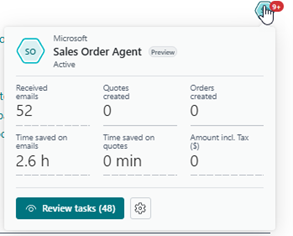
Payables Agent
This Copilot agent uses AI to help you manage vendor invoices. It identifies inconsistencies, recommends coding, and helps streamline the approval process. For AP teams, this is a practical, efficiency-boosting upgrade, not just AI for the sake of AI.
Auto Fill (with Bing Search)
Auto Fill can now draw from Bing Search to populate item details faster. If you're onboarding new products, building catalogs, or managing frequently changing items, this saves real time.
Summarize
A favorite among first adopters, Copilot can now generate clear, human-readable summaries of records, helping busy users get up to speed immediately.
Agents (Preview)
This update is an exciting direction: agents that carry out tasks on your behalf. Early previews show promise in managing routine processes and in proactively suggesting actions.
Enhanced PO Line Matching
Improved intelligence means fewer mismatches and smoother purchasing workflows.
MCP (Model Context Protocol) Server
This enhancement deepens the integration between Business Central and AI models, enabling Copilot to interpret BC data with greater accuracy and context.
General Application Improvements
Wave 2 includes several updates that may not grab headlines, but they significantly improve usability and reliability.
New Accounts Payable Role Center
AP teams get a more intuitive, role-focused dashboard that puts tasks, insights, and actions front and center.
Concurrent Posting
This one's a game changer for larger teams. You can now post more transactions simultaneously without collisions or delays.
Semantic Search
Searching in BC becomes much closer to how we naturally think. Instead of exact matches, BC now understands meaning and context.
Record Link Migration Tool
A welcome addition for implementations and upgrades; record links now migrate more reliably with the new tool.
Power Platform Connector for BC Environment Management
This feature strengthens automation opportunities for environment refreshes, notifications, approvals, and governance.
Sustainability Features
Microsoft continues to expand BC's ability to support ESG initiatives, enabling more tracking and reporting without heavy customization.
Updated Contoso Coffee Demo App
This improved environment makes training and demonstrations much more realistic and modern.
eCommerce Enhancements (Shopify)
eCommerce continues to grow across industries, and Microsoft's Shopify connector gets several improvements:
- Better troubleshooting tools to diagnose sync issues
- Linking salespeople to Shopify orders, improving reporting, and commissions
- Improved pricing synchronization, addressing one of the most common pain points
These updates reflect real-world customer feedback, making the integration smoother and more scalable.
Reporting Enhancements: Better Data, Better Decisions
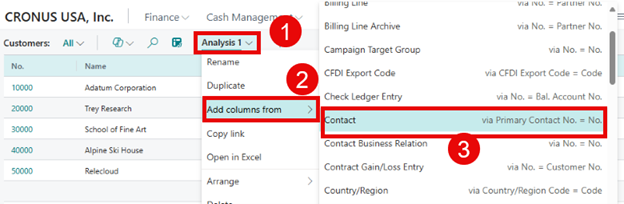
Reporting is one of the areas where we see meaningful improvements every release, and Wave 2 continues that pattern. Develop a strategy to evaluate which new features, such as Analysis Mode or Power BI report templates, align with your business goals and prioritize their adoption for maximum impact.
Analysis Mode – Now with Related Table Data
You can now pull related data directly into your analysis mode views, reducing the need for custom queries or external tools.
Audit Trail Report
Internal controls teams will appreciate this more precise and comprehensive audit trail.
Power BI Reports Are Now Open Source
That's huge. Microsoft has made its Power BI report templates open source, enabling partners and customers to extend them with confidence.
Improved Financial Reporting
Smarter layouts, better usability, and improved flexibility make this area more approachable for finance teams.
Source Currency Code and Amount in General Ledger Entries
A minor enhancement with a significant impact for multi-currency organizations.
New Power BI Apps
These refreshed and expanded apps give organizations faster insights right out of the box:
- Purchasing (new!)
- Finance
- Sales
- Inventory
- Inventory Valuation
- Manufacturing
- Subscription Billing
- Sustainability
Each app brings stronger visualizations, better KPIs, and more actionable dashboards.
Supply Chain Improvements
Wave 2 includes several enhancements that make purchasing, sales, and inventory management more efficient:
Quality Management (Coming December)
A structured framework for managing inspections, quality checks, and nonconformances.
Sort Sales and Purchase Lines by Line Type
A simple but highly valuable usability improvement.
More Personalization Options
Users can now add additional fields and columns, tailoring pages to their workflow.
Manufacturing Enhancements
Manufacturers get meaningful upgrades this cycle:
Improved Subcontracting
Including:
- Better logistics for component movements
- Additional pricing options
- Expanded receiving that provides for item tracking and warehouse handling
- Improved visibility into subcontracting status
Quality Management (December 2025)
Microsoft is building a long-term roadmap for integrated quality processes.
Calculate Consumption – Set Defaults
This improvement supports more accurate production consumption calculations.
Final Thoughts: Staying Current Is a Competitive Advantage
Business Central 2025 Wave 2 reminds us why cloud ERPs are so powerful: continuous innovation, constant refinement, and new capabilities that businesses can adopt immediately.
But these updates only matter if you take advantage of them.
My advice after more than two decades working with BC:
Make staying current a strategic priority, not an afterthought.
The organizations that consistently benefit from Business Central are those that treat updates as opportunities, not disruptions.
Ready to Up Your Game with Business Central?
If you'd like help evaluating Wave 2 features, optimizing your update schedule, or exploring AI capabilities like Copilot, the Liberty Grove Software team is always here to help.
Let's connect.Together, we can turn this update into a platform for your next stage of growth.
Here's to making the most of what's new in BC 2025 Wave 2; your future systems (and users!) will thank you.
About Andrew Good
Andrew Good, CEO, Liberty Grove Software
Andrew Good, CEO of Liberty Grove Software, a leader in digital transformation, directs the company with strategic insights that deliver impactful results. With over two decades of expertise in Microsoft technologies, Andrew has guided businesses through digital transformation across manufacturing, finance, and healthcare.
Andrew's extensive knowledge comes from personal experiences with various companies. His hands-on operational knowledge comes from Engineering, Maintenance, and operational roles at Unilever and Sony Music. Fourteen years of working with Microsoft Dynamics BC/NAV follows successful projects in ERP, Computerized Maintenance Management Systems (EAM), and quality systems.
His passion for technology is matched by his love for sailing, which inspires his leadership. Andrew parallels the precision of navigating the seas and the challenges of steering a successful company. Under his leadership, Liberty Grove Software thrives, offering tailored solutions to empower clients and optimize operations with innovative Microsoft-based systems.
