
Explore how Dynamics 365 BC connects to shop floor systems, sensors, or MES platforms to optimize production.
When I walk into a manufacturing plant these days, I see fewer clipboards and more screens. Advanced shop-floor integrations mean that machines are talking, operators are tapping tablets instead of filling out paper forms, and managers can see what's happening on the shop floor right now, not tomorrow morning.
That's precisely where advanced shop-floor integrations – IoT, MES, and Microsoft Dynamics 365 Business Central (BC) – come together.
And it's one of the areas my team at Liberty Grove Software and I are most excited about, because when you connect these worlds properly, you don't just "go digital"; you fundamentally change how production is planned, executed, and improved.
In this article, I'll walk through how Dynamics 365 BC connects to shop-floor systems, sensors, and MES platforms, what that actually looks like in practice, and some lessons we've learned helping manufacturers implement these integrations.
Why connect your shop floor to Dynamics 365 BC?
Let's start with the "why," because integration projects aren't small undertakings.
When you connect BC to machines, sensors, and MES, you're aiming for a few big wins that demonstrate clear benefits:
Real-time visibility
No more waiting for manual reporting. Production orders, consumption, scrap, and output flow in near real time from the shop floor to BC.
Better planning and scheduling
Planners work with actual machine performance, not assumptions. If a key line is running slower, BC can reflect that in capacity and delivery dates.
Accurate costing and margin control
Actual labor, material usage, and machine time are captured as they occur, feeding BC's costing engine with reality rather than rough estimates.
Higher OEE (Overall Equipment Effectiveness)
By tying machine data (downtime, speed loss, quality) into your ERP, you can identify and prioritize the bottlenecks that impact financial results.
Less admin, more value-added work
Operators stop being data entry clerks and focus on running the process. Data flows automatically in the background.
How does Dynamics 365 BC connect to all these systems?
Involving both IT and OT teams early can make this process smoother and more successful.

The three layers: ERP, MES, and IoT
Think of your landscape in three layers:
- ERP – Dynamics 365 Business Central
That's your system of record: items, BOMs, routings, production orders, inventory, costing, purchasing, and finance.
- MES – Manufacturing Execution System
MES sits closer to the shop floor. It handles things like:
- Dispatching and tracking production orders by operation
- Operator logins & labor tracking
- Detailed machine status and downtime reasons
- Quality checks and SPC (Statistical Process Control)
- Work instructions and electronic batch records
In some plants, this is a commercial MES product; in others, it's a combination of homegrown systems, HMI screens, and data collection terminals.
- IoT – Machines, sensors, PLCs, and data platforms
That's where signals originate:
- PLCs and controllers on the machines
- Smart sensors (temperature, vibration, pressure, etc.)
- Data historians and IoT platforms (like Azure IoT, Kepware, OPC UA servers, etc.)
BC doesn't talk directly to every sensor and PLC out of the box. Instead, BC typically integrates with:
- MES systems, which already aggregate shop-floor events and translate them into business-friendly data (good pieces, scrap, downtime, etc.), and/or
- IoT/Integration platforms that sit between raw machine data and ERP (for example, Azure services, middleware, or specialized connectors).
Let's look at the practical patterns.
Common integration patterns with Dynamics 365 BC
1. MES as the "shop-floor brain"
In this pattern, BC is the planning and costing engine, and MES acts as the execution brain on the floor, coordinating operations effectively.
Typical flow:
- From BC to MES
- Released production orders
- BOMs and routings
- Work centers/machine centers
- Item masters and units of measure
- From MES to BC
- Operation completions (quantity good, quantity scrapped)
- Actual start/finish times
- Labor hours and machine time
- Material consumption (by lot/serial if needed)
BC then:
- Updates inventory, WIP, and finished goods
- Post consumption and output
- Calculates actual production costs
- Feeds that into financials, sales, and planning
In practice, this is usually done via web services/APIs (OData/REST) or an integration platform that maps fields and handles retries, error logging, and transformations.
Where this shines:
If you're already using or planning to implement a robust MES, this pattern gives you clean separation: BC doesn't have to worry about raw machine signals; it just consumes meaningful, validated production events.

Direct IoT-to-BC integration
In some environments, especially lighter manufacturing or when you're just getting started, you may not have a full MES. Instead, you might connect IoT platforms directly to BC.
For example:
- A line counter on a packaging machine sends production totals to an IoT hub every minute.
- A middleware layer aggregates counts and batches them into "production output" records.
- That middleware calls BC's APIs to update the related production order with the produced quantities and post-consumption using backflush or rules.
You might also use IoT data to:
- Trigger quality holds in BC if a sensor reading exceeds the out-of-range threshold.
- Write non-conformance or inspection records when specific alarms occur.
- Adjust maintenance work orders in a connected maintenance system based on runtime and cycles.
Key ingredients:
- An IoT platform or gateway that can speak the "machine language" (OPC UA, Modbus, etc.)
- Integration middleware that can call BC's web services securely
- Clear business rules: how many pulses equals one good piece, what to do with partial data, etc.
Where this shines:
When you want fast wins and targeted automation on specific lines or machines without a full MES implementation.
Hybrid: BC + MES + IoT analytics
Many mature manufacturers end up with a hybrid architecture:
- MES handles execution and operator interaction.
- IoT/analytics platforms (often in the cloud) collect high-frequency sensor data for analytics, AI, and advanced monitoring.
- BC serves as the backbone for orders, inventory, costing, and finance.
In this world:
- MES and BC share master data and transactional updates (orders, completions, consumption).
- IoT platforms feed insights (predicted failures, quality risks, performance trends) either into MES, BC, or both.
- BC may consume summarized KPIs—like OEE by work center per day—for reporting and profitability analysis.
This pattern is powerful when you're ready to embrace continuous improvement powered by data rather than just basic automation, enabling smarter decision-making.
What does a "good" integration look like?
There's no one-size-fits-all, but successful shop-floor integrations with BC tend to share a few characteristics:
1. Clear ownership of master data
Decide where each master lives and who owns it:
- Items, BOMs, routings: almost always BC
- Work centers/machine definitions: usually BC, sometimes MES if much more detailed
- Quality specs: sometimes MES, sometimes QC modules integrated with BC
Then set up integration so that:
- Changes are propagated automatically where needed
- There's one "system of truth" for each data type
2. Simple, robust message flows
Fancy architectures are fun on paper, but on the shop floor, reliability beats elegance.
Good practices:
- Use simple, well-defined messages: e.g., "Operation Completed" with clear fields.
- Include reference keys (order number, operation number, item, date-time, user).
- Handle exceptions gracefully:
- What happens if BC is temporarily unavailable?
- How do you detect and fix duplicate or missing messages?
3. Real-time where it matters, batch where it doesn't
Not every integration needs to be millisecond real-time.
- For machine status dashboards, you want near-real-time updates.
- For costing and inventory, posting every few minutes or hourly is often sufficient.
We often design hybrid timing:
- Real-time or near-real-time for execution-critical events.
- Scheduled/batch for summarized metrics and secondary data.
Practical use cases you can target
If you're wondering where to start, here are some concrete use cases that deliver value quickly:
- Automated production reporting
- Machines or MES send good/scrap counts directly to BC.
- Production orders are updated without manual entry.
- Supervisors move from chasing paperwork to reviewing exceptions.
- Real-time WIP visibility
- Operators scan or select the order they're working on at terminals.
- BC (or MES) shows where every order is in the routing.
- Customer service can confidently answer "where's my order?"
- Material consumption and traceability
- Barcode/RFID or MES integration records which lots/serials were used on which orders.
- BC stores this for full forward/backward traceability.
- Recalls and quality investigations become much easier.
- Downtime and OEE linked to financials
- Machine downtime events are captured and categorized.
- OEE metrics are tied to specific work centers and products.
- You can see which constraints are costing you money and prioritize improvements.

Key lessons from real-world projects
After many integrations, a few themes keep showing up:
Start Small, but Design for Growth
Pick one line, one product family, or one plant as your pilot. Prove the value, refine the data model, and then scale out. But at the design level, think ahead:
- Will you add more lines, shifts, or plants?
- Will you bring in a MES later if you don't have one today?
Involve Both IT and OT Early
IT cares about BC, security, APIs, and data integrity. OT (operations/engineering) cares about PLCs, machines, shifts, and uptime.
You need both at the table. Some of the best integration ideas come from operators and maintenance technicians who live with the machines every day.
Don't Underestimate Change Management
Technically, it might be "just an interface." Organizationally, it's a change in how people work:
- Operators might stop filling out paper and work with terminals instead.
- Supervisors might shift from "data collectors" to "data analysts."
- Planners and finance get more accurate information – and will start expecting it.
Training, communication, and clear "what's in it for me" messages are crucial.
Where Dynamics 365 BC fits in your Industry 4.0 roadmap
I like to remind manufacturers: BC is not trying to be your PLC or your MES. It's your business backbone.
When you integrate BC with IoT and MES:
- BC gives structure, master data, and a single source of financial and operational truth.
- MES orchestrates execution and captures detailed shop-floor events.
- IoT collects and analyzes the raw heartbeat of your machines.
Together, they let you move from reactive firefighting to proactive, data-driven manufacturing.
Conclusion
If you're looking at your plant and thinking, "We have all these machines, all this data, but it's not connected to the business," you're not alone.
The good news is that Dynamics 365 Business Central is a strong foundation, and with the right approach to IoT and MES integration, you can unlock significant hidden potential.
And if you're not sure where to start – or whether you need MES, direct IoT, or a hybrid approach – that's precisely the sort of conversation my team and I at Liberty Grove Software have every week. The path doesn't have to be complicated, but it does need to be yours.
Let's talk. Schedule a conversation with Liberty Grove Software today, and let's build a smarter, safer, and smoother ERP transition – together.
About Andrew Good

Andrew Good, CEO, Liberty Grove Software
Andrew Good, CEO of Liberty Grove Software, a leader in digital transformation, directs the company with strategic insights that deliver impactful results. With over two decades of expertise in Microsoft technologies, Andrew has guided businesses through digital transformations across various industries, including manufacturing, finance, and healthcare.
Andrew's extensive knowledge comes from personal experiences with various companies. His hands-on operational knowledge stems from his experience in engineering and maintenance, as well as his operational roles at Unilever and Sony Music. Fourteen years of working with Microsoft Dynamics BC/NAV follows successful projects in ERP, Computerized Maintenance Management Systems (EAM), and quality systems.
His passion for technology is matched by his love for sailing, which inspires his leadership. Andrew parallels the precision required for navigating the seas with the challenges of steering a successful company. Under his leadership, Liberty Grove Software thrives, providing tailored solutions that empower clients and optimize operations with innovative, Microsoft-based systems.
Connect with Andrew on LinkedIn
Subscribe to Andrew’s Newsletter on LinkedIn
As a Business Central enthusiast, I'm excited to share my thoughts on the newest release: Microsoft Dynamics 365 Business Central Wave 2 2025 (version 27.0). This update continues Microsoft's momentum toward a more intelligent, connected, and sustainable ERP platform.
Whether you call it Business Central Wave 2 2025, BC Wave 2 2025, or the Microsoft Dynamics 365 Business Central W2 2025 Release, one thing is clear: this update isn't just evolutionary, it's transformative.
Let's dive into what's new, what matters most, and how to prepare your organization to take full advantage of these innovations, with some practical upgrade tips to guide you through the process.
The Big Picture: Why Business Central Wave 2 2025 Matters
Each spring and fall, Microsoft delivers new capabilities for Business Central through its "Wave" updates. The Business Central Wave 2 2025 release represents the second major update of the year, and it's a substantial one.
If you're running Business Central Online, version 27.0 will roll out automatically, with the update window closing by the end of February 2026. On-premises customers can follow traditional upgrade paths.
Why this matters: Microsoft is strategically strengthening the integration of AI, analytics, and automation, while also expanding its sustainability and compliance capabilities. This strategic move means more time saved, fewer manual touches, and clearer insights, all wrapped in a more approachable interface.
Intelligent Automation Takes Center Stage
Copilot Evolves from Assistant to Partner
In Business Central Wave 2 2025, Microsoft's Copilot gets sharper, more flexible, and more business aware. Users can now:
- Autofill contact details automatically using context-aware AI.
- Summarize documents and records with customizable prompts that developers can extend using AL code.
- Provide more specific guidance to Copilot agents when reviewing tasks, allowing nuanced instructions.
- Search with natural language, thanks to the enhanced Tell Me feature that recognizes intent instead of just keywords.
- Hide Copilot summaries when you prefer to focus purely on data.
Together, these features move Business Central closer to a future where the system doesn't just assist you; it actively collaborates with you.

The Rise of Business Process Agents
A standout of the BC Wave 2 2025 release is the new Sales Order Agent.
This AI-driven capability can read incoming emails, interpret data from attachments, and create draft quotes or orders automatically.
It understands item availability, maps staff to salespeople, and suggests delivery dates, essentially performing as a digital coworker.
That means that your sales team can focus on more strategic tasks, while the Sales Order Agent handles routine order creation and management, improving efficiency and reducing manual work.
This shift from "assistant" to "agent" marks a turning point. At Liberty Grove, we see this as the start of a new automation era, where Copilot evolves into a trusted team member rather than a tool.
Smarter Commerce: Shopify Integration Reinvented
E-commerce remains a driving force, with Microsoft Dynamics 365 Business Central W2 2025 delivering powerful enhancements to the Shopify connector. Businesses can now:
- Assign sell-to and bill-to details per company location, ideal for multi-branch operations.
- Map Shopify staff to Business Central salespeople to ensure accurate commissions.
- Synchronize market-specific prices automatically between platforms.
- Access better diagnostics and troubleshooting tools for the connector.
These features strengthen Business Central's position as the hub of a multi-channel commerce ecosystem, giving organizations both agility and visibility.
With these enhancements, businesses can streamline their operations, ensure accurate commission calculations, and maintain consistent pricing across platforms, all of which contribute to a more efficient and profitable e-commerce strategy.

Accounting and Financial Control: Better, Faster, Smarter
Financial management is the heartbeat of Business Central, and the Wave 2 2025 update introduces meaningful refinements, empowering you with improved financial and analytics tools:
- Excise tax automation for industries dealing with regulated goods.
- The ability to create multiple fixed-asset cards for better tracking across departments or regions.
- Alternative posting groups for employees, streamlining payroll or expense entries.
- Enhanced financial reports with new data fields for Word/Excel add-ins.
- Updated Power BI apps across sales, purchasing, inventory, projects, and finance, with drill-back capabilities to the originating data in BC.
For CFOs and finance teams, these enhancements translate directly into reduced reconciliation time and improved audit readiness.
The new features in the 'Accounting and Financial Control' section can improve financial management by automating tax calculations, providing better asset tracking, simplifying payroll processes, and enhancing financial reporting, all of which save time and improve accuracy in financial operations.
Insights That Matter: Reporting and Analytics in BC W2 2025
The Business Central W2 2025 Release doubles down on analytics. Microsoft has open-sourced Power BI apps, giving users more freedom to customize dashboards. Deferral reporting and revenue recognition are more accurate, while new drill-down features allow users to click a number in Power BI and jump directly into the transaction in BC.
It's a simple change with significant implications: real-time transparency and self-service analytics that empower decision-makers without IT bottlenecks.

Local Compliance and Global Reach
Microsoft continues to strengthen country-specific localizations in the Business Central Wave 2 2025 update. Highlights include:
- Enhanced Czech localization (alternate posting groups, unreliability flags, Intrastat demo data).
- UK localization is now structured as an extension, simplifying maintenance.
- US 1099 e-filing integration with the IRS IRIS portal (preview).
By modularizing local features, Microsoft makes global deployment more straightforward and consistent, which is a significant advantage for international businesses.
Developer Power and Technical Enhancements
Developers and partners will appreciate several under-the-hood advances in Business Central Wave 2 2025:
- Cancel builds and publishes directly from Visual Studio Code.
- New AL functions to truncate table data safely during testing.
- Enhanced SQL call visibility in performance profiling tools.
- Expanded telemetry and diagnostics, improving transparency in cloud environments.
- The ability to extend Copilot behaviors with AL code, allowing partners to build business-specific AI experiences.
These features make Business Central not only more capable for end users but also more enjoyable for the developers who craft solutions around it.

Supply Chain and Operations: Subtle but Impactful
Wave 2 2025 adds refinements that streamline day-to-day operations:
- Users can personalize more page fields and columns, tailoring the workspace to their role.
- The "Calculate Consumption" report can now use predefined defaults for consistent results.
- Sales and purchase posting lines can be sorted by type and number, improving review efficiency.
They may seem like minor details, but these quality-of-life improvements add up to smoother workflows and happier teams.
Sustainability and ESG: Data-Driven Responsibility
One of the most forward-looking areas in Microsoft Dynamics 365 Business Central W2 2025 is its expanded sustainability management module. New capabilities include:
- Tracking energy use and greenhouse-gas emissions in CO₂ equivalents.
- Managing Scope 3 value-chain emissions, aligning with global ESG frameworks.
- Creating CSRD preparation reports for European compliance.
- Approvals for sustainability journals to enforce data governance.
- Updated Sustainability Manager Role Center, providing a cleaner, role-specific interface.
For organizations taking ESG seriously – and every business should – these updates move sustainability reporting from spreadsheets into the ERP core.
User Experience: Small Changes, Big Difference
Wave 2 2025 includes thoughtful UI and security touches that elevate the everyday experience:
- Resizable panes for Copilot, Help, and Page Scripting, giving users control of their workspace.
- A new "Concealed Text" field type for storing sensitive data safely.
- Better bulk-action support on lists.
- Improved error summaries and contextual hints for data entry.
At Liberty Grove, we view these refinements as part of a broader trend, where Business Central is evolving into not just a powerful tool but also an enjoyable user experience.
Planning Your Upgrade: Practical Tips
Upgrading to Business Central Wave 2 2025 should be strategic, not stressful. Here's my tried-and-true approach:
- Spin up a sandbox first: test preview features safely.
- Audit your extensions and ISVs for compatibility.
- Stage your rollout: pilot with one department before going company-wide.
- Train your champions: power users drive adoption faster than memos.
- Monitor performance telemetry post-go-live to spot regressions early.
Done right, your upgrade becomes less of a project and more of an evolution.
The Leadership Lens: What This Wave Really Means
From my CEO seat, here's why I think Business Central Wave 2 2025 is significant:
- AI isn't optional anymore. Copilot and Agents are becoming part of everyday ERP workflows. The winners will be those who embrace, not fear, automation.
- Insight beats information. With Power BI deep-links and AL-extendable summaries, Business Central is turning raw data into guided decisions.
- Compliance is a strategy. ESG, tax, and localization features not only reduce risk but also enhance credibility and operational excellence.
At Liberty Grove Software, our mission is to help clients not just upgrade systems but elevate their businesses. This release gives us more tools than ever to make that happen.
Ready for What's Next? Let's Build Your Wave 2 2025 Strategy
The Microsoft Dynamics 365 Business Central W2 2025 Release is a leap forward in intelligence, sustainability, and usability. But as with any significant evolution, success depends on preparation and alignment.
If you'd like help assessing your readiness, training your team, or mapping out a phased rollout, my team and I would be happy to work with you.
Let's connect. Together, we can turn this update into a platform for your next stage of growth.
Contact Liberty Grove Software to start your Business Central Wave 2 2025 Readiness Checklist session today.
UST Education Series Presentation
Andrew Good has an upcoming UST Education Series presentation in which he will discuss what’s new in BC, describe the update rollouts for wave 2 2025, and explore strategies for managing your update schedule.
November 18, 11:00 am-12:00 pm EST
About Andrew Good
Andrew Good, CEO, Liberty Grove Software
Andrew Good, CEO of Liberty Grove Software, a leader in digital transformation, directs the company with strategic insights that deliver impactful results. With over two decades of expertise in Microsoft technologies, Andrew has guided businesses through digital transformations across various industries, including manufacturing, finance, and healthcare.
Andrew's extensive knowledge comes from personal experiences with various companies. His hands-on operational knowledge stems from his experience in engineering and maintenance, as well as his operational roles at Unilever and Sony Music. Fourteen years of working with Microsoft Dynamics BC/NAV follows successful projects in ERP, Computerized Maintenance Management Systems (EAM), and quality systems.
His passion for technology is matched by his love for sailing, which inspires his leadership. Andrew parallels the precision required for navigating the seas with the challenges of steering a successful company. Under his leadership, Liberty Grove Software thrives, providing tailored solutions that empower clients and optimize operations with innovative, Microsoft-based systems.
Connect with Andrew on LinkedIn
Subscribe to Andrew’s Newsletter on LinkedIn

When organizations move from legacy systems to modern platforms, the most critical hurdle is not the software itself but the data. Data migration challenges often determine whether an ERP or cloud adoption succeeds or stalls.
At Liberty Grove Software, we've seen firsthand how careful planning around mapping, cleansing, transformation, and reconciliation makes the difference between a smooth transition and a painful one.
Migrating data is rarely just a matter of "lift and shift."
Legacy systems carry decades of history, inconsistencies, and redundancies. Without a solid enterprise data migration strategy, companies risk bringing confusion forward into the new environment.
Done right, however, migration becomes more than a technical step; it's an opportunity to modernize, improve governance, and build trust in data-driven decision-making.
What Are the Key Considerations When Migrating Data from a Legacy System to the Cloud?
A common question clients ask me is: "What are the things that we should consider when migrating data from legacy systems?"
From our experience, three stand out:
| Scope of data | Decide what is essential to migrate and what can be archived. Not every historical transaction needs to live in the new system. |
| Compliance requirements | Retain the fields and records required for regulatory reporting or audit, even if they're no longer central to operations. |
| Future usability | Structure the data in a way that supports reporting, analytics, and business growth. |
An enterprise data migration strategy should strike a balance between short-term needs (going live quickly) and long-term value (ensuring the data supports decision-making for years to come).
Step One: Data Mapping – Setting the Blueprint
Data mapping is the foundation of every migration project. It's about aligning legacy fields with new structures. That's where data mapping best practices come in:
- Engage stakeholders: The business understands data meaning better than IT alone.
- Document thoroughly: Long projects need consistent reference points.
- Address custom fields: Legacy customizations may require creative solutions.
Many clients ask: "Which data mapping and transformation tools are best suited for complex enterprise migrations?"
The answer depends on the scale and complexity, but ETL (extract, transform, load) platforms, combined with ERP-native import frameworks, usually provide the best balance of power and flexibility.
Increasingly, data migration automation tools also integrate AI capabilities, making mapping faster and more accurate.
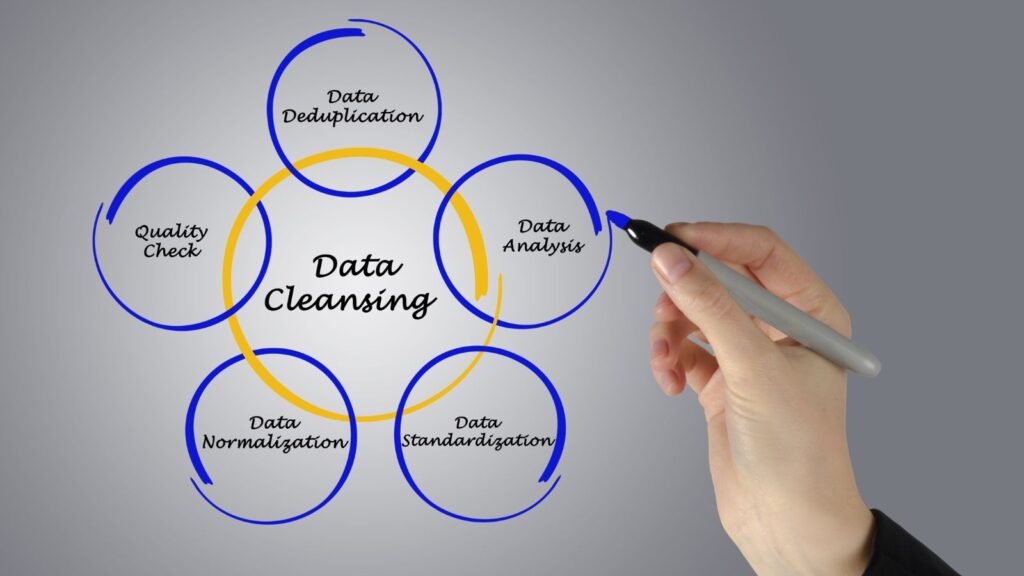
Step Two: Data Cleansing – Purging the Noise
Clean data leads to confident decision-making. Cleansing involves removing duplicates, correcting errors, and standardizing values to ensure accuracy. Examples include:
- Eliminating duplicate customer or vendor records with similar names
- Closing out inactive products
- Standardizing postal codes, tax IDs, and addresses
That's also where AI makes a difference. Traditional rules can only catch so much. With AI in data migration, fuzzy matching models and anomaly detection can identify errors humans often miss.
A frequent client concern is: "How can AI or ML techniques help in automating data cleansing, transformation, and reconciliation during migration?"
In practice, AI can:
- Detect duplicates with higher accuracy
- Predict missing values based on patterns
- Flag outliers that don't fit the expected rules
The result? Cleaner data with less manual labor.
Step Three: Data Transformation – Making It Fit
Even after mapping and cleansing, data must be reshaped to fit the new ERP or cloud environment. That's where data transformation strategies matter.
Typical transformations include:
- Format conversions: Adjusting date or currency formats
- Hierarchy restructuring: Aligning cost centers to new dimensional models
- Normalization: Standardizing units of measure, country codes, or naming conventions
- Enrichment: Adding attributes pulled from other systems
The right tools combine automation with flexibility. AI-driven platforms can propose transformation rules based on historical data, dramatically reducing manual effort. It's where how AI improves data migration becomes tangible: it doesn't just process faster; it learns patterns and adapts.

Step Four: Data Reconciliation – Building Trust
Reconciliation is the final step, and often the most underestimated. Teams ask: "How would you QA / validate data before and after a migration to ensure integrity?"
The answer lies in data reconciliation in migration:
- Compare record counts between systems
- Validate trial balances and subledgers
- Ensure open invoices and transactions align
- Run dual systems briefly to confirm outputs
Automated reconciliation tools can quickly catch discrepancies, but human validation remains essential. Ultimately, reconciliation builds trust. Without it, user adoption suffers because no one fully believes the numbers.
The Biggest Pitfalls in Migration Projects
In community discussions, a common thread emerges: "What are the biggest pitfalls or gotchas that make long-running migration projects drag on for years?"
From our perspective, the pitfalls usually include:
- Underestimating data volume: Trying to migrate everything instead of focusing on what matters
- Poor documentation: Losing track of mapping and rules mid-project
- Late stakeholder involvement: Business users brought in too late to validate assumptions
- Skipping reconciliation: Declaring success without validating accuracy
These are not just nuisances; they are the reasons projects fail. Addressing them upfront keeps migrations on schedule.

How AI Is Changing the Game
The rise of AI is reshaping what's possible in enterprise migrations. The improvement of data migration by AI is not a hypothetical concept; it's happening now.
AI assists by:
- Automating mapping: Reducing weeks of manual setup
- Accelerating cleansing: Using ML to detect duplicates and outliers
- Guiding transformation: Recommending standardization rules
- Streamlining reconciliation: Matching transactions intelligently
Combined with data migration automation tools, AI reduces risk, accelerates timelines, and frees teams to focus on oversight rather than grunt work.
However, there's a caveat: AI is powerful, but not infallible. Expert judgment and governance are non-negotiable. At Liberty Grove, we integrate AI tools into our migration projects while maintaining human oversight at the forefront of our approach. That balance yields the best results.
Turning Data Migration Challenges into Opportunities
Ultimately, overcoming data migration challenges is about more than moving records. It's about:
- Creating reliable, standardized data
- Strengthening governance
- Building confidence in business reporting
- Supporting future analytics and AI initiatives
Migration is not just a hurdle; it's a reset opportunity. Organizations that approach it strategically unlock a cleaner dataset and a stronger foundation for growth, instilling a sense of reassurance and confidence.
At Liberty Grove Software, we've helped clients across various industries transition confidently from legacy systems to modern ERP and cloud platforms. Whether through enterprise data migration strategy, proven data transformation strategies, or the adoption of AI in data migration, our focus remains the same: ensuring your data becomes an asset, not a liability.
Final Thoughts for Tackling Data Migration Challenges Successfully
Your new ERP or cloud system is only as good as the data it holds. By prioritizing mapping, cleansing, transformation, and reconciliation, and by leveraging AI where it adds the most value, you can overcome the toughest data migration challenges.
The path may be complex, but with the right tools, strategy, and oversight, your data migration can deliver not just a smooth transition but also a stronger future for your organization.
Let's talk. We’ll help you start your ERP Migration Journey.
About Andrew Good

Andrew Good, CEO, Liberty Grove Software
Andrew Good, CEO of Liberty Grove Software, a leader in digital transformation, directs the company with strategic insights that deliver impactful results. With over two decades of expertise in Microsoft technologies, Andrew has guided businesses through digital transformations across various industries, including manufacturing, finance, and healthcare.
Andrew's extensive knowledge comes from personal experiences with various companies. His hands-on operational knowledge stems from his experience in engineering and maintenance, as well as his operational roles at Unilever and Sony Music. Fourteen years of working with Microsoft Dynamics BC/NAV follows successful projects in ERP, Computerized Maintenance Management Systems (EAM), and quality systems.
His passion for technology is matched by his love for sailing, which inspires his leadership. Andrew parallels the precision required for navigating the seas with the challenges of steering a successful company. Under his leadership, Liberty Grove Software thrives, providing tailored solutions that empower clients and optimize operations with innovative, Microsoft-based systems.
Connect with Andrew on LinkedIn
Subscribe to Andrew’s Newsletter on LinkedIn

Digital transformation isn't just a buzzword; it's a lifeline for companies relying on aging ERP systems that no longer meet modern demands. It’s why we created this ERP Migration Roadmap to give companies the confidence to make the leap.
Whether you're running Microsoft Dynamics GP, NAV, or another legacy ERP platform, the shift to a cloud-based ERP like Microsoft Dynamics 365 Business Central (BC) is not only inevitable; it's an opportunity to reinvent how your business operates. With features such as seamless integration of business processes, advanced analytics for informed decision-making, and scalability to accommodate your business growth, BC offers a range of benefits that can significantly enhance your operations.
At Liberty Grove Software, we've guided countless organizations through this journey. One conversation stands out: I was sitting down with the CIO of a mid-sized manufacturing company last year.
He leaned back in his chair, arms crossed, and said, "Andrew, I know we have to do this, but the last thing I want is a drawn-out, disruptive project that paralyzes our business. How do we make this as smooth as possible?"
That's the question every executive asks, and it's precisely why having a clear, step-by-step ERP migration roadmap is essential.
Below, I'll share how we helped that CIO navigate his concerns and outline the proven path we use to take companies from discovery to go-live with confidence.
We also understand that ERP migration can be a complex process, with challenges such as data migration issues and user resistance.
With our expertise and proven methodology, Liberty Grove ensures your move to Business Central is seamless and sustainable.

1. Discovery: Building the Foundation for ERP Migration Success
Every successful ERP migration begins with discovery. That's where we assess your current ERP environment, business processes, and strategic goals. The objective isn't just to replicate what you have today in the cloud; it's to identify opportunities for improvement and innovation.
In this stage, we:
- Conduct stakeholder interviews to uncover pain points and priorities.
- Analyze your existing data, customizations, and integrations.
- Define your vision: What does success look like one year after migration?
When I met with that manufacturing CIO, he initially wanted to "move everything as-is." But through discovery, we uncovered redundant processes and outdated reports that were slowing down his team.
By challenging the status quo, we designed an ERP migration roadmap that modernized their ERP while simplifying operations.
2. Planning: Creating a Realistic ERP Migration Roadmap
Once discovery is complete, the next step is to turn insights into a clear migration plan. Planning is where we outline:
- Scope: Which modules, customizations, and third-party add-ons will be included?
- Timeline: A realistic project schedule that minimizes downtime and aligns with business cycles.
- Resources: Key internal champions and external partners who will drive the project.
- Budget: Including migration costs, licensing, and potential change management initiatives.
For our manufacturing client, timing was critical. Their busy season ran from September through November, so go-live had to fall outside that window. We structured their migration to Business Central in quieter months, reducing disruption while keeping leadership aligned with the broader digital transformation strategy.

3. Preparation: Cleaning and Aligning ERP Data
Data is the lifeblood of your ERP system, but legacy ERP systems often carry decades of outdated or duplicate data. Migrating "as-is" can create inefficiencies in your new cloud environment.
During preparation, we:
- Audit your existing data for accuracy and relevance.
- Determine which data should be archived versus migrated.
- Standardize formats and eliminate redundancies.
The CIO's finance team initially felt overwhelmed at the thought of cleaning their general ledger history. By breaking the work into phases and leveraging automation tools, we streamlined the process.
The result? A cleaner, more reliable Business Central migration with fewer headaches down the road.
4. Design and Configuration: Tailoring Microsoft Dynamics 365 Business Central
One of the most significant benefits of Microsoft Dynamics 365 Business Central is its flexibility. At this stage, we configure the system to align with your needs while embracing best practices.
Activities include:
- Mapping existing processes to Business Central's modern workflows.
- Incorporating necessary extensions or add-ons.
- Setting up user roles, security, and approvals.
At Liberty Grove, our mantra is 'configure first, customize second'. That means we prioritize setting up the system to align with your business needs using the standard features of Microsoft Dynamics 365 Business Central. Companies often carry over outdated customizations from legacy ERP systems, adding complexity without value. Instead, we help you focus on what drives growth today, not what made sense 15 years ago.

5. Testing: Validating Your ERP Migration Roadmap
Testing is where your ERP migration becomes tangible. It's the chance to validate processes, train users, and refine the system before going live.
Key testing phases include:
- Unit testing: Confirming core functionality.
- Integration testing: Ensuring third-party apps and data flows run smoothly.
- User acceptance testing (UAT): Allowing employees to confirm usability and accuracy.
Our client's CIO initially feared testing would slow the project down. Instead, by introducing iterative cycles, testing built confidence, helping end users feel ready for the switch to Microsoft Dynamics 365 Business Central.
6. Training: Driving ERP User Adoption
Technology is only half the battle; people are the other half. Training ensures user adoption and long-term ROI for your ERP migration project.
We design training programs that:
- Are role-based and tailored to daily tasks.
- Blend formal instruction with hands-on practice.
- Include ongoing support beyond go-live.
For our manufacturing client, combining in-person workshops with digital modules created a culture of confidence. Their CFO later told me, "This was the first rollout where my team didn't feel left behind."
7. Go-Live: Transitioning to Business Central with Confidence
Go-live is the moment everyone anticipates, but it's not the finish line. It's the start of your journey in Microsoft Dynamics 365 Business Central.
A successful go-live includes:
- Final data migration and cutover.
- On-site and remote support for transition.
- Quick resolution of post-launch issues.
That once-nervous CIO? After go-live, he sent me a note: "Andrew, this was the smoothest major system change in my career. Thank you." His confidence underscored the power of a well-executed ERP migration roadmap.

8. Post-Go-Live Optimization: Unlocking the Full Potential of ERP
The real value of Business Central emerges after launch, when companies move from stabilization to optimization.
Post-go-live steps include:
- Refining workflows based on real-world input.
- Expanding functionality with new extensions.
- Leveraging analytics and AI for more intelligent decisions.
The companies that thrive are those that treat their ERP migration not as a one-time project, but as an ongoing journey toward efficiency and innovation.
The Liberty Grove Advantage
Migrating to Microsoft Dynamics 365 Business Central isn't just a technology upgrade; it's a strategic transformation. At Liberty Grove Software, we bring:
- Deep expertise: Decades of experience with Dynamics GP, NAV, and BC migrations.
- Proven methodology: A step-by-step ERP migration roadmap that minimizes risk.
- A partner mindset: We don't just implement software; we empower your team to succeed long-term.
The manufacturing CIO I mentioned earlier? Today, his company closes its books three days faster, generates reports in minutes instead of hours, and operates with agility unthinkable under their old legacy ERP system.
Ready to Begin Your ERP Migration Journey?
If you're ready to explore moving from your legacy ERP system to Microsoft Dynamics 365 Business Central, the first step is a conversation. Let's build your personalized ERP migration roadmap together so that you can move forward with clarity, confidence, and measurable results.
Let's talk. We’ll help you start your ERP Migration Journey.
About Andrew Good
Andrew Good, CEO, Liberty Grove Software
Andrew Good, CEO of Liberty Grove Software, a leader in digital transformation, directs the company with strategic insights that deliver impactful results. With over two decades of expertise in Microsoft technologies, Andrew has guided businesses through digital transformations across various industries, including manufacturing, finance, and healthcare.
Andrew's extensive knowledge comes from personal experiences with various companies. His hands-on operational knowledge stems from his experience in engineering and maintenance, as well as his operational roles at Unilever and Sony Music. Fourteen years of working with Microsoft Dynamics BC/NAV follows successful projects in ERP, Computerized Maintenance Management Systems (EAM), and quality systems.
His passion for technology is matched by his love for sailing, which inspires his leadership. Andrew parallels the precision required for navigating the seas with the challenges of steering a successful company. Under his leadership, Liberty Grove Software thrives, providing tailored solutions that empower clients and optimize operations with innovative, Microsoft-based systems.
Connect with Andrew on LinkedIn
Subscribe to Andrew’s Newsletter on LinkedIn

If you're a manufacturing executive, you've likely heard the acronyms MTS, MTO, ETO, and Process. But what do they really mean for your operations – and, more importantly, for your manufacturing ERP strategy success?
At Liberty Grove Software, we've worked with manufacturers across North America and beyond – from small to medium-sized, privately held companies to global enterprises driving digital innovation.
Regardless of your size or sector, the first step in any successful ERP journey is understanding the type of manufacturer you are.
This understanding empowers you to make informed decisions and take control of your ERP strategy.
MTS, MTO, ETO, or Process: What's Your Model?
Let's break it down:
- Make-to-Stock (MTS): You produce based on forecasted demand. Think consumer goods or high-volume parts. Speed and inventory control are key.
- Make-to-Order (MTO): You build only after receiving a customer order. This approach reduces inventory risk but requires tight scheduling.
- Engineer-to-Order (ETO): You design and build unique products according to customer specifications. It's complex but highly customizable.
- Process Manufacturing: You produce in batches or continuous flows, common in food, chemicals, or pharmaceuticals. Traceability and compliance are critical.
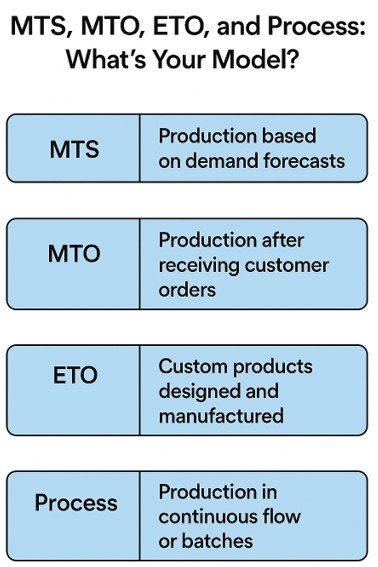
Each model has unique implications for your Microsoft Dynamics 365 ERP system –from how you structure your Bill of Materials to how you plan production and track costs.
Where to Start: ERP for Manufacturing Success Begins with Clarity
Before diving into configuration or customization, ask yourself:
- What's our dominant manufacturing model?
- Do we need to support multiple models (e.g., MTO + MTS)?
- What are our most significant pain points – inventory, lead times, costing, reporting?
This clarity is not just a starting point, but a reassurance that you are on the right track. It helps you align your ERP implementation with real-world operations, ensuring that your team, from finance to production, speaks the same language and is confident in the ERP strategy.

Key Elements of a Strong Manufacturing ERP Foundation
1. Bill of Materials (BOM)
Your BOM is the DNA of your product. Whether it's single-level or multi-level, it defines what goes into your finished goods. In Dynamics 365, BOMs can be linked to routings, cost centers, and even version-controlled for ETO environments.
2. Work Centers, Machine Centers & Routings
These define how and where work gets done. Work Centers represent labor or machine groups, while Routings define the sequence of operations. Accurate setup here drives everything from scheduling to costing.
3. Flow of Production Orders
Understanding the lifecycle of a production order – Created → Released → Started → Finished → Reported as Finished → Costed – is essential. Each status triggers different actions in the system and impacts inventory, labor, and financials.
4. Planning and Sequencing
That's where the rubber meets the road. Dynamics 365 offers robust tools for Master Planning, Demand Forecasting, and Finite Scheduling. For MTO and ETO, sequencing ensures high-priority jobs don't get stuck behind low-value work.
5. Costing
Whether you use Standard, Actual, or Hybrid Costing, your ERP must reflect true production economics. Dynamics 365 supports layered costing models, including activity-based costing, which is ideal for complex operations.
6. Reporting Options
Executives need visibility. Dynamics 365 integrates with Power BI, enabling real-time dashboards for KPIs like OEE, throughput, and cost variances. You can also drill into production variances, scrap rates, and capacity utilization.
7. Integration Options
Modern manufacturers don't operate in silos. Dynamics 365 integrates with:
- MES systems for shop floor control
- PLM tools for engineering collaboration
- EDI platforms for supplier and customer communication
- Finance and HR systems for unified operations
Final Thoughts: ERP That Fits Your Manufacturing DNA
At Liberty Grove Software, we understand that every business is unique; your ERP should adapt to your business, not the other way around.
Whether you're an SMB or a global manufacturer scaling operations, your ERP should reflect your unique production model, cost structure, and reporting needs. We are here to cater to your unique needs and help you achieve ERP success.
We believe your system should reflect how you operate, from BOMs to batch flows.
Ready to transform your ERP strategy Success from generic to genius? Let's talk.
Contact Liberty Grove for a complimentary consultation on how its team of experts can help optimize your manufacturing operation with Microsoft Dynamics 365. Let our experts help configure Microsoft Dynamics 365 to match your manufacturing DNA.
About Andrew Good
Andrew Good, CEO, Liberty Grove Software
Andrew Good, CEO of Liberty Grove Software, a leader in digital transformation, directs the company with strategic insights that deliver impactful results. With over two decades of expertise in Microsoft technologies, Andrew has guided businesses through digital transformations across various industries, including manufacturing, finance, and healthcare.
Andrew's extensive knowledge comes from personal experiences with various companies. His hands-on operational knowledge stems from his experience in engineering and maintenance, as well as his operational roles at Unilever and Sony Music. Fourteen years of working with Microsoft Dynamics BC/NAV follows successful projects in ERP, Computerized Maintenance Management Systems (EAM), and quality systems.
His passion for technology is matched by his love for sailing, which inspires his leadership. Andrew parallels the precision required for navigating the seas with the challenges of steering a successful company. Under his leadership, Liberty Grove Software thrives, providing tailored solutions that empower clients and optimize operations with innovative, Microsoft-based systems.
Connect with Andrew on LinkedIn
Subscribe to Andrew’s Newsletter on LinkedIn

When manufacturing executives consider implementing a modern ERP system, understanding the Microsoft Dynamics 365 Business Central basics is often not the first thing that comes to mind.
Conversations typically focus on high-level outcomes, such as streamlined operations, real-time reporting, improved supply chain visibility, and stronger customer engagement. These strategic goals are essential and often drive the investment in new technology.
However, overlooking how BC works on a day-to-day level can make or break the success of your ERP journey. The fundamentals – search, personalization, and shortcuts – are what enable those big-picture results to take shape across the organization.
It may seem counterintuitive.
Why should a CEO, CFO, or COO worry about search functions, shortcut keys, or personalization features? Isn't that the domain of end users or IT staff?
Understanding the basics of BC empowers leadership, directly impacting adoption, efficiency, and long-term ROI.
When executives grasp the fundamentals of BC, they set the tone for how the system is embraced across the organization, instilling a sense of control and confidence in their decision-making.

Why Executives Need to Understand the Basics
1. Leading by Example
Culture flows from the top. When senior leaders show they understand the ERP environment, even at a practical level, it demonstrates commitment and credibility. Employees notice when a CEO can navigate BC without fumbling for help.
They also notice when leadership relies on others for the smallest actions. That difference can set the tone for whether your teams see BC as empowering or burdensome.
2. Driving Adoption and ROI
ERP systems are a significant investment for manufacturing companies, but their full value is often not realized due to adoption issues.
When executives understand and emphasize the small efficiencies that make BC user-friendly, they drive adoption from the ground up, playing a crucial role in maximizing ROI.
3. Seeing the System as a Strategic Tool
The basics of BC are not just IT details. They are enablers of strategic visibility. For instance, knowing how to personalize dashboards in BC allows leaders to focus on KPIs that matter most, enabling faster, more informed decision-making at the top.

The Basics Every Manufacturing Executive Should Know
Let's look at some of the essentials in Business Central that every leader should understand.
1. The Power of Search
Business Central's search feature, often referred to as "Tell Me", is one of its most underrated tools. Instead of navigating menus, users can type what they need.
Whether it's a customer record, a financial report, or a production order, the system brings it up instantly.
For manufacturing leaders, this means you don't need to memorize where everything lives in the ERP. If you want to see yesterday's production variances or review overdue payables, just search.
It's the quickest path to insight, and it encourages leaders to interact with BC directly rather than waiting for reports.
2. Shortcut Keys Save Time
Keyboard shortcuts may seem trivial, but they add up. BC includes dozens of shortcuts designed to accelerate navigation and data entry. For example:
- Alt+Q opens the "Tell Me" search bar.
- Alt+Shift+F12 expands or collapses the navigation bar.
- Ctrl+F3 opens filtering options.
Executives might not need every shortcut, but knowing a few can reduce friction when reviewing data. More importantly, it signals to staff that leadership values efficiency, which encourages adoption of best practices across the organization.
3. Personalization for Role-Relevant Views
One of BC's greatest strengths is its ability to personalize dashboards and role centers. Manufacturing leaders can tailor their home screens to surface the KPIs that matter most.
For example:
- A COO might want production order status, machine utilization rates, and throughput metrics front and center.
- A CFO may prioritize cash flow forecasts, cost variances, and accounts receivable aging.
- A CEO might prefer a broader view: revenue trends, on-time delivery rates, and profitability by product line.
By understanding personalization, executives can design dashboards that align with strategic priorities, providing them with real-time leadership visibility and a deeper understanding of their business.
4. Filters and Views for Deeper Insights
Filters in BC allow users to zero in on the data that matters most. For instance, a leader might filter open sales orders by region to understand demand patterns or review overdue production orders by line.
Saving these filters as "views" provides instant access next time.
Leaders who understand filtering don't just wait for static reports; they actively interrogate the system to make better decisions.
That's especially valuable in manufacturing, where agility is often the difference between meeting customer demand and missing opportunities.
5. Excel Integration
Business Central integrates seamlessly with Excel. With a click, you can export data to Excel for deeper analysis or even push updates back into BC. For executives, this means there's no need to choose between "ERP" and "spreadsheet."
You can leverage both together, bridging the gap between operational data and strategic analysis.
6. Notifications and Alerts
You can configure BC to alert you when key thresholds are met or missed. For example, a CFO might receive a notification when cash falls below a certain level, while a COO could be alerted about delayed production orders.
Understanding how alerts work ensures leaders are proactively informed, rather than reactively surprised, giving them a sense of control and preparedness for potential issues.

The Strategic Payoff of Mastering the Basics
At first glance, basics like search, shortcuts, and personalization may feel tactical. But when executives understand and leverage them, the strategic payoff is significant.
- Faster Decisions – Leaders don't wait for IT or reports; they find answers themselves.
- Increased Adoption – Employees follow leadership's example, using BC more fully and consistently.
- Higher ROI – The organization realizes more value from its ERP investment by fully exploiting built-in features.
- Operational Agility – Leaders can pivot faster because they know how to surface the correct data at the right time.
In manufacturing, where margins are tight and competition is global, these advantages are not "nice-to-have." They are the difference between staying ahead and falling behind.
Common Pitfalls When Leaders Ignore the Basics
I've seen many manufacturing companies implement BC with high hopes, only to stumble in execution. In almost every case, leadership's lack of familiarity with the basics plays a role. Some common pitfalls include:
- Overreliance on Reports – Waiting for others to prepare reports instead of exploring BC directly.
- Bottlenecks in IT – Every small question is routed through IT because leaders aren't comfortable navigating the system.
- Low User Adoption – Employees see leaders struggling or disengaged, and adoption suffers.
- Missed Opportunities – Leaders fail to see data patterns in real time because they don't know how to filter, personalize, or search effectively.
Avoiding these pitfalls doesn't require technical expertise; it requires executive curiosity and a willingness to engage with the basics.
Building a Culture of ERP Excellence
At Liberty Grove Software, we've spent decades helping manufacturing companies implement and optimize ERP systems.
One of our consistent observations is that successful implementations are not just about technology. They're about culture.
When leadership understands the basics of Business Central, they:
- Model curiosity and engagement with the system.
- Empower teams to use BC fully, not just at a surface level.
- Create alignment between strategic goals and day-to-day usage.
It's how ERP becomes more than just software; it becomes a strategic enabler of growth, agility, and profitability.
Personalization in Action
Each executive role addresses a different aspect of the business, and that means each person needs different information. By personalizing dashboards this way, executives move from reactive firefighting to proactive management – using Business Central as a real-time command center.
| Role | Key Dashboard Elements | Why It Matters |
| COO | Production Orders Machine Utilization Inventory Levels Throughput Metrics On-Time Delivery Rate | Ensures operations run smoothly, resources are optimized, and customer demand is met without delays. |
| CFO | Cash Flow Forecast Accounts Receivable Aging Cost Variances Profitability by Product Line Vendor Payables | Provides visibility into financial health, controls costs, and supports better forecasting. |
| CEO | Revenue Trends Gross Margin On-Time Delivery Rate Top Customers Strategic KPIs | Keeps leadership focused on growth, profitability, customer satisfaction, and long-term strategy. |
Final Thoughts on Microsoft Dynamics 365 Business Central Basics
As a CEO who has worked with manufacturing companies across North America, I can confidently say that understanding the basics of Microsoft Dynamics 365 Business Central is within your reach.
It's one of the most innovative leadership moves you can make.
By mastering search, shortcut keys, personalization, filters, and other simple tools, you not only make your job easier; you set the tone for your entire organization. You demonstrate that BC isn't just "IT's system." It's your system. It's the backbone of your company's growth and competitiveness.
Understanding Microsoft Dynamics 365 Business Central basics isn’t just for end users; it’s a leadership skill that drives adoption, efficiency, and ROI across the entire organization. When executives embrace the fundamentals—such as search, personalization, shortcuts, and filtering—they demonstrate confidence, empower their teams, and unlock the full value of their ERP investment. By mastering the basics, leaders turn Business Central into more than just a system—it becomes a true enabler of agility, insight, and long-term growth.
At Liberty Grove Software, we help manufacturing leaders and their teams not just implement BC but thrive with it. That begins with the basics and builds toward long-term strategic success.
If you're ready to explore how mastering the essentials of Business Central can unlock more value for your company, let's talk.
3 Shortcuts Every CEO Should Know in Business Central
Even if you only remember a few, these shortcut keys can save time and show your team that you're comfortable in the system:
- Alt + Q: Opens the "Tell Me" search bar.
- Find anything in the system without clicking through menus.
- Ctrl + Alt + F1: Opens Page Inspection.
- Quickly see details behind the numbers on your screen; excellent for drilling into manufacturing data or financials.
- Ctrl + F3: Opens the filter pane.
- Instantly narrow results, whether you're reviewing sales orders, vendor invoices, or production variances.
You don't need to memorize dozens of shortcuts. Just a handful can dramatically improve your comfort level in Business Central.
Ready to Master the Business Central Basics for Smarter Manufacturing?
At Liberty Grove Software, we know that success with Microsoft Dynamics 365 Business Central starts with the essentials. When leaders understand search, shortcuts, personalization, and other basics, they don't just use an ERP system; they drive adoption, efficiency, and real ROI across the organization.
Let us help you transform Business Central into a powerful tool that empowers your entire leadership team, streamlines operations, and strengthens decision-making.
Let's talk. We'll show you how mastering the basics in Business Central can unlock faster insights, boost performance, and prepare your manufacturing business for the future.
About Andrew Good
Andrew Good, CEO, Liberty Grove Software
Andrew Good, CEO of Liberty Grove Software, a leader in digital transformation, directs the company with strategic insights that deliver impactful results. With over two decades of expertise in Microsoft technologies, Andrew has guided businesses through digital transformations across various industries, including manufacturing, finance, and healthcare.
Andrew's extensive knowledge comes from personal experiences with various companies. His hands-on operational knowledge stems from his experience in engineering and maintenance, as well as his operational roles at Unilever and Sony Music. Fourteen years of working with Microsoft Dynamics BC/NAV follows successful projects in ERP, Computerized Maintenance Management Systems (EAM), and quality systems.
His passion for technology is matched by his love for sailing, which inspires his leadership. Andrew parallels the precision required for navigating the seas with the challenges of steering a successful company. Under his leadership, Liberty Grove Software thrives, providing tailored solutions that empower clients and optimize operations with innovative, Microsoft-based systems.
Connect with Andrew on LinkedIn
Subscribe to Andrew’s Newsletter on LinkedIn
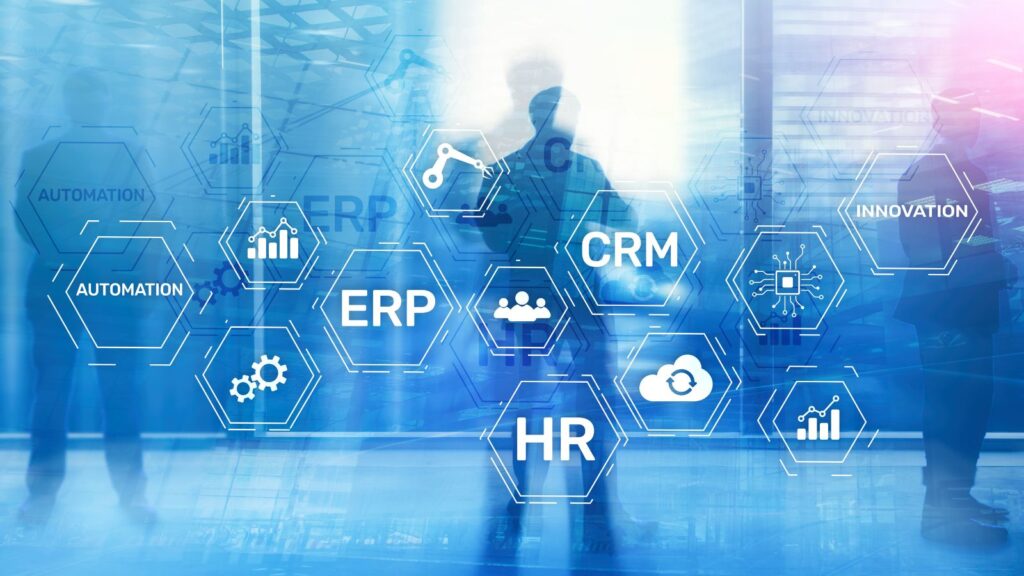
In today’s hyper-competitive manufacturing sector, leaders are under pressure to deliver more: more precision, more speed, more customer value – without adding operational complexity. For many organizations, the missing link is a truly connected ERP-CRM integration in manufacturing strategy.
ERP systems like Microsoft Dynamics 365 Business Central (BC) manage core operations: production planning, inventory control, procurement, and financials.
CRM platforms, on the other hand, manage the customer-facing side: sales pipelines, marketing campaigns, service management, and account histories.
When these systems work in silos, decision-makers lack the whole picture. Sales may overpromise on delivery dates because they can’t see production capacity.
Operations may struggle to prioritize orders without understanding customer urgency or strategic value. Finance may waste hours reconciling mismatched data from separate systems.
ERP-CRM integration closes that gap, creating a 360° operational and customer view, and for manufacturers, that’s a competitive advantage you can’t afford to overlook.

The Disconnect: How Siloed ERP and CRM Systems Limit Growth
Even the most sophisticated standalone ERP and CRM systems have limitations when they aren’t integrated:
1. Data Silos Create Inefficiency
Without integration, sales, operations, and finance each work from their own “version of the truth.” That means more manual data entry, more errors, and slower decision-making.
2. Forecasting Falls Short
Demand forecasts lack accuracy when sales projections aren’t tied directly to ERP production planning and inventory data. That leads to either missed opportunities or costly overproduction.
3. Delayed Order Fulfillment
Customer commitments may be made without visibility into real-time stock levels or supplier lead times, creating fulfillment delays and strained relationships.
4. Missed Upsell and Service Opportunities
Without a unified customer history, account managers may miss opportunities for repeat orders, cross-sells, or proactive service outreach.
For manufacturing executives, these gaps translate into lost revenue, higher costs, and reduced customer loyalty.
How Microsoft Dynamics 365 Business Central Unites ERP and CRM Data
Microsoft Dynamics 365 Business Central offers native and extended integrations with the Microsoft Dynamics 365 Customer Engagement (CE) suite, or other leading CRM platforms, ensuring every team works from the same real-time data set.
Key benefits for manufacturers:
| Single Source of Truth | From the initial sales inquiry to final delivery, every interaction is captured in one shared system. |
| Quote-to-Cash Visibility | Sales teams can see current inventory and production capacity before promising delivery dates. Operations can prioritize high-value or urgent orders based on CRM data. |
| Automated Data Flows | Customer details, order history, and production status update automatically across ERP and CRM, reducing manual entry and errors. |
| Integrated Reporting | Combine operational KPIs with customer satisfaction metrics in Power BI for a complete performance picture. |
With Business Central, ERP-CRM integration isn’t an afterthought; it’s an enabler of faster, more accurate, and more customer-focused decision-making.
Real-World Gains from ERP-CRM Integration in Manufacturing
Here’s how integration delivers tangible results:
Case Study: Precision Component Manufacturer
Challenge: The company’s sales team was closing deals without visibility into production schedules, causing delays and customer dissatisfaction.
Solution: Liberty Grove integrated Dynamics 365 BC with Dynamics 365 Sales, enabling sales reps to check production capacity in real time before finalizing orders.
Outcome: On-time delivery rates improved by 22%, and customer satisfaction scores rose by 18% within six months.
Case Study: Industrial Equipment Supplier
Challenge: After-sales service scheduling was reactive and inefficient.
Solution: Integration allowed service teams to see equipment usage data from ERP alongside service history in CRM.
Outcome: Proactive maintenance visits reduced emergency breakdown calls by 30%, improving both efficiency and customer trust.
The Liberty Grove Approach: From Assessment to Seamless Integration
Implementing ERP-CRM integration requires more than just connecting two systems. It’s about aligning processes, teams, and data flows to deliver measurable value.
Our 5-step integration methodology:
1. Strategic Assessment
- Map your sales, service, and operations workflows.
- Identify data gaps that limit performance.
- Align integration goals with business outcomes.
2. System Design
- Define how ERP and CRM data will flow.
- Configure role-based dashboards to keep the correct data in front of the right people.
3. Implementation
- Deploy integration tools and connectors (native or third-party).
- Migrate and clean data for accuracy and usability.
4. User Enablement
- Train teams to use integrated workflows in real-world scenarios.
- Provide documentation and quick-reference guides.
5. Optimization & Support
- Monitor adoption rates and data quality.
- Refine dashboards, reports, and automation as your needs evolve.
Scaling for the Future: Building a Connected Manufacturing Ecosystem
ERP-CRM integration is just the first step toward a fully connected manufacturing enterprise. Once data flows seamlessly between systems, you can layer on advanced capabilities such as:
- AI-Driven Demand Forecasting – Predict demand with greater accuracy by combining sales trends with production and supply chain data.
- IoT Integration – Feed real-time machine and production line data into both ERP and CRM for predictive maintenance and service automation.
- Customer Self-Service Portals – Give customers access to order status, shipment tracking, and service scheduling directly from your integrated system.
- Global Multi-Entity Coordination – Manage sales and production across regions with unified reporting and compliance oversight.

ERP and CRM: More than Just Software; A Strategic Advantage
When implemented strategically, ERP-CRM integration in manufacturing delivers more than operational efficiency; it drives top-line growth and strengthens customer loyalty.
For C-suite executives, the value lies in:
- Faster time-to-market for new products
- Improved cash flow through more accurate invoicing and payment cycles
- Reduced churn from better service and relationship management
- Greater agility in responding to market or customer shifts
Don’t let disconnected systems hold back your growth.
Talk to Liberty Grove about how ERP-CRM integration with Microsoft Dynamics 365 Business Central can streamline your sales and operations today.
Preparing Your Organization for AI, IoT, and Predictive Analytics
The future of manufacturing is data-driven, and integration is the foundation. By uniting ERP and CRM, you prepare your organization for emerging technologies that rely on shared, accurate data.
With Liberty Grove as your partner, you’ll be ready to:
- Adopt predictive analytics to optimize production and sales cycles
- Deploy IoT-enabled service models for proactive maintenance
- Use AI to recommend cross-sell and upsell opportunities to your sales team
Conclusion
ERP-CRM integration in manufacturing is no longer optional; it’s essential for staying competitive. By combining Microsoft Dynamics 365 Business Central with a robust CRM platform, you can break down silos, improve decision-making, and create a customer experience that drives loyalty and revenue.
Ready to Unite your ERP and CRM for Smarter Manufacturing?
Let Liberty Grove Software help you unite your ERP and CRM, align operations, boost customer satisfaction, and prepare for the future.
Let’s connect and show you how ERP-CRM integration can help you boost delivery speed, increase revenue, and delight customers – without adding complexity.
About Andrew Good
Andrew Good, CEO, Liberty Grove Software
Andrew Good, CEO of Liberty Grove Software, a leader in digital transformation, directs the company with strategic insights that deliver impactful results. With over two decades of expertise in Microsoft technologies, Andrew has guided businesses through digital transformations across various industries, including manufacturing, finance, and healthcare.
Andrew's extensive knowledge comes from personal experiences with various companies. His hands-on operational knowledge stems from his experience in engineering and maintenance, as well as his operational roles at Unilever and Sony Music. Fourteen years of working with Microsoft Dynamics BC/NAV follows successful projects in ERP, Computerized Maintenance Management Systems (EAM), and quality systems.
His passion for technology is matched by his love for sailing, which inspires his leadership. Andrew parallels the precision required for navigating the seas with the challenges of steering a successful company. Under his leadership, Liberty Grove Software thrives, providing tailored solutions that empower clients and optimize operations with innovative, Microsoft-based systems.
Connect with Andrew on LinkedIn
Subscribe to Andrew’s Newsletter on LinkedIn

In manufacturing, timing is everything. Whether you're tracking raw materials, managing production schedules, or meeting delivery commitments, the margin for error is slim. But there's one element that even the best ERP system can't automate: human knowledge. And that puts your organization at risk when ERP knowledge transfer in manufacturing is compromised.
As someone who has spent decades helping manufacturers implement and optimize Microsoft Dynamics 365 Business Central (BC), I've seen firsthand what happens when a key person leaves, and their knowledge leaves with them.
Sometimes it's a senior production planner who built the original BOM logic, or a finance lead who knew how to close the month in Dynamics 365 "their way." Sometimes it's the person who knows which reports leadership relies on, and how to run them.
The result? Disruptions, inefficiencies, and sometimes costly mistakes.
So, how do we protect and transfer that knowledge – especially when new hires join or seasoned team members move on?
At Liberty Grove Software, with our extensive experience in helping manufacturers turn knowledge into process, we are well-equipped to protect your business from the risks of transition.
Let's discuss what this means for your organization.
The Manufacturing Knowledge Gap Is Real – and Growing
Manufacturing companies today face a perfect storm:
- Retirements from long-tenured employees
- High turnover in key operational roles
- A competitive hiring landscape for skilled ERP users
- Increasing complexity in ERP systems and integrations
What's at stake isn't just process fluency: it's institutional memory. When someone who has been "keeping the ERP running" leaves, new users often encounter cryptic documentation, outdated Excel sheets, or simply no direction at all.
Microsoft Dynamics 365 BC is a powerful system. But it only works well if the people using it know what to do, when to do it, and why it matters.

The Hidden Cost of Poor Knowledge Transfer
Let me give you a real-world example.
Allow me to illustrate the consequences of poor knowledge transfer with a real-world example from one of our clients, a precision parts manufacturer.
Their long-time operations manager, who had been with them for 22 years, retired. He was the one who had built many of the custom reports in their Dynamics 365 BC system and managed production planning.
Unfortunately, nothing was fully documented. When he left, his replacement spent the first three months dealing with the aftermath instead of managing the floor.
Liberty Grove was approached to reverse engineer processes, rebuild reports, and document everything in a usable format. But more importantly, we helped turn that undocumented tribal knowledge into repeatable, scalable procedures so the next transition wouldn't be so painful.
That not only saved them from potential costly mistakes but also from the additional cost of the replacement's time spent on firefighting.
That's the real cost of poor knowledge transfer:
- Disruption in production workflows
- Inaccurate data in ERP reports and KPIs
- Inefficiencies in training new hires
- Loss of trust in the ERP system itself

Why Dynamics 365 BC Needs Human Context
Dynamics 365 BC is flexible by design. It supports various manufacturing models – MTS, MTO, ETO, and Process – as well as numerous ways to structure data, workflows, costing, and planning.
However, that flexibility can backfire when a company relies on how one person set it up, rather than embedding that logic into the system or shared documentation.
Some common knowledge transfer traps we see:
- Custom fields that no one remembers who added them, or why
- Excel exports used to "fix" reports instead of solving issues in BC
- Workflow rules based on old processes or people who are no longer around
- Untrained new hires clicking through screens without understanding the impact
That's where Liberty Grove comes in. We help organizations surface, capture, and transfer that knowledge – not just for continuity, but to drive better long-term performance.
How Liberty Grove Helps Manufacturers Secure Their Know-How
At Liberty Grove, our goal isn't just to configure a system; it's to empower your people to use it effectively. Here's how we support knowledge transfer at every step:
1. Knowledge Mapping
We start by identifying where the team's critical knowledge lives:
- Who knows how production orders are sequenced?
- Who understands costing methodology in the ERP?
- Who runs key month-end reports?
Once we identify the gaps, we can create a plan to capture and document that knowledge before it's lost.
2. Process Documentation in Plain English
We create step-by-step documentation that explains:
- What to do
- Why it matters
- What to watch out for
- We often embed screenshots from Dynamics 365 BC, include user role context, and document exceptions and workarounds that are business-critical.
3. ERP Training for New Hires
We offer training sessions tailored to various roles, including production planners, buyers, controllers, sales administrators, and other key personnel. That helps new hires get up to speed more quickly and ensures consistency, even when onboarding is happening rapidly.
4. Building Resilience Into the System
Where possible, we replace tribal knowledge with system rules:
- Automate approvals, alerts, or calculations using Power Automate
- Configure role centers in BC for personalized dashboards
- Use templates and standard routings to minimize manual setup
5. Ongoing Advisory Support
Sometimes the knowledge transfer isn't just about handing over a playbook; it's about helping new leaders make confident decisions. We offer ongoing advisory services to provide that safety net as teams evolve and grow.
Creating a Culture of ERP Literacy
C-suite leaders in manufacturing often ask me, "How do we future-proof this system?"
My answer: Invest in your people.
An ERP is only as strong as the team using it. If only one person understands your costing structure, BOM logic, or how to interpret capacity planning reports, that's not a strategy; it's a risk.
Encourage documentation. Build in process reviews. Assign system stewards. Create a culture where Dynamics 365 BC isn't a black box, but a transparent tool used by everyone, from production to finance.
And most importantly, work with partners who care as much about the people as they do about the system.

Final Thoughts: It's Not Just About Turnover – It's About Continuity
Whether you're onboarding a new hire or bracing for the retirement of a 20-year veteran, the question isn't if knowledge transfer matters; it's how prepared you are to handle it.
At Liberty Grove Software, we help manufacturers build that bridge – between experience and new energy, between complex systems and a clear understanding.
We believe knowledge shouldn't be confined to one person's head. It should be integrated into your process, system, and company culture.
And when that happens? You don't just survive staff transitions – you use them as opportunities to enhance your performance.
Let's Talk
If you're facing a knowledge gap or want to avoid one in the future, reach out. We'll help you build an ERP knowledge strategy that keeps your operations running strong, no matter who's in the chair.
Contact Liberty Grove for a complimentary consultation on how its team of experts can help your organization ensure effective ERP knowledge transfer and business continuity in BC, protecting your valuable data and processes.
About Andrew Good
Andrew Good, CEO, Liberty Grove Software
Andrew Good, CEO of Liberty Grove Software, a leader in digital transformation, directs the company with strategic insights that deliver impactful results. With over two decades of expertise in Microsoft technologies, Andrew has guided businesses through digital transformations across various industries, including manufacturing, finance, and healthcare.
Andrew's extensive knowledge comes from personal experiences with various companies. His hands-on operational knowledge stems from his experience in engineering and maintenance, as well as his operational roles at Unilever and Sony Music. Fourteen years of working with Microsoft Dynamics BC/NAV follows successful projects in ERP, Computerized Maintenance Management Systems (EAM), and quality systems.
His passion for technology is matched by his love for sailing, which inspires his leadership. Andrew parallels the precision required for navigating the seas with the challenges of steering a successful company. Under his leadership, Liberty Grove Software thrives, providing tailored solutions that empower clients and optimize operations with innovative, Microsoft-based systems.
Connect with Andrew on LinkedIn
Subscribe to Andrew’s Newsletter on LinkedIn

Business Central Disaster Recovery & Business Continuity
SaaS, Hybrid, and On-Premises Scenarios Explained
In today's digital landscape of innovation, where systems drive global operations and power everything from governments to multinational enterprises, downtime isn't just inconvenient; it's catastrophic. It’s why users of Microsoft Dynamics 365 Business Central need a Business Central Disaster Recovery strategy.
IT leaders responsible for Microsoft Dynamics 365 ERP systems are under immense pressure to ensure business continuity at all costs. Whether it's a ransomware attack, natural disaster, or infrastructure failure, having a robust Business Central disaster recovery strategy is no longer optional; it's essential.
At Liberty Grove Software, we specialize in Microsoft Dynamics 365 ERP services and consulting, guiding organizations through the complexities of ERP resilience and Business Continuity Disaster Recovery (BCDR).
Whether you're managing a SaaS deployment, a hybrid model, or a fully on-premises system, our focus is the same: empower your organization to recover quickly and securely from disruptions, especially for digitally transforming enterprises.
Cyber Resilience and Uptime: Why Business Central Needs a Disaster Recovery Plan
Cyber resilience isn't just about having cybersecurity measures in place; it's about ensuring your operations continue despite breaches, outages, or failures. As businesses increase their reliance on cloud-based ERP solutions like Business Central, leaders must consider the following:
- How quickly can we recover from an unexpected outage?
- What safeguards are in place to maintain business continuity?
- Do we have redundancy mechanisms to ensure minimal disruption?
Each Business Central deployment scenario – SaaS, Hybrid, and On-Premises –has unique disaster recovery considerations.
Let's explore how organizations can fortify resilience under each model.
Business Central SaaS: Built-In Resilience
Microsoft's SaaS deployment of Business Central comes with built-in disaster recovery, making it a desirable option for IT leaders looking for minimal infrastructure management. Microsoft's Azure cloud handles backup automation, failover, and security updates seamlessly.

Disaster Recovery in Business Central SaaS
- Geo-Redundant Backups: Microsoft automatically stores Business Central data across multiple Azure regions, ensuring recovery options in the event of an outage.
- Automatic Failover: If an Azure region suffers a failure, teams can shift workloads to another region with minimal disruption.
- High Availability: Business Central SaaS is designed with uptime guarantees backed by Microsoft's Service Level Agreement (SLA).
Limitations IT Leaders Must Consider
- No Manual Backup Control: Businesses cannot manually trigger backups; Microsoft manages all backup policies.
- Limited Customization for Disaster Recovery: SaaS environments rely on Microsoft's recovery protocols, leaving little room for personalized disaster recovery strategies.
- Recovery Time Objective (RTO): Depending on the scale of the outage, recovery may take 4 to 10 hours, which may be too long for certain industries.
BCDR Strategy for Business Central SaaS
To reinforce resilience, organizations using SaaS should:
- Implement third-party backup solutions to add a layer of data security.
- Maintain a secondary Business Central environment for mission-critical operations.
- Ensure Azure Active Directory (AAD) security protocols are optimized to mitigate unauthorized access risks.
Hybrid Business Central: Balancing Cloud and On-Premises Resilience
A Hybrid deployment enables businesses to maintain critical on-premises infrastructure while benefiting from Azure's cloud resilience.
It's often a preferred strategy for companies that need greater control over ERP recovery but still want cloud advantages.
Hybrid Disaster Recovery Blueprint
- Azure Site Recovery (ASR): Enables replication of on-prem Business Central workloads to Azure, providing cloud-based failover capabilities.
- On-Prem Backup Redundancy: Businesses can store backups both on-prem and in Azure for extra security layers.
- Hybrid Failover Strategy: In the event of an on-premises failure, workloads can be activated in Azure with minimal downtime.
Why Hybrid Disaster Recovery Works
- Flexibility to restore data onsite or in Azure when necessary.
- Stronger cybersecurity controls with customized recovery policies.
- Ensures on-prem data continuity while utilizing cloud efficiencies.
BCDR Strategy for Business Central Hybrid
To maximize resilience, IT leaders should:
- Establish failover procedures in Azure Site Recovery for seamless cloud replication and disaster recovery.
- Maintain regular backups in local and cloud repositories to ensure dual-layer protection.
- Implement multi-factor authentication (MFA) and Zero Trust security principles for Business Central user access.
On-Premises Business Central: Full Control, But Requires Proactive Recovery Planning
For organizations running Business Central on-premises, disaster recovery planning must be proactive because Microsoft does not manage infrastructure or failover processes. Responsibility rests entirely on IT teams.
On-Premises Disaster Recovery Blueprint
- Local & Offsite Backup Strategy: Business Central databases should be backed up both locally and to an off-site storage facility.
- Redundant Servers: Maintaining a secondary infrastructure ensures continuity in the event of a primary server failure.
- Replication to Azure: Although fully on-prem, workloads can replicate to Azure for emergency recovery scenarios.

Challenges IT Leaders Face in On-Premises DR Planning
- Higher Infrastructure Costs: Maintaining backup servers, network redundancy, and storage requires greater investment.
- Manual Disaster Recovery Execution: IT teams must manually activate failover, unlike SaaS, where Microsoft automates the recovery process.
- Cybersecurity Risks Without Cloud Protections: On-premises systems often lack the built-in security benefits of Azure.
BCDR Strategy for Business Central On-Premises
To ensure operational uptime, organizations must:
- Maintain frequent backups in multiple secure locations for redundancy and data protection.
- Implement disaster recovery simulation testing to validate recovery success rates.
- Consider hybrid failover to Azure to reduce on-prem-only failure risks.
Liberty Grove: Your Trusted Partner in Business Central Cyber Resilience
Disaster recovery planning isn't optional – it's a necessity.
Whether you’re operating in a SaaS, Hybrid, or On-Premises model, the risks associated with downtime demand a well-defined business continuity strategy.
At Liberty Grove, we provide expert Business Central resilience strategies, helping IT decision-makers develop a tailored disaster recovery blueprint for their specific deployment model through digital innovation.
How We Can Help
- Custom Disaster Recovery Assessments for Business Central environments
- Tailored BCDR solutions for SaaS, Hybrid, and On-Prem deployments
- Cybersecurity reinforcement strategies to safeguard ERP uptime
Let's prepare for disaster before it happens and ensure your business remains operational, regardless of the disruptions.
If you're ready to explore a stronger, more resilient Business Central environment, contact Liberty Grove for a complimentary consultation on how its team of experts can help your organization ensure data security and business continuity in BC and fortify your cybersecurity defenses.
About Andrew Good
Andrew Good, CEO, Liberty Grove Software
Andrew Good, CEO of Liberty Grove Software, a leader in digital transformation, directs the company with strategic insights that deliver impactful results. With over two decades of expertise in Microsoft technologies, Andrew has guided businesses through digital transformations across various industries, including manufacturing, finance, and healthcare.
Andrew's extensive knowledge comes from personal experiences with various companies. His hands-on operational knowledge stems from his experience in engineering and maintenance, as well as his operational roles at Unilever and Sony Music. Fourteen years of working with Microsoft Dynamics BC/NAV follows successful projects in ERP, Computerized Maintenance Management Systems (EAM), and quality systems.
His passion for technology is matched by his love for sailing, which inspires his leadership. Andrew parallels the precision required for navigating the seas with the challenges of steering a successful company. Under his leadership, Liberty Grove Software thrives, providing tailored solutions that empower clients and optimize operations with innovative, Microsoft-based systems.
Connect with Andrew on LinkedIn
Subscribe to Andrew’s Newsletter on LinkedIn

For CFOs in manufacturing, achieving operational efficiency and financial control is paramount. At Liberty Grove Software, we understand the complexities of managing production costs, supply chain fluctuations, and regulatory compliance.
Microsoft Dynamics 365 Business Central offers a cloud-based enterprise resource planning (ERP) solution specifically designed for discrete and process manufacturers, enabling companies to optimize their financial workflows and achieve scalable growth. Liberty Grove excels at helping companies with manufacturing finance transformation to achieve significant ROI and increase operational efficiency.
Unlocking Key Benefits of BC for Manufacturers
Manufacturers require real-time financial visibility and end-to-end integration to remain competitive. Business Central delivers:
- Accelerated Financial Closing: Reduce month-end close times and expedite financial reporting cycles.
- Cost Accounting Precision: Leverage real-time cost tracking for accurate standard cost, job costing, and variance analysis.
- Working Capital Optimization: Strengthen liquidity management and cash conversion cycles with automated workflows.
- Intercompany Transactions Efficiency: Streamline Financial Consolidation for Multi-Entity Operations.
- Regulatory and Compliance Adherence: Ensure smooth GAAP, IFRS, and tax compliance with built-in financial controls.
A Gartner survey of 301 CFOs and other senior finance leaders, conducted from September through October 2024, found that 77% of respondents plan to boost spending in the technology category with almost half 47%) of CFOs intending to increase spending by 10% or more in 2025 compared to last year (see Figure 1). The results underscore the critical role of technology in driving profitable growth and efficiency across industries.

Why Manufacturers Should Integrate Business Central
Manufacturers face dynamic financial challenges, including fluctuating raw material costs, complex supplier agreements, and demand-driven adjustments to inventory levels. Business Central empowers CFOs by automating financial processes enhancing efficiency, profitability, and enterprise agility.
Financial Impact of Integration:
- Reduce manual data entry by up to 80%, eliminating redundant tasks in accounts payable (AP), accounts receivable (AR), and general ledger (GL) reconciliation.
- Minimize financial discrepancies that can erode up to 1-2% of annual revenue due to inaccurate production costs and supplier invoices.
- Streamline month-end close cycles by reducing reconciliation time by up to 60%, ensuring timely financial reporting.
Improved Cash Flow Management:
- Automated AR processes enable faster invoicing and collections, reducing days sales outstanding (DSO) by 15-25%.
- Optimized AP cycles help manage supplier payments, ensuring efficient utilization of working capital.
- Demand-driven inventory forecasting reduces excess stock, resulting in a 10-15% reduction in carrying costs.

Driving Operational Excellence
Manufacturers rely on real-time production data, warehouse visibility, and dynamic cost analysis to stay ahead of the competition. Integrating Business Central facilitates seamless shop floor automation, procurement optimization, and financial synchronization across departments.
- Unified Data Across MRP & ERP: Synchronize data between your Material Requirements Planning (MRP) system and Business Central for accurate production forecasting.
- Automated Purchase Orders: Reduce procurement errors by up to 95%, ensuring better vendor management and supplier collaboration.
- Bank Reconciliation Automation: Reduce reconciliation processing time by up to 80% and enhance financial accuracy for audits.

Strategic Advantages of Business Central in Manufacturing
Enhanced Decision-Making:
- Customizable dashboards enable CFOs to analyze variance, track profitability ratios, and monitor break-even points.
- Predictive analytics enable CFOs to anticipate supply chain risks and adjust pricing strategies accordingly.
Improved Customer and Supplier Relations:
- Automated invoice processing enhances vendor trust, reducing disputes in supplier chargebacks and contract billing.
- Centralized financial data helps customer service teams provide accurate order statuses and payment updates instantly.
Understanding Integration Costs
Integration costs vary depending on the ERP's complexity, supply chain dependencies, and the level of business model customization. Based on Liberty Grove Software's experience, costs typically fall into three tiers:
- Standard Integrations: Pre-built connectors for core finance tasks ($5,000-$15,000).
- Custom Integrations: Tailored workflows for manufacturing-specific financial controls ($20,000-$100,000+).
- Multi-System Integrations: Complex multi-entity synchronizations ($100,000+).
Factors influencing pricing include whether the integration is real-time or batch processing, API availability, and middleware selection.
Key Phases in an Integration Project
Manufacturers must ensure seamless integration by following structured implementation phases:
- Discovery: Assessing financial workflows, cost allocation models, and reporting requirements.
- Design: Mapping data flows between MRP, WMS (Warehouse Management System), and ERP finance modules.
- Development: Building integrations for purchase order approvals, batch costing, and intercompany eliminations.
- Testing: Ensuring compliance with GAAP and IFRS standards, as well as tax reporting accuracy.
- Deployment: Training finance teams and supply chain controllers on automated workflows.
- Hypercare: Monitoring early-stage performance, addressing discrepancies, and optimizing functionality.
ROI Calculation for Manufacturers
To measure ROI on ERP integration, manufacturers should evaluate:
- Reduction in manual reconciliation labor costs (saving 5-10+ hours per week per employee).
- Impact on financial reporting speed (accelerated monthly close processes).
- Improved decision-making from real-time insights (preventing costly procurement errors).
Typically, manufacturers achieve a return on investment (ROI) within 12 months, particularly when manual accounts payable (AP) and accounts receivable (AR) processes exceed 10 hours per week.

High-Impact Automated Workflows
Manufacturers gain the most value from automating these workflows in Business Central:
- Procurement Automation: Streamlined purchase orders, supplier approvals, and contract management.
- AR/AP Automation: Automated billing, payment tracking, and vendor rebate calculations.
- Inventory Valuation Synchronization: Real-time stock updates for FIFO, LIFO, and standard costing methodologies.
- Quote-to-Cash Optimization: Seamless revenue recognition and customer invoicing alignment.
Best Practices for a Manufacturing Finance Transformation Implementation
- Begin with finance-led strategic alignment, ensuring integration supports financial reporting compliance and production scalability.
- Engage supply chain leaders to develop workflows that facilitate vendor collaboration and automate inventory management.
- Implement integrations in iterative phases, prioritizing accounts reconciliation, cost tracking, and intercompany transactions first.

Take the Next Step
For CFOs navigating manufacturing financial transformation, Business Central isn't just an ERP; it's a financial intelligence engine. Liberty Grove Software offers customized integrations that enhance cost efficiency, financial accuracy, and operational agility.
Ready to explore how Business Central can elevate your manufacturing finance strategy? Let's discuss how automation can propel your profitability and efficiency.
To learn more about how BC can redefine your operations, contact Liberty Grove for a complimentary consultation on how its team of experts can help you understand the costs and ROI of a cloud ERP migration strategy and the transition to Dynamics 365 Business Central.
Let's embark on this journey toward a more connected, secure, and dynamic future where your business thrives.
About Andrew Good
Andrew Good, CEO, Liberty Grove Software
Andrew Good, CEO of Liberty Grove Software, a leader in digital transformation, directs the company with strategic insights that deliver impactful results. With over two decades of expertise in Microsoft technologies, Andrew has guided businesses through digital transformations across various industries, including manufacturing, finance, and healthcare.
Andrew's extensive knowledge comes from personal experiences with various companies. His hands-on operational knowledge stems from his experience in engineering and maintenance, as well as his operational roles at Unilever and Sony Music. Fourteen years of working with Microsoft Dynamics BC/NAV follows successful projects in ERP, Computerized Maintenance Management Systems (EAM), and quality systems.
His passion for technology is matched by his love for sailing, which inspires his leadership. Andrew parallels the precision required for navigating the seas with the challenges of steering a successful company. Under his leadership, Liberty Grove Software thrives, providing tailored solutions that empower clients and optimize operations with innovative, Microsoft-based systems.
