

The Microsoft Dynamics 365 Business Central 2025 Release Wave 1 recently rolled out, introducing enhancements designed to improve usability, reporting, supply chain management, and more.
Business Central continues to evolve as a robust business management solution, empowering organizations to streamline operations and drive growth.
With two major releases each year, Microsoft remains committed to delivering innovative features that address the needs of modern businesses.
Liberty Grove Software is here to help you navigate and implement these updates seamlessly into your organization.
In this blog, I’ll walk you through the key features of the 2025 Release Wave 1, including what's already available and what's coming in the next few months.
Copilot: AI-Powered Efficiency
One of the standout additions in this release is the expanded role of Copilot, Microsoft's AI-driven assistant. Copilot doesn't just simplify complex tasks; it empowers your team to achieve more and enhances productivity across various business functions.
- Sales Order Agent: This feature automates the sales order creation process, making it faster and more intuitive. By leveraging natural language processing, the Sales Order Agent can generate orders directly from email interactions, reducing manual effort. You control the degree of automation to match your needs.
- Enhanced PO Line Matching: Copilot offers improved purchase order line matching, ensuring accuracy and efficiency in procurement workflows. This enhancement is already available and can transform how businesses manage their supply chains.
- Autofill Fields with Copilot: Another time-saving feature, Copilot can now autofill fields based on context, minimizing data entry errors and speeding up routine tasks, making your team more efficient.
- Payables Agent: Scheduled for release later this year, the Payables Agent will automate accounts payable processes, further streamlining financial operations.
- Summaries: Copilot can now generate concise summaries of key data points, enabling quicker decision-making and improved communication. For example, this will summarize customer date and give you a financial and sales overview at a glance.
These AI-driven capabilities underscore Microsoft's commitment to integrating intelligent tools into Business Central, helping businesses work smarter, not harder.
General Enhancements: Simplifying Compliance and Development
The 2025 Release Wave 1 also introduces several general improvements to enhance compliance, development, and sustainability.
- 1099 Forms: Starting in May, businesses can submit 1099 forms electronically, simplifying tax compliance and reducing paperwork.
- Development – AL Improvements: Developers will benefit from enhancements to AL, the programming language for Business Central, making it easier to customize and extend the platform.
- Sustainability Improvements: Microsoft continues prioritizing sustainability with new features designed to help businesses track and reduce their environmental impact.
These updates reflect Microsoft's dedication to providing tools that improve efficiency and support broader organizational goals.
Shopify Integration: Expanding E-Commerce Capabilities
For businesses leveraging Shopify, the 2025 Release Wave 1 brings exciting new features to enhance e-commerce operations.
- Move More B2B Data: Businesses can now transfer additional B2B data, including company and location information, between Shopify and Business Central.
- Activate Sales Channels: This feature simplifies activating sales channels, enabling businesses to reach customers more effectively.
- Import/Export Metadata: Improved metadata management allows for seamless data exchange, ensuring consistency across platforms.
These enhancements make it easier than ever to integrate Shopify with Business Central, empowering businesses to optimize their online presence.
Reporting: Insights at Your Fingertips
Accurate and accessible reporting is crucial for informed decision-making. The 2025 Release Wave 1 introduces several reporting enhancements to help businesses gain accurate insights.
- PDF Post Processing: Businesses can now perform post-processing on PDF reports, adding flexibility to document management.
- Analysis Mode: In June, this feature will allow users to add fields from related tables, enabling more comprehensive data analysis.
- Finance – Templates for Financial Reports: Scheduled for release in July, these templates will simplify the creation of financial reports, saving time and ensuring consistency.
- Word Layouts: Users can now access reports and request metadata directly within Word layouts, streamlining report customization. Get the add-in from AppSource to take advantage of the features available.
- Manufacturing – Enhanced Analytics: Starting in May, manufacturing businesses will benefit from improved analytics, including a new Power BI Manufacturing App and updated Excel layouts.
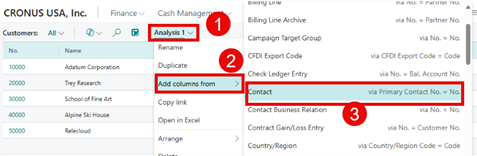
These reporting enhancements demonstrate Microsoft's commitment to providing tools that empower businesses to make data-driven decisions.
Supply Chain and Manufacturing: Streamlining Operations
Supply chain and manufacturing processes are at the heart of many businesses. The Business Central 2025 Release Wave 1 introduces features designed to improve efficiency and usability.
- Supply Chain:
- Reschedule within safety lead time.
- Cancel production orders with consumption.
- Concurrent inventory posting.
- Additional fields on pages for better data visibility.
- Manufacturing:
- Improved usability and over-picking capabilities.
- Omit warehouse picks for manual flushing methods.
- Output with warehouse put-aways.
- Block items or variants from production output.
- Reopen finished production orders.
- Print barcodes from production orders.
- Manage attachments and edit in Excel for item, output, and consumption journals.
These updates help businesses optimize operations, reduce waste, and improve productivity.
User Experience: Enhancing Accessibility and Usability
Microsoft continues prioritizing user experience with several updates to improve accessibility and usability.
- Preview PDF Attachments: Users can preview PDF attachments directly in the web client, saving time and improving workflow efficiency.
- Optimize Screen Estate Usage: This feature will optimize screen space in the web client in June, enhancing usability.
- Adjust Factbox Pane Width: Users can now adjust the width of the Factbox pane, allowing for a more customized interface.
These enhancements make Business Central more intuitive and user-friendly, ensuring a comfortable and seamless user experience.
Feature Management: Testing New Features
Business Central 2025 Release Wave 1 updates feature management capability, allowing businesses to activate and test new features before they are automatically enabled. That gives organizations greater control over their Business Central environment, ensuring a smooth transition to new functionalities. Always test new features in your Sandbox before deploying in production.

Business Central 2025 Release Wave 1: Summary
In conclusion, Microsoft Dynamics 365 Business Central 2025 Release Wave 1 is a cornerstone for businesses aiming to streamline operations, enhance efficiency, and adapt to a constantly evolving marketplace.
With each release, Microsoft reaffirms its commitment to innovation and user-centric improvements, such as the 2025 Release Wave 1.
By embracing these updates and partnering with experts like Liberty Grove Software, businesses can unlock their full potential, ensuring they stay ahead in today’s competitive landscape.
Ready to Embrace Business Central 2025 Release Wave 1 Newest Features?
At Liberty Grove Software, we understand that implementing new features can be challenging. That's why we're here to help. Our team of experts, with years of experience in Microsoft Dynamics 365 Business Central, is dedicated to ensuring that your organization can take full advantage of the 2025 Release Wave 1 enhancements. From planning and customization to training and support, we'll work with you every step of the way to ensure a successful implementation.
If you're ready to implement the latest Business Central enhancements, I invite you to contact Liberty Grove for a complimentary consultation on how our team of experts can guide your organization through the update implementation process.
With Liberty Grove Software by your side, you can confidently embrace these changes and unlock new opportunities for growth and success. These updates enhance business efficiency, streamline operations, and drive growth, leading to a more successful and competitive organization.
Let Liberty Grove be your partner in successfully implementing the latest BC updates and ensuring your business thrives.
About Andrew Good

Andrew Good, CEO, Liberty Grove Software
Andrew Good, CEO of Liberty Grove Software, a leader in digital transformation, directs the company with strategic insights that deliver impactful results. With over two decades of expertise in Microsoft technologies, Andrew has guided businesses through digital transformations across various industries, including manufacturing, finance, and healthcare.
Andrew's extensive knowledge comes from personal experiences with various companies. His hands-on operational knowledge stems from his experience in engineering and maintenance and his operational roles at Unilever and Sony Music. His fourteen years of working with Microsoft Dynamics BC/NAV include successful projects in ERP, Computerized Maintenance Management Systems (EAM), and quality systems.
His passion for technology is matched by his love for sailing, which inspires his leadership. Andrew parallels the precision required for navigating the seas with the challenges of steering a successful company. Under his leadership, Liberty Grove Software thrives, providing tailored solutions that empower clients and optimize operations with innovative, Microsoft-based systems.
Connect with Andrew on LinkedIn
Subscribe to Andrew’s Newsletter on LinkedIn

In today's dynamic business environment, making informed decisions quickly and securely isn't just an advantage; it's a necessity. As organizations evolve, the need for agile, secure, and data-driven systems becomes increasingly vital. Microsoft Dynamics 365 Business Central (BC) offers a Software-as-a-Service (SaaS) model that provides businesses with a robust platform that delivers precisely what they need.
In this blog, I'll dive into the key benefits of moving to Business Central SaaS, focusing on enhanced reporting, improved collaboration through tools like Teams and Outlook integration, and continuous security and performance monitoring.
Enhanced Reporting for Data-Driven Decisions
One of Business Central SaaS's standout advantages is its enhanced reporting capabilities. In today's competitive business landscape, the power of data is undeniable. Accurate, real-time insights into your operations empower you to make informed decisions that drive productivity and profitability.
Real-Time Visibility and Flexibility
Unlike traditional on-premises systems, BC SaaS delivers real-time data updates with every transaction. That means that dashboards, KPIs, and customized reports reflect the current state of your business – no more waiting overnight or manually consolidating data from disparate sources. Whether you're tracking sales performance, inventory levels, or customer interactions, the dashboard tools available in Business Central offer unparalleled visibility. Advanced data visualization and integration with tools like Power BI further enhance your ability to sift through complex data sets and gain actionable insights.
Customization for Your Unique Needs
BC SaaS is designed with flexibility, enabling organizations to tailor their reporting outcomes to meet specific business needs. With custom fields, user-defined metrics, and dynamic dashboards, you can drill down into the metrics that matter most to your business. For managers and executives, this level of customization translates into faster decision-making cycles, as every report is tuned to your strategy and operations. The latest updates in Excel reporting allow you to tailor your reports, so you get your data in the format you need.
Enhanced Reporting
The enhanced reporting capabilities improve internal transparency and pave the way for a more collaborative approach to business intelligence. With shared dashboards and real-time reporting, teams across departments can collaborate on the same data, harmonizing their efforts and aligning their strategies. This collective approach to data yields improved forecasts, more effective resource allocation, and, ultimately, more informed business decisions.

Improved Collaboration: Teams and Outlook Integration
Effective collaboration is the heartbeat of any successful enterprise. BC SaaS surpasses traditional ERP functionality by seamlessly integrating Microsoft's collaboration tools, including Teams and Outlook. This integration streamlines communication, unifies workflows, and transforms how teams connect.
Collaboration with Microsoft Teams
· A Unified Communication Hub
Microsoft Teams has become a cornerstone for organizational communication. With BC SaaS, integrating with Teams means your business processes and conversations are now interlinked. Imagine being able to discuss a sales report directly within a Teams channel while viewing the latest metrics pulled from Microsoft Dynamics 365 Business Central. Real-time collaboration like this enhances productivity and fosters a culture of transparency and teamwork.
· Streamlined Workflows and Project Management
Teams integration within BC SaaS allows the creation of task groups, project channels, and instant messaging associated with specific business processes. Whether you're coordinating on a multi-department project or seeking input on a critical operational decision, Teams ensures that every relevant party is connected. This capability has proven invaluable for incident management and strategic initiatives, where input from multiple stakeholders is essential for fast and effective resolution.
Seamless Outlook Integration
· Enhancing Communication and Scheduling
Outlook remains the backbone of professional communication for many organizations. BC SaaS's native integration with Outlook revolutionizes how you manage communications, scheduling, and records. For instance, emails, calendar events, and contact information can be seamlessly linked to relevant business records in Microsoft Dynamics 365 Business Central. This interconnectedness ensures the tracking of customer communications and sales opportunities, capturing all critical details.
· Redefining Workflow Efficiency
With Outlook integration, your team can convert emails into actionable tasks, schedule follow-up meetings, and even associate conversations with specific customer records—all directly within Business Central. This streamlined process eliminates redundant data entry and significantly enhances workflow efficiency. In today's fast-paced environment, the ability to seamlessly move between platforms without disruption is nothing short of transformative.

Continuous Security and Performance Monitoring
In an age of ever-present cyber threats, the security and performance of your business systems are paramount. BC SaaS addresses these concerns head-on, offering continuous security and performance monitoring that keeps your operations safe, compliant, and running at peak efficiency.
Automatic Security Updates and Compliance
One of the most significant advantages of a SaaS model is that Microsoft continuously updates your application with the latest security patches. BC SaaS automatically benefits from rapid, enterprise-grade security enhancements, unlike traditional on-premise systems, which often require manual updates and leave vulnerabilities unaddressed. That means you can focus on growing your business without fearing outdated security practices. Moreover, these updates ensure that your business remains compliant with regulatory standards, a vital aspect for industries where data protection is non-negotiable.
Proactive Performance Monitoring
Performance bottlenecks can significantly impact productivity and customer satisfaction. BC SaaS includes built-in performance monitoring that continuously evaluates system efficiency and resource utilization. By leveraging advanced analytics and machine learning, the system can proactively identify potential performance issues before they escalate, enabling your IT team to address them swiftly. This proactive approach minimizes downtime, ensures a smooth user experience, and maximizes the return on your technology investment.
Reduced IT Overhead
Continuous monitoring also translates to reduced IT overhead. With Microsoft BC SaaS, your organization no longer needs to worry about the complexities of maintaining secure, high-performing infrastructure. Microsoft's robust cloud infrastructure handles the heavy lifting for you, enabling your team to focus on strategic initiatives rather than addressing technical issues. This shift not only reduces operational costs but also increases overall business agility.

Embracing the Future with Business Central SaaS
At Liberty Grove Software, we believe embracing cloud technologies like BC SaaS is pivotal for businesses striving for excellence. Enhanced reporting, improved collaboration, and continuous security are not just features—they are strategic assets that drive innovation and competitiveness.
By leveraging the power of BC SaaS, your organization can transform how it processes data, collaborates across departments, and safeguards its critical operations. Seamlessly integrating tools like Teams and Outlook enhances communication and workflow, enabling your teams to work more effectively. Meanwhile, continuous security and performance monitoring provide peace of mind, allowing us to focus on growth rather than administration.
Transitioning to BC SaaS is more than just a technology upgrade; it's a strategic move toward building a resilient, agile, and innovative organization. At Liberty Grove Software, we are proud to guide our clients through this journey, ensuring they harness Business Central's full potential to drive long-term success.
Ready to Get Current with BC SaaS?
I invite you to explore how BC SaaS can empower your organization to achieve greater efficiency, robust security, and unparalleled collaboration. Let's work together to leverage the latest technology innovations that transform challenges into opportunities and drive your business forward.
If you're ready to learn more about how BC SaaS can redefine your operations, contact Liberty Grove for a complimentary consultation on how its team of experts can guide your organization through a cloud ERP migration strategy and the transition to Dynamics 365 Business Central.
Let's embark on this journey toward a more connected, secure, and dynamic future where your business thrives.
About Andrew Good
Andrew Good, CEO, Liberty Grove Software
Andrew Good, CEO of Liberty Grove Software, a leader in digital transformation, directs the company with strategic insights that deliver impactful results. With over two decades of expertise in Microsoft technologies, Andrew has guided businesses through digital transformations across various industries, including manufacturing, finance, and healthcare.
Andrew's extensive knowledge comes from personal experiences with various companies. His hands-on operational knowledge stems from his experience in engineering and maintenance and his operational roles at Unilever and Sony Music. Fourteen years of working with Microsoft Dynamics BC/NAV follows successful projects in ERP, Computerized Maintenance Management Systems (EAM), and quality systems.
His passion for technology is matched by his love for sailing, which inspires his leadership. Andrew parallels the precision required for navigating the seas with the challenges of steering a successful company. Under his leadership, Liberty Grove Software thrives, providing tailored solutions that empower clients and optimize operations with innovative, Microsoft-based systems.
Connect with Andrew on LinkedInSubscribe to Andrew’s Newsletter on LinkedIn

Customers often ask me whether Microsoft Dynamics 365 Business Central (BC) is suitable for their organization's size. And my answer is always a resounding “yes!” Why? Because BC is both powerful and adaptable, meaning it can adapt to any company’s size and be “right-sized” for any business.
Growing a business is exciting – but let's be honest, it can also get messy. As you expand, you might find yourself juggling multiple ERP systems, struggling to keep financial data consistent, or dealing with reporting headaches across different locations.
Sound familiar?
Here at Liberty Grove, we see this all the time. That's why we help businesses simplify operations using Microsoft Dynamics 365 Business Central (BC) – a flexible, scalable ERP solution that works whether running a single entity SMB or managing multiple branches across the globe.
And guess what? It doesn't stop there. Power BI is the perfect sidekick, helping you turn raw data into smart, real-time insights. Let's break down how BC can work for you.
Business Central: Built for Businesses of All Shapes and Sizes
Every company has its quirks, goals, and challenges. BC understands that and offers two powerful ways to manage multi-entity operations:
- All-in-One Consolidation – If you've got multiple subsidiaries, BC rolls up financial data seamlessly, giving you a crystal-clear picture of your overall business performance.
- Decentralized but Connected – If you need autonomy for individual locations, BC lets them operate independently while sharing essential transaction data with headquarters.
Oh, and did I mention the automation? BC has built-in tools to streamline treasury management, intercompany transactions, access controls and master data synchronization so you can focus on growth instead of manual processes.
What Today's Businesses Need – And How BC Delivers
Successful companies rely on fast, accurate data to make decisions. Business Central gives you:
- Real-time operational insights – Keep tabs on multiple entities without waiting for reports to trickle in.
- Consistent Chart of Accounts – Standardized financials mean no more headaches when comparing numbers across different branches.
- Agility for local teams – Adapt to local requirements while aligning your global strategy.
What Is Business Central, and Why Should You Care?
Running a business isn't just about great ideas and hard work. It's about keeping things organized, staying on top of finances, and ensuring everything runs smoothly. That's where Microsoft Dynamics 365 Business Central (BC) comes in.
Think of Business Central as the backbone of your operations – a powerful yet easy-to-use business management solution that helps companies handle accounting, financial reporting, inventory, sales, and more. Whether you're a small business looking to streamline operations or a growing company juggling multiple locations, BC adapts to fit your needs.
So… What Can Business Central Do?

Great question! At its core, BC helps businesses:
- Manage Finances – Track income, expenses, payroll, taxes—everything your accounting team loves.
- Automate Tasks – Say goodbye to spreadsheets; BC makes data entry and reporting seamless.
- Handle Inventory & Supply Chain – BC keeps stock levels accurate and helps optimize ordering if you sell physical products.
- Manufacture and Service – Utilize the production and assembly options to produce your products. Whether you make or distribute products you can leverage Service to keep your customers running.
- Stay on Top of Reporting – No more scrambling for numbers—get financial statements and insights in just a few clicks.
- Scale as You Grow – BC works for small businesses and enterprises, meaning you won't have to switch systems as your company expands.
Business Central Works the Way You Do
The beauty of BC is flexibility. Some businesses need a simple accounting tool, while others use it to connect multiple offices and subsidiaries. No matter your setup, BC fits the way you work – whether you're a one-location startup or a global company with complex reporting needs.
And the best part? BC isn't a standalone tool. It works seamlessly with Power BI (for business analytics), Microsoft Excel, Power Platform and other Microsoft apps to turn raw data into powerful insights without drowning in spreadsheets.
Business Central & Power BI: A Reporting Dream Team

Let's talk numbers. BC has great reporting tools built in, but Power BI takes it to the next level. Together, they offer:
- Profiles – Get your team focused on their tasks with the data they need to make decisions
- Pre-built financial reports – No setup, no fuss; just the data you need when you need it.
- Embedded Power BI dashboards – Get live visuals inside BC to track performance instantly.
- Power BI magic – Combine data from multiple sources, set up KPIs, and create custom reports, without needing a team of developers.
Success Factors: Why BC Works for Multi-Entity Businesses
If you're managing multiple locations or subsidiaries, consistency is everything. With BC, you get:
- Master Data Management – Standardized items, vendors, customers, and financials across all operations.
- Intercompany Accounting – Automate transactions between entities and maintain clear audit trails.
- Terminology & Treasury Controls – Set common standards across locations without limiting flexibility.
Managing Multiple Companies – How BC Makes It Easy

Handling multiple business units doesn't have to be complicated. BC offers two solid approaches:
BC Everywhere: The All-In Approach
If you want full integration across all branches, BC keeps everything aligned by handling the following:

- Multi-currency & FX tools – Because dealing with exchange rates shouldn't be a guessing game.
- Localization & multi-language support – Adapts to country-specific regulations while staying connected globally.
- Master data standardization – Ensures consistency, no matter where you operate.
Case Study: Global Automation Manufacturer Optimizes Operations with Business Central
Background
A large manufacturer of automation and control products operated multiple entities across different countries. Their legacy system, NAV 2009, created data silos, making it difficult to manage sales, finance, operations, and customer service across locations. They needed a cloud-based ERP solution to unify their global operations.
Challenges
- Disconnected Data: Each entity had isolated databases, leading to inefficiencies.
- Scalability Issues: The legacy system couldn’t support real-time insights or growth.
- Compliance & Localization: Each country had different regulatory requirements.
- Lack of Integration: No seamless connection between finance, sales, and operations.
Solution: Business Central Implementation
The company migrated to Microsoft Dynamics 365 Business Central, integrating multiple modules:
- Sales & Finance: Unified financial planning and reporting across all entities.
- Manufacturing & Warehousing: Streamlined production and inventory management.
- Multi-Currency & Multi-Language Support: Ensured compliance with local regulations.
- Integration with Salesforce: Enhanced customer relationship management.
Results
- 20% Reduction in Operational Costs through automation and efficiency.
- 30% Boost in Productivity by eliminating manual processes.
- 25% Increase in Data-Driven Decisions with real-time insights.
- Improved collaboration between global teams with a centralized system.
This transformation allowed the company to scale efficiently while maintaining compliance across multiple regions.
The Hub & Spoke Model: Best of Both Worlds
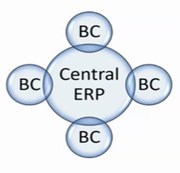
For businesses with a central ERP at HQ, BC serves as the operational platform for subsidiaries. It allows:
- Automated data extracts – No manual data entry – just smooth information flow.
- Corporate standards alignment – Common financial structures while accommodating local nuances.
- Cross-entity functionality – Seamless transactions between parent and child organizations.
Financial Reporting Without the Hassle
Forget about clunky reporting systems: BC keeps things simple with:
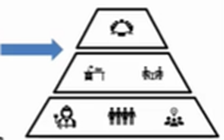
- No-code financial reports – Perfect for CFOs and finance teams who want quick insights.
- Excel template integration – Because, let's be real, everyone loves Excel.
- Optimized KPI tracking – Power BI lets you set up custom scorecards to track business health.
The Bottom Line: Business Central is Built for You
Every business is different, but one thing's for sure: efficiency, control, and intelligent insights are key to sustainable growth. Whether you're running multiple entities, need consolidation, or just want better reporting, Business Central adapts to YOU.
And if you want to get the most out of your data, Power BI is here to transform the way you analyze and report.
Ready to simplify operations and drive smarter decisions? Let's chat about how BC can work for your business!
Conclusion

Microsoft Dynamics 365 Business Central is more than just an ERP system; it’s a scalable solution designed to adapt to businesses of all sizes.
Whether you need streamlined financial reporting, automation, or seamless multi-entity management, BC provides the flexibility and intelligence to help you stay ahead. And when combined with Power BI, it transforms raw data into actionable insights, giving businesses real-time visibility into their operations.
No matter your company’s structure or growth trajectory, Business Central ensures you never outgrow your system, because it grows with you.
Ready to Explore The Future of Your Business with BC?
There are multiple benefits of transitioning to Business Central, and Microsoft demonstrates its commitment to the platform through regular updates. The Liberty Grove team of experts is here to help you understand how Business Central can optimize your operations – and ensure that it is right-sized for your organization.
Contact Liberty Grove for a complimentary consultation on how its team of experts can help configure Microsoft Dynamics 365 Business Central to your organization's specific size and business requirements.
About Andrew Good
Andrew Good, CEO, Liberty Grove Software
Andrew Good, CEO of Liberty Grove Software, a leader in digital transformation, directs the company with strategic insights that deliver impactful results. With over two decades of expertise in Microsoft technologies, Andrew has guided businesses through digital transformation across manufacturing, finance, and healthcare.
Andrew's extensive knowledge comes from personal experiences with various companies. His hands-on operational knowledge comes from Engineering, Maintenance, and operational roles at Unilever and Sony Music. Fourteen years of working with Microsoft Dynamics BC/NAV follows successful projects in ERP, Computerized Maintenance Management Systems (EAM), and quality systems.
His passion for technology is matched by his love for sailing, which inspires his leadership. Andrew parallels the precision of navigating the seas and the challenges of steering a successful company. Under his leadership, Liberty Grove Software thrives, offering tailored solutions to empower clients and optimize operations with innovative Microsoft-based systems.
Connect with Andrew on LinkedIn
Subscribe to Andrew’s Newsletter on LinkedIn

Navigating international finance with Microsoft Dynamics 365 Business Central.
For companies expanding across borders, financial management quickly grows complex. Multi-entity management, consolidation, foreign exchange (FX) revaluation, and tax localization create significant challenges for international finance teams. Without the right tools, teams spend too much time manually reconciling accounts, adjusting exchange rates, and ensuring compliance with local tax laws.
That's where Microsoft Dynamics 365 Business Central (BC) steps in. As a cloud-based ERP designed for scalability, Business Central streamlines financial operations while ensuring compliance with regional tax requirements and currency fluctuations, facilitating multi-entity management.
Organizations with multiple sites often employ a hub-and-spoke business model, such as BC, in which the parent company, or headquarters, oversees the organization's operations as a whole. In contrast, each site operates as an independent entity.
Geographically dispersed sites frequently have distinct requirements for information dissemination to the headquarters organization. Additionally, sites often lack the necessary resources to maintain an extensive system and do not require the same level of complexity.
Business Central provides a business management solution that is both user-friendly and easily maintained, all at a low cost of ownership, for small and mid-sized enterprises.
At Liberty Grove Software, we help businesses leverage the powerful features of Business Central to streamline their operations. Whether you're transitioning from disconnected legacy systems or seeking a more scalable ERP, Business Central ensures financial accuracy, operational efficiency, and compliance on a global scale.

Multi-Entity Management Made Simple with Business Central
Handling multiple subsidiaries, branches, or divisions can create inefficiencies, especially when finance teams struggle with intercompany transactions, consolidated reporting, and shared accounting structures. For instance, reconciling transactions between different entities often leads to discrepancies and delays in financial reporting.
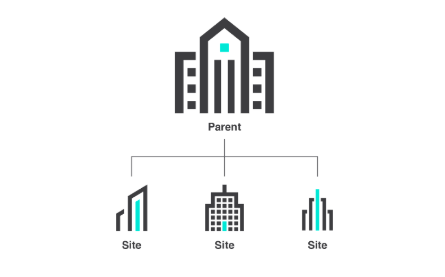
Image credit: Microsoft Corporation
How Business Central Helps
- Centralized Financial Consolidation – Multi-entity organizations can automatically roll up financial data across subsidiaries, eliminating the need for manual data aggregation.
- Intercompany Transactions – Seamless intercompany transactions ensure financial records stay accurate and reconciled across all entities.
- Decentralized Yet Connected Operations – Need independent operations at local offices? Business Central enables autonomy for each entity while maintaining essential transaction data linked to the headquarters.
At Liberty Grove Software, we help businesses implement and customize Microsoft Dynamics 365 Business Central's multi-entity capabilities, ensuring that consolidation works seamlessly while providing custom reporting frameworks tailored to fit unique organizational structures.

Mastering Multi-Currency Challenges
Exchange rate fluctuations impact financial reporting, profitability, and forecasting. Without automated FX revaluation, finance teams spend hours recalculating transactions manually.
Business Central's Multi-Currency Benefits:
- Automated Foreign Exchange (FX) Revaluation – BC automatically revalues balances based on updated exchange rates, ensuring accuracy in financial reporting.
- Multi-Currency Transactions – Whether selling, purchasing, or invoicing internationally, BC manages transactions in different currencies while maintaining financial consistency.
- Real-Time Currency Adjustments – BC links exchange rates to market data, ensuring teams work with the latest financial figures.
The Liberty Grove team specializes in tailoring currency setups for diverse financial models, whether you need custom currency exposure reports, automated exchange rate syncing, or enhanced financial controls across multiple currency transactions.
Navigating Local Tax Rules & Compliance
Expanding into new countries or regions means navigating complex tax requirements. From VAT and GST regulations to localized tax packs, companies need flexible ERP systems that ensure tax compliance without unnecessary manual work.
How Business Central Tackles Tax Localization:
- Localized Tax Packs – BC provides built-in tax configurations for various countries, including VAT, GST, withholding tax, and regional reporting standards.
- Automated Tax Compliance – Reduce errors with automated tax calculations that adjust according to jurisdiction-specific rules and regulations.
- Flexible Reporting for Tax Authorities – Create customized tax reports to comply with local authorities and meet financial audit requirements.
Liberty Grove ensures accurate tax localization setups tailored to regulatory requirements. Whether it's customizing tax reporting formats or integrating country-specific tax packs, our expertise ensures that companies maintain compliance and efficiency in international markets.

Seamless Integration for Global Teams
Business Central isn't just an ERP; it's a connected business ecosystem that seamlessly integrates with Microsoft Power BI, Excel, and other tools that finance teams already use.
Connected Systems for Smarter Decisions:
- Power BI Analytics – Embedded dashboards provide real-time visibility into financial performance.
- Excel & Automated Data Exports – Finance teams can efficiently export, reconcile, and analyze data with ease.
- Third-Party Apps & APIs – BC connects with existing applications, ensuring a flexible finance ecosystem.
The Liberty Grove approach is to tailor Business Central integrations to ensure that financial teams have the tools, automation, and data accessibility needed to make informed, strategic decisions.
Why Choose Liberty Grove for Your Business Central Implementation?
At Liberty Grove Software, we don't just implement Business Central; we customize and optimize it to fit your company's unique needs. Our approach, based on a deep understanding of international finance management and a commitment to client satisfaction, ensures that multi-entity finance teams, global controllers, and CFOs maximize the value of their ERP investments.
Our Expertise Includes:
- Seamless Business Central deployment tailored for global operations.
- Custom financial reports designed for multi-entity teams.
- Specialized FX automation & multi-currency setups.
- Localized tax configurations ensuring compliance across jurisdictions.
- Power BI integration for real-time financial insight dashboards.
Whether you're expanding across borders, streamlining intercompany transactions, or enhancing financial visibility, Liberty Grove Software helps you maximize the capabilities of Business Central to achieve long-term success.
Ready to Transform Your Global Financial Operations?
Let's talk about how Business Central can work for you.
Microsoft Dynamics 365 Business Central empowers companies to manage their multi-entity operations with seamless financial consolidation, automated intercompany transactions, and real-time currency adjustments. Its built-in tax localization ensures compliance across jurisdictions, while its integration with Power BI enhances financial visibility.
With a cloud-based ERP like Business Central, global finance teams achieve efficiency, accuracy, and scalability, allowing them to focus on growth and informed strategic decision-making.
If you're ready to learn more about how BC can help you manage multiple entities, contact Liberty Grove for a complimentary consultation on how its team of experts can guide your organization through the transition to Dynamics 365 Business Central – a cloud-based ERP to transform your global financial operations and facilitate your international growth.
About Andrew Good
Andrew Good, CEO, Liberty Grove Software
Andrew Good, CEO of Liberty Grove Software, a leader in digital transformation, directs the company with strategic insights that deliver impactful results. With over two decades of expertise in Microsoft technologies, Andrew has guided businesses through digital transformation across manufacturing, finance, and healthcare.
Andrew's extensive knowledge comes from personal experiences with various companies. His hands-on operational knowledge comes from Engineering, Maintenance, and operational roles at Unilever and Sony Music. Fourteen years of working with Microsoft Dynamics BC/NAV follows successful projects in ERP, Computerized Maintenance Management Systems (EAM), and quality systems.
His passion for technology is matched by his love for sailing, which inspires his leadership. Andrew parallels the precision of navigating the seas and the challenges of steering a successful company. Under his leadership, Liberty Grove Software thrives, offering tailored solutions to empower clients and optimize operations with innovative Microsoft-based systems.
Connect with Andrew on LinkedIn
Subscribe to Andrew’s Newsletter on LinkedIn
Dynamics NAV end of support is coming fast — and food businesses need to be ready.
If you’re still running your business on Microsoft Dynamics NAV, now is the time to start thinking about what comes next. Microsoft has officially begun phasing out support for NAV, and that has real implications for the future of your ERP environment. Here's what you need to know to protect your investment and operations.
Microsoft’s Dynamics NAV Lifecycle: What’s ending and when
Microsoft follows a fixed lifecycle policy for its software products, which gives each version of NAV 10 years of support: 5 years of mainstream support and 5 years of extended support. Once that ends, no more security patches, regulatory updates, or bug fixes are released. That creates risk.
Here’s where things stand:
| Version | Mainstream Support End | Extended Support End |
| NAV 2013/R2 | January 9, 2018 | January 10, 2023 |
| NAV 2015 | January 14, 2020 | January 14, 2025 |
| NAV 2016 | April 13, 2021 | April 14, 2026 |
| NAV 2017 | January 11, 2022 | January 11, 2027 |
| NAV 2018 | January 10, 2023 | January 11, 2028 |
The Dynamics NAV end of support timeline affects regulatory compliance, integration, and long-term scalability.
View Microsoft's official product lifecycle here
What Happens If You Stay on NAV After Dynamics NAV End of Support?
Continuing with an unsupported version of NAV might seem like a way to save costs in the short term, but the long-term risks are significant:
- No more critical security updates
- Risk of falling out of compliance with regulations
- Difficulty integrating with modern tools and systems
- Rising maintenance and support costs
Why Microsoft recommends Dynamics 365 Business Central
Dynamics 365 Business Central is Microsoft’s modern replacement for NAV. It delivers all the functionality of NAV, plus enhanced tools, better integration, and cloud flexibility. You can deploy it on-premise or in the cloud, depending on your business model.
Business Central gives you:
- Real-time data across your operations
- Seamless integration with Microsoft 365 tools like Outlook, Excel, and Teams
- Role-based dashboards for smarter decisions
- Cloud or on-premise deployment
- Flexibility to work anywhere, on any device
Read more about the benefits of Business Central here.
Why Work with Liberty Grove Software
We’ve worked with every version of Dynamics NAV and helped businesses across industries maintain, support, and successfully upgrade to Business Central. We've helped businesses across industries maintain, support, and successfully upgrade from every version of NAV to Business Central.
We bring:
- Deep expertise in every NAV version
- Proven upgrade methodologies
- Strong project management to stay on time and on budget
- Clear guidance and personalized support throughout the transition
We've even helped clients migrate in under 30 days. See how we did it.
For more technical detail and migration considerations, you can also read our in-depth blog on NAV to Business Central migration.
What Should You Do Next?
If your business is running on Dynamics NAV, start the conversation now. Whether you're looking for continued support or exploring your upgrade path, Liberty Grove Software can help you map out the right next steps.
Let’s talk about:
- Where you are in the NAV lifecycle
- What a move to Business Central would look like
- How to plan a smooth transition that fits your business needs
Your Next Step
Whether you're preparing for an upgrade or just exploring options, Liberty Grove Software can help you assess your readiness, understand your options, and create a transition plan that works for your business.
Let’s talk. Request an executive briefing or private demo today.
If you’re looking for more clarity on key transition questions, we’ve included a few common ones below. You can also explore other resources throughout our site.
Frequently Asked Questions
What is the end-of-life date for Dynamics NAV? Each version of Dynamics NAV has its own support timeline. For example, NAV 2015 reaches end of extended support in January 2025, NAV 2016 in April 2026, and NAV 2018 in January 2028. After these dates, Microsoft will no longer provide updates or security patches. View lifecycle dates
What should I do about the Dynamics NAV end of support? Begin evaluating your options with Business Central now to avoid unsupported risks.
Can I continue using Dynamics NAV after support ends? Yes, but it comes with risks. You won’t receive critical updates or security patches, which can expose your system to compliance issues and vulnerabilities. Many businesses use this time to plan an upgrade to avoid disruption.
What is Dynamics 365 Business Central? It’s Microsoft’s modern ERP platform and the official successor to Dynamics NAV. It includes all NAV’s core capabilities along with modern features like cloud hosting, better reporting, integration with Microsoft 365, and enhanced scalability.
Is upgrading from NAV to Business Central difficult? The upgrade process depends on your current NAV setup. Liberty Grove Software can help assess your system and create a tailored roadmap. We’ve completed migrations in as little as 30 days.
Can I keep Business Central on-premise? Yes. Business Central can be deployed in the cloud or on-premise. You can choose the model that fits your business best.
Where can I learn more about NAV to BC migration? Read our full migration guide here: NAV to Business Central Migration Blog

Possibly the most dreaded word in organizations is “change.” When many of our clients discuss change, they see their people running like cockroaches when the lights come on, diving for cover. Why? They’re afraid. But change is part of business – and it’s good for business – which is why effective change management is so important.
Imagine you're implementing a new system, but your employees are unsure about jumping on board with it.
Some people push back because they're used to the old way of doing things, while others find tackling the steep learning curve challenging.
If you don't have the proper support and communication, even the best tools, like Microsoft Dynamics 365 Business Central, can be underused, disliked, or even left behind altogether.
Effective change management makes the transition smooth and helps employees adapt and become involved with the new system.
This article will examine five practical strategies for handling change when implementing Microsoft Dynamics 365 BC.
Whether you're getting the system up and running for the first time or fine-tuning what you already have, these strategies will be helpful for you. They’ll help you boost user adoption, minimize disruption, and achieve success with your D365 BC project.

A Change Management Strategy for Digital Transformation Success
- Get people on board and spread the word
Effective communication is key to ensure a project’s success. The first step in managing change effectively is to help employees grasp the "why" behind what you’re doing.
Dynamics 365 Business Central has incredible tools that simplify workflows, boost productivity, and provide valuable insights. However, even excellent solutions might struggle to take off without everyone on board.
Here are some communication strategies to help you succeed:
Share the vision: discuss the benefits of Dynamics 365 BC and how it fits your organizational objectives. For instance, you could point out how automated reporting can cut down on time spent or how having all the data in one place can enhance how we interact with customers. Also, how a single source of truth means consistent and accurate results.
Get leadership involved: Ensure executives and managers are on board and support the implementation. Their support influences the vibe of the whole organization.
Set up informational sessions: Use webinars or town halls to discuss the transition. It could be great to share some success stories from companies that have gone through something similar.
Getting everyone on board and involved from the start helps foster a sense of ownership and excitement for the new system.
- Use the ADKAR model
The ADKAR model, which stands for Awareness, Desire, Knowledge, Ability, and Reinforcement, is a well-known approach to handling change.
Using it for Dynamics 365 Business Central implementation helps create a clear plan for meeting employee needs and encouraging adoption.
Applying ADKAR to Dynamics 365 BC is pretty straightforward. Here's how you can do it:
Start by explaining why you’re implementing Dynamics 365 BC: share how the company will benefit through emails, presentations, and team meetings.
Explain how Dynamics 365 BC makes everyday tasks a breeze: show how streamlined and automated workflows can reduce manual tasks, creating a buzz around the new system.
Focus on giving training tailored to specific roles to help close those skill gaps: sales teams could use help with tracking opportunities, and customer service teams might benefit from easy customer insights.
Let employees get hands-on experience to practice their skills: try out in-app guidance or sandbox environments to experiment without risks.
Acknowledging and rewarding employees who get on board with the system is essential. It helps make sure they stick with it in the long run.
This model helps ensure employees are ready, motivated, and supported during the transition.

- Tailor your training and support
Using a one-size-fits-all method usually doesn't cut it when training employees on a system as detailed as D365 BC.
Custom training programs focus on the specific needs of various roles, ensuring employees get the relevant and practical guidance they need.
Here are some tips for creating a solid employee training strategy:
Learning based on roles: concentrate on the specific workflows that matter to each department. For example, marketing teams might need some training on campaign tracking. In contrast, operations teams could use some help with supply chain management.
Tools you can interact with: Use in-app guidance, walkthroughs, and microlearning modules to offer relevant training within the Dynamics 365 BC interface.
Remember, the Liberty Grove Software team is here for you every step of the way! We’ll help you create a knowledge base with FAQs, tutorials, and troubleshooting guides.
When you focus on providing personalized training and ongoing support, you help employees feel confident and capable of using the system.
Successful training programs aren't just about getting people started – they must keep everyone engaged and use what they've learned for the long haul.
It's normal to feel some resistance when things start to change during a transformation process. Figuring out the root causes and tackling them head-on helps reduce disruptions and make the adoption process go more smoothly.

- Manage employee resistance
We might not like to hear it, but resistance to change is inevitable. Here's how to tackle resistance effectively:
Conduct surveys: Make it a habit to check in with employees and see what they think about the new system. It's a great way to spot any issues or concerns they might have.
Set up Q&A sessions: provide open forums where users can share their concerns and get feedback from the project leaders to help people embrace the transition.
Stay open to change: If some features get on people’s nerves, consider tweaking your workflows or offering more training.
If employees think data entry is a hassle, consider whether automation or integrations could make things easier. Listening to what users say and adjusting your approach based on their feedback builds trust and encourages teamwork.
- Maintain the change momentum
The implementation process doesn't just stop when you roll it out – maintaining momentum is essential for ensuring the sticky factor in your implementation.
Otherwise, employees might fall back into their old habits, undermining the advantages of Dynamics 365 Business Central for your organization.
Ways to reinforce things:
Celebrate those milestones: it’s necessary to recognize the teams and individuals who hit their goals with the system, like reaching sales targets or wrapping up many support cases using Dynamics 365 BC.
Monitor adoption metrics: check out dashboards to monitor login activity, feature use, and workflow completion rates. Keep everyone in the loop with progress updates to help boost motivation among employees.
Encourage participation: Reward those who jump on board early or teams that make the most of the system.
When organizations weave Dynamics 365 BC into their everyday routines and celebrate their wins, they can boost adoption and see a solid return on investment.
Mastering Change Management in Dynamics 365
Getting change management right is essential to making your Microsoft Dynamics 365 Business Central implementation successful. These strategies help organizations tackle digital transformation challenges, from raising awareness and getting everyone on board to ensuring long-term adoption.
Focusing on executive support, communication, tailoring the training, and listening to employee concerns will ensure that Dynamics 365 BC is helping you reach your business goals.
The Liberty Grove Software team has extensive experience helping companies make this leap, and we’re here to help.
Contact Liberty Grove for a complimentary consultation on how our team of experts can guide your organization through a change management strategy and the transition to Microsoft Dynamics 365 Business Central.
About Andrew Good
Andrew Good, CEO, Liberty Grove Software
Andrew Good, CEO of Liberty Grove Software, a leader in digital transformation, directs the company with strategic insights that deliver impactful results. With over two decades of expertise in Microsoft technologies, Andrew has guided businesses through digital transformation across manufacturing, finance, and healthcare.
Andrew's extensive knowledge comes from personal experiences with various companies. His hands-on operational knowledge comes from Engineering, Maintenance, and operational roles at Unilever and Sony Music. Fourteen years of working with Microsoft Dynamics BC/NAV follows successful projects in ERP, Computerized Maintenance Management Systems (EAM), and quality systems.
His passion for technology is matched by his love for sailing, which inspires his leadership. Andrew parallels the precision of navigating the seas and the challenges of steering a successful company. Under his leadership, Liberty Grove Software thrives, offering tailored solutions to empower clients and optimize operations with innovative Microsoft-based systems.
Connect with Andrew on LinkedIn
Subscribe to Andrew’s Newsletter on LinkedIn

Welcome to the second part of our two-blog series on ERP migration from Microsoft Dynamics NAV to Dynamics 365 Business Central. In the first blog, I discussed cloud ERP vs. on-premises ERP and the many benefits of cloud-based ERP systems. In this blog, I’ll outline an ERP migration strategy for your organization.
Once your organization has completed the crucial preparatory steps mentioned in the previous blog, it's time to embark on the significant and vital technical upgrade journey.
Many customers tell me this is the most daunting part of their cloud transition. That’s why I always recommend a sound ERP migration strategy, laying out the step-by-step procedure required for a successful cloud transition.
In this comprehensive guide, we'll walk through the step-by-step procedures necessary to ensure a smooth and successful migration. From installing Dynamics 365 Business Central to syncing your databases and updating custom codes, we'll cover everything you need to know to make this transition seamless. Stay tuned as we navigate this transformative process, empowering your organization to fully leverage a cloud-based ERP system's advantages.
Procedures for Conducting the Technical Upgrade from NAV to Business Central
Here is a comprehensive explanation of the procedures necessary to ensure you are fully prepared and ready to complete the upgrade:
- Install Dynamics 365 Business Central
The process of upgrading Dynamics NAV to Business Central can commence with the installation of Dynamics 365 Business Central on your server environment. Cloud-based deployment is also an option. Configure the installation settings in accordance with the instructions provided by Microsoft.
- Establish a connection to the application database
Set up a secure connection between the application database and Dynamics 365 Business Central to initiate the upgrade. That involves providing the requisite connection parameters, such as the server name, database name, and authentication details. Ensuring these parameters are correct is crucial for a successful upgrade.
- Establish a connection between the server instance and the development environment
Create a connection between the Dynamics 365 Business Central server instance and the application database in your development environment.
Verify that the connection settings are up-to-date and that the upgrade is proceeding smoothly before continuing.
- Import the Codeunit 1 Replacement
This step involves replacing the existing Codeunit 1 in Dynamics NAV with the updated version for Business Central. Codeunit 1 is a system codeunit that contains essential functions for the application. Importing the replacement ensures that these functions are updated and compatible with Business Central.
To preserve fundamental functionality during the upgrade process, import the Codeunit 1 replacement objects provided by Microsoft and follow the instructions for importing and configuring them in your development environment.
- Compile All Objects
Compile all items within the Dynamics 365 Business Central environment to guarantee compatibility and functionality.
Thoroughly evaluate the compilation output and address any warnings or issues during the process. Then, meticulously test the compiled objects to ensure they are fully functional and unaltered.
- Resolve Compilation Errors
To safeguard your system's integrity, rectify any compilation errors or complications arising during the upgrade process. Analyze the error signals the development environment produces and address each individually to guarantee a successful compilation.
This methodical approach ensures that the updated system is free of defects or issues.
- Repair the Published V2 Extensions
Repair any published V2 extensions to guarantee compatibility with Dynamics 365 Business Central. Adhere to the instructions the extension publisher or vendor provided for downloading and implementing the requisite updates or patches.
Evaluating the repaired extensions in a development or prototype environment is imperative to guarantee seamless integration and functionality.
- Align the Tenant Database
Synchronize your database and the new Dynamics 365 Business Central environment to ensure all data is accurate and current. Initiate a comprehensive database synchronization and monitor its progress to ensure successful synchronization.
This synchronization phase is essential for guaranteeing the integrity and consistency of data across your business's modules and capabilities.
Sound daunting? At Liberty Grove, we simplify these migration steps by starting with a current backup, delivering a testing database/environment, and performing the final migration. It's how our team ensures a smooth transition for our customers, minimizing downtime and maintaining data integrity.
"LGS manages the nuances of each migration, working with your stakeholders to ensure a successful migration. This is a complex and detailed process where our team excels." - Andrew Good

Procedures Following the Technical Upgrade of NAV to Business Central
Following the technical upgrade to Dynamics 365 Business Central, your organization must implement additional procedures to guarantee a seamless transition and optimal performance. The measures that are essential to adhere to are as follows:
- Enhance JavaScript-Based Control Add-Ins
Inspect and revise any JavaScript control extensions in the Dynamics NAV system. These add-ins enhance the user interface's functionality and may require updating to ensure compatibility with Dynamics 365 Business Central.
Acquire the necessary enhancements for the add-ins and collaborate with developers or external suppliers to execute them. Evaluating the updated add-ins in a development or prototype environment is essential to guarantee that they are functional and compatible.
- Install the V2 Extensions
Install any V2 extensions that are necessary to take advantage of the additional functionality or customization available in the new Dynamics 365 Business Central environment.
You can employ the extension management tools provided by Microsoft to locate, acquire, and install the desired extensions from the Dynamics 365 Business Central marketplace. Ensure that all extensions installed are compatible with the current version of Business Central and do not interfere with any existing functionality.
- Transition the Custom Code
Transfer custom code from your NAV to Dynamics 365 Business Central and guarantee it functions as intended in the new system.
Review the custom code objects inventory and adhere to Microsoft's migration requirements to ensure a seamless transfer. Test the converted code in a development or sandbox environment to identify any inconsistencies or defects before deploying it to the production environment.
- Configure Reports and Pages
Optimize the efficacy of Dynamics 365 Business Central by configuring pages and reports according to your business needs. Utilize the development environment tools offered by Microsoft to customize and configure the user interface components to meet the requirements of your organization.
All configured pages and reports must adhere to the most effective standards for performance, accessibility, and usability. I recommend performing user acceptance testing to collect feedback and implement the requisite adjustments to guarantee that the configured pages and reports align with user expectations and facilitate the efficient operation of your organization.
- Submit the customer license
Upload the customer license to guarantee that your Dynamics 365 Business Central environment is fully licensed and compliant. Adhere to Microsoft's instructions for activating and uploading the license.
It is imperative that the license is current and encompasses all the necessary users and features to operate your business. Additionally, it's essential to supervise license consumption and utilization to guarantee that license agreements comply and to prevent license breaches or penalties.
In Conclusion
Upgrading from Microsoft Dynamics NAV to Dynamics 365 Business Central is a significant milestone toward modernizing your business operations. By following this detailed guide and leveraging the expertise of Liberty Grove Software, your organization can successfully migrate to Dynamics 365 Business Central and unlock the full potential of a cloud-based ERP system for your business.
Remember, our support team is always here to assist you. Each step is designed to optimize efficiency and scalability, from installing Dynamics 365 Business Central to fine-tuning custom codes and configuring reports.
Business Central can propel your business into the future, where enhanced functionality, robust security, and advanced analytics come together to drive growth and innovation while freeing you from the costs of maintaining legacy systems.
Is it Time to Embrace the Advantages of a Cloud-Based ERP System with Business Central?
If you’re ready to take the success route and transition from NAV to Dynamics 365 Business Central, the Liberty Grove team of ERP consultants can work with you to develop an ERP migration strategy to ensure a smooth cloud transition.
With Dynamics 365 Business Central, your organization can adapt to the ever-evolving business environment and thrive in the digital era. Its future-proof nature ensures that your business can confidently face the challenges of tomorrow.
On the fence? The first of these two blogs discusses the benefits of transitioning to Business Central, and many Liberty Grove customers report that they are delighted with the great new features unveiled in the Dynamics 365 Business Central Wave 2 2024 upgrade.
Contact Liberty Grove for a complimentary consultation on how its team of experts can guide your organization through an ERP migration strategy and the transition to Dynamics 365 Business Central.
About Andrew Good
Andrew Good, CEO of Liberty Grove Software, a leader in digital transformation, directs the company with strategic insights that deliver impactful results. With over two decades of expertise in Microsoft technologies, Andrew has guided businesses through digital transformation across manufacturing, finance, and healthcare.
Andrew's extensive knowledge comes from personal experiences with various companies. His hands-on operational knowledge comes from Engineering, Maintenance, and operational roles at Unilever and Sony Music. Fourteen years of working with Microsoft Dynamics BC/NAV follows successful projects in ERP, Computerized Maintenance Management Systems (EAM), and quality systems.
His passion for technology is matched by his love for sailing, which inspires his leadership. Andrew parallels the precision of navigating the seas and the challenges of steering a successful company. Under his leadership, Liberty Grove Software thrives, offering tailored solutions to empower clients and optimize operations with innovative Microsoft-based systems.
Connect with Andrew on LinkedIn
Subscribe to Andrew’s Newsletter on LinkedIn

In today's fast-paced business environment, staying current with technology isn't just an advantage – it's a necessity. As businesses evolve and customer expectations grow, tools like Microsoft Dynamics 365 BC have become the backbone of streamlined operations, improved decision-making, and enhanced customer engagement.
Yet, the power of Dynamics 365 Business Central doesn't lie solely in its initial implementation – it resides in Microsoft's commitment to providing ongoing updates. These updates ensure that your ERP system remains relevant, secure, and optimized to deliver the best possible outcomes for your business.
At Liberty Grove Software, we've helped numerous clients transition to Business Central and adopt a proactive approach to these updates. We believe wholeheartedly in the philosophy of "getting current and staying current," and in this article, I'll explore the tangible benefits of embracing Microsoft's ongoing updates for Dynamics 365 Business Central.

Why Ongoing Updates Matter
Microsoft Dynamics 365 Business Central is not a static solution – it's a dynamic, cloud-based ERP system continuously evolving to meet modern business needs. Microsoft releases regular updates as part of its commitment to innovation, compliance, security, and customer success.
These updates encompass new features, performance enhancements, and critical security updates. Unlike traditional ERP solutions that may stagnate over time, Business Central equips you with the latest tools to compete effectively in your industry.
Here's why ongoing updates are essential:
- Improved Functionality
With each update, Microsoft introduces new features that address emerging business challenges and opportunities. These enhancements empower you to streamline workflows, automate repetitive tasks, and leverage advanced analytics to gain deeper insights into your operations.
For example, recent updates have included improved integration with Power Platform tools such as Power BI and Power Automate. These integrations enable businesses to create custom dashboards, automate workflows, and visualize data more effectively, driving better decision-making and efficiency. These low code tools allow you to tailor processes to your organization’s needs.

- Security and Compliance
Cybersecurity threats remain a persistent concern for businesses today, and staying ahead of these risks is crucial. Microsoft's security initiative is called the Secure Future Initiative (SFI). It focuses on advancing cybersecurity protection across Microsoft products and services, emphasizing principles like secure design, secure defaults, and secure operations.
Microsoft's ongoing updates include vital security patches that protect your system from vulnerabilities and ensure compliance with regulatory requirements.
As data privacy laws evolve globally, Business Central updates help you stay compliant, providing peace of mind and safeguarding your reputation. Regular updates also minimize the risk of costly breaches, ensuring customers' trust and business continuity.
- Improved Performance
Performance optimization is another key benefit of regular updates. Microsoft continually works to enhance the speed and reliability of Business Central, ensuring that your system can handle increased workloads and deliver a seamless user experience.
Whether you're managing high transaction volumes, accessing complex reports, or integrating with third-party applications, the improved performance brought by updates ensures your operations run smoothly and efficiently.
- Cost Efficiency
One of the often-overlooked benefits of ongoing updates is their impact on cost efficiency. By staying current, you avoid the pitfalls of outdated software, such as compatibility issues, performance bottlenecks, and increased maintenance costs.
Moreover, updates enable you to leverage new features that reduce operational costs through automation, improved resource planning, or better inventory management. In the long run, staying current is an investment that saves money and maximizes ROI.
- Future-Proofing Your Business
The business landscape constantly changes, and organizations must adapt to remain competitive. Microsoft Dynamics 365 Business Central's updates ensure that your ERP system evolves with your business, keeping you ahead of the curve.
For instance, Microsoft's focus on incorporating AI and machine learning into Business Central has opened new possibilities for predictive analytics, personalized customer experiences, and intelligent automation. These technologies are becoming essential for businesses looking to innovate and stay ahead.
How Liberty Grove Software Helps You Stay Current
Transitioning to Microsoft Dynamics 365 Business Central is a transformative step, but the journey doesn't end there. At Liberty Grove Software, we play a crucial role in empowering our clients to stay current and make the most of Microsoft's ongoing updates.
- Expert Guidance
As leaders in ERP solutions, we help you navigate the complexities of updates and ensure your system remains optimized for your business goals. Our team stays up-to-date with Microsoft's release notes, evaluating new features and determining their relevance to your needs.
- Proactive Planning
Staying current requires proactive planning. We work closely with your team to create a roadmap for updates, ensuring they are implemented seamlessly without disrupting your operations. By staying ahead of the curve, you can reap the benefits of new features as soon as they become available.
- Tailored Solutions
Every business is unique, and so are its ERP requirements. We customize Business Central updates to align with your workflows, processes, and industry standards. This tailored approach ensures you gain maximum value from Microsoft's innovations.
- Continuous Support
Our commitment to your success doesn't end with implementing Microsoft Dynamics 365 Business Central. Liberty Grove offers ongoing support to address challenges and ensure your system continues to perform optimally. With Liberty Grove as your partner, you can focus on growing your business while our experts handle the technical details.
Case Studies: The Impact of Ongoing Updates
To illustrate the benefits of staying current, let's explore two real-world examples of businesses that experienced transformative results through regular updates to Dynamics 365 Business Central.
Case Study 1: Streamlining Inventory Management
A mid-sized manufacturing company struggled with inefficient inventory tracking and frequent stockouts. By adopting Business Central and staying current with Microsoft's updates, they gained access to advanced inventory management features that automated stock tracking, improved forecasting, and reduced waste. The result? A 27% reduction in inventory costs and improved customer satisfaction due to faster order fulfillment.
Case Study 2: Enhancing Financial Reporting
A retail chain faced challenges in consolidating financial data across multiple locations. After transitioning to Business Central and embracing ongoing updates, they leveraged new reporting tools and Power BI integration to create real-time dashboards that provided actionable insights. With improved visibility, the company was able to identify cost-saving opportunities and make informed decisions, resulting in a 16.5% increase in profitability.
Key Takeaways: Why You Should Stay Current
Ongoing updates from Microsoft are more than a technical necessity – they're a strategic advantage that drives innovation, efficiency, and growth. By staying current, you're not just keeping up but staying ahead of your competition.
At Liberty Grove Software, we believe in empowering businesses to embrace Dynamics 365 Business Central's full potential.
Whether transitioning to Business Central or already using it, staying current is not just a suggestion; it's a crucial step in maximizing your investment and staying ahead of the competition.
Conclusion: Position Yourself for Success
As CEO of Liberty Grove Software, I've seen firsthand the transformative impact of Microsoft Dynamics 365 Business Central on businesses across industries. But the real value lies in Microsoft's ongoing updates, which keep your system up-to-date, efficient, and secure.
If you're ready to position yourself for success and make the most of your ERP solution, Liberty Grove Software is here to help. Let's work together to "get current and stay current," ensuring your Dynamics 365 Business Central system becomes a cornerstone of your business's growth and innovation.
Contact Liberty Grove for a complimentary consultation on how our team of experts can guide your organization through regular Microsoft Dynamics 365 Business Central Updates. Together, we'll unlock the full potential of your Dynamics 365 solution, enabling you to stay ahead of the curve – and your competition.
About Andrew Good
Andrew Good, CEO of Liberty Grove Software, a leader in digital transformation, directs the company with strategic insights that deliver impactful results. With over two decades of expertise in Microsoft technologies, Andrew has guided businesses through digital transformation across manufacturing, finance, and healthcare.
Andrew's extensive knowledge comes from personal experiences with various companies. His hands-on operational knowledge comes from Engineering, Maintenance, and operational roles at Unilever and Sony Music. Fourteen years of working with Microsoft Dynamics BC/NAV follows successful projects in ERP, Computerized Maintenance Management Systems (EAM), and quality systems.
His passion for technology is matched by his love for sailing, which inspires his leadership. Andrew parallels the precision of navigating the seas and the challenges of steering a successful company. Under his leadership, Liberty Grove Software thrives, offering tailored solutions to empower clients and optimize operations with innovative Microsoft-based systems.
Connect with Andrew on LinkedIn
Subscribe to Andrew’s Newsletter on LinkedIn

Mark your calendars for DynamicsCon 2025, the premier event for the Microsoft Dynamics and Power Platform community! Taking place May 13-16, 2025, at the Hyatt Regency in Chicago, this three-day, multi-track conference is your chance to dive deep into the latest advancements in Dynamics GP, Power Platform, and Dynamics 365 products such as Business Central, Customer Engagement, and Finance & Supply Chain.
With over 350+ sessions and 250+ expert speakers, DynamicsCon is more than just an event; it's where innovation meets community.
This is the place to be if you're looking to sharpen your skills, network with industry leaders, or discover solutions to your organization's challenges.
From expert-led presentations and interactive Q&A panels to networking opportunities with 125+ sponsors and peers, you'll leave inspired and equipped to take your Dynamics knowledge to the next level.
Enjoy exclusive perks like attendee-to-attendee scanning for seamless connections, complimentary breakfasts and lunches, and two exciting community receptions where collaboration and creativity thrive.
DynamicsCon 2025 isn't just a conference – it's a transformative experience designed to ignite ideas and drive results.
Introduction to BC Manufacturing (Andrew Good)
Wednesday, May 14, 2:15 PM-3:15 PM
Discover the essential building blocks of Business Central (BC) Manufacturing and unlock the potential of your production processes. Andrew Good will demystify BC terminology in this session and guide you through foundational concepts for defining a manufacturing operation. Key topics include:
- Bills of Materials (BOMs): Understand how to structure and manage the components of your products.
- Routings: Learn how to map out the sequence of operations to maximize efficiency
- Integration: Explore how to connect BOMs and Routings for a cohesive manufacturing workflow seamlessly
Whether you're new to BC or looking to solidify your understanding, this session offers invaluable insights into optimizing your manufacturing system. Attending gives you a clear and actionable overview of the tools and strategies available, setting the stage for more advanced capabilities. Build a strong foundation for your success in BC Manufacturing!
Ask the Experts Panel – Manufacturing & Supply Chain (Andrew Good participating)
Thursday, May 15, 3:30 PM-4:30 PM
Pose your tough manufacturing and supply chain questions to the experts in this engaging panel discussion.
I Am Live on Business Central - Now What? (Andrew Good)
Friday, May 16, 11:30 AM-12:30 PM
Dive into how you can maximize the power of Microsoft Dynamics 365 Business Central (BC) to overcome organizational challenges and adapt to change. As businesses evolve, new demands often require rethinking processes and operations. This session focuses on how BC can be your strategic ally in streamlining workflows and guiding critical business decisions.
Key topics include:
- Adapting with BC: Discover ways to align your system with shifting organizational needs.
- Streamlining Processes: Learn how BC simplifies complex workflows to save time and resources.
- Identifying Value Opportunities: Gain actionable insights to pinpoint areas where BC can add measurable value.
By attending, you'll uncover practical strategies to leverage your investment in BC for long-term growth and efficiency. Position your organization to thrive in a dynamic business landscape.
Purchase Order Processing from Soup to Nuts (Brad Hearn)
Friday, May 16, 10:15 AM-11:15 AM
From entering the purchase quote/order to posting the purchase receipt and invoice, Business Central lets you record your complete purchase process with many nuances and capabilities.
Brad Hearn will explore:
• Leveraging Blanket Purchase Orders or Recurring Purchase Lines
• Setting up Purchase Prices and Discounts
• Setting up Purchase Approval Flows
• Creating Purchase Quotes and Orders
• Handling Item Charges
• Posting Purchase Receipts and Invoices
• The impact of posting, how it affects Item Ledger Entries, Value Entries, G/L Entries, Vendor Ledger Entries, Detailed Vendor Ledger Entries to update your inventory and General Ledger
Streamline your purchase order processing for greater organizational efficiency.
More Learning Opportunities
There will be additional opportunities to hear the Liberty Grove team at the upcoming Dynamics User Group (DUG) Regional Canada Meetup, June 16-17, in Toronto, Canada, and other events throughout the year.
Meet Andrew Good

Andrew possesses extensive knowledge through his personal experiences with various companies. His engineering background has opened opportunities for him in different operational and management roles. Andrew has 23 years of experience in Business Central and NAV.
He brings a wealth of perspectives to the table when collaborating with clients. His credentials support the end users and partners: MCT, DCP (Dynamics Certified Professional), and MCP; he’s also a Professional Engineer.
Andrew helps clients maximize their BC/NAV systems with integrations, upgrades, and extensions that adapt to their evolving business needs. These projects cover integrations, financial operations, rentals, distribution, and manufacturing.
Meet Brad Hearn

Brad formerly led the Enterprise Reporting team for a significant pension fund investment organization and has been a consultant for a major BI vendor, assisting them in implementing BI and ETL solutions for their North American customers.
He is highly recognized for his ability to blend solid technical and analytical skills with a knack for understanding and collaborating with IT and business teams across various levels of an organization.
Don't miss your chance to be part of DynamicsCon 2025 – the event that unites the best minds in the Microsoft Dynamics and Power Platform community. With a mix of engaging sessions, invaluable networking opportunities, and actionable insights, this is your ultimate learning experience. Whether attending to gain new skills, connect with thought leaders, or explore innovative solutions, you'll leave with the tools to drive your organization forward.
Join DynamicsCon 2025 at the Hyatt Regency in Chicago this May and participate in the dynamic transformation. Reserve your spot today and secure your place at DynamicsCon 2025 – where community thrives, and ideas ignite!
Ready to Take Your Skills to the Next Level?
Mark your calendar and catch Andrew and Brad at DynamicsCon to uplevel your BC knowledge.
About the author
Liberty Grove Software is an established Microsoft Partner that focuses on providing customers with sales, service, and support for Microsoft Dynamics 365 Business Central/NAV solutions and training and upgrades.
Over more than 25 years, Liberty Grove has assisted hundreds of customers with businesses ranging from small to mid-sized to Microsoft Partners in implementing, training, customization, and upgrading Microsoft Dynamics ERP solutions

Working with clients, we frequently observe systems that cease to evolve after implementation, primarily when Microsoft Dynamics 365 Business Central (BC) Health Checks aren’t performed and issues aren’t resolved.
It’s possible to overlook the rationale behind acquiring an ERP system and the extent to which it delivers the numerous advantages it promises, such as improved customer relationships, increased sales, and streamlined business processes.
Your Dynamics 365 BC solution is more than just a tool – it's the backbone of your business operations and a key enabler of your strategic goals. However, to fully realize its potential, you must treat it as a dynamic, evolving asset rather than a static solution.
That’s why we recommend regular Dynamics 365 BC Health Checks. They’re not just an option – they're essential to ensuring your system delivers measurable results aligned with your ever-changing business needs.
A Dynamics Health Check is a comprehensive assessment of your ERP system's utilization, performance, security, and compliance. It enables you to explore effective methods for realizing the benefits of your solution and develop strategies for the system's future growth and expansion.
Succeeding with Dynamics 365 Business Central requires you to be aware of the overall health of your environment. Troubleshooting issues in a timely and proactive manner is also essential to optimizing your system’s performance.
At Liberty Grove Software, we understand that no two Dynamics 365 BC implementations are the same. That's why our tailored Health Checks go beyond the basics, digging deep into your system's unique configuration, utilization patterns, and performance metrics.
We identify areas for improvement and uncover new opportunities to streamline processes, enhance security, and maximize value.
Why Monitor Your System?
You may wonder why it is necessary to monitor your system, given that Microsoft conducts rigorous testing of Dynamics 365 BC and the Power Platform. The reason is that each implementation has distinctive utilization patterns and customizations that can impact the system's security, performance, cost, and supportability.
For instance, you possibly:
- Implemented new fields, forms, logic, or integrations that impact performance.
- Experience increased storage and operational costs due to the rise in the number of concurrent users or data volume.
- Encounter regulatory or compliance obligations that influence how you manage customer data.
- Have business intelligence requirements that necessitate examining usage patterns and enhancing processes.
Microsoft offers a range of tools to help monitor your system's health and notify you of any issues or malfunctions. The Liberty Grove Software team are experts in using these tools to help ensure the health and effectiveness of your system.
In this article, we will examine the primary components of your solution that require monitoring.
Performance Monitoring
Understanding your system's response rate to user actions, known as its performance, is crucial. Identifying and addressing performance deficiencies can significantly enhance user adoption and business efficiency, providing reassurance about the effectiveness of your system.
Testing the efficacy of your system before deployment is a crucial step. By using performance testing to establish a baseline for comparison and evaluate the effects of your customizations, you can feel prepared and confident about your system's performance.
It is also advisable to monitor the efficacy of your system in production. Numerous variables that are not directly associated with the Dynamics 365 application's functionality may affect its effectiveness in live production environments:
- Network traffic can fluctuate throughout the day, and remote workers who depend on individual Internet connections may experience varying response times.
- Response times may differ from those in your test environment due to integrations with other systems.
- The system may be under duress due to the operation of workflows and back-office tasks.
To evaluate performance, you must accumulate and analyze data from various sources.
Configuring notifications to advise you when your system's performance levels decline below a predetermined threshold is possible. This approach enables you to address and resolve problems more efficiently.
Licensing and Operational Cost Monitoring
Monitoring the cost of licensing and operations is a key aspect of financial responsibility and control. By maintaining a record of the licenses you possess and utilize, you can plan for future purchases and necessary adjustments, ensuring you remain in control of your system's costs.
Also, you can evaluate how your users need to work with the data; there is a Team Member license that may be appropriate for your organization.
Storage Allocation and Usage Monitoring
Storage allocation and utilization refer to the amount of space available and utilized for data storage. You commence with a limited quantity of storage space for your environment. As your business expands, you have the option to incorporate additional data.
You must be aware of the remaining storage space and the rate at which it fills up. You can allocate funds for additional storage or clear up space by archiving or deleting data. It is also possible to schedule data cleaning and updates on a routine basis.
Oversee Privacy and Security
Establishing a security policy specifying the appropriate users and their capabilities for accessing the system is imperative. You should also have a compliance policy that meets the regulatory and legal requirements of your industry or region.
It's important to restrict user access to data, oversee system activity, and track how individuals interact with your data.
For example, when an employee changes roles or leaves the organization, you should adjust or remove their security roles and permissions accordingly.
Similarly, when a vendor or consultant contract ends, you must revoke their access to any previously handled data to maintain security and protect sensitive information.
Monitor User Access and Resource Usage
It’s valuable to understand your users' behavior and expectations. The way they interact and leverage the system is a key indicator of its adoption. Telemetry in Dynamics 365 BC provides insights into user’s experiences and system performance.
Once you have a better understanding be sure to follow up with your users if a capability is underused.
Keep An Eye On The Application Logs And Errors
You must conduct routine system log reviews to identify any potential issues that could compromise the system's functionality. It’s also advisable to set up notifications to alert you when an error occurs, allowing you to react quickly and resolve the issue. Take advantage of notifications on the Job Queues.
Treat Your System’s Health Like You Would Your Own
Just as we visit the doctor for annual check-ups to protect our health, a Dynamics 365 Business Central Health Check helps identify any issues before they escalate.
The Liberty Grove Software team has extensive experience helping companies maximize the benefits of their Dynamics 365 Business Central solution, and we’re here to support you.
We're not just here to run assessments but to partner with you in driving long-term success. By leveraging our expertise, you'll gain a deeper understanding of how your system supports your business today – and a strategic roadmap for the future.
Let us help you transform challenges into opportunities and ensure your Dynamics 365 environment remains a competitive advantage.
Contact Liberty Grove for a complimentary consultation on how our team of experts can guide your organization through regular Microsoft Dynamics 365 Business Central Health Checks. Together, we'll unlock the full potential of your Dynamics 365 solution, enabling you to focus on what matters most – growing your business.
About Andrew Good
Andrew Good, CEO of Liberty Grove Software, a leader in digital transformation, directs the company with strategic insights that deliver impactful results. With over two decades of expertise in Microsoft technologies, Andrew has guided businesses through digital transformation across manufacturing, finance, and healthcare.
Andrew's extensive knowledge comes from personal experiences with various companies. His hands-on operational knowledge comes from Engineering, Maintenance, and operational roles at Unilever and Sony Music. Fourteen years of working with Microsoft Dynamics BC/NAV follows successful projects in ERP, Computerized Maintenance Management Systems (EAM), and quality systems.
His passion for technology is matched by his love for sailing, which inspires his leadership. Andrew parallels the precision of navigating the seas and the challenges of steering a successful company. Under his leadership, Liberty Grove Software thrives, offering tailored solutions to empower clients and optimize operations with innovative Microsoft-based systems.
Connect with Andrew on LinkedIn
