
The 2025 conference season is shaping up to be one of the most exciting yet! At Liberty Grove, we’re thrilled to announce that our own Andrew Good and Brad Hearn will share their Business Central Training Sessions expertise on the speaker circuit at some of the year’s most significant events. Whether you’re looking to master production orders or streamline purchase order processing, these sessions are packed with actionable insights to elevate your Microsoft Dynamics 365 Business Central game.
From tackling exceptions in production orders to exploring advanced purchase processing techniques, Andrew and Brad will provide the tools you need to overcome challenges and stay ahead in today’s fast-paced business environment.
Don’t miss these opportunities to learn directly from experts with decades of experience!

Production Orders from Beginning to End (Andrew Good)
When it comes to production orders, there are many choices available, from creating production orders to execution and finishing. In this session, Andrew will explore those choices and explain when you may want to use them. Exceptions, or errors, are part of life, and Andrew will review options to resolve them. He'll also discuss the importance of reviewing and completing orders promptly.
Participants will learn:
- Importance of identifying and fixing errors
- Different options for recording consumption and output
- Benefits of managing release production orders
Where You Can Hear Andrew Good
Directions North America 2025 - Las Vegas, NV - April 7-9
DynamicsCon - Chicago, May 13-16
Purchase Order Processing from Soup to Nuts (Brad Hearn)
From entering the purchase quote/order to posting the purchase receipt and invoice, Business Central lets you record your complete purchase process with many nuances and capabilities.
Brad Hearn will explore:
- Leveraging Blanket Purchase Orders or Recurring Purchase Lines
- Setting up Purchase Prices and Discounts
- Setting up Purchase Approval Flows
- Creating Purchase Quotes and Orders
- Handling Item Charges
- Posting Purchase Receipts and Invoices
- The impact of posting, how it affects Item Ledger Entries, Value Entries, G/L Entries, Vendor Ledger Entries, Detailed Vendor Ledger Entries to update your inventory and General Ledger
Where You Can Hear Brad Hearn
Directions North America 2025 - Las Vegas, NV - April 7-9
Community Summit Roadshow - Toronto, Canada - April 29
DynamicsCon - Chicago, IL - May 13-16
There will be additional opportunities to hear the Liberty Grove team at the upcoming Dynamics User Group (DUG) Canada Meetup, June 16-17 in Toronto, Canada, and the Engage event.
These sessions are more than just presentations – they’re a gateway to knowledge that can transform your work with Microsoft Dynamics 365 Business Central. With years of experience and proven results, Andrew Good and Brad Hearn are here to help you unlock your potential and achieve business success.
Meet Andrew Good, Liberty Grove Software CEO

Andrew possesses extensive knowledge through his personal experiences with various companies. His engineering background has opened opportunities for him in different operational and management roles. Andrew has 23 years of experience in Business Central and NAV.
He brings a wealth of perspectives to the table when collaborating with clients. His credentials support the end users and partners: MCT, DCP (Dynamics Certified Professional), and MCP; he’s also a Professional Engineer.
Andrew helps clients maximize their BC/NAV systems with integrations, upgrades, and extensions that adapt to their evolving business needs.
These projects cover integrations, financial operations, rentals, distribution, and manufacturing.
Meet Brad Hearn, Liberty Grove Software Senior Analyst, BI Specialist, CFA

Brad formerly led the Enterprise Reporting team for a significant pension fund investment organization and has been a consultant for a major BI vendor, assisting them in implementing BI and ETL solutions for their North American customers.
He is highly recognized for his ability to blend solid technical and analytical skills with a knack for understanding and collaborating with IT and business teams across various levels of an organization.
Ready to Take Your Skills to the Next Level?
Mark your calendar and catch them at Directions North America, DynamicsCon, and other exciting events this season. Your next breakthrough is just around the corner – don’t miss out!
About the author
Liberty Grove Software is an established Microsoft Partner that focuses on providing customers with sales, service, and support for Microsoft Dynamics 365 Business Central/NAV solutions and training and upgrades.
Over more than 25 years, Liberty Grove has assisted hundreds of customers with businesses ranging from small to mid-sized to Microsoft Partners in implementing, training, customization, and upgrading Microsoft Dynamics ERP solutions.
Part 1 of 2: The case for transitioning from Dynamics NAV to Microsoft Dynamics 365 Business Central, complete with Liberty Grove’s ERP Cloud Migration checklist.

Even with over two decades in the industry, I must acknowledge that today's business environment is in a perpetual and swift transformation as I have never seen before. Organizations must be well ahead of the curve to thrive in this rapidly evolving environment. One of the most common trends I’m witnessing is ERP Cloud Migration, with many organizations upgrading from Microsoft Dynamics NAV to Dynamics 365 Business Central.
Due to its expanded capabilities, upgrading to Dynamics 365 Business Central is prudent for organizations that employ Microsoft Dynamics NAV.
The upgrade from NAV to Business Central enhances productivity and guarantees future scalability. In this article, I will discuss the necessary resources to manage upgrades and detail some critical steps for a successful migration.
What’s the Rationale for Upgrading from Dynamics NAV to Dynamics 365 Business Central?
Microsoft Dynamics NAV is a popular and robust ERP solution that has been upgraded to Dynamics 365 Business Central (BC) to accommodate contemporary business requirements. Upgrading from NAV to Business Central allows you to enroll in a more sophisticated business solution without leaving the Microsoft ecosystem.
Microsoft guarantees that Business Central maintains Dynamics NAV's capabilities and provides sophisticated tools to manage supply chain, finance, operations, sales, and customer service more effectively.
Upgrading your organization from Dynamics NAV to Business Central will allow you to capitalize on its numerous benefits. It will undoubtedly enhance operational efficiency and expedite the business's growth.

Benefits of Cloud ERP vs. On-Premises ERP
An ERP Cloud migration from NAV to BC offers many primary benefits we will now delve deeper into:
Enhanced Functionality and Features: Dynamics 365 Business Central introduces advanced features and functions that surpass those of Dynamics NAV. The ERP Cloud transition from Dynamics NAV to Business Central is a comprehensive solution that optimizes business operations and maximizes efficiency.
Business Central's functionalities include embedded sales and customer support modules, sophisticated inventory monitoring, and robust financial management features.
Dynamics 365 Business Central integrates with other Microsoft services and products, such as Azure, Power BI, and Office 365, as part of the Microsoft platform.
This straightforward connection simplifies numerous operations for your organization. These may encompass the seamless interchange of data, the coordination of teams, and the automation of various business operations. They will enhance your organization's efficacy and decision-making and mitigate the high cost of managing legacy systems.

Cloud-Based Scalability and Flexibility: Dynamics 365 Business Central offers cloud-based deployment options, unlike Dynamics NAV, which is typically an on-premises installation.
This cloud-based architecture offers your business unparalleled scalability and adaptability. Corporations can adjust their resource allocations according to their business demands. The cloud-based deployment also ensures continuous updates and maintenance, which reduces the burden on your IT team and provides access to the latest features and security measures.
Furthermore, it enables remote access to the ERP system, enabling staff members to operate from anywhere, anytime, using any device.
Enhanced Security and Compliance: Utilize Business Central Dynamics to migrate NAV to ensure the complete protection of sensitive data and compliance with regulations. Adhering to stringent security protocols and compliance regulations is essential to achieving this level of proficiency.
Business Central provides a secure environment for manipulating financial data, client information, and business operations. This protection is the result of its frequent enhancements and built-in security measures.
Streamlined Business Processes and Workflows: Business Central offers a comprehensive array of features and functionalities to facilitate the organization of your business processes and workflows.
A Dynamics NAV ERP Cloud migration to Business Central allows your business to streamline operations, reduce manual duties, and improve efficiency by automating invoicing and procurement and modernizing inventory management and financial reporting.

Advanced Analytics and Reporting Capabilities: Dynamics 365 Business Central includes built-in reporting tools and advanced analytics capabilities. By upgrading Dynamics NAV to Business Central, your organization gains valuable insights into business performance and trends.
Business Central empowers your enterprise by producing interactive reports and customizable dashboards. It assists in identifying areas for development, accelerating business growth, and formulating data-driven decisions.
Future-Proofing Your ERP Investment: By transitioning from NAV to Business Central, your organization can guarantee its ERP investment will remain future-proof and competitive.
Due to Microsoft's consistent upgrades and advancements, Business Central establishes a scalable and long-term foundation for your future development and innovation.
By staying informed about recent technological advancements and industry trends, your enterprises can capitalize on new opportunities for prosperity and adapt to changing market conditions.
ERP Cloud Migration Checklist to Follow Before a Technical Upgrade to Dynamics 365 Business Central
You must take the initiative to prepare your company and ERP system for your ERP Cloud migration before commencing the technical upgrade to Dynamics 365 Business Central.
Liberty Grove’s ERP Cloud Migration Checklist ensures your organization is prepared for the upgrade:
| Action | Benefit |
| 1. Perform an exhaustive database backup | The initial step in ensuring your business’s data integrity and disaster recovery capabilities is to perform a thorough backup of the Dynamics NAV database. That safeguards critical data and configurations and guarantees a recovery point in the event of an unforeseen issue during the upgrade process. This step thereby precludes the possibility of permanent data loss. |
| 2. Remove all extensions | Dynamics NAV frequently incorporates various add-ons to improve its business functionality. To prevent conflicts or compatibility issues, all these extensions must be removed before upgrading to Business Central. |
| 3. Compile Objects | Before the Dynamics NAV transition, it is necessary to compile all items within the Dynamics NAV environment to identify and resolve any discrepancies or inconsistencies. This process will ensure your code is error-free and prepared for migration to Dynamics 365 Business Central. |
| 4. Submit the Business Central Partner License | Submitting an authentic partner license provided by Microsoft is another critical step in accessing the full range of features and functions of Dynamics 365 Business Central. This license is contingent upon the successful implementation and operation of Business Central. |
| 5. Terminate the Dynamics NAV instance that was previously in use | It’s imperative to cease the Dynamics NAV Server service before initiating the upgrade procedure to prevent modifications to the database. This step guarantees the consistency and integrity of data throughout the upgrade procedure. |
| 6. Disable the Server Instance and Breakpoint | Clearing the server instance eliminates any remaining information or configurations that may impede the migration process from NAV to Business Central. By removing any breakpoints in the code, this eliminates interruptions during the upgrade. |
| 7. Terminate all connections | Shutting down any active connections to the Dynamics NAV environment may prevent interference during the update. It encompasses external integrations that utilize the database or services, user sessions, and client applications. |
In Conclusion
The ERP Cloud transition from Microsoft Dynamics NAV to Dynamics 365 Business Central is a critical and strategic decision that can significantly improve and expand your organization's ERP capabilities.
You can use Dynamics 365 Business Central's entire power and capabilities to expedite your organization's progress toward increased efficiency, productivity, and growth.
The NAV to business central upgrade provides enhanced functionality and features, seamless integration with other Microsoft products, cloud-based flexibility, and scalability. Additionally, it offers enhanced security and compliance, workflows, and more organized business processes.
It also provides access to sophisticated analytics and reporting capabilities, thereby future-proofing your ERP investment.
Dynamics 365 Business Central offers a comprehensive solution that adapts well to the evolving requirements of contemporary enterprises. By leveraging its potential, your organization can achieve sustainable growth, enhance decision-making, and foster innovation in the current competitive Business environment.
Upgrade your ERP system today and embark on a digital transformation journey with Dynamics 365 Business Central. Investigate novel opportunities, optimize operations, and assist your organization in thriving and prospering in the digital era.
Watch for Part 2 of this two-blog series, which will detail the procedures for conducting the technical upgrade from NAV to Business Central.
Are you ready to Experience the Advantages of a Cloud-Based ERP System with Business Central?
If you’re ready to tip the scales in your favor with an ERP Cloud transition from Dynamics NAV to BC, the Liberty Grove team of ERP consultants can guide you through each step for a smooth digital transformation that will increase organizational efficiencies and profits.
Still unsure? The Dynamics 365 Business Central Wave 2 2024 upgrade's numerous new features convey the Cloud vs. ERP narrative and illustrate the superiority of Cloud ERP over on-premises.
Contact Liberty Grove for a complimentary consultation on how its team of experts can guide your organization through an ERP Cloud migration strategy and the transition to Dynamics 365 Business Central.
About Andrew Good

Andrew Good, CEO of Liberty Grove Software, a leader in digital transformation, directs the company with strategic insights that deliver impactful results. With over two decades of expertise in Microsoft technologies, Andrew has guided businesses through digital transformation across manufacturing, finance, and healthcare.
Andrew's extensive knowledge comes from personal experiences with various companies. His hands-on operational knowledge comes from Engineering, Maintenance, and operational roles at Unilever and Sony Music. Fourteen years of working with Microsoft Dynamics BC/NAV follows successful projects in ERP, Computerized Maintenance Management Systems (EAM), and quality systems.
His passion for technology is matched by his love for sailing, which inspires his leadership. Andrew parallels the precision of navigating the seas and the challenges of steering a successful company. Under his leadership, Liberty Grove Software thrives, offering tailored solutions to empower clients and optimize operations with innovative Microsoft-based systems.
Connect with Andrew on LinkedIn
Subscribe to Andrew’s Newsletter on LinkedIn

As I speak with clients day-to-day, one question keeps coming up: What’s the right choice between Cloud vs On-Premises ERP?
Why?
An increasing number of companies are migrating ERP solutions, such as Dynamics GP, Dynamics NAV, and Dynamics SL, to Dynamics 365 Business Central to unlock potential, mitigate the high cost of maintaining legacy systems, and achieve faster innovation.
Businesses across the globe have come to recognize the importance of having a cloud-based ERP system. More companies and IT departments are switching from outdated on-premises ERP systems to more adaptable, affordable, and flexible cloud technology.
When comparing Cloud vs. On-Premises ERP, companies often consider cost, scalability, and security factors.
In this article, I’ll discuss the benefits of cloud-based ERP and provide strong arguments for pursuing your ERP cloud migration.
Business leaders understand the importance of staying ahead of the curve in today's fast-paced business environment. For many organizations, this means upgrading their systems to ensure efficiency, scalability, and sustainability.
One significant digital transformation journey companies embark upon is moving to Microsoft Dynamics 365 Business Central (BC). This transition is pivotal for companies seeking to harness the power of modern ERP solutions.
Here's why this transition is essential and how it can benefit your business.
Why is the Move to Business Central Important?
- Upgrade from NAV to BC
For businesses currently using Dynamics NAV, upgrading to BC is more than just a software update—it's a complete transformation. Dynamics NAV has been a reliable ERP solution for many years, but as technology advances, so must your systems. Business Central offers a more intuitive interface, enhanced functionality, and seamless integration with other Microsoft products like Office 365 and Power Platform.
Key Benefits:
| Enhanced Usability | Business Central's modern and user-friendly interface makes it easier for users to navigate and perform tasks efficiently. For example, the customizable dashboard allows you to prioritize the information most relevant to your role. |
| Improved Functionality | With advanced features and capabilities, Business Central offers a more comprehensive solution for managing business processes. |
| Seamless Integration | Integrating with other Microsoft products enhances productivity and provides a unified platform for all business operations. |
This upgrade ensures your business remains competitive and can leverage technological advancements to drive growth and efficiency.
- Moving from BC On-Premises to SaaS
Transitioning to a Software as a Service (SaaS) model provides substantial benefits for those already using Business Central on-premises. The SaaS model offers improved accessibility, which means teams can work from anywhere they have an internet connection. It also reduces the burden of maintaining hardware and infrastructure, as Microsoft handles all updates and security measures.
Key Benefits:
| Accessibility | Work from anywhere with internet access, supporting remote work and enhancing flexibility. |
| Reduced IT Overhead | With Microsoft managing updates and security, your IT team can focus on strategic initiatives rather than routine maintenance. |
| Scalability | Easily scale your solution to meet changing business needs without significant upfront investments. |
This transition can lead to cost savings, improved operational efficiency, and greater agility in responding to business changes.
- Addressing Legacy Systems and Limited Support
Many businesses still operate on legacy systems that are no longer supported or are becoming increasingly difficult to maintain. These outdated systems can hinder growth and expose your business to security risks. Moving to Business Central gives you access to a modern, supported platform with robust security features and regular updates.
Key Benefits:
| Modern Technology | Utilize the latest technology and best practices to streamline operations and drive efficiency. |
| Enhanced Security | Benefit from Microsoft's robust security measures to protect your data and ensure compliance with industry standards. |
| Ongoing Support | Access regular updates and support from Microsoft, ensuring your system remains up-to-date and fully functional. |
When considering Cloud vs. On-Premises ERP and which is right for your organization, evaluate the comparisons above and how Cloud ERP could positively impact your business. The transition enhances your operational capabilities and ensures compliance with industry standards and regulations, giving you and your organization peace of mind and a solid foundation for growth.
Key Considerations for a Successful Transition to Business Central
While the benefits of moving to Business Central are clear, it's essential to approach the transition strategically to ensure success. Here are some key points to be aware of:
Thorough Planning and Assessment
Before initiating the transition, thoroughly assess your current systems, processes, and business needs. Identify areas for improvement and set clear objectives for the migration. This planning phase is critical to ensure a smooth transition.
Key Actions:
- Conduct an assessment of your current ERP system and identify areas for improvement.
- Set clear objectives and goals for the migration, aligning them with your overall business strategy.
- Develop a detailed project plan outlining the steps, timeline, and resources required for the transition.

Stakeholder Engagement and Communication
Engage key stakeholders, including employees, management, IT staff, and external partners, early in the process and maintain open communication throughout the transition. Ensuring everyone is aligned and informed will help mitigate resistance and foster a collaborative environment.
Key Actions:
- Identify key stakeholders and engage them in the planning and decision-making process.
- Communicate the benefits and objectives of the transition to all employees, addressing any concerns or questions.
- Establish regular communication channels to provide updates and gather feedback throughout the project.

Data Migration and Integration
Data migration is critical to the transition and must be accurately and securely transferred from the old system to Business Central. Additionally, plan to integrate Business Central with your organization's other systems and applications.
Key Actions:
- Develop a data migration plan that details the steps for transferring data, ensuring accuracy and security.
- Conduct thorough testing of data migration processes to identify and address any issues before going live.
- Maintain accurate records by defining dimensions and establishing gatekeeper rules, which effectively require data accuracy checks to ensure data cleanliness.
- Plan to integrate Business Central with other systems and applications, ensuring seamless connectivity and data flow.
Training and Change Management
Provide in-depth training to employees to ensure they are comfortable and proficient with the new system. Additionally, implement change management strategies to support employees throughout the transition and address any challenges.
Key Actions:
- Develop and deliver training programs customized to different user roles and responsibilities.
- Implement change management strategies to support employees in adapting to the new system and processes.
- Provide ongoing support and resources to address team questions and challenges after the transition.
Continuous Improvement and Monitoring
The transition to Business Central is not a one-time event but an ongoing process. Continuously monitor the system's performance and gather user feedback to identify areas for improvement. Regularly reviewing and updating your processes is essential to ensure optimal performance and alignment with business goals. This commitment to continuous improvement ensures that Business Central will always be at the forefront of your business's needs.
Key Actions:
- Establish a system to monitor Business Central's performance and effectiveness.
- Gather user feedback and conduct regular reviews to identify areas for improvement.
- Implement continuous improvement initiatives to optimize processes and enhance the system's performance.
Cloud vs On-Premises ERP: Which One is Right for Your Business?
| Benefit | Cloud-Based ERP | On-Premises ERP |
| Cost Effectiveness | Lower upfront expenses since costly hardware and infrastructure are not required. Pricing strategies based on subscriptions provide cost certainty. | Needs a significant upfront expenditure for software, hardware, and continuing upkeep. |
| Flexibility and Scalability | Easily adaptable to evolving business requirements. Without causing significant problems, organizations can add or delete users and functionality. | Complex updates and extra hardware purchases are frequently required for scalability. |
| Accessibility | Facilitates remote work and increases flexibility by being available from any location with an internet connection. | This type of ERP typically only allows access to on-site locations, which limits the ability to work remotely. |
| Updating and Maintenance | Provider-managed, guaranteeing frequent updates and upkeep without needing in-house IT staff. | Updating and maintaining the system requires specialized time and resources from internal IT personnel. |
| Security | Strong security measures, like data encryption and regular backups, are usually in place at providers to guarantee data safety. | The company is in charge of security, which may necessitate a significant investment in security infrastructure. |
| Innovation and Integration | Provides easy access to the newest developments by integrating with other cloud services and technology. | Integrating new technology can be more difficult and expensive. |
Embrace the Future with Business Central
The journey to Business Central is a strategic move that positions your business for future success. Whether upgrading from Dynamics NAV, transitioning from on-premises to SaaS, or moving away from legacy systems, Business Central provides a comprehensive solution that meets your needs. Embrace the change and unlock the potential of your business with Microsoft Dynamics 365 Business Central. This transition is about change and the exciting opportunities and growth it can bring to your business.
By carefully planning and executing the transition, engaging stakeholders, ensuring data accuracy, providing comprehensive training, and fostering a culture of perpetual improvement, companies can achieve a successful and smooth migration to Business Central. This strategic move will empower your organization to thrive in today's dynamic business environment, driving growth and innovation for years.
Cloud vs. ERP: Are you ready to take the next step toward Business Central?
So, Cloud vs. On-Premises ERP. Do you know which is right for you?
If you’ve weighed the pros and cons and decided to transition from Dynamics NAV to BC, the Liberty Grove team of ERP consultants can guide you through each step for a smooth digital transformation that will increase organizational efficiencies and profits.
Still on the fence? The many new features in the Dynamics 365 Business Central Wave 2 2024 upgrade tells the Cloud vs. ERP story and demonstrate how Cloud ERP trumps On-premises. The upgrade also illustrates Microsoft’s commitment to the product – and the companies that use it to maximize efficiencies.
Contact Liberty Grove for a complimentary consultation on how its team of experts can guide your organization through the Cloud vs. On-Premises ERP decision and the transition to Dynamics 365 Business Central.
About Andrew Good
Andrew Good, CEO, Liberty Grove Software
Andrew Good, CEO of Liberty Grove Software, a leader in digital transformation, directs the company with strategic insights that deliver impactful results. With over two decades of expertise in Microsoft technologies, Andrew has guided businesses through digital transformation across manufacturing, finance, and healthcare.
Andrew's extensive knowledge comes from personal experiences with various companies. His hands-on operational knowledge comes from Engineering, Maintenance, and operational roles at Unilever and Sony Music. Fourteen years of working with Microsoft Dynamics BC/NAV follows successful projects in ERP, Computerized Maintenance Management Systems (EAM), and quality systems.
His passion for technology is matched by his love for sailing, which inspires his leadership. Andrew parallels the precision of navigating the seas and the challenges of steering a successful company. Under his leadership, Liberty Grove Software thrives, offering tailored solutions to empower clients and optimize operations with innovative Microsoft-based systems.
Connect with Andrew on LinkedIn
Subscribe to Andrew’s Newsletter on LinkedIn
The Dynamics 365 Business Central Wave 2 2024 upgrade includes many new features and improvements to enhance business efficiency and profitability. Andrew Good, CEO of Liberty Grove, recently presented the upgrade's features.
Business Central has a rich history dating back to the 1980s. Over the years, it has undergone significant evolution, starting as a single-user version. As Windows evolved in 1995, Microsoft acquired The Vision and rebranded it as part of its suite of ERP solutions in 2005. The most significant evolution came in 2018 with the introduction of Business Central, a game-changing event for businesses, and the simultaneous introduction of NAV to take it to the cloud.
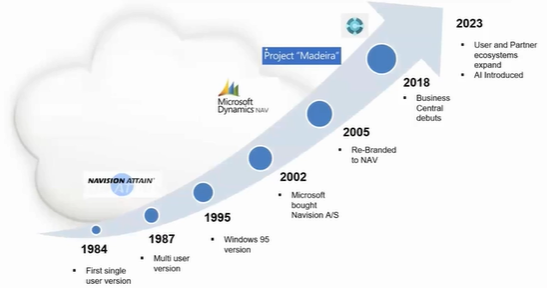
Microsoft updates Business Central, one of its most popular products, twice a year to keep it current and enhance its features, which companies rely on for efficient business management.
Here's a detailed look at some of the Liberty Grove team’s favorite features of the most recent Business Central upgrade and how they can benefit businesses:
Enhanced Reporting and Analytics
The Wave 2 update elevates the reporting functionalities within Dynamics 365 Business Central, providing users with tools to gain deeper insights and conduct real-time data analysis. It is essential for informed and timely decision-making. New industry-specific templates and highly customizable dashboards make it easier for teams to visualize data and track key performance indicators (KPIs).
AI-Powered Insights and Forecasting
Business Central now leverages AI to provide predictive insights and forecasting capabilities. It helps businesses anticipate market trends, manage inventory more effectively, and make data-driven decisions that increase profitability.

Financial Management Improvements
The upgrade includes enhancements to financial management features, such as support for multiple VAT numbers and the ability to use installments on sales documents. These improvements streamline financial operations and ensure compliance with various government regulations.
Workflow Automation and Usability Enhancements
Business Central Wave 2 introduces new automation tools that simplify and expedite routine tasks. For example, Copilot can help create sales orders directly from chat, making the process faster and more efficient. Additionally, integrating with GitHub Copilot in Visual Studio Code improves developer productivity by providing intelligent code suggestions and automating repetitive coding tasks.
Expanded E-Document Capabilities
The e-document feature in Business Central now offers more capabilities for sending documents, including integration with Dynamics 365 Field Service and expanded reporting capabilities for sustainability. That allows businesses to track their greenhouse gas emissions and other sustainability metrics, helping them meet regulatory requirements and improve their environmental impact.

Global Availability and Localization
Business Central Wave 2 expands its global availability, making it easier for businesses to operate in multiple regions and comply with local regulations. It includes support for various VAT numbers and country-specific features that cater to the unique needs of different markets.
Improved Integration with Third-Party Applications
The upgrade enhances integration with third-party applications, allowing businesses to connect Business Central with other tools and systems seamlessly. This interoperability ensures data flows smoothly across various platforms, reducing manual data entry and improving overall efficiency.
Core Application Functionality
- Copilot Integration: Enhanced Copilot capabilities for creating sales orders directly from Chat and generating product information faster.
- Sales Order Creation: Copilot can now assist in creating sales orders directly from Chat, making the process faster and more intuitive.
- Multiple VAT Numbers: Support for various VAT numbers to facilitate international business.
- Product Information: Copilot helps generate product information, such as Variables, Units of Measurement, and other details, more efficiently.
Integration with Dynamics 365 Field Service
- Service Orders: The integration now covers service orders, allowing for better coordination between Business Central and Field Service.
- Document Archiving: New capabilities to archive service management documents.
Sustainability Reporting
- Greenhouse Gas Emissions: New reporting features to help companies track and report their greenhouse gas emissions, aiding in sustainability efforts.
Power Platform Integration
- Auto-Apply Templates: Templates are automatically applied when synchronizing data with Dataverse, streamlining data management.
- Subscription Billing: Improved management of subscription billing and revenue recognition.
- Shopify Connector: Enhanced integration with Shopify, including features like synchronizing product translations and defining shipping information.

User Experience Improvements
- Multi-User Warehouse Entries: More than one user can now post warehouse entries simultaneously, improving efficiency in warehouse management.
- Financial Reporting: New reports and demo data for financial reporting to help businesses better analyze their financial health.
- Project Planning: Users can add extended text to project planning lines, providing more detailed project information.
Application Enhancements
- E-Document Capabilities: Expanded capabilities for sending documents.
- Integration with Dynamics 365 Field Service: Expanded integration to cover service orders.
- Sustainability Reporting: New reporting capabilities for tracking greenhouse gas emissions.
Power Platform Integration
- Auto-Apply Templates: Auto-application of templates when synchronizing data with Dataverse.
- Subscription Billing and Revenue Recognition: Management of subscription billing and revenue and expense recognition.
- Shopify Connector: Improved Shopify connector for better integration.
Country and Regional Updates
- Legislative Capabilities: New legislative capabilities to help organizations stay compliant with various government regulations, ensuring they meet all legal requirements.
Conclusion
The Dynamics 365 Business Central Wave 2 2024 upgrade introduces features that streamline business processes, enhance decision-making, and improve financial management. Businesses can increase efficiencies and profit by leveraging AI-powered insights, automation tools, and expanded e-document capabilities.
The global availability and enhanced integration with third-party applications further solidify Business Central as a comprehensive business management tool for small and mid-sized organizations.
Microsoft Business Central offers a comprehensive solution that meets all your needs for managing complex business operations. With its robust tools for data management, synchronization, and correction, you can ensure data integrity and operational efficiency.
Business Central is a powerful tool designed to manage complex business processes efficiently. By ensuring accurate static and transactional data, providing robust controls and workflows, and offering flexible user permissions, Business Central helps businesses maintain data integrity and operational efficiency.
Investing in Business Central means embracing a future-proof solution that supports informed decision-making and drives business success.
Ready To Make the Most of Business Central?
Liberty Grove can help you optimize Business Central to ensure your organization's productivity, efficiency, and profitability.
Contact Liberty Grove for a complimentary consultation on how its experts can help you maximize Business Central and increase organizational efficiencies.
Related Reading
Microsoft Dynamics Business Central 2024 Release Wave 1
Printing from Microsoft Dynamics 365 Business Central
Payment Automation in Business Central: A Strategic Advantage for Businesses
About the author
Liberty Grove Software is an established Microsoft Partner that focuses on providing customers with sales, service, and support for Microsoft Dynamics 365 Business Central/NAV solutions and training and upgrades.
Over more than 25 years, Liberty Grove has assisted hundreds of customers with businesses ranging from small to mid-sized to Microsoft Partners in implementing, training, customization, and upgrading Microsoft Dynamics ERP solutions.
The organization is one of only a few companies worldwide that Microsoft recognizes as qualified to provide Business Central/NAV Upgrade Service Centers.

Microsoft Dynamics 365 Business Central (BC) is often the central transaction system for an organization. As such, it needs to be a trusted source of information for the daily operations and reporting. So, ensuring Business Central data is clean is essential to being a trusted resource.
Following his recent UST Education session, our CEO, Andrew Good, will explore the various Business Central resources and techniques to ensure your data starts and remains clean.
And that trusted data is based on a couple of critical areas:
- Ensuring the setup data is correct and keeping it clean, and when you have transactions, making sure that those flow through, have the information they need, and are gathering it as they proceed through the business.
- Having the tools to fix issues when they arise.
This blog will address:
- The various data sources and techniques to ensure the data starts and remains clean.
- Tools to correct transactions when things go wrong.
Andrew will share some techniques to keep your static and transaction data clean. He'll also discuss correcting transactions if they go wrong in Business Central. Because we're going to review several different areas, we're not going to get into any area in depth, but you will walk away with a sense of how you can set things up and keep things under control.
Overview of Business Central: A Brief Introduction
Business Central is an all-encompassing business management solution designed to streamline operations and enhance efficiency for small to medium-sized enterprises. It integrates various business processes, providing finance, sales, customer service, and supply chain management tools. Business Central enables organizations to make informed decisions, improve productivity, and foster growth by unifying these functions.
Business Central has a rich history dating back to the 1980s. Over the years, it has undergone significant evolution, starting as a single-user version. As Windows evolved in 1995, Microsoft acquired The Vision and rebranded it as part of its suite of ERP solutions in 2005. The most significant evolution came in 2018 with the introduction of Business Central, a game-changer for businesses, and the simultaneous introduction of NAV to take it to the cloud.
This evolution is crucial for you to understand, as it sets the context for the current capabilities of Business Central.
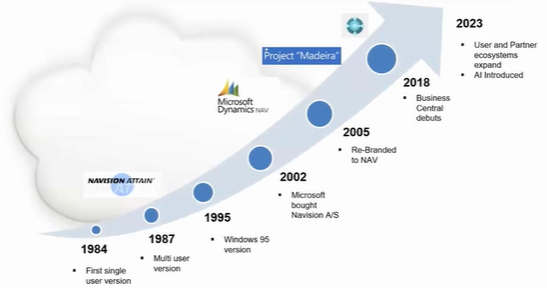
The result was that Business Central was on premises for legacy customers hosted in the cloud through data centers and private hosting or as a software-as-a-service solution (SaaS), or the cloud as we now refer to it. In 2023, many things happened. The ecosystem has continued to grow from both a user and a partner perspective. Microsoft introduced AI to Business Central last year, and the ecosystem has exploded with apps that fill in the gaps with Business Central, which is good at providing base functionality.
The Flexibility of Business Central

Organizations may have unique needs related to multi-company manufacturing or specific needs such as Food and Beverage. For instance, a manufacturing company might need to track production across multiple locations, or a Food and Beverage company might require specific inventory management features. Some apps address these differences between the base product and your needs.
If we look at critical static data that you would have in Business Central, there's a lot of setup information, such as General Ledger sales, purchasing, manufacturing, inventory, and warehouse.
Then, you must consider those accessing the system, so user setup is essential. What permissions do they have within the system?
For example, we can start with Finance and consider various functional areas in the system. We have critical base data such as our chart of accounts and the dimensions used within Business Central posting groups. These are the background tables that record a payment from a customer. What balance sheet account has the payment hit? How does that flow into the General Ledger set up in the background so that users don't have to pick GL accounts on a transaction-by-transaction basis?
As we move away from Finance and look at some of the other operational areas of the system, we will have customers, vendors, items, and bills of material routings. We also have work centers, machine centers, and work center groups.
That makes for a considerable amount of data you want to store correctly initially and continually as time passes.
Your organization's chart of accounts might morph. You may need to adjust your chart of accounts by adding new accounts or dimensions. You may want to gather information in a more detailed fashion, so there might be several changes you wish to make related to dimensions.
The intent here is not to get into the dimensions in significant detail but from a Business Central perspective. You might have a typical chart of accounts where transactions flow and accumulate underneath those accounts in the General Ledger and its entries.
Dimensions are the ability of Business Central to stamp additional characteristics on each transaction. Those additional characteristics your team may have worked with when they had a segmented chart of accounts represent the various segments.
Business Central provides tremendous flexibility to accumulate data so that you can go back and look at how your organization is performing. But suppose you're going to analyze the data down the road. In that case, you want to ensure that people aren't adjusting a chart of accounts, changing an account number, adding new dimensions, or blocking dimensions without your control.
With these things under control, you start to have Clean Master Data or static data that you can trust.
Maximizing Efficiency with Microsoft Business Central

A robust ERP system like Microsoft Business Central is crucial in today's fast-paced business environment. This powerful tool helps manage static and transactional data, ensuring your operations run smoothly and efficiently. Here's how Business Central can benefit your business and why it stands out as a top choice for managing complex business processes.
Managing Static Data
Comprehensive Setup: Business Central allows you to manage extensive static data, including pricing locations, warehouse descriptions, and more. This static data forms the foundation upon which dynamic business processes are built.
Project and Service Management: Business Central integrates project management and service management functionalities, streamlining various aspects of your business operations.
Handling Transaction Data
Versatile Journals: Business Central offers a range of journals to manage different types of transactions. These include:
- Financial and General Journals: For recording standard financial transactions.
- Recurring General Journals: For repetitive financial entries.
- Fixed Asset Journals: For managing asset transactions.
- Sales and Purchase Journals: For sales and purchase-related entries.
- Manufacturing Journals: For consuming and outputting manufacturing components.
- Item and Warehouse Journals: For inventory adjustments and warehouse management.
Transaction Tracking: Sales orders, purchase orders, and production orders in Business Central automatically build and post journals in the background, ensuring comprehensive transaction tracking and accuracy.
Key Tools and Controls
Role Centers: Each user in Business Central is assigned a role, providing a customized interface relevant to their specific tasks. That ensures users have access to the tools they need without unnecessary complexity.
Workflows for Data Validation: Business Central's workflow functionality helps validate data setup for customers, vendors, and items. It ensures data integrity and smooth operations. For example, setting up a vendor approval workflow ensures no one can engage a vendor until their setup is fully approved, maintaining data accuracy.
Permissions Management: Business Central allows you to control user access through permission sets and security groups. That ensures that users have the appropriate access based on their roles, maintaining data security and compliance.
Dimensions and Data Integrity
Setting Up Dimensions: Business Central allows the setup of multiple dimensions to characterize transactions. These dimensions help categorize data meaningfully, enhancing reporting and analysis capabilities.
Default Values and Gatekeeper Rules: By setting up default values and gatekeeper rules, you ensure that all necessary data characteristics are present before posting transactions to the general ledger. That prevents errors and maintains data integrity.
Validation Rules: Business Central allows you to establish validation rules to prevent invalid data combinations. It ensures that only accurate and relevant data enters your system, simplifying reconciliation and reporting processes.
Benefits of Business Central

Integration with Dynamics 365: Business Central integrates seamlessly with other Dynamics 365 applications, offering a comprehensive solution for mid-sized organizations.
Enhanced User Experience: The intuitive interface and role-specific dashboards make Business Central user-friendly, reducing the learning curve and increasing productivity.
Scalability and Flexibility: Whether you operate on-premises or in the cloud, Business Central scales with your business needs, providing the flexibility to adapt to changing market conditions.
Optimizing Business Operations with Microsoft Business Central
Microsoft Business Central provides a robust ERP solution for businesses looking to enhance operational efficiency and ensure data integrity. This platform offers comprehensive tools to manage static and transactional data effectively, ensuring your business runs smoothly. Here's how Business Central can benefit your organization:
Ensuring Data Integrity
Defining Dimensions and Gatekeeper Rules
Defining dimensions and setting gatekeeper rules, essentially mandatory checks for data accuracy, are essential to maintaining accurate records. For example, if you're dealing with inventory, you might require an item type code for every transaction. By setting this as a gatekeeper rule, any transaction missing this dimension will prompt the user to correct it, ensuring consistency and accuracy. The advantage is that once set on an item, this information flows seamlessly into transactions, reducing the need for manual entry.
Master Data Management - Synchronizing Data Across Entities
If your organization operates across multiple legal entities, such as international branches, master data synchronization is vital. Business Central allows you to set up a parent company with standardized charts of accounts, dimensions, and other data. This data can then be synchronized across all local companies, ensuring consistency. For example, a client with 47 companies uses this feature to keep their data in sync, making consolidation processes much more efficient.
Correcting Data and Ensuring Accuracy
Dimension Corrections
Mistakes happen, and Business Central provides tools for corrections when someone records data incorrectly. The Dimension Correction tool, a feature that allows you to update previously posted entries, ensures your records remain accurate. This tool is crucial for maintaining the integrity of your financial and operational data, as it allows you to correct any errors without compromising the accuracy of your records.
Audit Trails and Transaction Reversal
Business Central maintains a sequential ledger for all transactions, providing a complete audit trail. If a transaction is incorrect, you can reverse and replace it, ensuring transparency and accuracy in your records. For instance, if a sales transaction was recorded incorrectly, you can use the Transaction Reversal feature to reverse the entry and replace it with the correct one, maintaining the accuracy of your records. This feature is particularly useful in maintaining compliance and accountability.
Practical Tools for Data Management

Workflows for Data Validation
Workflows in Business Central help validate data setup, ensuring the correct configuration of customers, vendors, and items in the system. For example, a vendor approval workflow prevents using a new vendor until the setup is fully approved, maintaining data integrity from the start.
Permissions and Security
User access control is essential for data security. Business Central uses permission sets and security groups to manage user access based on their roles, ensuring users have the appropriate access while maintaining data security.
Real-World Applications
Managing Complex Transactions
For businesses involved in manufacturing, Business Central handles complex transactions like production orders. A release production order allows you to manage the production process, from component consumption to final output. This feature ensures that you can track and record all aspects of production accurately.
Keeping Data Clean

Timely Review and Validation
Regular review and validation of transactions are crucial for data accuracy. With Business Central's proactive approach, you can set up workflows and validation rules to ensure all necessary data characteristics are present before posting transactions. This proactive approach empowers you to prevent errors and maintain the integrity of your data.
At Liberty Grove, we have one client in the manufacturing area where about three different departments touch a given item (or four!), so the engineering department sets up the new item. When they're ready for approval, it goes from engineering to the production department to purchasing, and then ultimately, finance reviews everything and completes the approval process.
So, in that case, the client has four levels of approval before that item is used. That focus on control has paid dividends since they implemented a rigorous process and control in and around the item approval process.
At Liberty Grove, our CRM system spans both countries that we work in, and we have one CRM entity, but in the background, we have two legal entities for the transactions. One of the ways to set up a template effectively in Business Central is to set up a recurring journal.
You can establish setup templates in Business Central for customers and items, allowing you to have different types of customers, such as service or parts customers. You can set up templates, and they will populate your typical choices.
And lastly, timely review of transactions. You can resolve an issue and revisit the business process if you find it. Root cause analysis is crucial. Consider this technique when you're running into problems in your system.
Keeping Business Central Current
Microsoft updates Business Central significantly twice a year and in a minor way another ten times a year, meaning there is a monthly update to your system when you're in the cloud. It's in the background, and Microsoft manages it. Additionally, you can schedule when to upgrade your sandbox, which is your test environment, versus your production environment.
Microsoft's learning environment has evolved significantly, and there are a couple of tools related to workflows. In addition, there are tools for dimension corrections and master data management available in Microsoft Learn.
The principles and the concepts of clean data apply to any system you're working with, whether it be CRM or accounting. If you have control of your static data and limit access to those who can access, approve, or change it, you know your transactions are trustworthy. You're in an excellent spot to move forward, consider your techniques for dealing with exceptions when they occur, and make necessary changes.
Conclusion
Microsoft Business Central offers a comprehensive solution that meets all your needs for managing complex business operations. With its robust tools for data management, synchronization, and correction, you can ensure data integrity and operational efficiency.
Business Central is a powerful tool designed to manage complex business processes efficiently. By ensuring accurate static and transactional data, providing robust controls and workflows, and offering flexible user permissions, Business Central helps businesses maintain data integrity and operational efficiency.
Investing in Business Central means embracing a future-proof solution that supports informed decision-making and drives business success.
Is Your Business Central Data Clean and Optimized?
Liberty Grove can help you make the most of Business Central to ensure your organization's productivity, efficiency, and profitability.
Contact Liberty Grove for a complimentary consultation on how its experts can help you ensure your data in Business Central is clean and easy to analyze and understand so you can make informed business decisions.
Related Reading
Microsoft Dynamics Business Central 2024 Release Wave 1
Transitioning from Dynamics NAV to Dynamics 365 Business Central
About the author
Liberty Grove Software is an established Microsoft Partner that focuses on providing customers with sales, service, and support for Microsoft Dynamics 365 Business Central/NAV solutions and training and upgrades.
Over more than 25 years, Liberty Grove has assisted hundreds of customers with businesses ranging from small to mid-sized to Microsoft Partners in implementing, training, customization, and upgrading Microsoft Dynamics ERP solutions.
The organization is one of only a few companies worldwide that Microsoft recognizes as qualified to provide Business Central/NAV Upgrade Service Centers.
