

A blog is kind of an interesting word, don’t you think? It helps to understand where it came from. It was first coined as a “weblog” in 1997. And then, in 1999, someone separated “Weblog” into 2 words, as in “we blog” and the blog was born. Early blogs were often more like personal diaries or journals. Business blogs came later and have, for many companies, become an integral part of their marketing.
At , we blog in order to share topics of interest with clients and prospective clients alike. In 2019, many of our blogs were about . It’s the newest of all the Microsoft ERP software solutions and therefore has warranted a great deal of our attention.
Summarized below are:
Our Top 3 Microsoft Dynamics 365 Business Central Blogs
Click on any headline to read the full blog.
is a shining example of an ERP solution that goes far beyond the limits of basic accounting software. It is an all-in-one business management solution that helps companies connect their financials, sales, service, and operations to streamline business processes, improve customer interactions, and make better decisions. Dynamics 365 Business Central brings the full power of Dynamics NAV to the cloud and has, at its foundation, a set of trusted, proven technologies that have served millions of users worldwide.
Every ERP software product on the planet can handle the basics of financials. So why choose Microsoft Dynamics 365 Business Central? When you connect to your Microsoft Dynamics 365 Business Central instance, you immediately gain access to company financial information. Microsoft Dynamics 365 Business Central is designed specifically for business owners, accountants, and executives to keep tabs on profit margins, income and expenditures, and cash flows. With Business Central, you can track the life cycle of your fixed assets, customer payments, and fiscal performance.
It would be rare if your chosen ERP software system could meet 100% of your requirements. Typically, it would be more like 95%. The remaining 5% could come in the form of programming: a software configuration or customization that we at Liberty Grove would perform for you. Or, it could come in the form of an add-on. Add-ons are software applications that, as a rule, have been developed by third parties, in other words, not Microsoft. In the Microsoft, world calls these third parties ISVs, Independent Software Vendors. Scores of add-ons that have been developed specifically for Business Central.
Keep Watching Our Blog for More Microsoft Dynamics 365 Business Central News and Information
You can subscribe to our blog by entering your email address in the box provided in the top right corner of every page on our site. Visit us at .
Call us at 630-858-7388 or email us at nav@libertygrove.com.
Related Article:
What Return on Your Investment Can You Expect from Microsoft Dynamics 365?
Do you eat 3 square meals a day? Or are you one of those people who “graze” all day long? Regardless of your eating habits, you’re a consumer of food and beverages. We are, too!
But in addition to consuming food and beverages, the team at also has an appreciation for how food and beverages get onto your table. Because we provide the ERP software that food and beverage manufacturers and distributors use to run their businesses, namely Microsoft Dynamics NAV and Microsoft Dynamics 365 Business Central.
Want to know about the specialized ERP software systems that Liberty Grove implements and supports for food and beverage manufacturers and distributors?
Liberty Grove Presents: Our Top 3 Food & Beverage ERP Blogs
Just click on any heading below to read the full blog.
1-Microsoft Dynamics NAV: The Perfect ERP Solution for Food & Beverage Companies
Historically, Liberty Grove has always focused on manufacturing and distribution, with nearly 90% of our clients in one or both of these disciplines. In recent years, we have increasingly worked with food and beverage clients. In support of this specialized area, we began offering enhanced food and beverage functionality using Dynamics Food ERP, a Certified for Microsoft Dynamics (CfMD) application that is built for the food industry. It addresses the needs of industry-specific such as Quality Control, Container Management, Catch-weight, In-line Scales, and Label Printing.
2-Check out DynamicsFoodERP: Microsoft NAV for the Food & Beverage Sector
Our team has spent thousands of hours working with hundreds of Food & Beverage companies all over the world. We love solving problems so that your company can run more profitably. We have experience in process engineering, food safety, supply chain integration, logistics, accounting, CRM, consignments, project management, and device integration. We put that experience to work to get you up and running quickly and smoothly on Microsoft Dynamics NAV or Microsoft Dynamics 365 Business Central with our Dynamics Food ERP add-on application built for your industry-specific processes and needs.
3-Microsoft Dynamics NAV for Food & Beverage: Eat, Drink, and Make Merry
The Food & Beverage Industry is vast. Food distribution alone is a $400 billion industry in the United States, and food manufacturing in the state of Texas alone is a $16 billion industry. We don’t often stop to think about where the food on our table comes from. We eat, drink, and make merry without giving it a second thought. We don’t stop to consider the computer software that’s used by food and beverage manufacturers and distributors. But those of us who work in the technology industry know that enterprise resource planning (ERP) software is the wizard behind every Food & Beverage curtain.
If you’re a Food & Beverage manufacturer and/or distributor…
Contact us because we are the experts in Microsoft Dynamics ERP software for the Food & Beverage industry. Call us at 630-858-7388 or email us at nav@libertygrove.com.
Related Article:
Optimizing Your Current ERP System vs. Purchasing New Software

Got Microsoft Dynamics ERP? NAV or Dynamics 365 Business Central (BC)? They’re our specialty. We’ve been a NAV partner for close to 25 years. So, offering , which is primarily based on the codebase for , was a logical progression.
As early adopters of both NAV and BC, is in the perfect position to talk to you about optimization and streamlining. It’s what we’ve been doing for our clients since 1996.
Let’s talk about the benefits of setting up ACT/EFT
As a finance professional, you already know that ACH stands for Automatic Clearing House, while EFT means Electronic Funds Transfer. Both refer to money transfers from one account, or bank, or place to another. Both are ways to simplify the process of moving money. There are some differences between the two, but we often look at setting up both for optimal results. The benefits include the ability to:
- Redirect manpower to more critical functions
- Reduce transaction costs
- Add security to every transaction
- Reduce the environmental impact
Let’s talk about the benefits of lockbox deposits
Lockbox systems help businesses collect payments more efficiently. Instead of handling incoming payments yourself (and waiting for those payments to move through the mail), payments go to a virtual lockbox. The bank can collect those payments, capture information about the transaction for your record-keeping purposes, and put the money into your business account.
Both NAV and BC offer lockbox management systems that are streamlined and optimized for efficiency.
Let’s talk about the benefits streamlining and optimizing bank reconciliation
We honestly don’t have a single client who hasn’t already automated their bank rec. It’s a no brainer decision, and it’s an integral part of the financials that come with NAV and BC. But in case you have any doubts, here are the benefits of automated bank rec:
- Eradication of reconciliation errors
- Consistent exception management
- Reduced financial risk
- Removal of skilled employees from repetitive administration
- Improved and consistent dispatch performance regardless of business volume
Need to automate foreign exchange?
We’ve got that covered for you, too. And it’s a huge time saver.
Take the next step
Contact us because we are the experts in Microsoft Dynamics ERP, be it NAV or BC. Call us at 630-858-7388 or email us at nav@libertygrove.com.
Related PostWhat Return on Your Investment Can You Expect from Microsoft Dynamics 365?

The headline news is currently focused on the coronavirus pandemic. But let us not forget that in addition to protecting ourselves and staying safe, we also need to safeguard the security of our ERP application. While we are holed up, safe, and secure in our homes, hackers may be exploiting the vulnerabilities of our ERP systems.
Keeping Microsoft Dynamics 365 Business Central (BC) Secure
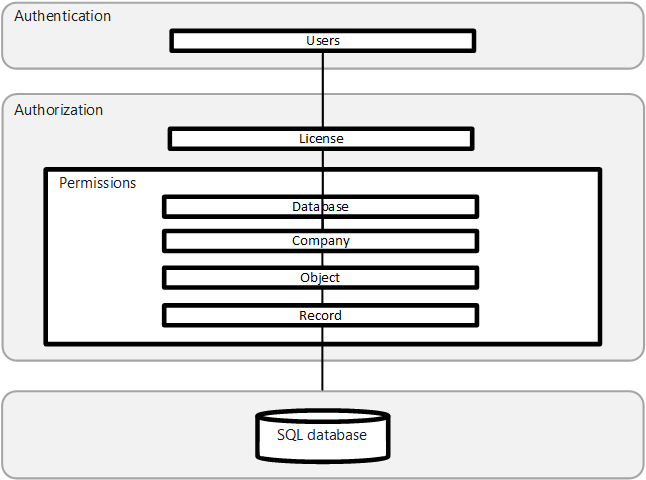
takes your security seriously. Fortunately, many layers of security are already built into Microsoft Dynamics 365 Business Central, as depicted in this diagram:
Let's start with a brief overview of the 3 "A" s
Authentication
Before users can sign-in to the Business Central application, they must be authenticated as a valid user in the system. Business Central On-Premises supports several authentication methods, such as Windows and Azure Active Directory. Business Central Online uses strictly Azure Active Directory (Azure AD).
Authorization
Once authenticated, authorization determines which areas a user can access, such as the pages and reports that they can open, and the permissions that they have on associated data. AuditingBusiness Central includes several auditing features that help you track information about who is signing-in, what their permissions are, what data have they changed, and more.
Beyond the 3 "A" s
Yes. There is more that you should be doing. Best practices include, as but 2 examples, the following: Data Encryption
You can encrypt data on the Business Central server by generating new or importing existing encryption keys that you enable on the Business Central server instance that connects to the database. Security Development Lifecycle
Microsoft's Security Development Lifecycle (SDL) is a software development process that helps developers build more secure software and address security compliance requirements while reducing development costs.
Stay tuned for part 2 of this series on application security
Security is not just a hot topic. It is imperative. We will take a deeper dive in our upcoming blog: "Security in Microsoft Dynamics 365 Business Central Online and BC On-Premises." Stay tuned!
Meanwhile, if you have any questions, please call us at 630-858-7388 or email us at nav@libertygrove.com.
Related Article:
What Return on Your Investment Can You Expect from Microsoft Dynamics 365?

Gears are used to power tons of mechanical devices and gadgets. They provide power, and torque, and speed. But they only work if the teeth connect. If they don’t connect, what you have is a bunch of gears spinning away…separately.
Take a moment to picture that.
Then think. Are the gears that drive my company spinning futilely apart and accomplishing nothing at all? Or are the teeth connected and doing their job the way they were designed to work? For power, torque, and speed.
In a fully integrated ERP software system, all the teeth connect.
If we think of your business as a machine, here are some of the machine parts:
- ERP – Enterprise Resource Planning
- CRM – Customer Relationship Management
- SCM – Supply Chain Management
- EDI – Electronic Data Interchange
- EFT – Electronic Funds Transfer
- ACH – Automatic Clearing House
- BOM – Bill of Materials
- HR – Human Resources
- GL – General Ledger
- AP – Accounts Payable
- AR – Accounts Receivable
- WMS – Warehouse Management System
- NOC – Network Operations Center
There are CEOs, CIOs, COOs, CMOs, CTOs, CSOs, and many others in charge of those machine parts. Plus, all of their underlings. And they all have to work together to make those cogwheels turn like the well-oiled machine that it’s supposed to be.
Now think again about your business.
How many of those parts are integrated? How many are outliers? What would happen if you integrated those outliers, and you had a whole that was truly greater than the sum of its parts?
I’ll tell you the answer. You would have a highly successful, profitable, efficient, streamlined, and productive company.
That’s what or can and will accomplish for you.
Take the next step…
Contact us because we are the experts in Microsoft Dynamics ERP software. Call at 630-858-7388 or email us at nav@libertygrove.com.
Related Article:
Optimizing Your Current ERP System vs Purchasing New Software

Allow me to introduce myself. I’m Cynthia Priebe, Senior Business Analyst and Project Manager for Liberty Grove Software. I’m also a Summit veteran, so to speak, having attended Summit for many years. I know that even if you’re not a first-time Summit attendee, even if you’re a veteran like me, the Summit agenda is so vast that it can be a bit overwhelming.
That’s why I’ve scoured the agenda to come up with a few sessions, offered by other partners and participants, that I wouldn’t want you to miss. Here they are…
My Top 3 Picks: Get the Most out of Your NAV/BC System (and have fun doing it)!
Summit Session ID: GET68Title: Let's Go Through NAV Setup, Shall We?Presenters: Business Automation Specialists of MN; River of Goods, Terrybear Urns & Memorials
Date: Wednesday, October 16, 2019Time: 4:30-5:30 PMCPE Credit: 1Brief Description: Typically, your IT partner will help you with this, but no one knows your company better than you. So you need to understand the implications of your company's settings in BC/NAV and how they are all connected. We'll walk through the cause and effects of the system setup relative to Sales & Receivables, Purchases & Payables, Inventory, G/L, and Posting.
Summit Session ID: ADM66Title: NAV in a Rapid Growth Environment: A Story of a Happy NAV KingdomPresenters: Charlotte’s Web
Date: Thursday, October 17, 2019Time: 9:30-10:30 AMCPE Credit: 1Brief Description: Once upon a time, a small company used basic NAV in a basic way, and everyone was happy. Then this company started growing, becoming more complex, and NAV didn't work so well anymore, and all the people in the NAV kingdom were upset. But fear not, knights in shining armor came to the rescue. You'll hear how this turnaround happened, how everyone lived happily ever after.
Summit Session ID: FIN80Title: FIN80 - Abracadabra: How to Eliminate Most of Your Boring TasksPresenter: Qixas GroupDate: Friday, October 18, 2019Time: 2:30-3:30 PMCPE Credit: 1Brief Description: Raise your hand if you like doing manually-intensive, repetitive accounting tasks. Yeah, we thought so. Let your BC/NAV system do many of your current (aka boring) tasks for you. We'll walk through how easy it is to take advantage of automation you already own so you can focus on more value-added activities. We'll show you how to set up reminders, job queues, and much more.
____________________________________________________
I’m also a Summit 2019 presenter and I’ll be conducting a half-day Academy class as well as 3 regular conference sessions. You can use this link to navigate to and register for any of the sessions listed above or below: https://na.powerplatformsummit.com/conference-schedule/sessions
My Academy and Summit Sessions
Academy Training: Accounts Payable for Dynamics NAV & D365 BCDate: Monday, October 14, 2019Time: 1:00-5:00 PMCPE Credits: 4Brief Description: From day-to-day AP functionality to hands-on in the online learning environment for creating orders, invoices, payments, credit memos, and more. Find out what all those boxes and options mean on the Purchases & Payables Setup page, exactly how the system uses the number series on purchase documents, and how to maximize archiving versions. Course material applies to most versions of NAV and Business Central. Key version differences will be highlighted.
Summit Session ID: GET67Title: Small Changes with Big Impact: Core Application Setup & Configuration - Options & OpportunitiesDate: Wednesday, October 16, 2019
Time: 2:00-3:00 PMCPE Credit: 1Brief Description: Although BC/NAV can be customized to meet an organization's unique requirements, too often we jump to customize before looking at what may be configurable "out-of-the-box." We will show some of the most powerful (and some not so much) built-in setup and configuration options. We will also share how to make the "configuration is enough" conversation with stakeholders easier. This session illustrates how one small change can have a big impact on what BC/NAV can do for you.
Summit Session ID: ADM60Title: Mods: Just Because Everyone Does Them Doesn't Mean You Should Too!Date: Thursday, October 17, 2019
Time: 10:45-11:45 AMCPE Credit: 1Brief Description: Modifying your BC/NAV system is the classic "pay me now or pay me later" experience. Just because you can doesn't mean you should. Mods run on a continuum from not doing any to doing many deeply complex mods. Coupled with the evolution of extensions and SaaS services, the if, when, and how to modify your system is an incredibly complicated evaluation. At the end of this session you will understand when to modify, when not to, and how to justify these decisions.
Summit Session ID: FIN58 Title: My AP Person Just Left, Now What?!?Date: Thursday, October 17, 2019Time: 1:30-2:30 PMCPE Credit: 1Brief Description: It’s sobering to realize how much you don’t know about the detailed processes within your accounting department, and more so, how much inefficiency is happening right under your nose. Inspired by a real-life event, we’ll provide an overview of how AP works in BC for a foundation of what should be happening. We’ll dive into how to go about reviewing your current processes, questions to ask your staff to uncover existing inefficiencies and a game plan for recovery and improvement.
______________________________________________
Visit Liberty Grove Software at Summit
When I’m not presenting, I’ll be in the Expo Center at the Liberty Grove Software booth, 1416. I hope you’ll come visit me there. I know that many of you are looking for a smooth upgrade path to Business Central from NAV. I’d love to meet you so we can chat about your upgrade plans. I’ll also be more than happy to answer any questions you might have about your Microsoft Dynamics NAV/BC system.
Between now and then, you can always reach us by calling 630-858-7388 or by emailing us at nav@libertygrove.com.
Did you grow up hearing this expression: If at first, you don’t succeed, try, try again? I understand the sentiment, but I take issue with it. Because a failed ERP system implementation is a very costly endeavor. You just don’t want to try, try again. You want to get it right the first time and save yourself a boatload of angst and money. I suggest that you’d be well served if you could:
Avoid the pitfalls by knowing what they are
We’ve put together a shortlist of reasons . And we’ve counterbalanced those with brief descriptions of how will work with you to overcome those challenges.
Failure Reason #1: Lack of User Engagement - Your users are performing their jobs, but they could be contributing more.
Liberty Grove will help you develop a critical eye to understand what needs to be done to get your users engaged.
Failure Reason #2: Lack of Understanding by the Implementation Team - There is a lot to learn when implementing your system and when the team is stretched, details are missed. The key users may not have been included in the discussions, so their detailed understanding of the organization and its stakeholders' needs did not become part of the implementation plan.
Liberty Grove will help you build an inclusive and consultative implementation plan.
Failure Reason #3: Unclear Project Goals and Missed Expectations - Every system implementation should include clearly identified (and ranked) objectives. Often times a project starts out with one or two key objectives, then morphs over time to include this requirement, plus another and so on. If this is left unchecked, then the project’s scope expands along with the timeline, budget and risks.
Liberty Grove will help you regain clarity and focus your project to meet your key objectives.
Failure Reason #4: Poor User Adoption - A new system involves a lot of change for the organization and the users that support it. This change is often underestimated or left to the users to figure out. This results in distracted users that are not focused on your project's goals.
Liberty Grove will help you understand where the issues are and how to engage your users.
Failure Reason #5: Training was Not Part of Ongoing System - Often, there is little or no training offered. Training may have been de-prioritized due to timing issues. For example, the project is running late, and we need to go live on the originally agreed to a date.
Liberty Grove will help get your users trained and develop an ongoing training program that makes sense for your team.
Liberty Grove will help you determine what resources and effort are required internally to complete the project on time and on budget.
Take the next step toward success
Liberty Grove implements, rescues, and revitalizes Microsoft Dynamics 365 Business Central/NAV ERP systems. Our team of Microsoft Dynamics specialists is waiting to chat with you. Call us at 630-858-7388 or email us at nav@libertygrove.com.
Related Post
If Your Microsoft Dynamics NAV Is in Trouble, We Have a Rescue Team on Alert

If your Microsoft Dynamics NAV implementation is in trouble, you’ve come to the right place. Because we can diagnose the problem and solve it. It’s what we do.
You could be:
1-A Dynamics NAV client who needs help
2-A Dynamics NAV partner with a client who needs help
In the first case, we can provide direct assistance. While in the second case, we will work anonymously so that as a Microsoft partner, your relationship with your client will not be compromised. The end result will be the same. In both cases, we’ll get the NAV implementation back on track.
Troubleshooting Is Our Middle Name
At Liberty Grove, 60% of our business comes from people calling us for help on specific NAV issues. They call on us because we have a reputation for getting them done. We solve the tough NAV problems that others have failed to figure out.
The problem you’re experiencing could be related to an implementation or an upgrade or just something that suddenly goes wrong with your system for no apparent reason. Apparent being the key word here. Because there’s always a reason, even if it’s not obvious.
When you go to the Liberty Grove website and hover over Services on the top menu bar, the first service listed is troubleshooting.
Liberty Grove to the Rescue
Think of Liberty Grove as your rescue team. The team is the key word here. Because the power of a team is greater than the power of one. Our team consists of fully certified employees and associates who possess a minimum of ten years’ experience with NAV. Many of them have written books on NAV, taught courses, or assisted Microsoft in problem resolutions.
The Liberty Grove team loves a good challenge. So bring it on!
Here’s a stellar example of what the Liberty Grove team can accomplish:
“Our existing Navision Solution Center could no longer support us. They had done a software upgrade that took one extra year to implement and ran $200,000 over budget. Upon implementation, it only partially worked and they had no ability to fix the remaining issues. We had a large complicated mess. We needed help or we would have been forced to find another software alternative. Our Microsoft engagement manager suggested Liberty Grove Software.
“Dave was reluctant, but luckily for us, I was able to persuade him to take us on as a client. With his product knowledge of NAV, Dave was able to analyze our software disconnects, rebuild them and restore our missing software applications. He has a strong ability to map out project issues, design a solution, test the solution and then implement it. Dave has strong project management skills, to manage them, and to manage us. He has created a very strong team of professionals and we have been always happy with their results.
“Without Liberty Grove’s help, we would not be in the strong financial position we are in today.”
David A. Fox, Chief Financial Officer, Washington Music Center
Reach Out to Liberty Grove
Our team of Food & Beverage specialists is waiting to chat with you. We have 2 phone numbers and 1 email address to give you. Chicago 630-858-7388, Toronto 416-646-8484 and nav@libertygrove.com.
Related ArticleMeet the Liberty Grove Microsoft Dynamics NAV Rescue Team

As a Microsoft Dynamics NAV partner since 1996, we at understand all of the reasons why our partners don’t choose to upgrade on a regular basis. It costs money. It’s disruptive. Their users are familiar and comfortable with the version they’re on. The version they’re on may be old but it still does everything they need it to do. We’ve heard it all, many times, and we get it – from their perspective.
BUT… in the end, when you don’t upgrade on a regular basis, you end up with some pretty serious headaches when the version you’re on is no longer supported, when you either have to or finally choose to upgrade your Microsoft Dynamics NAV software.
For one thing, there is no direct path for upgrading from an older version such as NAV 2013 to NAV 2018. It has to be done in stages, multiple stages. And that is very time consuming, costly, and tricky.
In the end, if you had upgraded on a regular basis, you would have actually saved time, money, and angst.
Don’t get me wrong. We can do it, no problem. We’ve done it many times. We just know that you would have been better served if you had upgraded sooner.
Having said all of that, let’s look at all of the reasons for upgrading to Microsoft Dynamics NAV 2018.
Benefits of Upgrading to NAV 2018
When you upgrade to NAV 2018, you’ll be able to take advantage of all of the new functionality that has been packed into this version, including:
- The Web client, which allows access to NAV from any Web browser
- Assembly Manager, with kitting and light manufacturing capabilities fully integrated into the supply chain
- Improved integration with SharePoint, allowing you to share information with people both inside and outside your organization
- Significant performance improvements as a result of tighter integration with SQL Server
- Significant reporting enhancements with next-generation RDLC
- Improved cost accounting and cash flow forecasting capabilities
- New supply planning parameters that let you exert greater control over the planning engine
We’re confident that you’re going to love Dynamics NAV 2018. The new release has been exceedingly well received within the NAV community. So, if you’re ready to upgrade, then …
Reach Out to Liberty Grove Software
Our team of Microsoft Dynamics NAV specialists is waiting to chat with you. Here’s how to contact us. Call us at 630-858-7388 or email us at nav@libertygrove.com.
Related Articles:
The Proof of the Pudding Lies in 700+ Microsoft Dynamics NAV UpgradesMeet the Liberty Grove Microsoft Dynamics NAV Rescue Team

When the average Jane and John Doe think about the Food & Beverage sector, their thinking doesn’t go much further than the food they eat and the beverages they drink. They don’t think about the fields where the produce was grown, the canning and packaging plants, the supply chain and distribution networks.
Perhaps they think fleetingly about where they purchased their food and drink. It might have been a conventional supermarket such as Kroger and Safeway, a mass or discount retailer such as Wal-Mart and Target, a natural and gourmet market such as Whole Foods and The Fresh Market, a foreign-based discount retailer such as Aldi and Lidl, a specialty food retailer such as Sprouts and Trader Joe’s, a warehouse club such as Sam’s Club and Costco, an independent health food store, drug store, farmers’ market, food co-op, online retailer such as Amazon, meal delivery service such as Blue Apron ...
Our friends, Jane and John Doe, certainly don’t think about the software systems that support the complex requirements of this complex sector.
But we do. Because we are:

About DynamicsFoodERP
Dynamics Food ERP is a Certified for Microsoft Dynamics (CfMD) software solution built for the Food & Beverage industry. It addresses the needs of both distributors and manufacturers, from Quality Control, Container Management, and Catch-weight, to in-line scales, labeling, and printing.
Our team has spent thousands of hours working with hundreds of Food and Beverage companies all over the world. We love solving problems so that your company can run more profitably. We have experience in process engineering, food safety, supply chain integration, logistics, accounting, CRM, consignments, project management, and device integration. We put that experience to work to get your implementation up to speed faster and more smoothly.
Last but not least, DynamicsFoodERP is a “boutique” owner-managed company, allowing us to offer personal service that larger companies, by their very nature, cannot. This means that the team you meet when you’re still in the “getting to know us” stage is the same team that will be responsible for implementing, deploying, and ensuring the success of your system. We absolutely will not rest until you’re 100% satisfied with your new system.
We can make that kind of commitment because we know the capabilities that DynamicsFoodERP brings to the table. We know that it has everything you need to go from farm to fork, including FDA-level traceability. If you’re in the Food and Beverage industry, then DynamicsFoodERP, built on the venerable Microsoft Dynamics NAV software system, is the solution for you.
Please read all about it. Then contact us to get started on your road to success.
