

When you integrate Power BI into your Microsoft Dynamics ERP system, it’s like receiving a series of gifts from Microsoft. And those gifts are all geared toward making your ERP more powerful, more intelligent, more proactive, and more inciteful. That’s why it’s called Power BI. It adds power and Business Intelligence to your solution.
is part of the Microsoft Power Platform. It is a business analytics service that provides interactive visualizations and business intelligence capabilities with an interface simple enough for end-users to create their own reports and dashboards.
Here are brief descriptions of 8 gifts that are showered upon you when you implement Power BI:
Power BI Desktop - The Windows-desktop-based application for PCs and desktops, primarily for designing and publishing reports to the Service.
Power BI Service - The SaaS-based (Software as a Service) online service. This was formerly known as Power BI for Office 365 and is now referred to as PowerBI.com or Power BI.
Power BI Mobile Apps - The Power BI Mobile apps are for Android and iOS devices and Windows phones and tablets.
Power BI Gateway - Gateways are used to sync external data in and out of Power BI and are required for automated refreshes. In Enterprise mode, they can also be used by Flows and PowerApps in Office 365.
Power BI Embedded – The Power BI REST API can be used to build dashboards and reports into the custom applications that serve Power BI users, as well as non-Power BI users.
Power BI Report Server - An On-Premises Power BI Reporting solution for companies that will not or cannot store data in the cloud-based Power BI Service.
Power BI Premium - Capacity-based offering that includes flexibility to publish reports broadly across an enterprise, without requiring recipients to be licensed individually. This provides greater scale and performance than shared capacity in the Power BI service.
Power BI Visuals Marketplace - A marketplace of custom visuals and R-powered visuals.
Although the listed above are only briefly described, it is still a lot to take in, no less understand. There’s a seasoned team of Microsoft professionals at who are at your service. We can answer all of your questions and take you on a deep dive into Power BI, the Microsoft Power Platform, and the Microsoft Dynamics 365 Power Extensions, including Power BI, the Power Apps, and Power Automate.
Take the next step…
Contact by calling 630-858-7388 or emailing nav@libertygrove.com. Related Post
ERP in the Cloud: A Bright Spot in the Pandemic

Like milk and cookies, or peanut butter and jelly, some things are simply better together.
The same is true for Office 365 and your Microsoft Dynamics ERP. It’s ever so much better for your business when the two applications are fully integrated.
Put the two together, and what do you get? is your cloud-based powerhouse solution for comprehensive, integrated ERP and CRM. Microsoft’s Office 365 (O365) is your powerhouse for the tools you use every day, such as Word, Outlook, and Excel. O365 also comes with cool tools that you can explore such as Skype, SharePoint, OneNote, Social Engagement, and PowerBI. Take a moment and think: Wow!
Now, take another moment to imagine what you can accomplish when you connect BC and O365. Think: Wow, on steroids!
Microsoft Dynamics 365 Business Central + Office 365 will:
- Use cloud services to manage and interact with customers.
- Ensure that your teams remain productive.
- Make daily work simpler with easy access to familiar applications (Word, Outlook, Excel).
- Allow easier maintenance.
- Provide greater availability.
- Promote better collaboration across multiple devices.
- Transform the way you work with customers.
Let’s look at the 3 most familiar (and popular) O365 applications and explore how they interact with BC to improve and transform your business.
1. Excel with BC
Whenever you need to update large amounts of records, instead of editing the records one after the other, you can update the records in Excel online, from within BC.Likewise, if you want to analyze data, use Excel online within the BC platform to perform all the necessary data analysis and save the updated information in Microsoft Dynamics 365 BC.Another area for taking advantage of the Excel with BC integration is with Reporting. You can use Excel to view reports. As long as the data in Excel remains connected to the BC platform, the reports will update automatically.
2. Word with BC
Tap into Microsoft Word using the Word templates available in BC and benefit from cool new features. Use Word templates to design the layout of a document, just as you would when using the traditional Microsoft Office Word. You can also merge customer data into Word templates to create summaries.
3. Outlook with BC
With this integration, you can:
- Track your emails with ease.
- View information about sales activities with a single click from within the Outlook Calendar, so you can track meetings and customer appointments.
- Create new Dynamics records directly from within Outlook.
- Create activity lists in response to emails that are automatically scheduled as tasks and added to the customer record.
- Without leaving Outlook, you can view inbound orders, track order confirmations, and send out your POs.
All of the above is just the tip of the iceberg. So go ahead and …
Take the next step
Talk to the team at about the unlimited potential for digital transformation when you integrate and Microsoft Office 365 (O365).
Call 630-858-7388 or email nav@libertygrove.com.
Related Post
Power Up Microsoft Dynamics 365 Business Central with Electronic Banking and Bank Rec

Microsoft Teams is a business communication platform that provides workspace chat and videoconferencing, file storage, and application integration. Throughout the COVID-19 pandemic, Teams saw a meteoric rise in popularity as literally millions of meetings moved to virtual environments.
The Rise of Microsoft Teams
In March of 2020, the daily active usage of Teams was 44 million. A month later, in April of 2020, Teams averaged 75 million users a day. One year later, in April of 2021, Teams averaged 145 million users a day. And on a single day, Teams logged 4.1 billion meeting minutes! Those statistics validate my claim that Teams has seen a meteoric rise in popularity.
However, it wasn't just the pandemic that caused the increased usage of Teams. It was also the features and functionality offered by Microsoft Teams as compared with similar platforms. For example, the fact that Teams is available in 45 languages. Or, as another example, the fact that with the touch of a button, Teams users can Instantly go from group chat to video conference. What's more, Teams of two or 10,000 (!) can meet in one place from anywhere in the world.
Connecting Microsoft Teams with Microsoft Dynamics 365 Business Central
So, while Microsoft Teams is a platform that lets you connect with others, collaborate seamlessly, and simplify work, that's just the beginning. provides an app that connects Microsoft Teams to your business data in Business Central which allows you to quickly share details across team members, look up contacts, and respond faster to inquiries.
The app is available on the Teams marketplace, and you can use it with the Teams desktop, mobile app, or web. No matter where you are in Teams, you can look up details about customers, vendors, and other Business Central contacts. This feature not only lets you view general information about contacts but also gives access to interaction history, related documents, and more.
You can also share contact details in a conversation. From there, participants have access to even more details about the contact as well. Just copy a link to any Business Central record and paste it into a Teams conversation to share with your coworkers. The app will then expand the link into a compact, interactive card that displays information about the record.
Once in the conversation, you and coworkers can view more details about the record, edit data, and take action, all without leaving Teams.
The Business Value of Integrating Teams and Microsoft Dynamics 365 Business Central
You will have the ability to make decisions faster as a team by bringing business data into Microsoft Teams. Whether you're in conversation with coworkers, preparing cross-department financial budgets, or bringing roles together for an important project, the Business Central app for Teams streamlines conversations and allows you to act on your Business Central data without leaving Microsoft Teams.
Beyond Collaboration, There's Teams for Training
All of the existing built-in Teams features can effectively conduct interactive individual or classroom-style training, with virtual whiteboards and shared documents on shared screens. Teams is a great all-in-one hub for remote training at all levels.
In Conclusion
The Business Central app for Teams extends the value of your Business Central ERP software. It is designed to work with your customizations and solutions, no matter your role, industry, or geography. That's why 145 million people use Teams every day.
Take the next step…
Talk to the team at about the value you will gain by integrating Microsoft Dynamics 365 Business Central (BC) and Microsoft Teams.
Call 630-858-7388 or email nav@libertygrove.com.
Related Post
Power Up Microsoft Dynamics 365 Business Central with Electronic Banking and Bank Rec

There’s nothing better than getting together with friends and family over a celebratory meal washed down with your choice of a beverage. That hasn’t happened much during the pandemic, and if you’re like me, you’ve missed it.
Good News
The good news is that we’re seeing the end of that COVID-19 tunnel.
Better News
The end of that tunnel is good news for you and me, but it’s even better news for the cafes, restaurants, food trucks… wherever it is that you eat, drink, and make merry. Because those establishments are beginning to reopen. Finally.
However, it’s not like the flip of a switch. Behind those eateries, there’s a supply chain that brings the produce and ingredients they need to their doors so that they can bring the finished products to your table. And that food supply chain has been hard hit throughout the pandemic.
Best News
The best news is that we have the technology to help everyone, at every point in the supply chain, get back up and running: from the growers and brewers; the carriers on land, sea, and air; the warehouses and distribution centers; to the restaurants, cafes, food trucks, and let’s not forget the bars!
Some will never reopen, and that’s sad. But many will.
What technology will they need? They will all need the basics, which means accounting software. But today, accounting software is rarely sold as a standalone application. Accounting software is, rather, the foundation for ERP (Enterprise Resource Planning) software.
ERP for Food & Beverage
Here at , we implement and support an ERP solution that we know works best for customers in the , and that is: , a leading food and beverage add-on for that provides enhanced food and beverage functionality.
DynamicsFoodERP is Certified for Microsoft Dynamics (CfMD). It has been built specifically for the food industry to address the industry’s unique needs, such as Quality Control, Container Management, Catch-weight, and Scale Integration.
DynamicsFoodERP was built on the collective experiences of more than the 200 Food & Beverage companies that run the software today. Like a baker’s dozen, 13 have been developed to serve the Food & Beverage industry.
But wait! Saying “Food & Beverage” is too broad. has that issue covered, too. We’ve broken the overall Food & Beverage into six segments (Dairy, Meat, Fish, Fruit & Vegetable, Bread & Bakery, Confectionery) so that we can drill down into each segment’s specific processes and requirements.
Doing Food & Beverage Industry ERP Right, So We Can All Eat, Drink, and Make Merry
Talk to about DynamicsFoodERP software for your Food & Beverage company.
Call 630-858-7388 or email nav@libertygrove.com.
Related Post
ERP in the Cloud: A Bright Spot in the Pandemic

What did you have for breakfast this morning? I had a chocolate croissant from my local bakery, a small bowl of fresh fruit, and a cup of English Breakfast tea from Starbucks. (Not the most nutritious, but definitely yummy!)
How often do you think about how and where those items were produced? My guess is that it rarely crosses your mind. But because I work at and cater to the Food & Beverage industry (pun intended), I actually think about food origin a lot. As in all day, every day.
Mostly I think about how the software we implement for our clients in the Food & Beverage industry:
DynamicsFoodERP. This is software that provides complete solutions and specific functionality for various food industry segments. When added to Microsoft Dynamics 365 Business Central (BC), DynamicsFoodERP ensures that the overall system seamlessly fits the business processes for each segment.
For example:
Bread and Bakery
When I took the first bite of my chocolate croissant this morning, I was hyperaware of the unique needs of the Bread and Bakery segment. In this sector, companies often make changes to their recipes. After any change, it is essential to calculate the effects of a change in a recipe quickly. Also important is the ability to obtain management information quickly. Besides the sector-specific solution for recipe management, DynamicsFoodERP has also developed solutions for other Bread and Bakery issues such as ingredient declarations and various quality systems.
Fruit and Vegetable
Similarly, when I took the first bite of my delicious fresh food cup, I immediately began thinking about the unique requirements of the Fruit and Vegetable segment with the Food & Beverage industry. The Fruit and Vegetable segment typically requires a wide range of unique functionality such as consignment management, strong logistical support, advanced cost reporting, sales on account, and settlement. DynamicsFoodERP fulfills all of these requirements. A unique aspect of the solution is that all of the components are centered around lot administration.
Beverage
When I took my first sip of my favorite English Breakfast tea, I was once again reminded that even processors of coffee and tea, including regular, decaffeinated, and instant types require FDA food facility registration. Regulatory compliance is yet another hurdle for companies in the Food & Beverage industry. And of course, like everything else in today’s tech-rich world, there’s an app for that!
Industry Hazard
Honestly, I just can’t help myself. I guess you might call it an industry hazard. Because there’s pretty much nothing that I eat or drink that doesn’t make me think about how Microsoft Dynamics 365 Business Central (BC) with DynamicsFoodERP helps Food & Beverage companies manage their processes, their supply chain, their regulatory compliance, their financials … manufacturing, distribution, warehousing, inventory … their very livelihoods.
About DynamicsFoodERP - Briefly
DynamicsFoodERP is Certified for Microsoft Dynamics (CfMD) and built for the food industry. It addresses the needs of both distributors and manufacturers that range from Quality Control, Container Management, Catch-weight to In-line Scales and Labelling/Printing. DynamicsFoodERP is built on the collective experiences of the more than 200 Food & Beverage companies that run it today.
About Liberty Grove Software - Briefly
Our roots trace back to 1996 as one of the first Navision developer/resellers in North America (Navision was the predecessor to Microsoft Dynamics 365 Business Central/NAV). As you can tell from our website, we focus exclusively on Business Central/NAV. This is intentional because we want to offer only the highest caliber expertise to our clients, and we feel we can achieve this only if we devote ourselves to one ERP product.
Take the next step…
Contact by calling 630-858-7388 or emailing nav@libertygrove.com.
Related Post
Doing Food & Beverage Industry ERP Right, So We Can All Eat, Drink, and Make Merry

There are two kinds of nuts: The kind you eat and the kind that get fixed onto bolts. Microsoft Dynamics ERP (Enterprise Resource Planning) software solutions will manage and streamline your business processes, whether your company processes and packages edible nuts or manufactures and distributes inedible nuts and bolts. has a long history of implementing comprehensive Microsoft ERP software solutions for both kinds of operations. However, since the requirements for companies in the are quite different than those for companies in the , let's go ahead and look at them separately.
Microsoft Dynamics ERP for Food & Beverage Companies
The core ERP solution for all our clients, including those in the Food & Beverage sector, is . Business Central is a native cloud, all-in-one business management solution that integrates ERP and CRM (Customer Relationship Management, also known as Customer Engagement (CE)). It's easy to use and adapt. It connects your financials with your sales, service, and operations, thereby eliminating silos that prevent you from seeing an accurate overall picture of your business.
Liberty Grove takes that connectivity to the next level for Food & Beverage companies by integrating an industry-specific program, , into your Business Central foundation. DynamicsFoodERP provides all the additional functionality you need to run your enterprise in all the following :
- Fruit and Vegetable
- Bread and Bakery
- Confectionary (Our nuts fall into this 1.9-billion-dollar segment!)
- Fish
- Dairy
- Meat
DynamicsFoodERP is a Certified for Microsoft Dynamics (CfMD) solution, purpose-built for the food industry. It addresses the needs of both distributors and manufacturers with features that range from Quality Control, Container Management, and Catch-weight to transport management, in-line scales, and label printing.
Microsoft Dynamics ERP for Discrete Manufacturers
Once again, the core ERP solution for all our discrete clients is . As a rule, BC has the muscle to handle the requirements of our manufacturing clients without the need for add-on applications. You will find, for example, that with Business Central right out of the box, you can:
- Create a standard bill of materials (BOM) or easily customize it to a specific job.
- Rely on accurate supply planning and demand forecasting.
- Automate production and purchase orders to keep the supply in balance with demand.
- Use BC's capacity planning functionality to route specific production orders and plan for the associated material requirements.
- Take advantage of the finite loading feature to ensure no more work is assigned to a work center at capacity.
- Calculate capable-to-promise (CTP).
- AND SO MUCH MORE
At , where we always have focused on manufacturing and distribution, nearly 90% of our clients fall into one or both of these disciplines.
We are acutely aware of the challenges facing manufacturers, and we work with our clients to mitigate the risks associated with those challenges, using tools such as BI (Business Intelligence), the IoT (Internet of Things), automation, and robotics. These tools are increasingly built into the new releases of Microsoft Dynamics 365 Business Central that come out twice a year.
Microsoft Dynamics ERP for Distribution
To state the obvious, whether your enterprise is in the Food & Beverage industry or the Manufacturing sector, ultimately, your products must be distributed. We will delve into the distribution capabilities of Microsoft Dynamics 365 Business Central in an upcoming blog.
Meanwhile, you can read about Business Central for Distributors here.
Take the next step…
Contact by calling 630-858-7388 or emailing nav@libertygrove.com.
Related Post
ERP in the Cloud: A Bright Spot in the Pandemic

Your Enterprise Resource Planning (ERP) software is not and should never be an island unto itself. ERP needs to communicate and connect with the world at large with EDI.
There's so much more to your ERP software than what is delivered to you out of the box.
Get ready to learn how to connect your to the world and back with our 3-part series that will take a deep dive into the top 3 tools that will do the job for you:
Electronic Data Interchange (EDI)
Microsoft Dataverse
Microsoft Power Apps
Connecting Microsoft Dynamics 365 Business Central to the World and Back. What is EDI?
We chose to begin our 3-part series with an old friend, namely Electronic Data Interchange.
EDI is an old friend because it has existed since the early 1970s, while Microsoft Dataverse and Microsoft Power Apps are the newer guys on the block.
Narrowly defined, EDI initially referred to the concept of businesses electronically communicating information to each other that was traditionally communicated on paper.
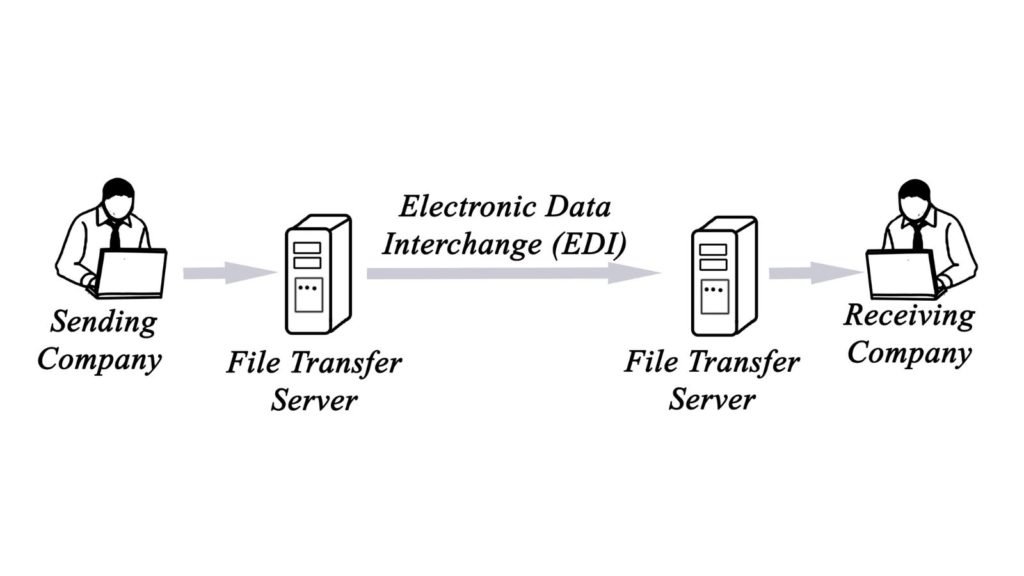
Purchase orders and invoices are two good examples.
Various technical standards for EDI were established, all of which facilitate such exchanges without having to make special arrangements. Some of these standards also address the needs of specific industries or regions.
Then in 1996, the National Institute of Standards and Technology updated the definition of EDI as "the computer-to-computer interchange of strictly formatted messages that represent documents other than monetary instruments."
The implication is that EDI represents a sequence of messages that flow between two parties, either of whom may serve as originator or recipient, without human intervention.
Fast forward to the present, and you will find that EDI solutions now offer a great deal more than the "mere" interchange of documents, in part because your EDI software also integrates to your Microsoft Dynamics 365 Business Central ERP system.
Full-service EDI programs make managing your orders simple and easy, all from within your Business Central system.
Many full-service EDI programs allow you to schedule tasks and processes to run when it's most convenient for you.
You can control how often and when you send and receive transactions from your trading partners, when updates are sent to accounting, and much more. By controlling the frequency and the timing, you can avoid overwhelming or slowing down your system.
Do you want to receive alerts if an exception has been detected?
Do you want to control staffing costs by further automating EDI processes?
Do you want to give your trading partners access to track the status of their own orders?
works with several who meet our high standards and are focused on making your EDI implementation fast and easy while offering flexibility in your EDI approach.
We will help you find the EDI solution that best fits your needs.
Take the next step…
Contact by calling 630-858-7388 or emailing nav@libertygrove.com.
And stay tuned…
Because in Part 2 of this series we will take a deep dive into Microsoft Dataverse, followed by a deep dive into Microsoft Power Apps in Part 3.
Watch the Liberty Grove blog for more great content.
Related Post
Team Up Business Central with Microsoft Teams for Training and Collaboration
Connecting Microsoft Dynamics 365 Business Central to the World and Back | Microsoft Power Apps
Connecting Dynamics 365 Business Central to the World and Back. What is Microsoft Dataverse?

Our first blog in this three-part series laid out our plan to explore three tools that connect your Microsoft Dynamics Business Central (BC) Enterprise Resource Planning (ERP) system to the world and back:
Electronic Data Interchange (EDI)
Microsoft Dataverse
Microsoft Power Apps
In Part 1, we took a deep dive into the features, functionality, value, and rewards of a powerful EDI solution and how it will enhance the connectivity and efficacy of your Dynamics BC ERP software. If you missed Part 1, don't worry. You can still catch up and here. Then you will be ready to continue as we dive into the next tool in the series.
Connecting Microsoft BC to the World and Back…
Part 2 – Microsoft Dataverse
Let's start with the basics because Microsoft Dataverse is relatively new. It is entirely possible that either you have never heard of Microsoft Dataverse, or you have heard about it, but you don't have a clear idea of what it is and why you might want to use it.
What Is Microsoft Dataverse?
Microsoft Dataverse lets you securely store and manage data that is used by various business applications. Microsoft Dataverse data is stored within a set of tables. Each column in the table is designed to store a particular data type, such as name, age, salary, etc. Microsoft Dataverse comes with a base set of standard tables covering the most typical scenarios. However, you can also create custom tables specific to your business and populate them with data by using Power Query. App developers can then build rich applications from this data by using .
Why Use Microsoft Dataverse?
Microsoft Dataverse is a secure, cloud-based storage option for your data. There are many reasons to consider Microsoft Dataverse and many benefits, too. Here are three:
- Easy to manage – Both the data and the metadata are stored in the cloud. You don't have to worry about setting it up because that's already done for you.
- Easy to secure – Users can see data only if you grant them access. Role-based security means that you control access for different users within your company.
- Easy Access to your Dynamics 365 Data – Data from your Microsoft Dynamics 365 applications is also stored within Microsoft Dataverse.
Microsoft Dynamics 365 and Microsoft Dataverse
Various applications use Dataverse to store and secure data. This enables you to build apps using Power Apps and Dataverse directly against your core business data. Since this data is already used within Microsoft Dynamics 365 ERPs, there is no need for any further integration. To elaborate a bit more, consider these Microsoft Dataverse benefits:
- Build apps against your Microsoft Dynamics 365 ERP data – Build apps quickly against your business data within Power Apps or by using the extensible platform that allows developers to:
- Programmatically interact with data and metadata
- Apply business logic
- Create custom connectors
- Integrate with external data
- Manage reusable business logic and rules – Business rules and logic already defined in your Dataverse tables are applied to apps created with Power Apps to ensure data consistency, regardless of how users access the data or which app they use.
- Reusable skills across Microsoft Dynamics 365 ERPs and Power Apps – Users who are skilled in Power Apps or Dynamics 365 can now take advantage of those skills across the Dataverse platform. Creating tables, forms, and charts are now common tasks that can be performed across applications.
Security in Microsoft Dataverse
Whenever you introduce new tools into your system, security is always a concern. That's why it's good to know that the Microsoft Dataverse rich security model protects users' data integrity and privacy while promoting efficient data access and collaboration. You can combine business-unit security, role-based security, row-based security, and column-based security to define the overall access to information that any user will be granted in a Microsoft Dataverse environment.
As you can see…
There's a lot to learn about Microsoft Dataverse, and we're guessing that you probably have at least a few questions. That's why we're inviting you to…
Take the next step…
Contact by calling 630-858-7388 or emailing nav@libertygrove.com.
And stay tuned…
Because in Part 3 of this series, we will take a deep dive into the Microsoft Power Platform, emphasizing the popular Microsoft Power Apps. Keep watching the Liberty Grove blog for more great content.
Related Post
Connecting Microsoft Dynamics 365 Business Central to the World and Back (Part 1 – EDI)

Our first blog in this 3-part series laid out our plan to explore three tools that connect your (BC) Enterprise Resource Planning (ERP) system to the world and back:
Electronic Data Interchange (EDI)
Microsoft Dataverse
Microsoft Power Apps
In Part 1, we took a deep dive into the features, functionality, value, and rewards of a powerful EDI solution and how it will enhance the connectivity and efficacy of your Dynamics BC ERP software. If you missed Part 1, don't worry. You can still catch up and here.
In Part 2, we explored Microsoft Dataverse, which allows you to securely store and manage data that is used by various business applications. Dataverse is easy to manage, easy to secure and provides easy access to your data. If you missed part 2, you can still catch up and here.
Then you will be ready to continue as we dive into the final tool in this series.
Connecting Microsoft Dynamics 365 Business Central to the World and Back…
Part 3 – Microsoft Power Apps
Microsoft Power Apps is part of the that also includes – in addition to the Power Apps – , Power virtual Agents, and . As such, the Microsoft Power Platform is more than the sum of its parts. Because when you connect all four elements together, you can take the next step and connect to Office 365, Dynamics 365, Azure, and hundreds of other apps. Then you have the power to build end-to-end, impactful business solutions to resolve your most pressing business challenges.
It's all about power and connections.
For our purposes today, we are going to focus on the . With Power Apps, anyone can quickly build and share low-code apps. With Power Apps, you can build great solutions to enhance the reach, the value, and the productivity of your existing system. Power Apps allow you to:
- Get started quickly - Empower your team to start building and launching apps right away using pre-built templates, drag-and-drop simplicity, and quick deployment—then roll out continuous improvements as needed.
- Build apps without compromises - Give everyone the power to build the apps they need with advanced functionality previously only available to professional developers— including pre-built AI components.
- Enable extensibility for developers - Provide professional developers the tools to seamlessly extend app capabilities with Azure Functions and custom connectors to proprietary or on-premises systems.
Power Apps drives business transformation, reduces development costs, and increases overall efficiency. A Forrester Consulting Total Economic Impact™ (TEI) study concluded that Microsoft Power Apps results in a:
- 188% ROI (Return on Investment) over a 3-year period
- 74% reduction in app development costs
- 3.2 hours per week average improvement in line-of-business employee productivity
With Power Apps, you will find that apps can be built in hours, not months, easily connecting to data and using familiar Excel-like expressions to add logic. Note, too, that Power Apps can run on Web, iOS, and Android devices.
Ready to connect your Microsoft Dynamics BC ERP to the world and back?
Take the next step…
Contact by calling 630-858-7388 or emailing nav@libertygrove.com.
Related Post
Connecting Microsoft Dynamics 365 Business Central to the World and Back (Part 1 – EDI)
Connecting Dynamics 365 Business Central to the World and Back. What is Microsoft Dataverse?

IF the health of your business is just as important as your own personal health, THEN in much the same way that you would schedule an annual physical with your Primary Care Provider, you should also schedule an annual, if not a semi-annual, business and ERP health check with your Microsoft partner.
Just think of as your ERP system's healthcare provider.
Time to Take the Pulse of Your Business
But before we run any analytics, before we probe your Microsoft ERP, we would want to know if there have been any changes in your business. So, we will check that pulse first.
Your answers to the following fundamental questions about your business will help us determine how to proceed.
- Have there been any significant changes in your business?
- Is your business growing YoY at a rate that is acceptable to you?
- Were you forced to downsize during the Pandemic?
- Have you increased or decreased your staff?
- Have supply chain disruptions impacted your operations?
- Have you made any acquisitions in the past year?
- Have you ventured into any new markets?
- Have you launched any new products or services?
You can see where we are going with this interrogation. Simply stated, changes in your business may impact your ERP software.
Time to Take the Pulse of Your Microsoft Dynamics ERP
Our health check process is the same whether you run or . And once again, before we plunge in, we would ask a series of questions that would guide us in our effort to ascertain how healthy your ERP is. We start with the fundamental three "S" es.
- Speed: Is overall performance up to par, or have you noticed any sluggishness?
- Storage: Do you have the storage capacity to meet your current and future needs?
- Security: Have you had issues with security, any breaches that you're aware of?
Then we would move into functionality.
- Are you taking full advantage of all the functionality available in your NAV or BC system to the best of your knowledge?
- Are there any gaps in functionality that we could help you fill by integrating new applications into your NAV or BC system?
- Are there processes that you would like to automate to gain efficiency and productivity?
Based on your answers, we would know where to begin and how to proceed. By the time we're done, you will be able to rest assure that your ERP is as healthy as it should be.
Here are some additional services that provides that you may not be aware of:
Time to Take the Next Step
Contact by calling 630-858-7388 or emailing nav@libertygrove.com.
Related Post
How Easy Is It to Move Your Microsoft Dynamics ERP to the Cloud?
