

The event is Community Summit 2021. It’s the annual Microsoft User Conference. And this year some sessions will be live and some will be virtual. For those of you who are planning to attend in person, this is where it’s all going to happen, at the exquisite George R. Brown Convention Center in Houston.
Out of an abundance of caution, the Liberty Grove team will be presenting virtually, and we hope you’ll tune in, from Houston, your office, or from home.
The dates are October 12-15.
The agenda over 3 ½ days features 600+ sessions presented by 300+ Microsoft Dynamics experts.
Whether you attend Community Summit 2021 in person or virtually, you’ll come away with real-world tips and tricks, with new insights into advanced strategies around the issues you’re tackling every day in an ever-changing business landscape…regardless of which version of Dynamics you’re running. And you will be able to virtually attend…
6 Liberty Grove Sessions
We’re so excited that this year we will be presenting 6 virtual sessions that we know will be relevant for our Microsoft Dynamics 365 Business Central/NAV clients.
1) On October 12th our own Brad Hearn will present:
How to Architect Your Data for Powerful Business Intelligence
Business Central’s data architecture is built for the purpose of daily operational business support. And sure, for quick reporting, you can plug Power BI into your Business Central table(s). But for systems with years of extensive operational data, architecting it for analysis and reporting will make your Analysts much happier and enable more powerful insights into your information.
The presentation will explain the concepts and design of a Star Schema database for analysis and reporting. You will learn about fact tables to hold your important measures and the associated dimension tables to allow you to easily slice and dice your data.
2) On October 13th Andrew Good will present:
Advanced Production Scheduling
Learn how you can plan routing and labor steps in the plant or factory, and prioritize schedules based on importance, capacity, and resources (people and machines).
3) Also on October 13th, Brad Hearn will present:
How to Target and Track Your Sales Opportunities Right in Business CentralDo you need the full-blown CRM, or will Business Central’s Sales and Marketing capabilities satisfy your needs? This session will walk you through setting up multiple contacts for your customers or potential customers, create targeted marketing campaigns, and tracking the progress of your sales opportunities, all within Business Central.
4) Additionally on October 13th, Andrew Good and Friends will present:
Ask the Experts: Finance & Accounting & Jobs - Dynamics NAV/BCThis is a roundtable where NAV/BC experts will be prepared to answer any BC/NAV questions you might have and provide guidance on your NAV/BC implementation or use.
5) Then, on October 14th Andrew Good will present:
Business Central: Essentials for International Deployments
Learn about the options for getting products put together in Business Central. This session will review the options for Assemblies (aka kitting) and Production Orders. Determine which works best for your situation. This will include an introduction to the Planning Worksheet.
6) And finally, on October 15th, Andrew Good will present:
Deep Dive: Discover the Details of Costing in Business Central
Costing, done right, allows you to know where you are making money or not. Learn how to set up and track costing. Also, learn about “gotchas” and how to manage them!
__________________________________________________
Wow! Andrew and Brad are going to be super busy!
Community Summit 2021 Resources
We at are available to help you navigate your way through the conference materials and choose the sessions that will have the greatest impact on the future of your company.
But if you want to do some research on your own, here are 3 helpful links:
- Main Event Page Summit NA 2021 | Live Microsoft User Conference
- Agenda Page Agenda | Summit NA 2021 | Live Microsoft User Conference
- Registration Page Register | Summit NA 2021 | Live Microsoft User Conference
Take the next step…
Contact by calling 630-858-7388 or emailing nav@libertygrove.com.
Related Post
ERP in the Cloud: A Bright Spot in the Pandemic
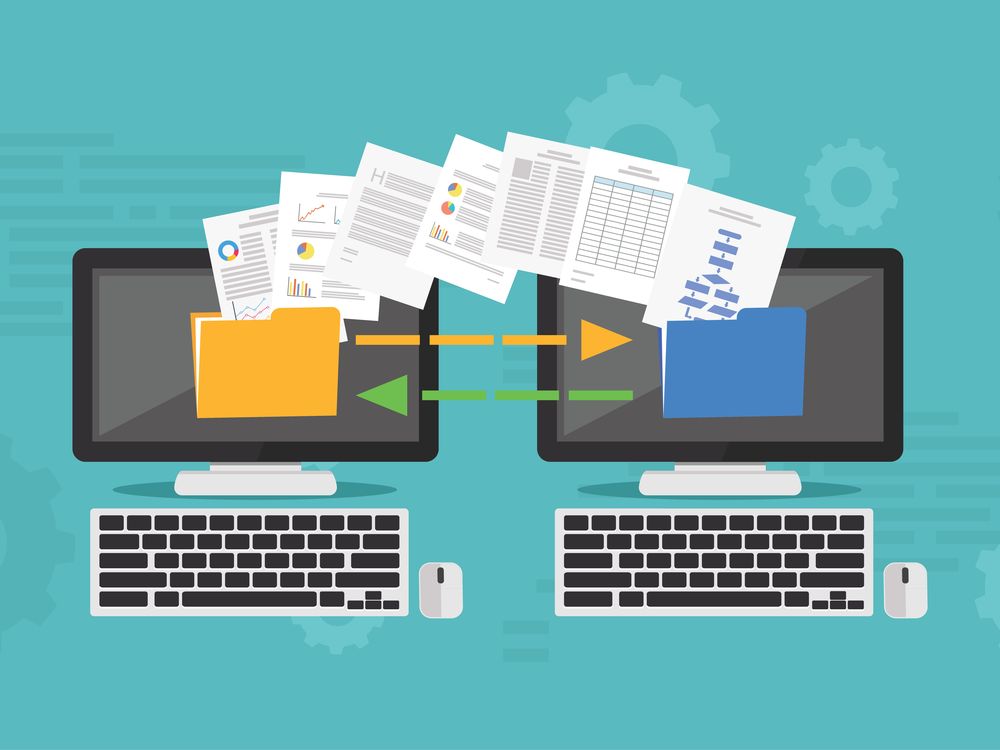
To stay ahead of the curve and ahead of your competition, your ongoing goal is to keep finding new ways to increase productivity, decrease operating costs, and streamline and optimize the work being performed in every department in your company. This often involves adopting new technologies and automating tasks that might otherwise require undue amounts of manual handling.
Here at , we always have our eyes on emerging opportunities for our Microsoft Dynamics 365 Business Central and Microsoft Dynamics NAV clients to achieve those goals.
Introducing the Data Exchange Framework
You can use the Data Exchange Framework to more efficiently and effectively manage the exchange – the import and the export – of electronic business documents, bank files, currency exchange rates, and any other data files with your business partners. In other words, you can use the Data Exchange Framework in new integration features by setting up which data you want to exchange and how.
For example, the format of files for the exchange of data in bank files, electronic documents, and currency exchange rates (among others) with ERP systems vary depending on the provider of the data file or stream and on the country or region. Microsoft Dynamics Business Central/NAV already supports various bank file formats and data service standards. But to provide support for other electronic document formats, PDFs being a good example, you would use the Data Exchange Framework.
Setting the Framework up is a defined step-by-step process. But once it’s done, you will have eliminated the cumbersome, time-consuming manual handling of non-standard formats.
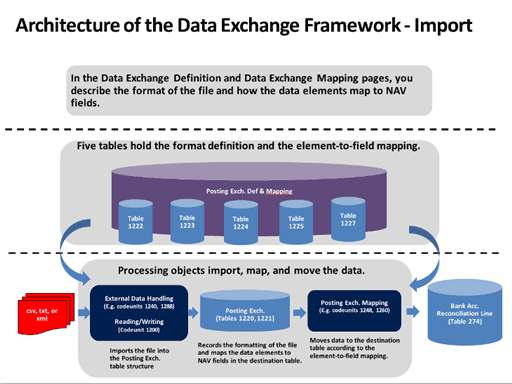
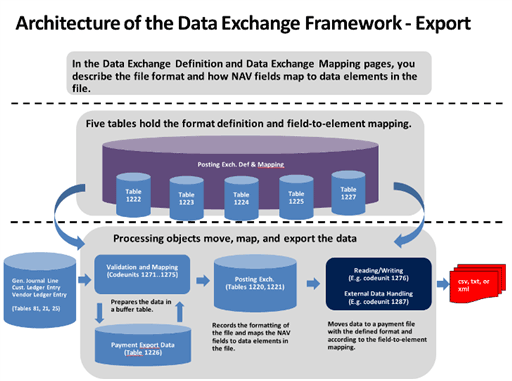
Perhaps the following diagrams that show the architecture of the Data Exchange Framework will help you better visualize how the import and export frameworks work:
WE will set it up for YOU
When you look at the architecture schematics above, you will quickly realize why it would be difficult to explain the Data Exchange Framework in just a few written words. However, the bottom line is that Liberty Grove can explain it to you and set it up for you. That’s what we’re here for!
Therefore, the next step is…
Contact Liberty Grove Contact by calling 630-858-7388 or emailing nav@libertygrove.com.
Related Post
Connecting Dynamics 365 Business Central to the World and Back. What is Microsoft Dataverse?

Let's call it Ransomware 101. To understand what Ransomware is and the risks, we have only to look at the headlines and statistics. Of course, you will also want to know how you can avoid or combat an attack.
Ransomware in Recent Headlines
From Barron's: Ransomware Is Booming. What Business Need to Know2020 Was a Bad Year for Ransomware. 2021 Will Be Worse.
From ZDNET:How Ransomware could get even more disruptive in 2021!Ransomware attacks now to blame for half of healthcare data breaches
From DarkReading.com:Driven by Ransomware, cyber claims rise in number
Ransomware Attacks Show Little Sign of Slowing in 2021
Ransomware Statistics
- In a recent survey of 5,000 IT managers, 51% of organizations represented in the survey reported a Ransomware attack over the last 12 months.
- There will be a Ransomware attack every 11 seconds by 2021.
- The global cost of Ransomware will be $20 billion in 2021.
- Phishing emails cause 66% of Ransomware infections.
- 46% of Ransomware operators impersonate authority figures such as the FBI.
- Only 37% of American businesses are confident that they can stop a Ransomware attack.
How to Avoid and Combat Ransomware Attacks
The vast majority of all Ransomware infections result from 1) unpatched systems, 2) rampant password reuse, and 3) lack of multi-factor authentication.
By employing basic best practices against the three issues above, organizations can make things much harder for attackers and protect against large-scale compromise. It's also essential to plan for the worst, have regular backups for critical systems, and isolate them from the main corporate network, so they are not compromised in the case of a widespread attack.
Organizations should prioritize patching and consider implementing a robust security awareness program to train employees to recognize and report phishing attempts.
Take the next step…
is here to help you protect your network, your systems, and your data from Ransomware attacks. Call us at 630-858-7388 or email us at nav@libertygrove.com. Your safety is our priority.
Related Post
Network, Systems, and Data Security: Old Foes, New Foes
When it comes to cybersecurity, knowledge is your best weapon and your best friend. In other words: Know thine enemy! Unfortunately, there are many enemies. Some are old, and some are new, some have yet to be identified. You cannot be secure until and unless you know what kinds of threats are out there. Who are they? Where might they come from? How will they attack? Where are your vulnerabilities? And perhaps most importantly, how can you protect your network, your systems, and your data?
Old Foes
The “old foes” are the ones we all know about. They are so frequent that they have become household names, such as:
- Ransomware (2005)
- Phishing (1996)
- Malware (1990)
It should be noted that all three of the terms above appear in the Merriam-Webster Dictionary. The dates in parentheses represent the first known use of each word. Clearly, these are very old foes.
New Foes
Even as we learn how to protect against and mitigate the impact of our old foes on our business, new ones are emerging, such as:
- RaaS – That stands for Ransomware as a Service! Yes, we listed Ransomware as an old foe, but RaaS is different. It’s a particularly worrying new trend. Providers operate as a business, selling malware to criminals and saving them the time and effort of having to build it themselves.
- SME Attacks – Cybercriminals are incredibly creative and adaptable. The new trend we’re seeing is that these hackers have realized that SMEs (Small and Medium Enterprises) are easier targets than larger businesses which are more difficult to penetrate. If you’re an SME, watch out!
- Deepfake technology uses AI to create or alter videos to show scenarios that are highly convincing, but that actually never happened. Most SMEs won’t be directly affected by deepfake videos, but they may impact your employees, clients, or partners. So, beware!
Create Awareness to Combat your Vulnerabilities
We can talk about the efficacy of firewalls and antivirus software. We can look at endpoints to spot vulnerabilities. But the most critical way to protect your company from cybercriminals who want to take you hostage or disrupt your business or steal your data for nefarious purposes is to create awareness. Your employees need to understand how important it is not to open emails or click on links from sources they don’t recognize.
You’re in Good Hands with
We can work with you to strengthen your security protocols and protect your network, systems, and data. Just contact Liberty Grove. Call us at 630-858-7388 or email us at nav@libertygrove.com.
Related Article:
Benefits of a Strategic ERP System Review

There's a difference between ERP security and healthy. and both provide advanced security features that protect your ERP software and your business from most internal and external threats, including computer viruses.
We've written extensively about Microsoft Dynamics ERP security. Check out these articles:
So… if your computers aren't infected…
What else could be ailing your systems? Perhaps you were not prepared for the demands of a remote workforce. And that is putting a lot of stress on your IT team as they attempt to support cadres of remote users coping with a set of new issues that have evolved as a result of the COVID-19 pandemic.
- Are remote users adequately protected?
- Are their systems experiencing latency?
- Do they have access to all of the applications and files that they need?
- How do they access your IT team?
- Do they all have broadband at home?
- Do you need to set up "hot spots" for some of your remote staff?
- Are they all acquainted with and following best practices protocols?
Those are just some of the issues that our clients call us about. For many of our clients, these are new system health considerations that they must figure out how to handle. And when offices open up again and employees return, how can you be sure that they're not bringing viruses with them?
Liberty Grove Can Help
- We can scan your system and all of its users to determine where there may be problems.
- We will perform a thorough health check that goes deeper than the everyday problems your IT team is accustomed to handling.
- We can provide best practices documentation that you can share with your users.
We know your system inside out because we implemented it for you! We know every nook and cranny, every third-party add-on, the existence of every silo (hopefully none), every configuration and/or customization that was introduced during and after your initial implementation.
In short…
We are the experts in your Microsoft Dynamics NAV or your Microsoft Dynamics 365 Business Central software system. The only way we're going to beat COVID-19 and the fallout from this virus is by all of us working together. We're here to help you stay on your feet for the long term, especially when the economy opens up and there are surges in demand.
Contact Liberty Grove
Take a load off your mind. Visit to schedule a thorough health check. Call us at 630-858-7388 or email us at nav@libertygrove.com.
Related Article
It's Time for Your Annual ERP System Health Check
What can Extensions do for you and your clients? It’s a long, long list. So, let’s begin at the beginning by looking at what Extensions are. As implied by the name, Extensions allow you quickly and easily tailor, extend, and build applications to fit your Dynamics clients’ specific needs — with little to no code.
The Benefits of Using Microsoft Dynamics 365 Business Central as a Platform for App Builders
Once again, it’s a long, long list. Here are a few of the benefits:
- Experience seamless onboarding
- Use Microsoft Go-to-Market (GTM) Services
- Enhance the business value and increase deal size with existing and new customers
- Achieve greater scale
- Bundle with Power Apps, Power Automate, Power BI, Azure AI, and many others
What Can You Build?
Here are just 2 examples:
- Develop a Vertical Solution – You can create an app for a specific industry using the new, modern development tools and Extensions version 2.0.
- Development of a Horizontal Solution – You can create an add-on app that integrates with Business Central and build an interface based on how your clients want their data to flow between Business Central and your services.
Expedite Your Clients Transition from Microsoft Dynamics NAV to Business Central
Importing business data from NAV to Business Central is a breeze. You can use Extensions 2.0 or Excel. Business Central includes templates for accounts, customers, vendors, and inventory items that you can choose to apply when you import your clients’ data. You can import master data and some transactional data from NAV based on the default configuration package in Business Central. You can work with the package to import and validate the data before you apply the package.
The default configuration package supports 26 tables. Here is a small sampling:
- GL Account
- Customer
- Vendor
- Item
- Gen. Journal Line
- Item Journal Line
- Customer Posting Group
- Vendor Posting Group
- Inventory Posting Group
Get to Know Extensions
If we have piqued your interest and you want to learn, Liberty Grove is your source of up-to-date information about Extensions. Call us at 630-858-7388 or email us at nav@libertygrove.com.
Related Article:
It’s Time for Your Annual ERP System Health Check

The two questions we at hear the most often are:
- Q1-How, do I upgrade my customized system?
- Q2-Should I upgrade, re-implement, or transition to a cloud ERP solution?
Those two questions are related. As we tackle Q1, you will see that they are two sides of the same coin. We will explore both questions in order.
Q1- How do I upgrade my customized system?
In the not so distant past, customizing your ERP software system was a common practice. It was a way to make presumably small changes to your system to meet the maybe 5% of your requirements that out-of-the-box software didn’t provide. Customization, by definition, required custom code. It might have been okay if it was only one minor change. But all too often, it was a slippery slope, whereby one minor change became many. In short…
It might have been a great tactic, that is until it was time to upgrade. And then it became a nightmare.
Q1- How do I upgrade my customized system? Answer: We are not saying that your customized system cannot be upgraded. can execute your upgrade. However, depending on how many customizations were coded in your system, it could be quite complex and costly…even risky. Which is why you might consider a transition to a modern cloud ERP solution such as . Business Central does not require custom code. Business Central eliminates the complexity, cost, and risk that you incur when you’re upgrading a legacy system.
Q2-Should I upgrade, re-implement, or transition to a cloud ERP solution? Answer: Let’s parse this question into your three options.
Should you upgrade? Sure, you can choose to do that. However, considering the points we discussed above, you need to know that there is a tipping point at which it does not make sense to do that based on a cost/benefit analysis. Today, we recognize that every ERP software implementation requires some amount of configuration and personalization. However, we execute those configurations without touching the underlying code.
Should you re-implement? Sure, you can choose to do that. If you love your current system so much that you don’t want to give it up, can re-implement your ERP. That would involve stripping out the custom code that is causing so many problems and using instead some of the new codeless options that are available to replicate the functionality that the customizations previously provided for you. It can be done. The real question is, does it make sense from a cost/benefit perspective.
Should you transition to a cloud ERP solution? In the majority of cases, this makes the most sense from every angle that you would want to consider – cost, complexity, risk, functionality, time, integrations, security… From every one of those perspectives, transitioning to will be your best option. can execute your transition to a cloud ERP solution. Business Central will be more cost-effective, less complex, and less risky. Business Central will provide more functionality, greater security, and ease of integrations. And as far as timing is concerned, you effectively flick a switch, and you are on Business Central.
Take the next step
Call us at 630-858-7388 or email us at nav@libertygrove.com.
Related Article:
Optimizing Your Current ERP System vs. Purchasing New Software
If you haven’t been following the AL story, suffice it to say that there’s a lot you should know about AL development and its future for Microsoft Dynamics 365 Business Central. As usual, we like to begin at the beginning with the basics before probing more deeply into the topic. If you do not find the information you’re looking for about AL, can answer your remaining questions.
What Is AL?
AL quite simply stands for Application Language. It resembles the Pascal language on which it is based. AL is a critical step in the transition from C/AL (Client/server Application Language) to Extensions (aka AL, applications, apps). Thus C/AL is now the legacy code, and AL is the current code used in the realm we exist in today, whereby all new development is created as apps.
What Does AL Do?
AL is used for manipulating data (such as retrieving, inserting, and modifying records) in a Microsoft Dynamics 365 Business Central database, and controlling the execution of the various application objects, such as pages, reports, or code units.
From a technical perspective, AL uses three types of single-line Simple Statements that are executed sequentially and do not alter the flow of execution of code:
- Assignment statements which assign a value to a variable
- Method statements for executing built-in system methods or user-defined (custom) methods
- AssertError statements for testing how your application behaves under failing conditions
From a layman’s perspective, all you really need to know is this:
Most of the functionality needed to meet your business requirements is available as part of the base functionality in Business Central. From there, you will find a lot of readily available apps that fill in the holes. A few common examples are EDI, mobile applications, and document capture. Any remaining gaps can be filled with custom development.
In order of priority, determine how you can meet your needs with base functionality, standard Apps, and custom (aka private) extensions.
IF you have decided to proceed with private extensions, then you need to determine how you will test them, what design supports the test, build the test, build the extension, test the extension, and deploy it. The need for programmatic testing is new to the Business Central/NAV world but has been widely used elsewhere. It allows you to quickly (low cost and low effort) assess how the App will work when new versions of BC are rolled out. Currently, there is a new version each month!
What is the best time to transition/upgrade to Microsoft Dynamics 365 Business Central?
That time is now while you still have access to Business Central 2019 Wave 1 (version 14) that supports both C/AL (legacy code) and AL (current code), which gives you the best of both worlds. Of course, any time is a good time to move off your legacy ERP, enjoy the myriad benefits of a modern cloud ERP platform, and secure a competitive edge for your business. Act now, because support for this version of Business Central will expire in October.
Take the next step…
Call us at 630-858-7388 or email us at nav@libertygrove.com.
Related Article
Maximizing your Development Effectively with Extensions

We tend to think of hackers as dark, hooded, evil-looking, threatening characters. But the reality is that they could just as easily look as non-threatening as the boy or girl next door, or like you and me!
The same is true for some of the tactics they use, which on the face of it look like the real deal. Innocent. Not threatening. Not suspicious. Nothing that makes a warning bell go off in your head.
For example, there has been a wave of increasingly sophisticated email scams, where hackers have accessed corporate email accounts and have requested what appear to be legitimate bank account changes for a vendor. Your finance department probably receives such requests fairly routinely. So why would they suspect that anything is awry?
Despite a worldwide pandemic, cyber attackers haven't stopped poking holes in our defenses. This is especially true because millions of people are working from home where their defenses may not be as airtight as those of their corporate offices.
Bank fraud is so common that no one person or company is immune. And the most common entry point is email, as in the example above.
Another common attack is “phishing.” An attacker might send you an email pretending to be your bank and asking that you validate a recent purchase. When you click on the link in the email, it takes you to what looks exactly like your online bank account, except it is actually a clone controlled by the attacker. You might think you’re at bankofamerica.com but if you look closely, the “from” email address is actually bank0famerica.com (with a zero instead of a lowercase “o”).
Some scammers will even call you and pretend they’re from Microsoft, the IRS, your bank, one of your clients, or vendors. They might even pretend to be from your company’s cybersecurity provider alerting you to a potential breach. Then they persuade you to give out your personal or corporate information to (ironically) protect you. Don’t fall for it.
You need to know that your bank or other financial institution would never ask you to confirm these credentials in an email or an unsolicited phone call. When in doubt, contact your bank, your client, or your vendor directly to see if it was really them.
What Should You Do to Stay Safe?
At a corporate level, recommends the following:
- Monitor third-party vendor connections
- Implement multiple layers of protection
- Use strong authentication methods
- Upgrade your software with the latest security patches
- Encrypt your data
- Use monitoring software to ensure that your current virus protection is running and has not been disabled
- Make sure your firewalls are configured correctly
- Perform regular internal security audits
- Plan for annual updates and improvements
But the single most important thing you must do is to review your security protocols with all your employees, in-house and remote.
- Make sure they are aware of rampant email scams.
- Show them how to check “from” email addresses for anomalies.
- Emphasize the danger in clicking links from unverified sources.
We are all trying to stay safe from a pervasive coronavirus that has been very difficult to control. Computer viruses are insidious, too. And you can’t count on last year’s security measures to protect against this year’s sophisticated hackers.
Liberty Grove Can Help
Our team can review your systems and note any vulnerabilities that we perceive need to be addressed. We can even conduct security training sessions for your employees. Since an ounce of prevention is worth a pound of cure, let us help you establish that ounce of prevention. Call us at 630-858-7388 or email us at nav@libertygrove.com.
Related Article
Health Check: How Is Your ERP System Coping with COVID-19?

Are your remote workers secure? Are you sure?
There are three essential elements to establishing a secure remote workforce:
- Enable remote access to apps
- Manage devices and apps
- Protect corporate resources
What you really want are security solutions that are simple, easy to use, cost-effective. Ideally, these solutions are also flexible and scalable, without overwhelming your IT team. Furthermore, you want solutions that will maintain high levels of service to your customers while enabling your employees to stay productive.
The traditional “perimeter security” approach will not keep your data and people secure in a virtual landscape. That’s why you need to expand your security circle. Using Microsoft tools, you can easily implement this 3-step process:
1. Enabling secure remote access to apps
The goal is to enable secure access to your apps from anywhere. Whether those apps are in the cloud or anywhere else, the process starts with enforcing secure identities for your employees. Microsoft Azure Active Directory (AD) is a control plane for managing all your user identities. AD acts as a comprehensive identity and access management platform. And it is part of your Microsoft 365 subscription. You may already be using it, but if not, this would be a great time to start! Azure AD provides access control by enabling single sign-on to all your apps. With single sign-on, users only need to log in once to access any and all applications. One login[JP1] . One password. They do not need to remember separate passwords for each application account.
2. Managing and securing devices and apps
In most cases, companies are managing a heterogeneous mix of devices along with different “panes of glass” that are required. Microsoft Endpoint Manager brings all those endpoints and apps together under a single pane of glass. Endpoint Manager combines the on-premises capabilities of Microsoft Configuration Manager and the cloud-native benefits of Microsoft Intune into the Microsoft 365 Admin Center. Therefore, you can deploy and manage all your apps and endpoints, extend an on-premises infrastructure with cloud security, and securely enable Bring Your Own (BYO) to access resources. You will also have the ability to automate deployment for any device directly from the manufacturer to the user and automate the provisioning of user settings, configurations, and apps.
For even greater control of mobile devices and the apps that live on them, you can deploy Microsoft Mobile Device Management (MDM) for control at the device level. With MDM, you can use conditional access to restrict access to and from the managed device. There is also Microsoft Mobile Application Management (MAM), which is ideal for BYO scenarios.
3. Protecting corporate resources
Now, and for the foreseeable future, with nearly everyone working remotely, the surface area for protecting your corporate resources is more complicated. Therefore, protecting your data, apps, and endpoints against cyber threats and security risks is more important than ever. Microsoft Information Protection safeguards sensitive data wherever it lives and travels. Microsoft Information Protection provides more than 90 out-of-the-box sensitive-information definitions that you can use to detect common data types like credit card numbers.
There are several other Microsoft security tools that you might consider:
- Microsoft Data Loss Prevention (DLP) for Teams, which automatically blocks messages that contain sensitive information
- Microsoft Cloud App Security, which allows you to monitor and control web sessions in real-time from threats such as the download of sensitive files from an unmanaged device
- Microsoft Office 365 Advanced Threat Protection (ATP), which protects your organization from phishing and malware attacks, while also helping your security teams be more productive through the automation and AI capabilities inherent in Office 365 ATP.
No amount of protection is too much!
Take the next step…
Contact for more information about Expanding your Security Circle to Include Remote Workers. Call us if you require assistance to deploy any of the Microsoft security tools described above. Email us to learn about the security features built into Microsoft Dynamics NAV and Microsoft Dynamics 365 Business Central.
Call us at 630-858-7388 or email us at nav@libertygrove.com.
Related Article
Warning! Hackers Are Increasingly Sophisticated – Are Your Defenses Keeping Up?
