

The international implementation team consists of fully certified employees and associates who possess a minimum of ten years of experience with Microsoft Dynamics 365 Business Central/NAV. Many of them have written books on Business Central/NAV, taught courses, and/or assisted Microsoft in problem resolutions around the globe.
The Liberty Grove team has impressive credentials. That’s a fact. But how do you as a client benefit?
#1 - Country page A page called “Country/regional availability and supported languages” appears on a Microsoft Dynamics 365 Business Central website. On it are listed the countries/regions where Dynamics 365 Business Central is available and which languages are supported. It also indicates whether localized versions are available, and in those cases where Microsoft has not delivered a localization, partners can build localizations using translation and localization apps that are published on Microsoft AppSource. These apps are built on top of the international (W1) version of Dynamics 365 Business Central. The list is long. It begins with Australia and ends with Vietnam. An international team can help you take advantage of these translated/localized versions. If your business is global, Liberty Grove can help you use these versions to your advantage.
#2 Resources Having the global resources you need for your business can be critical to your success in foreign markets. Liberty Grove can rally boots on the ground abroad for you, without significantly increasing your T&E (Travel & Expenses) costs.
#3 Etiquette Etiquette is not “one size fits all.” An international implementation team can bridge the etiquette gap. What passed as acceptable language and behavior in one country may be unacceptable in another.
#4 Global Expansion If you are considering global expansion, the Liberty Grove team can assist you in that process and ensure that your Microsoft Dynamics ERP is up to the task.
Take the next step | passez à l'étape suivante
Contact the Liberty Grove Software international implementation team for more information.
Call us at 630-858-7388 or email us at nav@libertygrove.com.
Related Article
Expanding your Security Circle to Include Remote Workers (wherever they may reside)

In some ways, it is a small world. And yet in other ways, it is a rather big world. For global companies, which are often comprised of multiple legal entities that potentially traverse all 24 time zones, there are numerous challenges. We are going to take a look at 3 of those and provide solution options.
Establishing a coordinated setup approach
There are a variety of ways to accomplish this, ranging from no control, which effectively means that you will manage your setup manually, to fully automated. There are also layers of data that the controls can be applied to. A few examples are setup, master data, and transactions.
The route you take will be determined by the decisions you make. For example, a decision might be made to synchronize the setup but allow the various operating companies to manage their own master data, such as their customers, vendors, and items.
Or, you might decide to manage both the setup and master data centrally, while allowing the various entities to manage their own transactions. There are numerous permutations, and a lot will depend on your unique corporate structure.
For expert advice, you can always contact here at . Call 630-858-7388 or shoot an email to nav@LibertyGrove.com.
Database synchronization options
- Multiple companies in one database
- Multiple companies in multiple databases and/or tenants
- Manual
Manual is rarely the best option and rarely the option that we would recommend. We do, however, recognize that, based on your corporate structure, that might still be the best option for you.
Again, for expert advice, you can always contact here at . Call 630-858-7388 or shoot an email to nav@LibertyGrove.com.
Technology options
- Microsoft Dynamics 365 Business Central standard APIs
- Microsoft Dynamics 365 Business Central custom APIs
- Configuration packages
Using the standard APIs available in Microsoft Dynamics 365 Business Central is often the best and the easiest option. Setting up custom APIs in Microsoft Dynamics 365 Business Central is the next best option, and you may indeed have good reasons to choose that route.
Using configuration packages is an option, but it is far from ideal.
Again, for expert advice, you can always contact here at . Call 630-858-7388 or shoot an email to nav@LibertyGrove.com.
We look forward to hearing from you!
Related Post
Benefits of Working with an International Implementation Team
It's almost time for Community Summit 2020 and the excitement is building. Many of our team members and clients will be attending the virtual conference this year.
Scouring the agenda and figuring out what session(s) to attend can be challenging as there are so many worthwhile sessions to watch.
I'm Andrew Good, President, and CEO at , and I wanted to share with you the five sessions and two roundtables my team will be presenting during Community Summit 2020 for Microsoft Dynamics 365 BC/NAV.
To help you quickly find those sessions and roundtables, I have taken the liberty (pun intended!) to share all the sessions below with links so that you can add them to your schedule easily.
Sessions
Title: Business Central Upgrade: How do I Move from NAV to Business Central
Presenter: Andrew Good, President and CEO Liberty GroveDate: Thursday, October 08Time: 10:40 AM - 11:30 AM CDTCPE Credit: This session will be available for CPE credits pending completion of the session survey post-event.Brief Description: What are the options to move from NAV to BC? There are a lot of different ways to approach an upgrade to BC, so let's discuss options and the pros & cons of each approach. Here you will learn how you can move forward with either a lightly or heavily modified NAV system. We will discuss some of the challenges of migrating to the cloud.
Title: Business Central – Holes in Manufacturing and How to Fill Them
Presenter: Andrew Good, President and CEO Liberty GroveDate: Thursday, October 08Time: 4:30 PM - 5:20 PM CDTCPE Credit: This session will be available for CPE credits pending completion of the session survey post-event.Brief Description: We all know there will be gaps in functionality between your customer's requirements for manufacturing and what Business Central provides. But how do you bridge those gaps? We'll discuss how to use extensions, both private and public (aka Apps), to provide the additional functionality you need. We'll also cover how to leverage add-ons and embedded IP (private extensions) through a case study focused on meeting a company's manufacturing requirements.
Title: Business Central – Costing
Presenter: Andrew Good, President and CEO Liberty GroveDate: Friday, October 09Time: 9:30 AM - 10:20 AM CDTCPE Credit: This session will be available for CPE credits pending completion of the session survey post-event.Brief Description: How the right choices can meet financial and operational requirements. You can capture your cost elements and incorporate them into your inventory costs. We will review different approaches for incorporating fixed and variable costs into your inventory.
Title: Foreign Currency - The Basics
Presenter: Anantha Subramanya, Senior Business Analyst and Project ManagerDate: Friday, October 09Time: 12:30 PM - 1:20 PM CDTBrief Description: This session provides a review of:
- How foreign currencies are setup,
- How to assign currencies to customers, vendors, and bank accounts
- How these rates flow into Sales and Purchase documents,
- How the rates can be overridden as needed and
- The related periodic activities
Title: Intro to International Purchasing and Sales
Presenter: Anantha Subramanya, Senior Business Analyst and Project ManagerDate: Friday, October 09Time: 1:30 PM - 2:20 PM CDTBrief Description: We will dive into the flow of materials from their overseas factory to a freight forwarder, port, ship, domestic port, and delivery to the warehouse/factory.
Roundtables
Roundtable Title: Medic Roundtable: Technical
Speaker and Panel: Dmitry Katson Microsoft MVP Liberty Grove and AJ Ansari COO
DSWi, and Steven Chinsky Tigunia
Date: Thursday, October 08Time: 1:30 PM - 2:20 PM CDTBrief Description: Join the BCUG/NAVUG experts as they dive into the latest technical topics and share recent obstacles. Bring your own questions and get answers!
Roundtable Title: Medic Roundtable: Supply Chain & Costing
Speaker and Panel: Tom Blaisdell, Sr. Support Escalation Engineer Microsoft, Andrew Good President and CEO Liberty Grove, Lewis Rosenberg IT Manager Mars Fishcare, Steven Chinsky Tigunia, Kim Dallefeld Managing Member Dallefeld Consulting
Date: Thursday, October 08Time: 12:30 PM - 1:20 PM CDTBrief Description: Join the BCUG/NAVUG All-Star's in a roundtable discussion on Supply Chain topics and Costing. Bring your questions and get them answered by the experts!
Learn more about Liberty Grove Software
I know that many of you are looking for a smooth upgrade path to Business Central from NAV. I'd love to discuss more about your upgrade plans. I'll also be more than happy to answer any questions you might have about your Microsoft Dynamics NAV/BC system.
You can reach me by calling 630-858-7388 or by emailing me at agood@libertygrove.com.
Related Posts
You Have Upgrade Questions. We Have Upgrade Answers.

There is no easier way to say this: A remote workforce necessitates a remote training and professional development program. But that is not a leap. It is a mode that, for the most part, we are already quite familiar with, since well before the dictates of the current pandemic.
It might surprise you to learn that many IT professionals have degrees in computer science acquired through online courses.
The technology that’s available today for remote teaching and learning means that whatever your training and professional development program looked like before COVID-19, you will be able to easily move it online, seamlessly. The only difference is that it will cost less because you won’t incur T&E fees for your trainers and speakers.
Now you’re probably saying: “That’s great for a company’s in-house training and professional development program. But…”
What about Microsoft Certification Exams?
A quick search on the Internet revealed the following:
Dated 2/29/20: You can take any Microsoft Certification role-based or fundamentals exam at Pearson VUE online, and in the comfort of your home or office. Online proctoring exam delivery maintains the integrity of the exam results by monitoring your exam experience by a proctor via webcam and microphone.
Find out more here: https://docs.microsoft.com/en-us/learn/certifications/online-exams
Dated 9/1/20: Fundamentals and role-based certification exams that are a part of the USD15 exam* offer for job seekers must be taken online through PSI, Microsoft’s exam delivery partner for this offer. Taking an exam online provides a completely digital experience in the comfort of your home or office while maintaining the integrity of exam results by being monitored by a proctor via webcam and microphone. Online exams with PSI are available in most countries and in English, Japanese, Korean, Simplified Chinese, French, Spanish, and German.
Find out more here: https://docs.microsoft.com/en-us/learn/certifications/online-exams-psi
*USD15 exams cost only $15USD (!) and are specifically offered to Microsoft professionals who are unemployed or furloughed due to COVID19. Find out more here:
https://docs.microsoft.com/en-us/learn/certifications/skillingoffer?WT.mc_id=gsi
Now you’re probably saying: “That’s great as far as the availability of online Microsoft certification exams. But…”
What Other Training Is Available Online?
A somewhat random, quick search on the Web revealed that online training and/or certifications exams are available:
- Cisco
- Azure
- OSHA (Occupational Safety and Health Administration)
- AMA (American Management Association)
- SBA (Small Business Association)
- Sandler Systems
- HP (Hewlett Packard)
- AWS (Amazon Web Services)
And that’s just what I found in the first 2 minutes of searching.
Remote Training Is Not a Problem; It Is an Opportunity
The widespread of availability of remote training, often at reduced pricing, is an opportunity for you to advance your career. Online programs mean you can study when it’s convenient for you. All you need is a laptop and an Internet connection. If there are classes you have always wanted to take but couldn’t because they were always scheduled during your workday, now is the time to take them.
As the United States records 7 million cases of COVID-19, of which 207,000 were fatal, perhaps these remote training and professional development programs are the only silver lining.
Need Help Developing a Remote Training and Professional Development Program?
Liberty Grove Software is here to help. Call us at 630-858-7388 or email us at nav@libertygrove.com.
Related Article
Expanding your Security Circle to Include Remote Workers

Business Central + Microsoft Teams
If Microsoft Dynamics 365 Business Central is your ERP application, you now have the ability to “link” Business Central with Microsoft Teams for the ultimate collaboration experience. What could be better?
Microsoft Teams is the hub for collaboration in Microsoft 365. Now, you can make decisions faster as a team by bringing your business data from Business Central into Microsoft Teams. The potential scenarios for using Business Central data with Teams are endless. It could be as simple as facilitating a conversation among your coworkers, as necessary as bringing key roles together to work on a time-sensitive project, or as critical as preparing cross-department financial budgets.
The Business Central app for Teams streamlines every meeting, every conversation, every group project, every cross-department, cross-roles endeavor. Because now you can act on Business Central data without leaving Teams.
The new Business Central app for Teams just became available in preview this month (October 2020). It offers features such as:
- The ability to paste a link to any Business Central record into Teams chat, and it will expand that into a compact card that you can then share with your coworkers.
- The ability to view the full card details in a window within Teams. This includes embedded content such as FactBoxes and charts.
- The ability to edit fields, initiate workflows and take action from the window without having to switch apps.
What’s more, the Business Central app for Teams is designed to work with any customizations you may have made to Business Central. Regardless of your role, your industry, or your geography, you can paste a link to almost any business entity that you work with.
If you want the ability to look up and access Business Central data directly from within Teams, here’s how to get started.
You can install the Business Central app from the Teams store. You can search for the app from your Teams client. An administrator can then make it available to all users based on the organizational policies specified in the Microsoft Teams administration center.
Team Member licenses are also an effective way to grant users read access to BC.
Business Central + Microsoft PowerApps and PowerAutomate
There are even more ways to enhance Business Central as a collaboration platform. For example, the integration of Business Central with PowerApps and PowerAutomate allows you to extend the application's reach to anyone with a phone and/or tablet. It is a great way to get information into the right hands quickly and get updates into Business Central just as quickly.
To test that hypothesis at Liberty Grove Software, we developed a proof of concept that allows users to check inventory availability and details. It took 20 minutes to develop the App and it was immediately available to run on our phones. Definitely, a great way for users to get key information quickly and update certain fields in Business Central, too.
Learn more and get help
Liberty Grove Software has all the information you need to get started. And we are here to help. Call us at 630-858-7388 or email us at nav@libertygrove.com.
Related Article
AL Development: The Future for Microsoft Dynamics 365 Business Central

The key to getting the most out of your ERP software system is to be sure that it’s optimizing your processes and conducting a periodic strategic review with your software provider. A strategic review is a step above the basic care and feeding that your ERP software solution also requires.
To understand the benefits of a strategic review, we will look at two possible scenarios.
1. Your Business Is Static Especially in these very trying times, if your business is static, i.e., it is holding its own, you may feel relieved. But that does not mean you are happy. Clearly, you would prefer to see some year-over-year (YoY) growth, be it in sales, gross revenue, or net profit (or all three!).
As your Microsoft Dynamics ERP partner, can examine your operations and processes to find strategic areas that could be tuned up and better optimized, allowing you to infuse a few more dollars into your bottom line and show an uptick in your overall business, or in certain areas of your business.
For example, let’s say that you are currently using a 3rd party application for warehouse management. Perhaps warehouse management wasn’t included in the original implementation, for whatever reason. That 3rd party warehouse management system (WMS) is costing you anywhere from $100-$500 per user, per facility, per month. Let’s assume you have five users in 1 facility, which is average for a small company. That’s $500-$2500 per month per facility. Annually that’s $6,000 at the low end and $30,000 at the high end.
Get rid of that 3rd party WMS in favor of the WMS capabilities already available in your Microsoft Dynamics ERP, and you have just added anywhere from $6,000 to $30,000 to your bottom line.
Congratulations!
2. Your Business Is Evolving
In this scenario, despite the trying times we live and work in, and despite the pressures most businesses are experiencing, your business is not just turning a profit; it is registering year-over-year (YoY) growth. Let’s say that your sales have risen. Your gross revenue has risen, too. But your margins are smaller, so your net profit is showing only a slight uptick. You could increase your prices, although that might mean your prices are no longer competitive, and you would lose that edge. Alternatively, you could cut costs, which would increase your profit margins.
That’s where a strategic review of your system with , your Business Central/NAV partner, comes into play.
For example, we would look at strategic areas where cost-cutting is often possible. Generally, tasks are currently being handled manually that can easily be automated or set up with workflows, such as the AP approval process. Payments can be made via EDI or EFT. Inventory management materials resource planning (MRP) can be completely automated, too. And these are but a few of the areas we would review to find cost savings that would further improve your margins and your bottom line.
Take the next step
If we have piqued your interest and you want to learn about the benefits of a strategic review, contact Liberty Grove. Call us at 630-858-7388 or email us at nav@libertygrove.com.
Related Article:
Benefits of Working with an International Implementation Team

We take care of our pets with regular checkups, and we feed them on a regular basis. We take care of our cars with regularly scheduled tune-ups and tire rotations. We change the oil and the filters periodically, too. Your Microsoft Dynamics 365 Business Central/NAV system deserves at least the same attention.
The Care and Feeding of Your Microsoft Dynamics 365 Business Central/NAV System
Working with , we can set up a reasonable schedule for the care and feeding of your Microsoft Dynamics 365 Business Central/NAV system. Here are several areas that deserve attention. It’s not a complete list, but it’s a good start.
Security
- Have you updated your security protocols lately? If not, it’s time to do that now!
- Have you checked your end-point vulnerabilities lately? Let’s do that now, too!
Performance
- Has your system been sluggish lately? Let us take a look at why.
- Is your need for storage increasing? What is your current capacity versus your near-term and long-term projections? Let’s be proactive and add capacity now rather than being reactive and wait until it’s an emergency.
- Are there 3rd party apps that don’t talk to or integrate with your primary Business Central/NAV ERP system? Let’s integrate into BC/NAV and bring them into the fold.
- How much of your daily, repetitive tasks are currently being handled manually? Let’s take a look at how automations and workflows can eliminate those repetitive tasks and make you more efficient.
- What percentage of the features and functionality available to you in Microsoft Dynamics 365 Business Central/NAV are you currently using? The odds are that you’re not taking advantage of a lot. Now would be a great time to look at what’s available versus what you’re using. Would the features that you’re not using be helpful if you turned them on? Let’s get on that right away.
- There are, as mentioned above, hundreds of options for everything from invoice automation, point of sale solutions, warehouse management, FTE budgeting, web-based EDI, barcode and RFID tracking…you name it, everything from soup to nuts.
- It's easier than ever before to purchase these ISV applications because they're listed on Microsoft's commercial marketplaces, either Azure Marketplace or AppSource, or both. Microsoft AppSource is for business solutions, such as software-as-a-service (SaaS) applications, and also apps that extend directly into Dynamics 365, Microsoft 365, and the Microsoft Power Platform. AppSource consulting services are professional services offerings that help customers get started with or accelerate their usage of Dynamics 365 and Power BI.
- Best of all, many ISVs now offer QuickStart packages that accelerate the implementation and integration of their applications into your core ERP. You don't need a programmer to configure the software. And you don't need to tamper with the underlying code, which inevitably caused problems down the road.
- Web Client that allows access to Microsoft Dynamics 365 Business Central from any browser
- Assembly Manager for kitting and light manufacturing fully integrated into your supply chain
- Improved Integration with SharePoint, allowing you to share information with people both inside and outside your organization
- Performance Improvements from tighter integration with SQL Server
- Reporting Enhancements with next-generation RDLC
- Improved Cost Accounting and cash flow forecasting capabilities
- New Supply Planning Parameters for greater control over the planning engine
Storage
Silos vs. Integrations
Automations and Workflows
Features and Functionality
Optimization
All of the above fall into the category of optimization!
Take the next step
Contact Liberty Grove, your partner, for a fully optimized, fine-tuned Dynamics ERP solution. Call us at 630-858-7388 or email us at nav@libertygrove.com.
Related Article
Benefits of a Strategic ERP System Review

The reality is that even the best, even the most expensive Enterprise Resource Planning (ERP) software system on the planet, will not meet 100% of your clients' requirements right out of the box. More than likely, the out of the box system will cover 90-95 percent of their needs.
There are a few options for covering that last 5-10 percent. 1) You can "configure" the software with APIs and other tools. 2) You can "customize" the software by amending or adding to the underlying code. 3) You can find an Independent Software Vendor (ISV) that has precisely the features and functionality you're looking for, and you can then integrate that application with your core ERP.
Given that there are literally hundreds of ISVs offering applications specifically designed to integrate with Microsoft Dynamics ERPs, the ISV route is the most straightforward route to get your client 100% of what they need.
You may have hesitated to go this route in the past, perhaps because it was hard to find the right ISV, or probably due to the time, it might take to implement these ISV apps' integration. But today? Today that's not the case, for a few reasons.
All you have to do is leverage ISV solutions to meet all of your customers' requirements.
Here is what a typical ISV listing on Microsoft AppSource looks like:
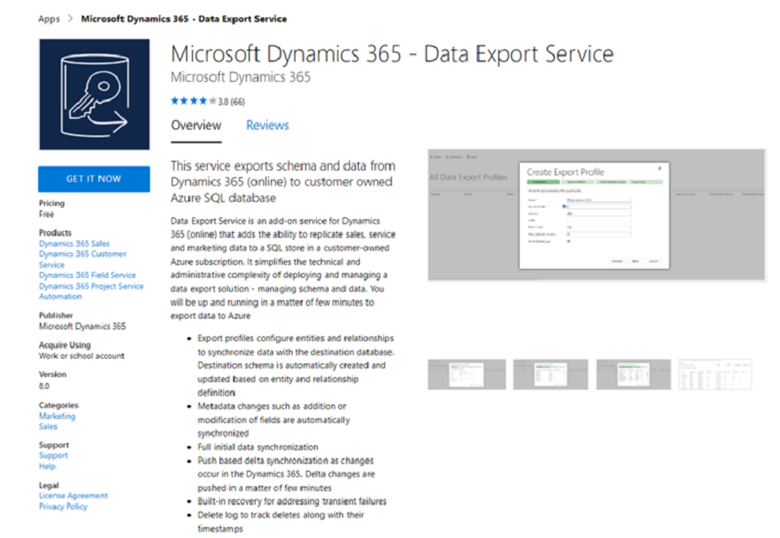
The commercial marketplaces and the proliferation of ISV offerings are a huge boon for Microsoft Dynamics ERP partners.
Take the next step
If you have any questions or need assistance, call us at 630-858-7388 or email us at nav@libertygrove.com.
Related Post
Maximizing your Development Effectively with Extensions

When I sat down to write this blog about Supply Chain Management, I thought about the 1987 Steve Martin movie: Planes, Trains, and Automobiles. It's a comedy of errors that, in a way, relates to our topic because it illustrates how difficult it can be just to get from Point A to Point B when something along the line goes wrong.
What Is a Supply Chain?
In commerce, a supply chain is a system of organizations, people, activities, information, and resources involved in supplying products or services to consumers. Supply chain activities involve the transformation of natural resources, raw materials, and components into a finished product that is delivered to the end-user.
Supply Chain Models
There are a variety of supply-chain models that address both the upstream and downstream elements of Supply Chain Management (SCM). The SCOR (Supply-Chain Operations Reference) model became the cross-industry de facto standard defining the scope of Supply Chain Management. SCOR measures total supply chain performance. It is a "process reference model" for Supply Chain Management, spanning from the supplier's supplier to the customer's customer. It includes delivery and order fulfillment performance, production flexibility, warranty and returns processing costs, inventory and asset turn, and other factors in evaluating the overall effective performance of a supply chain.
Positive and Negative Factors Impacting SCM
On the plus side, the Internet has been a huge boon for Supply Chain Management, mainly because customers can now directly contact distributors. This has reduced the length of the chain to some extent by cutting down on middlemen. This also results in cost reductions and greater collaboration.
On the minus side, we have seen all too clearly how an event like a pandemic can wreak havoc on established supply chains.
And then there's regulation, whether it's increasing demand for traceability or security. Over the past 20 years, there has been a shift towards more traceable supply chains across most industries – food, pharma, medical device, manufacturing of all stripes.
Security has also become particularly important in recent years. As a result, supply chains are often subject to global and local regulations. In the United States, several major regulations emerged in 2010 that have had a lasting impact on how global supply chains operate. These new regulations include the Importer Security Filing (ISF) and additional provisions of the Certified Cargo Screening Program.
Supply Chain Integrations
recommends integrating your supply chain with your Enterprise Resource Planning (ERP) system. Integration opens the door for process improvements via applications such as Electronic Data Interchange (EDI). EDI is the computer-to-computer exchange of business documents in a standard electronic format between business partners. By moving from a paper-based exchange of business documents to one that is electronic, companies enjoy significant benefits such as reduced cost, increased processing speed, reduced errors, and improved relationships with business partners.
Another key integration is process automation. With Microsoft Power Automate, you can streamline and automate repetitive tasks and paperless processes, so you can focus your attention where it is needed most. Build time-saving workflows into everything from individual tasks to large-scale systems with seamless integration using hundreds of pre-built connectors. With Microsoft Power Automate, you can also enable everyone to build secure workflows with a low-code, no-code guided experience to automate mundane everyday tasks with robotic process automation (RPA).
Take the next step and learn more about these opportunities. Call us at 630-858-7388 or email us at nav@libertygrove.com.
Related Post
Benefits of a Strategic ERP System Review

I wouldn’t go quite so far as to say that it’s a silver lining in this devastating pandemic. However, due to the pandemic, we have learned a lot about doing business and finding ways to continue our operations, all in the face of COVID-19.
If your Enterprise Resource Planning , then everyone in your organization can have remote access to it any time and from anywhere, so that they can work remotely and not skip a beat. Of course, UPS delivery drivers cannot work remotely. Amazon pick and pack employees cannot work remotely. Nor can the team on the shop floor of a widget manufacturing company.
But the executive and administrative folks can work remotely and do!
As a result, enterprises have learned how to work with a significant percentage of their teams that do not report to the office every morning. This has broken down certain barriers and created new opportunities. For example, less office space is required, and some of those overhead costs can be reduced. We can hire highly talented people who do not reside within a commuting distance from our offices. They could be anywhere, even outside of the U.S. Now, I’ve heard people say: What about the time zone differences? Well, as a partner, we work with Microsoft teams across the globe, and we have easily accommodated those differences. It’s easier than you might think.
The fact is that even after the pandemic, many, if not most companies, will continue to have a sizable remote staff. It will be the new normal.
What if your ERP is NOT in the cloud?
If that’s the case, then it’s high time for you to consider moving your ERP to the cloud. has been the top choice for ’s clients to do so. Let’s take a quick look at the benefits of upgrading to Business Central.
When you move to Business Central, you will be able to take advantage of new functionality, such as:
We would love to tell you more about it.
Take the next step, passez à l'étape suivante, to beat the restrictions of a COVID-19 workplace.
Contact Liberty Grove Software for more information.
Call 630-858-7388 or email nav@libertygrove.com.
Related Article
Expanding your Security Circle to Include Remote Workers (wherever they may reside)
