
Businesses send information and documents, such as sales and purchase orders and invoices, by email every day. Now, you can make that process easier by connecting one or more email accounts to , allowing you to send documents without opening an email application.

Furthermore, you can compose each message individually with essential formatting tools like fonts, styles, and colors. You can also add attachments of up to 100MB. Last but not least, you can now set up report layouts that include only the key information you want to include from documents within Business Central (BC).
is excited to share these new capabilities with you.
The Business Value
These new features provide email capabilities that are reliable and easy to set up. While email is still by far the most common way that businesses communicate with customers and vendors, the technology stack beneath email has evolved, as have the expectations regarding what can be sent from where and how. Those expectations can be better met with the advanced email functionality now available for Business Central.
Features Overview
BC's advanced email functionality lifts your email capabilities to the next level by embracing the capabilities and security that many modern email providers offer. Entirely new scenarios have been enabled, such as added support for multiple accounts, distribution groups, and improved attachment management. The experience is enhanced even further by adding support for workflows and preview capabilities, which unlock further opportunities for businesses to communicate with the outside world.
Here are a few examples:
Assigning Email Scenarios to Email Accounts
Email scenarios are processes that involve sending a document, such as a sales or purchase order, or a notification, such as an invitation to an external account. You can use specific email accounts for specific scenarios. For example, you can specify that all users always send sales documents from one account, purchase documents from another, and warehouse or production documents from a third account. You can assign, reassign, and remove scenarios whenever you want. A default email account will be used for all scenarios that are not assigned to a specific account.
Setting Up Reusable Email Texts and Layouts for Sales and Purchase Documents
You can set up reports that include selected key information from sales and purchase documents in the texts of your emails. For example, you can set up the Sales - Invoice report for posted sales invoices. Once you go through the set-up procedure, each time in the future that you choose, for example, the Send action on the Posted Sales Invoice page, the email body will contain the document information of that report and the standard styled text according to the report layout previously selected.
Setting Up a Substitute Sender Address on Outbound Email Messages
If you are using the legacy SMTP settings, you can use the Send As or Send on Behalf capabilities from Microsoft Exchange to change the sender address on outbound messages. Business Central will use the SMTP account to authenticate to Exchange but will either substitute the sender address with the one you specify or amend it with "on behalf of."
Setting Up Document Sending Profiles
You can set up a preferred method of sending sales documents for each of your customers so that you do not have to select a sending option, such as whether to send the document by email or as an electronic document, every time you send a document.
Liberty Grove can set up these new features for you. That's what we're here for!
Therefore, the next step is to… Contact by calling 630-858-7388or emailing nav@libertygrove.com.
Get More from Business Central: Use the Data Exchange Framework

From grapes to wine, from wheat to bread, from tomatoes to tomato sauce – the Food & Beverage Industry is huge. Here are a couple of random factoids:
- Food distribution alone in a $400 billion industry in the United States.
- Food manufacturing in the state of Texas alone is a $16 billion industry.
We don’t often stop to think about where the food on our table and in our lunch boxes comes from, or how it’s harvested, processed, packaged, and distributed. How it reaches the shelves of the corner market or the supermarket. We eat, drink, and make merry without giving any of those considerations a second thought.
Beyond that, we definitely don’t stop to consider the computer software that’s used by food and beverage manufacturers and distributors. Except perhaps for those of us who work in the technology industry. Because we know that enterprise resource planning (ERP) software is the wizard behind every Food & Beverage curtain.
The Wizard of NAV
“Every company has its strengths. For that's manufacturing and distribution, with a special emphasis on food and beverage. And Microsoft Dynamics NAV.”
So let’s take a moment to look at Microsoft Dynamics NAV and what makes it the ERP software solution of choice for so many companies in the .
- Powerful, highly adaptable user interface (UI)
- Integration with other Microsoft products
- Advanced business intelligence (BI)
- Diverse third-party add-ons
- Ease of customization
When selecting an ERP vendor, one of the most important factors is the size, resources, and staying power of that vendor. No company wants to go through the effort and expense of installing a new ERP system only to have the vendor go out of business six months later.
And while all of Microsoft’s 4 ERP systems have staying power, when we look at how many customers worldwide use Microsoft Dynamics to run their businesses, NAV tops them all by huge margins. With boasting 110,000 and Microsoft Dynamics GP coming in at less than half of that with 47,000.
The Wizard of NAV Is DynamicsFoodERP
Liberty Grove has always focused on manufacturing and distribution, with nearly 90 % of its clients in one or both of these disciplines. In recent years, our company has increasingly worked with food and beverage clients. In support of this, we began offering enhanced food and beverage functionality using DynamicsFoodERP, a leading food and beverage add-on for Microsoft Dynamics NAV.
The Wizard of NAV Is DynamicsFoodERP
Liberty Grove has always focused on manufacturing and distribution, with nearly 90 % of its clients in one or both of these disciplines. In recent years, our company has increasingly worked with food and beverage clients. In support of this, we began offering enhanced food and beverage functionality using DynamicsFoodERP, a leading food and beverage add-on for Microsoft Dynamics NAV.
DynamicsFoodERP is the ERP Solution for the Food and Beverage IndustryPerfect for medium-sized companies with many users, DynamicsFoodERP allows you to manage and plan production for one or many plants using a single database. Get all the power you need to keep track of financials, cut costs and optimize all the value in your supply chain. Manage recipes, product specifications, quality checks, labeling, logistics, transportation, and distribution. DynamicsFoodERP is perfect for regional, national or international operations and handles multiple currencies. With a custom configuration designed for the way your company works, DynamicsFoodERP delivers advanced features and expert implementation. Gain full visibility of sales orders, raw materials and production schedules in near-real time. Or use DynamicsFoodERP Essentials for a standard category-based configuration and get up and running quickly, with a smaller upfront investment. Either way, as your needs change, DynamicsFoodERP is there to help you manage.
Liberty Grove Is Your DynamicsFoodERP Partner
Eat, drink, and make merry with us. Our team of Food & Beverage specialists is waiting to chat with you.
We have 2 phone numbers and 1 email address to give you. Chicago 630-858-7388, Toronto 416-646-8484 and nav@libertygrove.com.

Microsoft has released a new white paper entitled Dynamics NAV costing Error Detection and Data Correction.
This white paper discusses common inventory costing issues and how you can correct erroneous data after inventory costing issues have been identified.
This document focuses on the data and the fields that typically cause problems in the cost adjustment process. This is meant to be a guide instead of a complete manual. For more detailed information about costing in Microsoft Dynamics NAV, see this earlier costing white paper for Dynamics NAV 5.0. Though written for an older version of NAV, its basic principles remain valid.
The Costing Error Detection report was developed to help you find common costing data problems. If this report shows that there are errors in your database, you can use the suggestions in this document to correct the data. There are no automated fixes for repairing costing data.
For Microsoft Dynamics NAV 5.0 and Microsoft Dynamics NAV 2009 with service packs, use Report 60010. For earlier releases of Microsoft Dynamics NAV, use Report 60000, which can be found in KB 893788 (requires a CustomerSource or PartnerSource login).
About This Post
This post describes how Microsoft Dynamics NAV 2013 addresses the challenging tasks of determining the availability of components for assemble-to-order items. It also describes how to promise accurate delivery dates to customers when one or more components are not available until after the sales order due date. For an introduction to assembly management in NAV 2013, see Dynamics NAV 2013 Assembly Management Part 1 – Overview.
Sales Order Entry for Assemble-to-Order Items
You work for a company that makes modular desks, cabinets, chairs, and other business office furniture. Because customer requirements can vary significantly, your company has made the very wise decision to stock main components instead of finished goods, and to rely on assembly management to meet end customer requests.
This sounds like a great idea in the boardroom, but as the sales order processor, you have legitimate concerns. You know that many of your office furniture sets consist of dozens of components, some of which are themselves assembly or production items (multilevel BOM scenarios). Because the finished goods must be assembled from these components, the question of product availability is really a question of component availability. The problem is, how can you check the availability of so many components while speaking to an impatient customer on the phone?
Fortunately, Dynamics NAV 2013 has an answer for that…
Assembly Availability Warning
In the first part of this series, you created a sales order for 5 units of the assemble-to-order item 1984-W, “Sarajevo Whiteboard, blue”, after you ensured that there was sufficient component inventory to make those 5 units. As a result, you did not encounter an assembly availability warning.
This time, create a sales order for 10 units of item 1984-W for customer 20000, with a requested delivery date of February 10, 2014 (ignore the credit warnings). Before entering the Quantity on the sales order line, change the location code for the sales line to SILVER.
Assuming that you have not changed the database since the first post in this series of articles, you should see the following warning page:
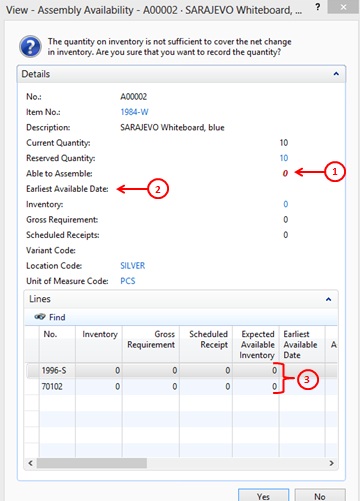
In this case, ignore fields like Current Quantity, Reserved Quantity, Inventory, Gross Requirements, and Scheduled Receipts on the Details FastTab. These all pertain to the finished good item, and in most assemble-to-order scenarios, you won’t have any finished goods items (though you may have a few in inventory from a sales return).
The more interesting fields pertain to components. The most interesting of these is the Able to Assemble field on the Details FastTab (indicated by the red-circled 1). It says “0” in red. Unfortunately for you, this means you don’t have enough components to assemble any 1984-W finished goods.
Red circle # 2 points at a field called Earliest Available Date. This field normally indicates the earliest available date at which your entire sales order line can be fulfilled based on scheduled inbound supply. If no date is displayed, this means that your current inbound supply is insufficient to cover all of your requirements. In short, if you take no additional actions, you will never be able to fulfill your sales order line.
The lines in the Lines FastTab (red circle 3) show you the details for each individual component. In this case, the details are rather straightforward. There is no existing inventory and no scheduled inbound supply for either component. If you scroll to the right, the situation for each component is stated even more clearly in its respective Able to Assemble and Earliest Available Date fields.
Click Yes to proceed despite this warning. Close the sales order, and then do the following:
- Create a purchase order to vendor 10000 for 7 units of item 1996-S, location SILVER, with an expected receipt date of February 15, 2014, and for 3 units of item 70102, location SILVER, with an expected receipt date of February 17, 2014. Close the purchase order.
- Reopen your sales order and re-enter the quantity of 10 in the Quantity field for the sales order line. This results in the following availability warning:
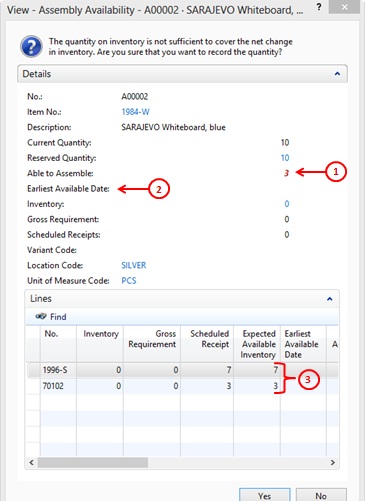
Now the Details FastTab indicates that you can make 3 of the finished goods item 1984-W. Why 3? Because you only have 3 units of item 70102, i.e. it’s your bottleneck. This is easy to calculate because each unit of item 1984-W requires 1 unit of item 70102. If the math gets more complicated, just scroll right and NAV will tell you exactly how many finished goods items you can make per component in the component’s Able to Assemble field.
At this point, there is still no date in the Earliest Available Date field on the Details FastTab because you still can’t completely satisfy the sales order line. To remedy this, open the purchase order you created earlier and increase the order quantity for each component to 12. Make sure that the expected receipt dates remain February 15, 2014 for item 1996-S and February 17, 2014 for item 70102. Then return to sales order and again re-enter the quantity of 10 in the sales order line. This results in the following availability warning.
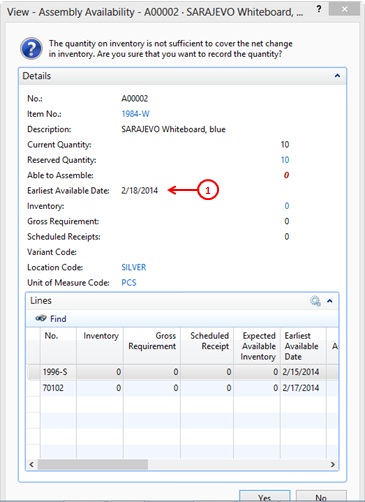
Now there is a date populated in the Earliest Available Date field on the Details FastTab. This is the date that you can promise to your customer.
As you can see from the earliest available dates shown for the individual components on the Lines FastTab, February 18, 2014 is the day after the earliest available date when you will receive the last of the components required to fill your sales line – in this case, component item 70102.
As you can can also see, the warning stops showing quantities for the components once it determines that the sales line can be satisfied at some future date. I don’t know if this is a bug or a design decision, but I find it a bit of a disappointment. I prefer seeing the numbers even after the computer figures out a solution, but perhaps that’s just me.
In any event, you can get that information easily enough. Click Yes to close the warning, and then click Line->Item Availability->BOM Level. This opens the Item Availability by BOM Level page. On the Home tab of this page, click the Expand All function.
In the Option section, set the Demand Date to February 28, 2014, so you can see the bigger picture. Then select the line for item 1996-S and click Event on the Navigate tab. This opens the Item Availability by Event page. On the Home tab of this page, click Expand All and you’ll see the following:
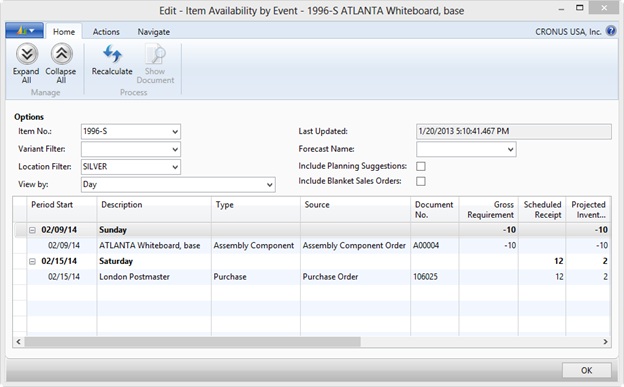
You can’t ask for a much clearer chronological picture than that. Personally, I’d like to see this functionality available directly from the Assembly Availability warning, but, then again, I’d like to be young, handsome, and rich, too.
One last point. The scenarios in this post have been kept simple so as to not obscure the main points, but the value of these availability warnings and pages rises dramatically as assembly items become more complex. Don’t believe me? Item 766BC-B, CONTOSO Office System, has a multilevel assembly BOM consisting of nearly 40 components in total. Try entering a large assembly order for that item (i.e. one that triggers component shortages) without using the availability warning/pages, and then tell me how you feel.
It’s that time of year! Directions EMEA, the annual member conference dedicated exclusively to Microsoft Dynamic NAV, is in Vienna, Austria this year September 02 – 04. Attendees can receive updates from Microsoft executives, attend educational seminars, learn about the latest trends in the NAV community, and exchange information with other NAV partners.
As one of North America’s most respected NAV partners, Liberty Grove Software will once again attend the conference. With two decades of successful implementations, upgrades, and custom development projects in the U.S. and Canada, our NAV experts, authors, and MVPs look forward to meeting you at this year’s conference.
Join Liberty Grove Software and hundreds of Microsoft Dynamics® NAV users at NAVUG Forum 2013, October 22-24, in Tampa, Fla. (http://navugforum.com)! Offering a wealth of practical ideas, collaborative learning, in-depth knowledge and unsurpassed networking, NAVUG Forum is the event exclusively for Dynamics NAV users. Attendees will benefit from:
- More than 100 interactive breakout sessions, most led by fellow Dynamics NAV users, which provide many opportunities for group discussion… Arrive with questions and leave with answers and solutions!
- Distinct learning tracks—ranging from Finance and Manufacturing to Business Intelligence and Upgrading—so you can focus on what’s most important to you.
- Plentiful opportunities to network, interact with and learn from others who use Dynamics NAV every day.
- Stirring keynote presentations that will inspire you to accomplish great things.
- Optional activities, such as pre-conference training through NAVUG Academy, to get the most from your NAVUG Forum experience.
Why Attend NAVUG Forum?
We recognize that NAVUG Forum 2013 is just one of several Dynamics NAV conferences you may be considering attending. So why choose NAVUG Forum?
- It’s the only Dynamics NAV conference designed and led by users, for users… Every attendee is focused on Dynamics NAV; learn how they’ve overcome the challenges you face every day.
- Interactive learning at its best… Engage in lively group discussions and give-and-take—and return home with practical ideas you can implement right away.
- It focuses on the technology you’re using right now to help you get maximum value from your current solution.
- Thousands of years of combined knowledge and experience… With 400+ attendees, you’ll benefit from plenty of unique perspectives and knowledge from Dynamics NAV users like you.
Come Visit Us at the Liberty Grove Exhibit
As one of North America’s most respected Dynamics NAV partners, with two decades of successful implementations, upgrades, and development projects, we always have lots to discuss about Dynamics NAV. Come pay us a visit! Register today!
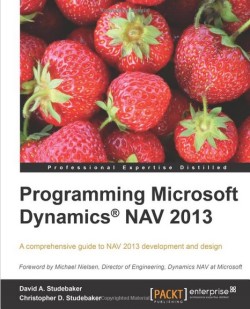
David Studebaker, LGS’s co-founder and Chief Technology Officer, has released the third volume of his popular Programming Microsoft Dynamics NAV series, this one on Dynamics NAV 2013. The book is co-authored by his son, Christopher Studebaker.
The book is a comprehensive reference for development in Microsoft Dynamics NAV 2013, with C/SIDE and C/AL. Brimming with detailed documentation that is additionally supplemented by superb examples, it is the perfect companion for experienced programmers, managers and consultants.
With over 40 years of software design, development, programming, and project management experience, the last fifteen years of which have been devoted to Microsoft Dynamics NAV, Dave is NAV certified in applications, development, and installation/configuration. He is also a Microsoft Certified Trainer (MCT) who has previously assisted Microsoft with NAV documentation, course materials, and the original project methodology that led to Sure Step, the official project management methodology for all Microsoft Dynamics products.
Programming Microsoft Dynamics NAV 2013 can be purchased here at PACKT and here at Amazon.
In a recent interview with MSDynamicsWorld.com, Liberty Grove’s CEO Andrew Good and ArcherPoint’s CEO Gregg Kaupp discuss issues related to upgrading to NAV 2013 R2, including:
- The upgrade process;
- Upgrade costs;
- Reporting challenges;
- The new release cycle;
- New technology elements;
- ISV readiness;
- Licensing issues;
- Reasons for failure and success;
- Preparing for an upgrade;

The annual Directions conference is the only Microsoft Dynamics NAV event driven by NAV partners — for NAV partners. It is designed to help your organization build new business contacts, learn about best practices, and discover valuable tools for execution and success. At each conference you’ll find a wealth of sessions and speakers offering relevant and crucial information to give you the knowledge base you need to be successful. Just as important are the many networking opportunities at the Conference where you can enhance your relationships throughout the Microsoft Dynamics NAV Community.
This year’s conference takes place on September 14-16 at the Sheraton San Diego Hotel & Marina in San Diego California. Once again, a strong contingent of Liberty Grove’s NAV experts, authors, and MVPs will attend. We’d be happy to talk to you about any of the numerous ways in which we support other NAV partners on a daily basis.

Join Liberty Grove Software, a Platinum sponsor, and hundreds of Microsoft Dynamics® NAV users at NAVUG Summit 2014, October 14-17, in St. Louis, MO. (http://navugsummit.com).
Enjoy the ultimate learning and networking event for the Microsoft Dynamics NAV Community, and learn firsthand how other NAV users overcome their daily challenges. Benefits include:
- Attend thought-provoking, inspiring keynote presentations;
- Participate in up to 100 educational breakout sessions and group discussions led by fellow Dynamics NAV users;
- Tap into the experience of around 400 attendees across a range of roles and organizations;
- Follow distinct learning tracks so you can focus on what’s most important to you;
- Increase you Dynamics NAV Knowledge and skills through outstanding pre-conference training from NAVUG Academy.
And don’t forget to enjoy the great city of St. Louis!
Come Visit Us at the Liberty Grove Exhibit
As one of North America’s most respected Dynamics NAV partners, with two decades of successful implementations, upgrades, and development projects, we always have lots to discuss about Dynamics NAV. Come pay us a visit!
