
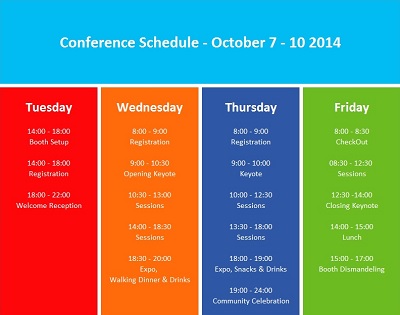
Directions EMEA, the annual member conference dedicated exclusively to Microsoft Dynamic NAV, is in Poznan, Poland this year October 08-10.
Attendees can help build a stronger and more engaged Dynamics NAV community, enhance NAV Partner communications & the relationship with Microsoft, and learn what it takes to be successful.
The Directions Conference sessions offer something for everyone :
- Developers will gain technical knowledge;
- Implementers will gain project management expertise;
- Sales people will learn strategic selling tips and share what works on the front line;
- Executives will be inspired to run their company even more successfully.
As one of North America’s most respected NAV partners, Liberty Grove Software will once again attend the conference. With two decades of successful implementations, upgrades, and custom development projects in the U.S. and Canada, we’ll be happy to talk to you about any of the numerous ways in which we support other NAV partners on a daily basis.
Microsoft has released new iPad and Android apps for Dynamics NAV 2015:
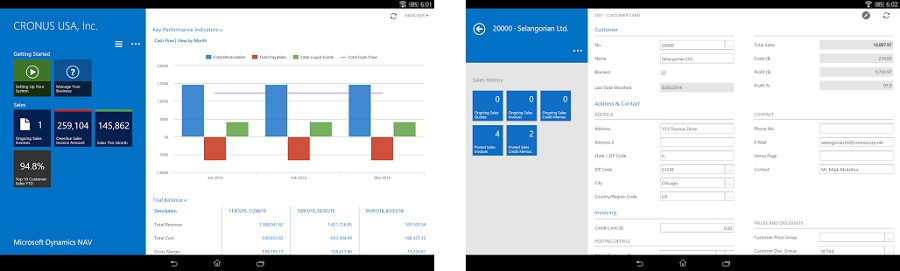
Microsoft describes the apps as the “perfect companion for service engineers, sales field organizations, executives and decision-makers, or anyone in your organization who wants access to Dynamics NAV from a touch enabled mobile device”.
Listed features include:
- Get an overview of your business in the Role Center.
- Tap and swipe to get to your data and drill down into details.
- Search across all columns in a list.
- Send lists to Microsoft Excel or Office 365.
- Shoot pictures using the camera on your mobile device and upload them to Dynamics NAV.
- Rotate your device to get an overview of your data or focus on content.
You can preview the iPad app here, and the Android app here.
Mark Brummel is a Microsoft Dynamics NAV MVP, a leading author of Dynamics NAV books, and one of Liberty Grove’s most experienced team members.
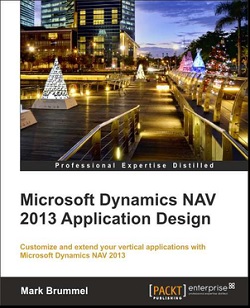
Mark has recently completed a new book – Microsoft Dynamics NAV 2013 Application Design – as a follow-up to his popular 2009 edition.
This book is ideal for a NAV consultant and developer or designer of business applications. It assumes that you have a basic understanding of business management systems and application development with working knowledge of Microsoft Dynamics NAV. The book:
- Will help you set up applications for a number of vertical industries and scenarios;
- Acquaints you with Dynamics NAV’s data model and transaction schema with the help of highly efficient design patterns;
- Includes two completely designed and explained vertical solutions, including application objects;
Microsoft Dynamics NAV 2013 Application Design can be purchased here at PACKT and here at Amazon.

Liberty Grove Software and The Qixas Group are pleased to provide you with an opportunity to learn more about how to utilize design patterns to streamline your development, improve the ease of future upgrades, and align development efforts to maximize your investment in Microsoft Dynamics NAV®.
Dates: Monday, March 23, 2015 and Tuesday, March 24, 2015
Location: Toronto Airport Corporate Centre, Toronto, ON
Cost: $680
Format: Hands On Workshop
Please register here: Qixas Group: Microsoft Dynamics NAV Patterns and Practices Workshop.
This will be a hands on workshop in which you will have the chance to learn about existing patterns, how to create new ones, and incorporate them into your future.
The workshop will be presented by lead Microsoft Dynamics NAV specialists at Qixas Group and co-hosted by Mark Brummel, NAV MVP, who has generously volunteered his time.
Objectives
During the workshop, you will build a full add-on application using design patterns. The application will use 7 architectural patterns, 14 design patterns and will discuss 6 implementation patterns.
We will also cover general concepts such as Naming Conventions and Code Cloning.
You will learn how to implement best practices from Object Oriented Programming in C/AL such as Natural Language Programming, Encapsulation, Hooks, Interfaces and more.
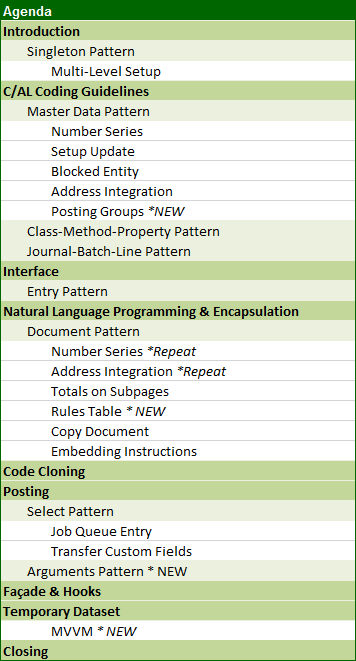
Agenda
Prerequisites
Laptop with
- Dynamics NAV – Preferably with NAV2013 or higher
- Full Dev. License
- SQL Server Mgt. Studio
- Visual Studio Community Edition
On March 23 and 24, the first Master Class for Microsoft Dynamics NAV Application Architecture and Design Patterns was held in Toronto.
Thirteen students attended. This what they had to say:
“I think this should be a mandatory class… developers who have the knowledge of design patterns and common coding practices inherently develop stronger, cleaner code.” ~ Michael Hollinger, Harbor Wholesale Foods
“An awesome course that covers the best practices of NAV development and application architecture.” ~ Sukeev Kailayapathy, Second Foundation
The workshop will be scheduled twice per year in Toronto (or on demand if enough students register). Your teacher will be Floyd Chan.

Toronto – Class of 2014
The workshop is scheduled for the following locations this year.
May: The Netherlands | Luc van Vugt, Mark Brummel
May: Belgium | Steven Renders, Mark Brummel
June: Iceland | Gunnar Gestsson, Mark Brummel
June: Japan | (Closed Partner Training)
June: Romania | (Closed Partner Training)
October: United States | (NAVUG, Reno)Mark Brummel
October: Online NAVUG Academy | Mike Doster
November: Online NAVUG Academy | Mike Doster
Master Class – Application Architecture & Design Patterns
During the workshop, we will reveal all the secrets that are hidden in the Dynamics NAV Source Code. You will get answers to questions like…
- How is Dynamics NAV Architected and how do the modules communicate
- What are Design Patterns and Anti Patterns and how do they apply to Dynamics NAV
- How can I avoid conflicts during my object merge
- What impact do monthly rollups have to my roadmap and release strategy
- Can the new Delta Files help me get more organized
- Why does Dynamics NAV have so much Code Cloning
- Are the coding standard documented and how can apply them
- Can I implement Object Oriented concepts such as MVVM, overloading and reflection
- How do I organize my object structure
- Best Practices such as Encapsulation and Natural Language Programming
- Be familiar with over 30 most used Design Patterns in Dynamics NAV
- What does a perfect UI look like to be repeatable in the cloud
- Understand the impact of Meta Data on Software Design
- What is the difference between Reservation Entries, G/L Entries and Interaction Log Entries
Course Outline
The course has four, iterative blocks that explain the elements for good software architecture using Design Patterns – Repeatable User Interface, Coding Guidelines, Architectural Principles and Exercises.
Introduction
- Introduction to Application Architecture
- Rollup update & Upgrade Strategies
- Design Patterns & Anti Patterns
- Meta Data Driven Software Development
Object Architecture
- Define Object Hierarchy
- Enhance the use of the Symbol Menu
- Interfaces
- Function Libraries
- Natural Language Programming
- Encapsulation
- Arguments & Overloading
- Façade & Hooks
Coding Guidelines
- Design
- Internationalization
- Localizability
- Readability
- Data Dictionary
- Hungarian Notation
- User Interface
Design Patterns
- Singleton, Multi Level Setup & Rules Pattern
- Master Data, Entity State & Compound
- Documents, Copy, Posting & Archiving
- Test Near, Test Far, Do It, Clean Up
Code Cloning
- Fundamentals
- Transaction Mirroring
- Forking, Templating, Customize & Exact Match
Modern UI for Repeatable Software
- Instructions in the User Interface
- Transaction Data Update
- Hiding Fields & Fast tabs
- Totals on Sub Pages
- Create Data from Templates
Model View View Model
- Working with Temporary Tables
- MVVM Pages
- Reports based on data in memory
- Query data on Pages

Join Liberty Grove Software, a Platinum sponsor, and hundreds of Microsoft Dynamics® NAV users at NAVUG Summit 2015, October 13-16, in Reno, NV. (http://navugsummit.com).
Enjoy the ultimate learning and networking event for the Microsoft Dynamics NAV Community, and learn firsthand how other NAV users overcome their daily challenges. Benefits include:
- Attend thought-provoking, inspiring keynote presentations;
- Participate in up to 100 educational breakout sessions and group discussions led by fellow Dynamics NAV users;
- Tap into the experience of around 600 attendees across a range of roles and organizations;
- Follow distinct learning tracks so you can focus on what’s most important to you;
- Increase you Dynamics NAV Knowledge and skills through outstanding pre-conference training from NAVUG Academy.
And don’t forget to enjoy the great city of Reno!
Mark Brummel will be leading this deep dive session for experienced NAV developers. This will be offered on October 12 and 13 at the NAVUG Summit 2015 conference. Learn how to design and develop code that works well with NAV cumulative updates, is extensible and clean.
Course Outline- The course has four, iterative blocks that explain the elements for good software architecture using Design Patterns – Repeatable User Interface, Coding Guidelines, Architectural Principles and Exercises.
Introduction
- Introduction to Application Architecture
- Rollup update & Upgrade Strategies
- Design Patterns & Anti Patterns
- Meta Data Driven Software Development
Object Architecture
- Define Object Hierarchy
- Enhance the use of the Symbol Menu
- Interfaces
- Function Libraries
- Natural Language Programming
- Encapsulation
- Arguments & Overloading
- Façade & Hooks
Coding Guidelines
- Design
- Internationalization
- Localizability
- Readability
- Data Dictionary
- Hungarian Notation
- User Interface
Design Patterns
- Singleton, Multi-Level Setup & Rules Pattern
- Master Data, Entity State & Compound
- Documents, Copy, Posting & Archiving
- Test Near, Test Far, Do It, Clean Up
Code Cloning
- Fundamentals
- Transaction Mirroring
- Forking, Templating, Customize & Exact Match
Modern UI for Repeatable Software
- Instructions in the User Interface
- Transaction Data Update
- Hiding Fields & Fast tabs
- Totals on Sub Pages
- Create Data from Templates
Register
http://www.navugsummit.com/event/academy-training
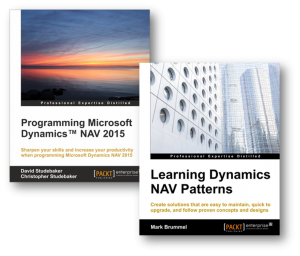
Liberty Grove Software, a Platinum sponsor, is proud and honored to work with two of the NAV community’s most well known and highly respected authors, David Studebaker, Liberty Grove’s co-founder, and Mark Brummel, a 10-year NAV MVP.
Dave’s Programming Microsoft Dynamics NAV 2015 and Mark’s Learning Dynamics NAV Patterns complement each other. Both Dave and Mark will be at the NAVUG Summit in Reno/Tahoe this month. They will have copies of their latest books and will participate in a book signing session sponsored by NAVUG.
So join us at NAVUG and remember to book some time to pay Dave and Mark a visit.
Mark Brummel is a 10-year Microsoft Dynamics NAV MVP, a leading author of Dynamics NAV books, and one of Liberty Grove’s most experienced team members.
Mark has recently completed a new book – Learning Dynamics NAV Patterns. In this book, Mark evangelizes and documents the ‘NAV way’. This is a combination of architectural principles and design best practices, formalized in a workshop called Master Class for Microsoft Dynamics NAV Application Architecture and Design Patterns. The methodology helps in creating solutions that are easy to upgrade, recognizable for users, and maintainable outside the ecosystem of their creators. All three elements apply to the original Navision product that was shipped in 1995, and was extracted, updated, and documented in this methodology
This book is ideal for a NAV consultant and developer or designer of business applications. It assumes that you have a basic understanding of business management systems and application development with working knowledge of Microsoft Dynamics NAV. The book:
What You Will Learn
- Apply object-oriented practices to C/AL programming
- Structure your application to avoid merge conflicts
- Refactor legacy code and avoid anti-patterns
- Design decision trees to decide when to use which patterns
- Clone codes and their application in Dynamics NAV
- Make your application extensible by creating predefined hooks and facades
Learning Dynamics NAV Patterns can be purchased here at PACKT and here at Amazon.
About This Post
This is an introductory post to the new assembly management functionality in Dynamics NAV 2013. It is designed to provide readers with a basic overview of this new functionality. Additional posts on more specific assembly management processes and setup issues will follow.
Dynamics NAV Assembly Managment 101
Assembly management will likely be of significant interest to you if your company does one or both of the following:
- You combine items to sell as kits, such as a Christmas basket, which customers can customize when they order.
- You make products by using light manufacturing processes (for example, assembling pre-made furniture) that do not require Dynamic NAV’s full manufacturing capabilities.
Assembling items as kits offers numerous advantages:
- You can accommodate last-minute customer requests.
- You can reduce inventory by stocking core components and then assembling the finished goods only when they’re needed, instead of trying to stock all possible variations of finished goods in advance.
- You can offer special pricing on specific kits, which may assist you in promotional campaigns.
The use of light manufacturing raises an important cost issue: if all you’re doing is performing a simple assembly operation, do you really want to use a full-scale production system that was designed for more complex and demanding tasks? Do you want to pay the cost of buying, setting up, and maintaining NAV’s full manufacturing functionality when you will only use a small fraction of it?
Traditionally, Dynamics NAV addressed these requirements through its kitting functionality. But the old kitting solution piggybacked manufacturing functionality, which meant you still had to pay for unneeded capabilities. Besides, piggyback solutions rarely make for a perfect fit. In the case of kitting, key limitations included:
- An inability to accommodate the true complexity of assembled products, which might consist of a combination of purchased items, manufactured items, and other assembled items.
- Insufficient support for order processors. For example, the sales order interface did not allow the customization, information on component availability, and order promising capabilities required during order entry.
- An inability to combine assembly items in stock and assemble-to-order items on the same sales line.
Dynamics NAV’s new assembly management functionality has been designed and coded from the ground up. It features true assembly items with no dependence on manufacturing, and an assembly order document that is as well-designed and fully featured as NAV’s sales, purchase, and production order documents.
It’s most redeeming quality, however, is the ease with which it handles multiple assembly scenarios, from a simple assembly to fully customized combination orders that require production and purchasing support for successful fulfillment.
Simple Assembly Order Scenario
Make sure you are working from the clean sample database for CRONUS International Ltd. that installs with NAV 2013. In this sample database, item 1984-W is described as “Sarajevo Whiteboard, blue”. It consists of item 1996-S, “ATLANTA Whiteboard, base”, and item 70102, which is a can of blue paint. This composition is recorded in Dynamics NAV 2013’s new Assembly BOM, shown here:
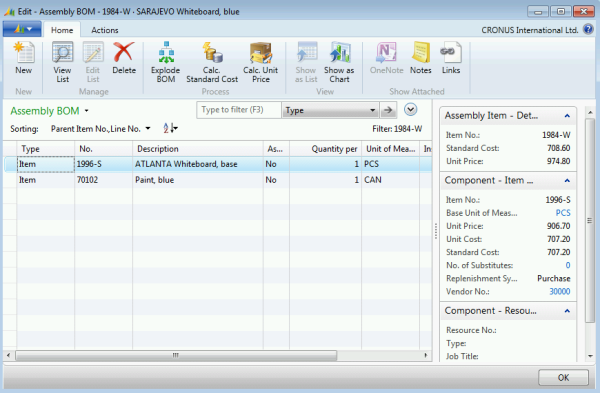
The Assembly BOM page is accessed from the Navigate tab of the item card. It allows you to define the component items, resources, and instructions required to complete the assembly, but, for now, pretend you are dealing with the assembly scenario shown above – the simple combination of two items.
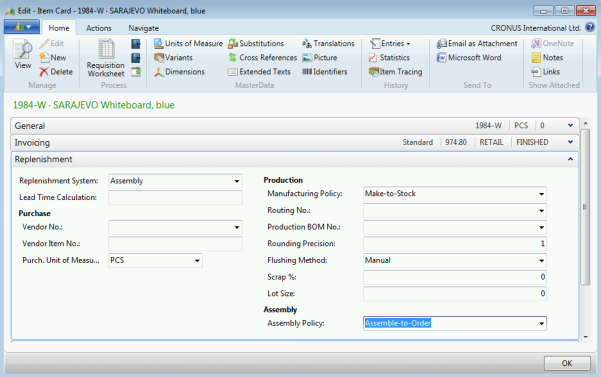
As a salable item that has an Assembly BOM, item 1984-W is already technically an assembly item. However, if you want the sales order interface and the planning system to treat item 1984-W as an assemble-to-order item, you also need to open its item card and set its replenishment system to “Assembly”, and its Assembly Policy to “Assemble-to-Order”, as shown below:
Before you begin, use the item journal to add 5 units of each of the component items 1996-S and 70102 to inventory without specifying a location.
Now create a new sales order for 5 units of item 1984-W for customer 20000 with a requested delivery date of February 05, 2014. Enter the order exactly as you would a sales order for any item, and ignore any credit warnings. When you enter a value in of “5” in the Quantity field of the sales order line, notice that the program immediately populates the Qty. to Assemble to Order and Reserved Quantity fields, as shown below:
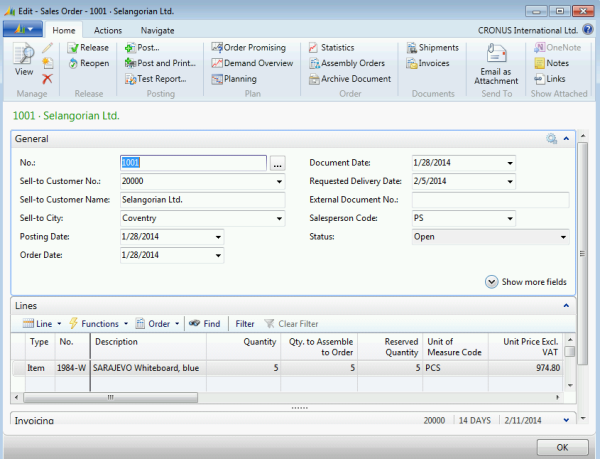
Now drill down into the Qty. to Assemble to Order field. This brings up the Assemble-to-Order Lines page, shown here:
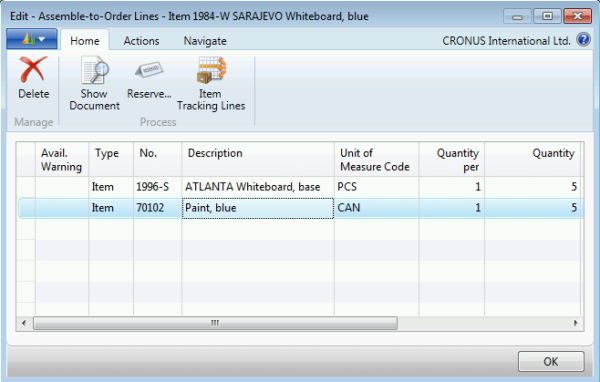
On this page, you can add, delete, or change the items that make up this assembly item. For example, you can change the paint from blue to red. Or you can change the Quantity per value for individual items. This is the page you would use to quickly customize a customer’s order during order entry. I’ll be describing various approaches to support this assembly customization in a later post, but, for now, click the Show Document function on the Home tab. This brings up the actual assembly order, as shown below:
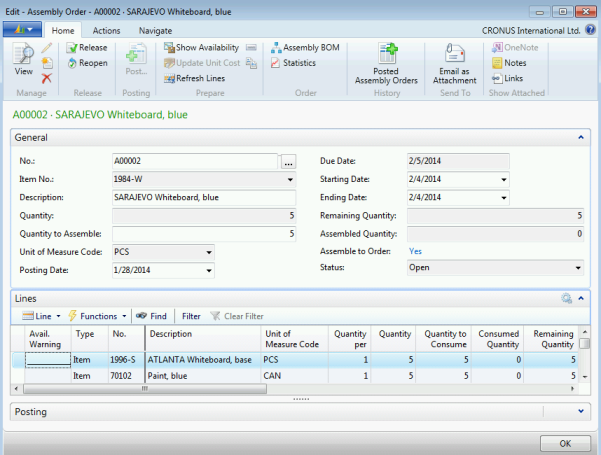
What’s significant about this? Because this assembly order, which was created by the program on your behalf (recall that you did nothing other than simply enter a sales order), is a full-fledged NAV document, complete with its own dimensions, posting functions, associated ledger entries, costing information, and statistics. It also facilitates order tracking, reservations, and warehouse movement/picking. In fact, assembly orders stand at the center of the new assembly management system, and it is this separate and fully defined entity that makes it possible for assembly management to integrate so completely with the rest of the supply system. Indeed, assembly orders now participate in the Dynamic NAV’s supply chain every bit as much as production, purchase, and transfer orders.
At the same time, NAV’s design team never forgot that, while they needed a sophisticated underlying design to achieve such integration, it was equally important to support sales order processors in their interaction with customers. That’s why so much of the interaction between sales orders and assembly orders is automated. For example, escape back to the sales order and reduce the sales quantity from 5 units to 4.
Notice what happens? The Qty. to Assemble to Order field automatically reduces from 5 units to 4, and the underlying assembly order is automatically modified to match.
Drill down into the Reserved Quantity field on the sales order line.
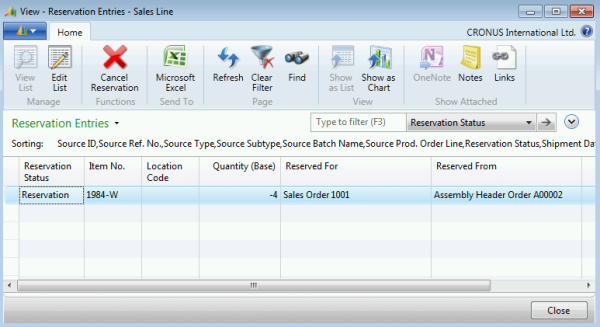
Reservations are also automatically created and maintained.
You can also automatically create inventory movements to move components from their respective bins to the assembly area. From that point on, warehousing functionality takes care of the rest, which means that order processors are asked to do only what they should in the assemble-to-order process: enter the customer’s order as requested.
To complete this post, change the sales order line quantity back to 5 and then ship and invoice the order.
Future Posts In This Series
In future posts in this series, we’ll examine the following basic subjects:
- Assembly order promising
- Planning for assembly items
- Shipping assembly items
- Combination orders and partial shipments
With those basics covered, we’ll then examine a few different assembly order scenarios and discuss the best way to configure Dynamics NAV’s assembly management functionality to address those scenarios.
