

During the “Project Madeira” preview, Microsoft ran a Technology Adoption Program which resulted in a number of Apps published early.
In this session, we will discuss what was learned from this program and explain how to get started creating your own apps. We will share tips and tricks on how to evaluate your existing IP and which steps to implement to make sure you meet validation requirements.
The webinar will be next week, Tuesday, December 6th at 10:00 AM EST. (4:00 PM CET)
Title: Lessons learned from the AppSource TAP
Speaker: Mark Brummel
Registration Link: Lessons Learned from the AppSource TAP
We look forward to seeing you there.
Here is the recording of today’s webinar. During the “Project Madeira” preview, Microsoft ran a Technology Adoption Program (TAP) which resulted in a number of Apps published early.
In this session, we discussed what was learned from this program and explain how to get started creating your own apps. We will share tips and tricks on how to evaluate your existing IP and which steps to implement to make sure you meet validation requirements.
Your user group thrives on volunteers and the work they do. NAVUG would love to get your help to make it an even more vibrant.
The Partner Source download functionality is currently in transition and you cannot download from the Partner Source site. The good news is there is a work around. Often you need to get a cumulative update for NAV, so here is how to get them during the transition.
Workaround
- Sign into Partner Source (mbs.microsoft.com/partnersource)
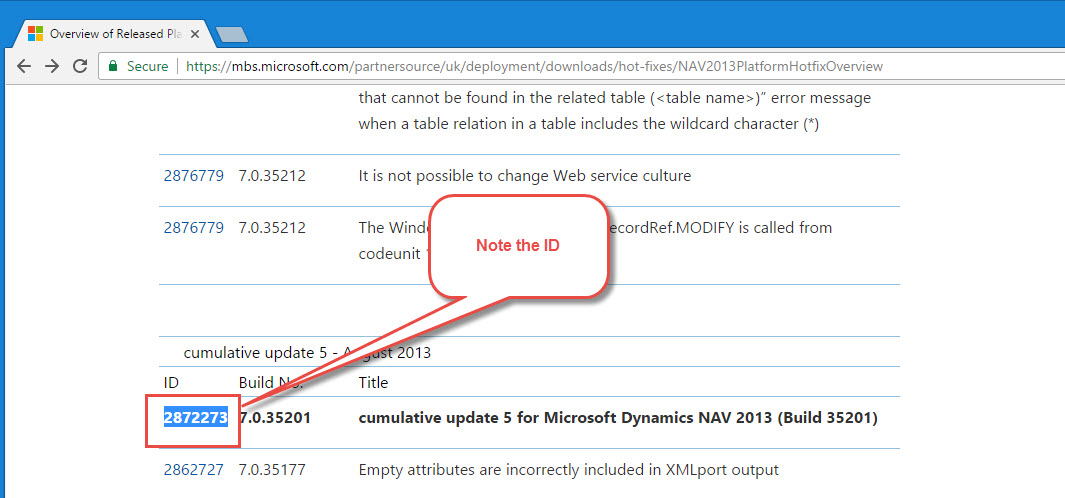
- Find the update you are looking
- Note the ID for the cumulative update
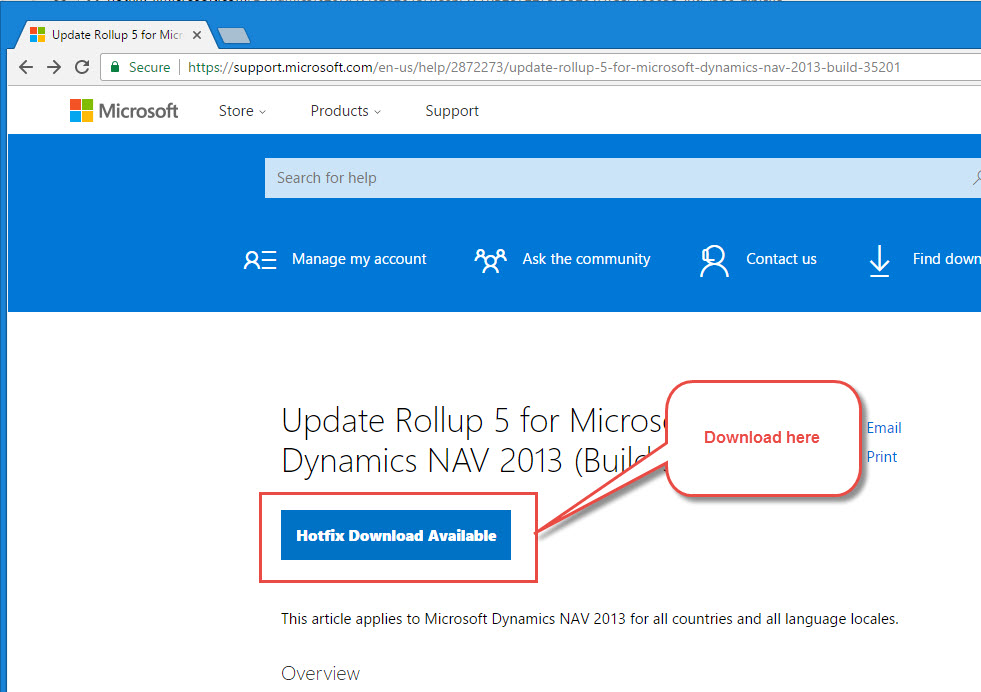
- Go to support.microsoft.com
- Search using the ID from above.
- Select Hotfix Download Available
Liberty Grove Software is offering training for Microsoft Dynamics 365 for Finance and Operations, Business Edition, a new a feature rich Enterprise Resource Planning application that is straightforward and intuitive to use. You will develop a comprehensive understanding quickly through this accelerated learning experience.
Hear what one of the participants, Steve Endow, has to say about Dynamics 365 for Financials from a GP perspective. All of this from an interactive instructor lead course.
Steve Endow’s blog Posts…
Dynamics GP vs. Dynamics 365 Financials: Do users really need access to transaction distributions?
Dynamics 365 Financials Training – Day 1
Dynamics 365 Financials Training – Day 2
Registration Details for the next course.
This is a two day pre-conference training session for NAV Developers. Want to reset you perspective on NAV or start with a great foundation. Join Mark Brummel as he works through NAV Development and coding best practices and approaches. Learn about Extensions and Visual Studio Code along with the importance of consistent application of design patterns.
Course Outline – The course has four, iterative blocks that explain the elements for good software architecture using Design Patterns – Repeatable User Interface, Coding Guidelines, Architectural Principles and Exercises.
Introduction
- Introduction to Application Architecture
- Rollup update & Upgrade Strategies
- Design Patterns & Anti Patterns
- Meta Data Driven Software Development
Object Architecture
- Define Object Hierarchy
- Enhance the use of the Symbol Menu
- Interfaces
- Function Libraries
- Natural Language Programming
- Encapsulation
- Arguments & Overloading
- Façade & Hooks
Coding Guidelines
- Design
- Internationalization
- Localizability
- Readability
- Data Dictionary
- Hungarian Notation
- User Interface
Design Patterns
- Singleton, Multi-Level Setup & Rules Pattern
- Master Data, Entity State & Compound
- Documents, Copy, Posting & Archiving
- Test Near, Test Far, Do It, Clean Up
Code Cloning
- Fundamentals
- Transaction Mirroring
- Forking, Templating, Customize & Exact Match
Modern UI for Repeatable Software
- Instructions in the User Interface
- Transaction Data Update
- Hiding Fields & Fast tabs
- Totals on Sub Pages
- Create Data from Templates
Join Kerry Rosvold and Amanda Mayer for comprehensive journey through Dynamics 365 for Financials. Learn how to configure and use it. Your hands on work will get you immersed and recording financial and inventory activity.
This course will equip you to:- Master basic use of Dynamics365 for Financials application wide features- Set up general ledger, sales, purchase, and inventory areas.- Grasp complex setup concepts like posting groups and dimensions.- Gain a deep functional understanding of basic sales and purchasing activities.- Understand simple pathways to a complete month end close.- Introduce more functionality like sales tax, multicurrency, fixed assets and more.- Utilize basic financial statements and produce advanced financial and operational reporting.
Dynamics 365 Business Central will be available on Monday April 2., 2018.
Here is a introduction.

Join Liberty Grove Software, a Platinum sponsor, and hundreds of Microsoft Dynamics® NAV users at NAVUG Summit 2018, October 15-18, in Phoenix, AZ.
Enjoy the ultimate learning and networking event for the Microsoft Dynamics NAV Community, and learn firsthand how other NAV users overcome their daily challenges. It is a premier user-centric experience. Benefits include:
- Attend thought-provoking, inspiring keynote presentations;
- Participate in up to 175+ educational breakout sessions and group discussions led by fellow Dynamics NAV users;
- Tap into the experience of 1100+ attendees across a range of roles and organizations;
- Select from distinct learning tracks so you can focus on what’s most important to you;
- Increase you Dynamics NAV Knowledge and skills through outstanding pre-conference training.
And don’t forget to enjoy the great city of Phoenix!
