

We are very happy to support and sponsor the second in a series of webinars about the new possibilities around application Extensions and Eventing in Microsoft Dynamics NAV 2016. These webinars will be hosted by NAV MVPs who are experienced in the subject.
Over 100 NAV professionals registered for the first session, presented by Mark Brummel on December 10, 2015.
Date: Thursday January 28th at 10:00 AM EST. (4:00 PM CET)
Title: Eventing and Extensions in Dynamics NAV 2016
Speaker: Soren Klemmensen
Registration Link: Eventing and Extensions in Dynamics NAV 2016
We look forward to seeing you there.
We are very happy to support and sponsor the third in a series of webinars about the possibilities around application Extensions and Eventing in Microsoft Dynamics NAV 2016. This is the final webinar in this series. We’re already working on new topics so stay tuned for more.
These webinars are presented by Microsoft Dynamics NAV MVPs.
The first and second webinars, presented by Mark Brummel and Soren Klemmensen, respectively, were huge successes. We anticipate this session to be the same. So register early as there is limited ‘seating’.
Date: Tuesday February 23th at 10:00 AM EST. (4:00 PM CET)
Title: NAV 2016 Extensions Explained
Presenter: Gunnar Gestsson, NAV MVP
Registration Link: NAV 2016 Extensions Explained
We look forward to seeing you there.

Join the NAVUG Wisconsin Inaugural User Group Meeting on March 16th at the Microsoft Office, N19W24133 Riverwood Drive,Suite 150, Waukesha, where a wealth of practical ideas, collaborative learning, in-depth knowledge and unsurpassed networking will be offered. NAVUG events are designed exclusively for Dynamics NAV users. Attendees will benefit from:
- Interactive Discussion sessions — Arrive with questions and leave with answers and solutions!
- Educational Sessions—ranging from Finance and Reporting to Manufacturing and Supply Chain Management—so you can focus on what’s most important to you. Details will be provided on the registration page.
- Plentiful opportunities to network, interact with and learn from others who use Dynamics NAV every day.
Why attend local NAVUG Events? We recognize that NAVUG events are one of several Dynamics NAV events you may be considering attending. So why choose NAVUG?
- NAVUG meetings are designed and led by users, for users… Every attendee is focused on Dynamics NAV; learn how they’ve overcome the challenges you face every day.
- Interactive learning at its best… Engage in lively group discussions and give-and-take—and return home with practical ideas you can implement right away.
- We focus on the technology you’re using right now to help you get maximum value from your current solution.
You’ll benefit from plenty of unique perspectives and knowledge from Dynamics NAV users like you.
Based on my experience working for different organizations, multiple software solutions and many customers across a variety of industry verticals, I have found that more projects are doomed due to poor estimates and unreasonable schedules than succumb to technical, political or development team issues. Inaccurate estimates can result in long hours, poor quality and missed customer expectations—failure.
Estimating software projects is not art. It is not science. It is a combination of both. It is possible to consistently provide reasonably accurate estimates for software development costs and schedules. Of course, that accuracy depends on the completeness of the requirements, the project phase at which estimation is done, the quality of the method or methods being used, and the experience of the team putting the estimate together.
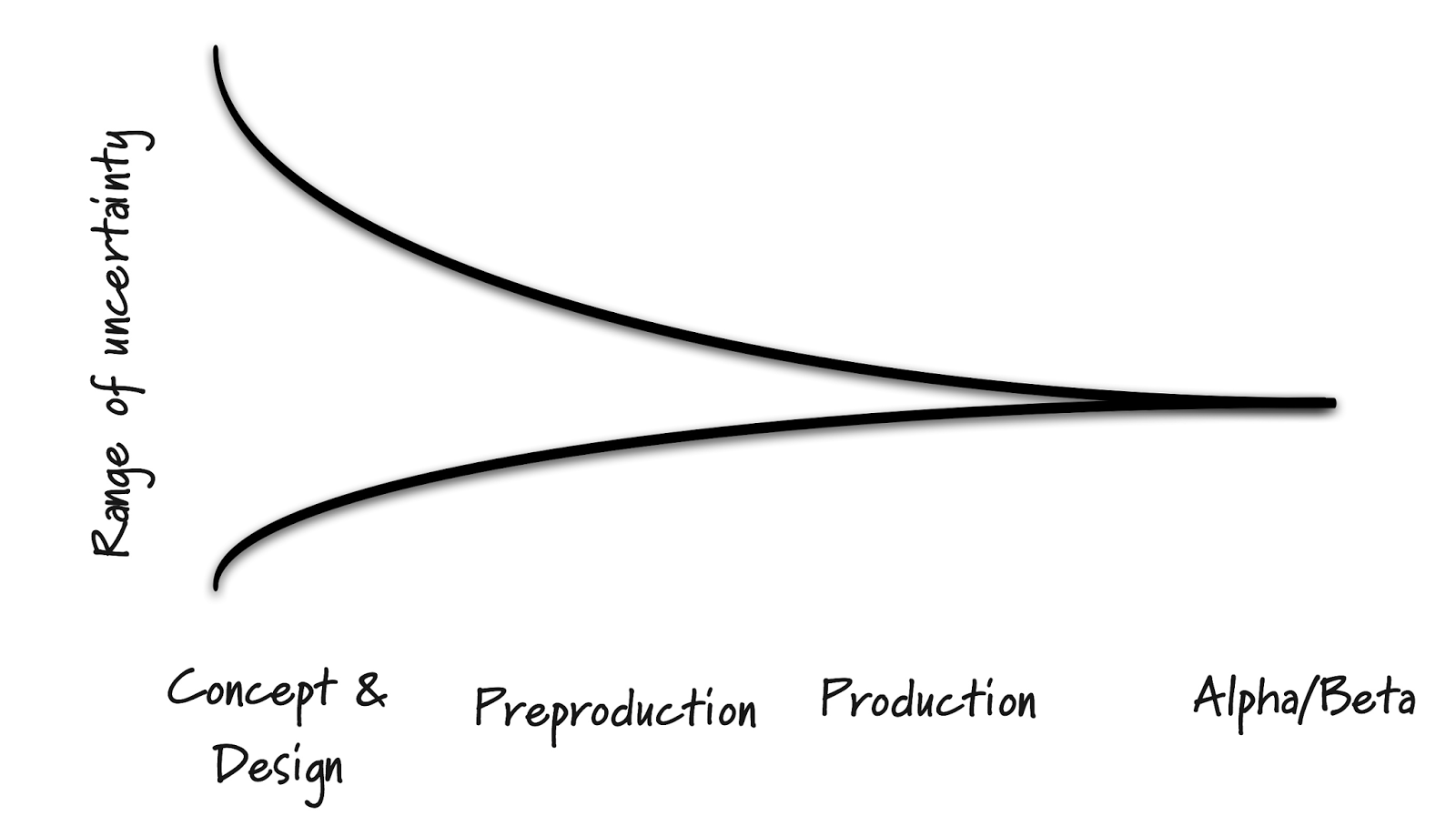
As many may already know, the earlier in the project or relationship with the stakeholders, the less accurate the estimate. In studies such as “Reasons for Software Effort Estimation Error: Impact of Respondent Role, Information Collection Approach, and Data Analysis Method” it was found through a review of surveys on software estimation, that the average effort overrun of software projects seems to be in the range 30% to 40%. I would add from my own experience that this percentage varies when looking at which phase of the project the estimating occurs. I suggest that estimates can be off by 50% in the earliest phase of a project or relationship, decreasing to 25% at planning and finally to as low as 10% during the execution or supporting phases. These numbers are modified, regardless of project, when the estimating team’s experience with the software and knowledge of its functional use within the organization increases. The “Cone of Uncertainty” is one way of illustrating this improved ability to estimate as time goes on.
If you get a group of project managers and software developers into a room together and ask each how each would estimate a specific project, you will probably get as many answers as there are people in the room. However, they could all most likely be categorized into one of the following methods:
- Experience – Typically a project team approach using their experience with an understanding of the project requirements to come to a consensus. Very useful in the absence of empirical data, however it is hard to document the factors used to derive the numbers and the results are often biased.
- Project Comparison – Derived by comparing the proposed project to previous projects. This method uses actual historical data and the estimators experience to identify and quantify differences. This is very similar to how a real estate appraiser values a property for a mortgage using comparables and adjusting factors to come to the value. However, the challenge with this method is determining the value of the differences and their impact on the estimate.
- Top-Down – High level requirements are used to identify the main components of the project. This approach focuses on the system level activities including customizations, configuration, integration, training, testing and documentation. Many of the other estimating methods miss the cost of these activities. This method requires minimal project detail and is usually faster to complete, but often overlooks low-level problems that may escalate costs. In addition, this method does not provide a detailed basis for justifying the estimate.
- Bottom-Up – A more traditional approach, this method requires detailed and historic knowledge and is often expected if the estimator has been working with the project stakeholders for a period of time. It may also be expected if a detailed discovery was performed prior to the estimate exercise. Use Case Points (functionality seen by the user) or Function Points (how the user interacts with the system) are often the basis for this type of estimating. Points are identified then categorized. By creating the estimate to this level of detail, errors in estimating have a chance to balance out within the project. However, this method often overlooks the system level effort. Accuracy of this method decreases the earlier in the project it is performed.
In summary, all of these methods have strengths and weaknesses, and can be complimentary to each other. A combination of two or more should be used to get the most accurate estimate and project plan. In the end, the best estimating process should:
- Not depend on a single method;
- Compare and contrast differing results determining the reason for differences;
- Document assumptions;
- Be monitored throughout the project for accuracy and false assumptions;
- Provide historical data to be used for project updates and to increase the accuracy of future estimates.
What is the best way to present the estimate information to the project stakeholder? As in the actual estimating process itself, there is no “one size fits all.”
Managers tend to view estimates as final numbers. To counter this and as a protective measure, the tendency is to present the estimates in summary and/or as a range. Early in the process or where limited knowledge of the software, and/or the project requirements are known, this may be acceptable. However, in later stages of the project or the later stages of the relationship with the organization and project stakeholders, this method may seem inadequate. Lack of documentation may start debates or discussions that would otherwise be avoided if more detail or a more concise estimate existed.
Even early estimates with their higher percentage of inaccuracy are more understandable when the process behind the numbers is exposed in greater detail including assumptions and out-of-scope. When the estimate is reviewed and discussed with the project stakeholders, they may provide more or different information allowing the estimate to be corrected and additional work or requirements identified. The added documentation and transparency makes the estimates more trustworthy. This can be very valuable in the early stages of a project for not only the obvious reasons, but also because stakeholders become more involved in the process reducing the “us and them” mentality and fostering a more complete team approach between the development team and the project stakeholders.
No matter the approach taken, it is important that the estimate include all the information needed for the stakeholders to make an informed decision. This includes an Executive Summary, Project Objectives, Success Criteria, Key Deliverables, Scope, Change Management, Risks, Quality Statement, Project Management, Roles and Responsibilities, Other Considerations, Project Timeline and of course the Project Estimate with supporting documentation.
In conclusion, estimating is a mix of art and science. No two people will estimate in the same way. Good project managers know how to estimate using experience, common sense, various methods, best practices and a team effort to come up with a project plan the stakeholders will understand, embrace and recognize as just that – an estimate.
Reference“Reasons for Software Effort Estimation Error: Impact of Respondent Role, Information Collection Approach, and Data Analysis Method”, Magne Jørgensen and Kjetil Moløkken-Østvold IEEE TRANSACTIONS ON SOFTWARE ENGINEERING, VOL. 30, NO. 12, DECEMBER 2004.
Other resources include personal experience and the following:“Software Estimation – A guide for PRACTITIONERS” (11/7/13) Compiled by Santosh Ramachandran published through LinkedIn and SlideShare http://www.slideshare.net/santoshr25/guide-to-software-estimation“Software Estimation using a Combination of Techniques” by Klaus Neilson, MBA, PNI-ACP, PMI-RMP, PMP – PMI Virtual Library | www.PMI.org | © 2013 Klaus Nielsen https://www.pmi.org/~/media/PDF/Knowledge-Shelf/Nielsen_2013.ashx
After completing a successful series of webinars about Extensions & Eventing in NAV2016, we will now focus on other cool new features of the product, starting with Power BI.
This webinar will be presented by Steven Renders, a new NAV MVP from Belgium. Steven will dive into details, from an independent perspective, about how to best combine these two products.
Date: Tuesday April 5th at 10:00 AM EST. (4:00 PM CET)
Title: Power BI and Microsoft Dynamics NAV
Presenter: Steven Renders, NAV MVP
Registration Link: https://attendee.gotowebinar.com/register/8108881035923626499
We look forward to seeing you there.
On March 23 and 24, the first Master Class for Microsoft Dynamics NAV Application Architecture and Design Patterns was held in Toronto.
Thirteen students attended. This what they had to say:
“I think this should be a mandatory class… developers who have the knowledge of design patterns and common coding practices inherently develop stronger, cleaner code.” ~ Michael Hollinger, Harbor Wholesale Foods
“An awesome course that covers the best practices of NAV development and application architecture.” ~ Sukeev Kailayapathy, Second Foundation
The workshop will be scheduled twice per year in Toronto (or on demand if enough students register). Your teacher will be Floyd Chan.
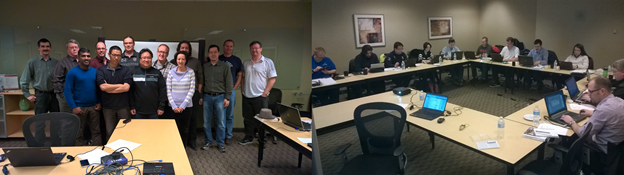
Toronto – Class of 2014
The workshop is scheduled for the following locations this year.
When Where Who
May, The Netherlands, Luc van Vugt, Mark Brummel
May, Belgium, Steven Renders, Mark Brummel
June, Iceland, Gunnar Gestsson, Mark Brummel
June, Japan(Closed Partner Training)
June, Romania(Closed Partner Training)
October, United States (NAVUG, Reno), Mark Brummel
October, Online NAVUG Academy, Mike Doster
Novemberm, Online NAVUG Academy, Mike Doster
Master Class – Application Architecture & Design Patterns
During the workshop, we will reveal all the secrets that are hidden in the Dynamics NAV Source Code. You will get answers to questions like…
- How is Dynamics NAV Architected and how do the modules communicate
- What are Design Patterns and Anti Patterns and how do they apply to Dynamics NAV
- How can I avoid conflicts during my object merge
- What impact do monthly rollups have to my roadmap and release strategy
- Can the new Delta Files help me get more organized
- Why does Dynamics NAV have so much Code Cloning
- Are the coding standard documented and how can apply them
- Can I implement Object Oriented concepts such as MVVM, overloading and reflection
- How do I organize my object structure
- Best Practices such as Encapsulation and Natural Language Programming
- Be familiar with over 30 most used Design Patterns in Dynamics NAV
- What does a perfect UI look like to be repeatable in the cloud
- Understand the impact of Meta Data on Software Design
- What is the difference between Reservation Entries, G/L Entries and Interaction Log Entries
Course Outline
The course has four, iterative blocks that explain the elements for good software architecture using Design Patterns – Repeatable User Interface, Coding Guidelines, Architectural Principles and Exercises.
Introduction
- Introduction to Application Architecture
- Rollup update & Upgrade Strategies
- Design Patterns & Anti Patterns
- Meta Data Driven Software Development
Object Architecture
- Define Object Hierarchy
- Enhance the use of the Symbol Menu
- Interfaces
- Function Libraries
- Natural Language Programming
- Encapsulation
- Arguments & Overloading
- Façade & Hooks
Coding Guidelines
- Design
- Internationalization
- Localizability
- Readability
- Data Dictionary
- Hungarian Notation
- User Interface
Design Patterns
- Singleton, Multi Level Setup & Rules Pattern
- Master Data, Entity State & Compound
- Documents, Copy, Posting & Archiving
- Test Near, Test Far, Do It, Clean Up
Code Cloning
- Fundamentals
- Transaction Mirroring
- Forking, Templating, Customize & Exact Match
Modern UI for Repeatable Software
- Instructions in the User Interface
- Transaction Data Update
- Hiding Fields & Fast tabs
- Totals on Sub Pages
- Create Data from Templates
Model View View Model
- Working with Temporary Tables
- MVVM Pages
- Reports based on data in memory
- Query data on Pages
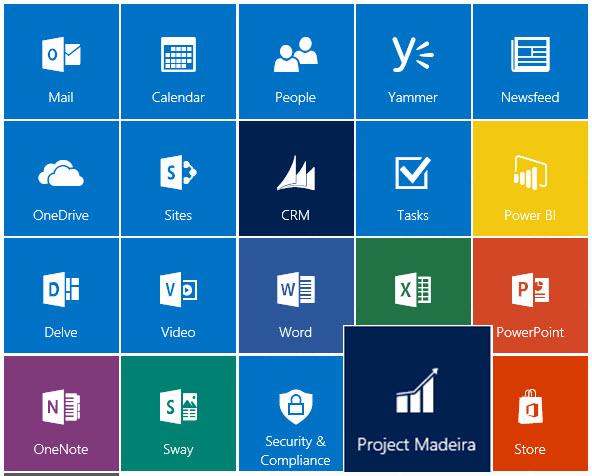
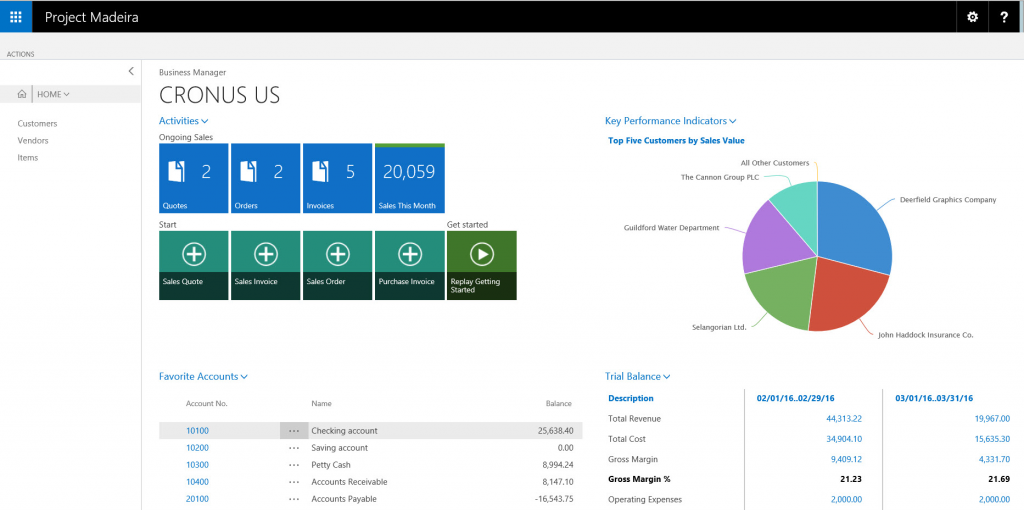
Heard about Project “Madeira” and want to learn more? Here is the ideal opportunity to learn about what it is, how to use it, and what it can do for you.
Brought to you be Mark Brummel, NAV MVP and Andrew Good, MCT, DCP.
Title: Getting ready for Project “Madeira”
When: Wednesday April 20, 2016
Time: 10:00 am EST (GMT-5)
Registration Link: https://attendee.gotowebinar.com/register/4848502505237202433
Panelists
- Mark Brummel – Microsoft NAV MVP
- Erik Hougaard – Microsoft NAV MVP
- Erik P. Ernst – Microsoft NAV MVP
- James Crowter – Microsoft NAV MVP
- Mark Polino – Microsoft GP MVP

Join Liberty Grove Software at NAVUG Focus in Chicago for two days of NAV specific sessions, on June 7 & 8, around Finance, Manufacturing and IT. This will be an opportunity to learn more about these areas, ask questions you have and improve your skills. Also, you can attend Academy Classes that offer a deeper understanding of key areas.
NAVUG Forum 2016
NAV Core Application Setup Refresher Training
NAV Core Development Refresher Training

Liberty Grove Software and The Qixas Group are pleased to provide you with an opportunity to learn more about how to utilize design patterns to streamline your development, improve the ease of future upgrades, and align development efforts to maximize your investment in Microsoft Dynamics NAV®.
Dates: Thursday September 29 and Friday September 30, 2016
Location: Toronto, ON
Cost: $1,580
Format: Hands On Workshop
Please register here: Qixas Group: Microsoft Dynamics NAV Application Architecture and Design Patterns.
This will be a hands on workshop in which you will have the chance to learn about existing patterns, how to create new ones, and incorporate them into your future.
The workshop will be presented by lead Microsoft Dynamics NAV specialists at Qixas Group and co-hosted by Mark Brummel, NAV MVP, who has generously volunteered his time.
Objectives
During the workshop, you will build a full add-on application using design patterns. The application will use 7 architectural patterns, 14 design patterns and will discuss 6 implementation patterns.
We will also cover general concepts such as Naming Conventions and Code Cloning.
You will learn how to implement best practices from Object Oriented Programming in C/AL such as Natural Language Programming, Encapsulation, Hooks, Interfaces and more.
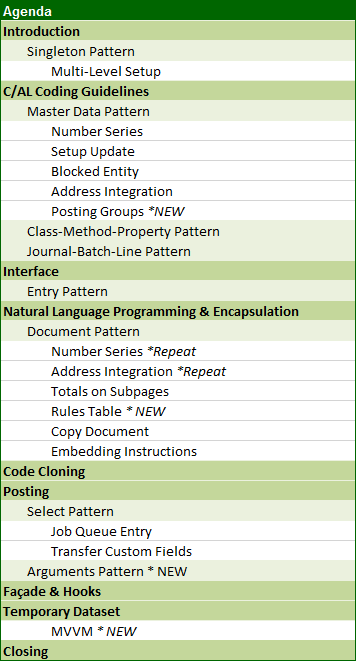
Agenda
Prerequisites
Laptop with
- Dynamics NAV – Preferably with NAV2013 or higher
- Full Dev. License
- SQL Server Mgt. Studio
- Visual Studio Community Edition
Mark Brummel and Andrew Good participated in their first podcast on June 16, 2016 with MS Dynamics World. Learn more about the dynamics in a Dynamics world.
Here is the podcast…
