
What Data Should Manufacturers Migrate from Dynamics GP to Business Central?
When manufacturers begin planning a move from Microsoft Dynamics GP to Microsoft Dynamics 365 Business Central, one question tends to create more debate than almost any other:
How much of our data should we bring with us?
The instinctive answer is often, “All of it.”
I understand why. Your ERP contains years, sometimes decades, of business history. Customer records, vendors, items, inventory, transactions, production information, costing, and financial data can feel too valuable to leave behind.
But there is an important distinction between business history and business value.
They are not always the same thing.
In the previous article in this series, How Manufacturers Can Successfully Plan a Dynamics GP to Business Central Migration, I argued that data readiness should begin during planning, not once the migration tools are already running. If your source data contains duplicate records, obsolete items, inconsistent naming conventions, or years of workarounds, moving everything does not solve those problems.
It relocates them.
That is why a successful Dynamics GP to BC data migration should not be measured by how much data you move. It should be measured by whether the data you bring into BC helps the organization operate more effectively and make better decisions.
“Migration should preserve business value, not historical clutter.” – Andrew Good, CEO, Liberty Grove Software
Table of Contents
Why Does ERP Data Strategy Matter?
What Data Should Manufacturers Migrate to Business Central?
What Data Should Manufacturers Usually Leave Behind?
Why Should Data Cleansing Happen Before Migration?
What Are the Most Common ERP Data Migration Mistakes?
What Does Better Manufacturing Data Look Like in Practice?
What Should Executives Confirm Before Data Migration?
Executive Takeaways
Final Thoughts
Frequently Asked Questions
Why Does ERP Data Strategy Matter?
ERP data is not simply something your system stores.
It drives decisions.
A planner relies on item, inventory, BOM, routing, and demand data. Purchasing relies on vendor and supply information. Production relies on accurate material and process information. Finance relies on transactions, balances, dimensions, costing, and master records. Leadership relies on all those functions to produce a credible picture of business performance.
That means poor manufacturing ERP data has consequences beyond an untidy database.
If inventory records are inaccurate, planners may make the wrong supply decisions. If item information is inconsistent, reporting becomes harder. If BOMs are outdated, production requirements can be wrong. If customer and vendor records are duplicated, employees waste time determining which record is correct.
And if management reporting is built on unreliable data, executives may be making decisions with more confidence than the underlying information deserves.
That is why I encourage leadership teams to think about ERP data migration as a business-quality initiative.
The question is not:
“Can we migrate this?”
The better question is:
“Will this data help us run the business we want to operate after modernization?”
That change in perspective can simplify the project considerably.
What Data Should Manufacturers Migrate to Business Central?
There is no universal migration template. What needs to move depends on the business, regulatory requirements, reporting needs, manufacturing model, and how Dynamics GP has been used.
But there are several categories that manufacturers should evaluate carefully.
Customers and Vendors
Active customer and vendor records usually have clear operational value.
The key word is active.
You want BC to begin with clean records your teams can trust, not a directory of every organization you have transacted with since the ERP was first installed.
Review addresses, payment terms, contact information, tax information, duplicate accounts, naming conventions, and whether records are still genuinely in use.
The same principle applies to vendors. Purchasing needs accurate supplier information, but it does not need multiple versions of the same vendor created over many years.
Items and Inventory
For manufacturers, item data deserves particular attention because it touches so many other processes.
Items can affect purchasing, planning, production, inventory valuation, warehousing, costing, sales, and reporting.
Before inventory migration, determine which items remain active and whether their descriptions, units of measure, costing information, planning parameters, and other attributes are accurate.
Physical inventory also needs to reconcile with what you intend to load into BC.
Moving an incorrect inventory balance into a new ERP does not make it more correct.
Bills of Material
A BOM migration can be one of the most consequential parts of manufacturing data preparation.
Bills of material represent how products are constructed. If they contain obsolete components, incorrect quantities, inconsistent units, or outdated structures, those issues can follow directly into planning and production.
This is an excellent opportunity to involve engineering, operations, planning, and other process owners.
Do not assume that because a BOM exists in GP or an adjacent system, it accurately represents how the product is built today.
Routings
Routings deserve the same scrutiny.
Review work centers, machine centers, operations, sequence, setup and run times, capacity assumptions, and other information used to describe how production happens.
This is where ERP migration becomes more than a data-copying exercise.
You are establishing the operational foundation the new system will use.
Open Production Orders
Open production orders may need to move depending on the migration and cutover strategy.
The important point is that they should be reviewed rather than blindly transferred.
Ask whether each order is genuinely active, whether quantities and statuses are correct, and whether related inventory and production information will reconcile at cutover.
Financial Balances
Finance needs a clean opening position.
The exact approach will depend on accounting requirements and the migration strategy, but balances need to be validated and reconciled.
For CFOs and controllers, this is an area where ownership should be explicit. Do not leave financial data decisions solely to the technical migration team.
“The technical team can move data. The business has to decide which data deserves to move.” – Andrew Good
What Data Should Manufacturers Usually Leave Behind?
This is often the harder conversation.
People are naturally uncomfortable leaving data out of a new system. The concern is understandable: “What if we need it later?”
But retaining access to historical information and loading that information into your new operational ERP are two different things.
Some data is often better archived or made available through another historical-access strategy.
Obsolete Inventory
If an item has not been used for years and has no operational, service, regulatory, or reporting requirement, ask why it belongs in the active BC environment.
Old items can complicate searches, reporting, planning, and day-to-day system use.
Duplicate Records
It’s important to resolve duplication in records before migration begins, wherever practical.
Do not move three versions of the same supplier into BC and expect users to decide which one is correct.
The migration project is an opportunity to establish a trusted record.
Old Transactions
Manufacturers often assume that every historical transaction must reside in the new ERP.
Frequently, it does not.
You may need historical data for financial, regulatory, customer-service, warranty, audit, or analytical purposes. That does not automatically mean every transaction needs to be converted into BC.
Determine the business requirement first, then select the appropriate access strategy.
Inactive Customers and Vendors
A customer you last sold to 12 years ago may be part of your history, but does it need to be an active customer in your new ERP?
Perhaps. Perhaps not.
That decision should be based on business, legal, reporting, and service requirements rather than fear of deleting something.
Historical Workarounds
This is one of the most important categories.
Over time, ERP environments accumulate fields, codes, records, and processes designed to compensate for old limitations or past business requirements.
Those workarounds can become so familiar that employees begin to regard them as requirements.
They are not always requirements.
If the underlying business need has disappeared or BC handles the process differently, migrating the workaround can preserve unnecessary complexity.
Modernization should not become an exercise in rebuilding yesterday’s compromises.
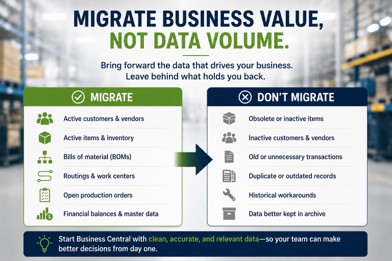
Successful data migration is not about moving everything. It is about moving the information that still creates business value.
Why Should Data Cleansing Happen Before Migration?
I sometimes hear data cleansing described as something that can be handled during implementation.
Technically, some of it can.
Strategically, I would start earlier.
ERP data cleansing requires business decisions, and business decisions take time.
Who determines whether two customer records are duplicates?
Who decides which item description becomes the standard?
Who owns naming conventions?
Who validates BOMs?
Who decides whether an inactive vendor should remain accessible?
Who signs off on inventory?
These are not database questions. They are ownership questions.
Good cleansing typically includes standardization, duplicate removal, naming conventions, validation, and governance.
And that last word matters.
Data governance determines who owns information, who can change it, which standards apply, and how quality will be maintained after go-live.
Otherwise, you can spend months cleaning data for migration, only to gradually recreate the same problems in BC.
“Clean data once and you improve a migration. Govern data well and you improve the business.” – Andrew Good
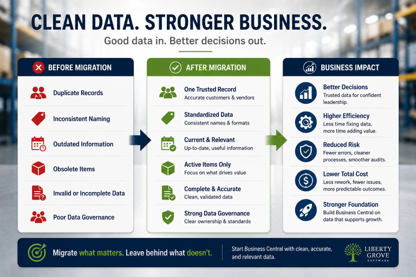
Clean, governed data gives Business Central a stronger foundation and gives leaders greater confidence in the decisions that follow.
What Are the Most Common ERP Data Migration Mistakes?
I see several recurring patterns in manufacturing environments.
Migrating everything because it feels safer. More data does not necessarily mean more value. It can mean more conversion effort, testing, reconciliation, and clutter.
Waiting too long to involve the business. IT understands systems. Finance, production, purchasing, planning, engineering, and operations understand what their data means.
Cleaning data without establishing ownership. If nobody owns the standard after go-live, quality will deteriorate again.
Assuming historical data is accurate because it is historical. Age does not make information trustworthy.
Ignoring relationships between manufacturing data. An item may connect to inventory, BOMs, routings, production orders, costing, purchasing, and reporting. Data decisions need to consider those dependencies.
Treating reconciliation as a final technical check. Finance, operations, and inventory owners should define what must reconcile and what constitutes acceptance before cutover.
The pattern behind these mistakes is similar to what I discussed in our previous ERP planning article.
When business decisions are postponed, they eventually become implementation problems.
What Does Better Manufacturing Data Look Like in Practice?
Here is a composite example based on a situation I have seen in different forms over the years.
A manufacturer preparing for modernization initially wanted to migrate nearly everything.
That seemed logical. The organization had accumulated years of customer, vendor, item, and transaction data, and no one wanted to be responsible for leaving anything important behind.
Then the team started looking more closely.
There were multiple customer records representing the same organization. Vendor naming conventions had changed several times. The item master included products and components that had not been used in years. Some BOM information reflected previous production practices. Employees knew which records to ignore, but that knowledge lived in people’s heads.
That last point matters.
The old system appeared to contain the company’s business knowledge. Still, some of the most important knowledge was actually the employees’ understanding of which parts of the data could be trusted.
Instead of simply converting everything, the organization began making deliberate decisions.
Duplicate records were consolidated. Obsolete information was identified. Active items were reviewed. Manufacturing data received business-owner validation. Historical information that still needed to remain accessible was separated from the data required to operate the new environment.
The migration became more manageable.
More importantly, the new ERP is built on a stronger information foundation.
That is the outcome executives should care about.
The objective is not a perfectly clean database. The objective is data people can confidently use to operate and manage the company.
What Should Executives Confirm Before Data Migration?
Executives do not need to review individual item records, but they should ensure that the organization has answered the right questions.
Before approving the final Business Central data migration approach, I recommend confirming:
- Do we know which data is required to operate the business on day one?
- Have business owners been assigned to customers, vendors, items, inventory, BOMs, routings, and financial data?
- Have duplicate and obsolete records been identified?
- Have active manufacturing master data records been validated?
- Do inventory quantities and values have a reconciliation plan?
- Have we determined how open production orders will be handled?
- Have finance leaders approved the approach to balances and historical financial information?
- Do we know which historical transactions genuinely need to be available in BC?
- Is there an archive or access strategy for history that will not be included in the migration?
- Have naming conventions and data standards been established?
- Have we defined who can create and change critical master data after go-live?
- Are migration testing and reconciliation criteria documented?
- Has someone been given final authority to approve data readiness for cutover?
If the answer to several of these is no, the migration team probably needs more business preparation before final conversion begins.
Executive Takeaways
For CFOs, controllers, CIOs, operations leaders, and other executives responsible for ERP modernization, I emphasize five principles.
First, migrate business value, not volume. The amount of data moved is not a measure of project success.
Second, make data decisions with the business. IT can execute a migration, but process owners need to determine what information is accurate, useful, and necessary.
Third, clean manufacturing master data before it becomes BC master data. Items, BOMs, routings, inventory, customers, and vendors deserve particular attention.
Fourth, distinguish historical access from operational migration. You may need to preserve information without loading all of it into the new ERP.
Fifth, establish data governance before go-live. Data quality is not a one-time migration project. It is an ongoing management responsibility.
The principle underneath all five is simple:
Good ERP data enables good business decisions. Poor data recreates old problems in a newer system.
Before You Move the Data, Make Sure It Deserves to Move
ERP modernization offers manufacturers a rare opportunity to strengthen the business's information foundation.
Do not waste that opportunity by automatically carrying every old record, duplicate, workaround, and inconsistency into BC.
At Liberty Grove Software, our ERP Data Readiness Assessment helps manufacturing organizations evaluate the data behind their Dynamics GP environment before migration decisions become implementation problems.
We help leadership and process owners identify critical manufacturing data, uncover quality issues and dependencies, establish ownership, determine what should migrate, and create a practical strategy for information that should remain accessible without becoming part of the new operational environment.
If you are planning a Dynamics GP to Business Central migration, talk with Liberty Grove Software about an ERP Data Readiness Assessment. Start BC with data your people can trust, not simply data your old ERP happened to contain.
Schedule Your ERP Data Readiness Assessment
Final Thoughts
In the previous article “How Manufacturers Can Successfully Plan a Dynamics GP to Business Central Migration,” I made the case that successful ERP modernization begins with disciplined planning.
Data is where that principle becomes very tangible.
Your Dynamics GP environment represents years of business activity, but longevity alone does not make every record valuable. Some data is essential. Some need correction. Some need to remain accessible. And some have outlived its usefulness.
A good migration strategy understands the difference.
For executives, the objective should not be to ask the implementation team, “Did everything move?”
Ask instead:
“Do we trust the information we are using to run the business?”
That is a much higher standard, and a much more valuable outcome.
In the next article in this series, I will move from migration planning and data readiness to another question every executive team eventually must answer: How do we justify the investment?
Our next article, “How to Build a Business Case for Moving from Dynamics GP to Business Central,” will examine the visible costs of modernization, the less-visible costs of remaining on GP, ERP ROI, operational benefits, and how leadership teams can build a business case around future capability rather than simply replacing aging software.
Because ultimately, ERP modernization is not about owning newer technology.
It is about building a stronger business.
Frequently Asked Questions
What data should manufacturers migrate from Dynamics GP?
Manufacturers should generally evaluate active customers, vendors, items, inventory, BOMs, routings, open production orders, and required financial balances for migration. The final scope should reflect operational, financial, regulatory, reporting, and historical access requirements, rather than a default decision to migrate everything.
Should historical ERP transactions be migrated?
Not necessarily. Historical transactions may need to remain accessible for audit, reporting, customer service, warranty, regulatory, or analytical purposes without being fully converted into Business Central. Define why history is needed before deciding how it should be preserved.
Should inactive customers and vendors be migrated?
Only when there is a clear business, legal, reporting, or operational reason. Migrating large numbers of inactive records can add clutter and make the new environment harder to manage.
What manufacturing data is critical during an ERP migration?
Items, inventory, BOMs, routings, production-related information, costing data, customers, vendors, and relevant financial information are particularly important because they affect planning, production, purchasing, warehousing, finance, and reporting.
How do manufacturers clean ERP data before migration?
Start by assigning business ownership. Then identify duplicates, obsolete records, inconsistent naming conventions, invalid values, and outdated manufacturing information. Establish standards, validate critical records, reconcile balances and inventory, and document approval criteria.
What is ERP data governance?
ERP data governance defines ownership, standards, responsibilities, permissions, and processes for maintaining reliable data. Effective governance helps prevent quality problems that were removed during migration from returning after go-live.
What are the biggest ERP data migration mistakes?
Common mistakes include migrating everything by default, involving business owners too late, failing to remove duplicates, preserving obsolete information, overlooking relationships between manufacturing records, delaying reconciliation planning, and treating data quality as solely an IT responsibility.
How does poor data affect Business Central?
Poor source data can undermine planning, reporting, inventory accuracy, production processes, purchasing, costing, and decision-making after migration. A modern ERP cannot automatically make inaccurate or poorly governed business information trustworthy.
About Andrew Good

Andrew Good, CEO, Liberty Grove Software
Andrew Good, CEO of Liberty Grove Software, a leader in digital transformation, directs the company with strategic insights that deliver impactful results. With over two decades of expertise in Microsoft technologies, Andrew has guided businesses through digital transformation across manufacturing, finance, and healthcare.
Andrew's extensive knowledge comes from personal experiences with various companies. His hands-on operational knowledge comes from Engineering, Maintenance, and operational roles at Unilever and Sony Music. Fourteen years of working with Microsoft Dynamics BC/NAV follows successful projects in ERP, Computerized Maintenance Management Systems (EAM), and quality systems.
His passion for technology is matched by his love for sailing, which inspires his leadership. Andrew parallels the precision of navigating the seas and the challenges of steering a successful company. Under his leadership, Liberty Grove Software thrives, offering tailored solutions to empower clients and optimize operations with innovative Microsoft-based systems.
Connect with Andrew on LinkedIn
Subscribe to Andrew’s Newsletter on LinkedIn
