
How to Clean Dynamics GP Data Before Migrating to Business Central
I see a simple mistake manufacturers make when they start thinking about ERP data migration.
Manufacturers often assume that because data exists in Dynamics GP, it should be transferred to Business Central unchanged, but this overlooks the need for thorough validation to ensure data trustworthiness before migration.
It doesn't.
After 10, 15, or 20 years in the same ERP environment, most manufacturers have accumulated more than just business history. They have duplicate customer records, inactive vendors, obsolete items, inconsistent descriptions, outdated bills of material, questionable routing information, old units of measure, and records everyone recognizes but nobody is sure anyone still uses.
None of this means Dynamics GP has failed.
It means the business has evolved.
In a previous article, I discussed what data manufacturers should migrate from Dynamics GP to Business Central. That is a strategic question about what information has enough business value to move forward.
This article addresses the next question.
Once you have decided what should migrate, is that data actually ready to move?
That distinction matters.
A technically successful migration can move poor-quality data perfectly.
You end up with the same problem in a newer ERP.
Data migration shouldn't be about proving we can move the data. It should ensure the business can trust the data when it arrives.
For manufacturing executives, Dynamics GP data cleanup should be treated as a business-readiness issue, not database housekeeping.
Early executive attention builds control and supports proactive leadership.
Table of Contents
Why Clean Dynamics GP Data Before Migration?
What Manufacturing Data Should Be Cleaned?
What Should You Do With Duplicate, Inactive, and Obsolete Records?
Why BOMs and Routings Require Special Attention
Who Owns ERP Data Cleanup?
When Should Data Cleanup Begin?
How Should Clean Data Be Validated?
What Questions Should Executives Ask About Data Readiness?
A Final Thought: Don't Move the Mess
Frequently Asked Questions
Why Clean Dynamics GP Data Before Migration?
Manufacturers should recognize that data quality directly impacts planning, inventory, and decision-making, so executives must actively support and prioritize data cleansing before migration.
That is the executive answer.
The technical team may see records and tables. I see the operational decisions those records drive.
A production planner depends on accurate item, inventory, BOM, routing, capacity, and demand information.
Purchasing depends on accurate vendor, item, lead-time, and supply information.
Finance depends on reliable master data, balances, dimensions, costing, and transactions.
Operations depends on the integrity of the information flowing between all of them.
And leadership ultimately depends on those functions to produce a credible picture of what is happening across the business.
If an item exists under several inconsistent descriptions, which one should the planner trust?
If obsolete components remain in a BOM, what happens when somebody uses that structure to make a production decision?
If inactive vendors and duplicate customers move into the new ERP, have we modernized the underlying information or changed where we store it?
This becomes even more important as manufacturers pursue greater automation, analytics, and AI-enabled decision support.
Those technologies do not magically repair weak master data.
They make the quality of the underlying information more consequential.
The more you expect from your ERP, the more you have to expect from your data. Automation and analytics can make good information more valuable, but they can also expose poor information much faster.
I remember reviewing a manufacturing environment where the ERP routing no longer reflected what was happening on the floor. The experienced production team knew the real process, so day-to-day operations kept running.
The ERP wasn't the source of truth anymore; a migration forces you to confront that gap.
That’s why I encourage executives to view ERP data cleansing as part of building BC's operating foundation, not as a cleanup exercise assigned to IT.
What Manufacturing Data Should Be Cleaned?
Manufacturing data cleanup should first focus on the master and operational data the future business will actively rely on.
That typically means examining areas such as:
- Customers
- Vendors
- Items
- Units of measure
- Locations
- Inventory information
- Production BOMs
- Routings
- Work centers and machine centers
- Dimensions and accounts
- Open transactions
- Manufacturing master data
The exact scope will vary by manufacturer.
The important point is to examine each data domain in the context of how the business actually operates.
Consider a representative manufacturer with thousands of item records accumulated over many years.
Some are active finished goods.
Some are components.
Some relate to products discontinued years ago.
Some were created for one customer order.
Others may represent essentially the same material but use different descriptions or units of measure because different employees created them at different times.
The migration question is not simply, "Can these item records be converted?"
The better question is, "Which records will our employees rely on after go-live, and are they accurate enough to support those decisions?"
Microsoft's own Dynamics 365 implementation guidance distinguishes migration data, such as customers, products, and open transactions, from configuration data and emphasizes planning, testing, and assigning responsibilities for data management throughout implementation.
For manufacturers, that discipline matters more because production data is interconnected.
Microsoft Dynamics 365 Business Central manufacturing uses production BOMs to define components, routings to define production operations, and work and machine centers to represent capacity and costs.
If those foundational structures are wrong, the issue is not cosmetic.
The error can carry into planning and production.
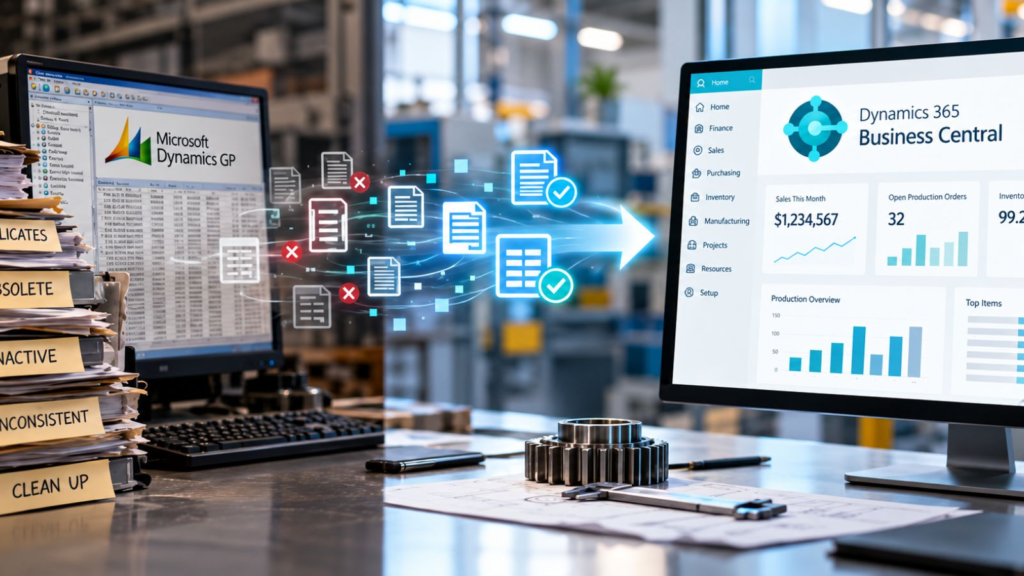
Dynamics GP data cleanup should turn years of accumulated ERP data into a cleaner, standardized, and validated foundation for Business Central.
What Should You Do With Duplicate, Inactive, and Obsolete Records?
Evaluate duplicate, inactive, and obsolete Dynamics GP records rather than automatically migrating or deleting them.
I tend to think about the decision in four ways:
Retain. Clean. Consolidate. Archive.
Some records are active, accurate, and clearly belong in the future environment.
Some are still required but need correction before migration.
Some duplicates can potentially be consolidated, provided the operational, financial, audit, and reporting implications have been properly evaluated.
Others may need to remain accessible for historical, legal, tax, audit, compliance, or reporting purposes without necessarily becoming part of the active operational dataset in BC.
This is where executive discipline matters.
"We might need it someday" is not a data strategy.
Neither is "delete everything old."
A CFO may have legitimate requirements around financial history and auditability. Operations may need historical item or production information. Customer service may rely on information that appears inactive to IT but is important when a long-standing customer calls.
The correct decision depends on the record, its business purpose, and the organization's retention requirements.
Cleaning data does not mean throwing history away. It means being deliberate about what belongs in your active operating environment and what belongs in your historical record.
That is a very different conversation.
Why BOMs and Routings Require Special Attention
BOMs and routings deserve special attention because they describe how the manufacturer intends to build products and perform production operations.
Business Central production BOMs define the components and subassemblies used to produce an item. Routings capture the operations required to manufacture it and underpin process and capacity scheduling.
That makes them far more than reference data.
They are operating instructions.
A representative scenario illustrates the risk.
Imagine a manufacturer that has produced a product family for 15 years. Engineering changes have occurred. Components have been substituted. Equipment has changed. Setup times have improved. Certain operations are now performed differently on the shop floor.
However, the ERP structure has not always kept pace.
Experienced employees know the difference between "what GP says" and "what we actually do."
That gap is manageable as long as those employees are present and everyone understands the workaround.
Migration exposes it.
Now leadership has to decide whether to migrate the documented process or the real process.
That is why I pay particular attention to:
- Obsolete components
- Incorrect quantities
- Old BOM revisions
- Routing steps that no longer reflect production
- Setup and run times
- Work center and machine center information
- Units of measure
- Undocumented production knowledge
Microsoft notes that work and machine centers in BC represent people, equipment, and production capacity used in routing operations, and that calendars, capacity, efficiency, and costs affect scheduling and costing.
If the underlying manufacturing master data is unreliable, simply moving it does not create a reliable manufacturing system.
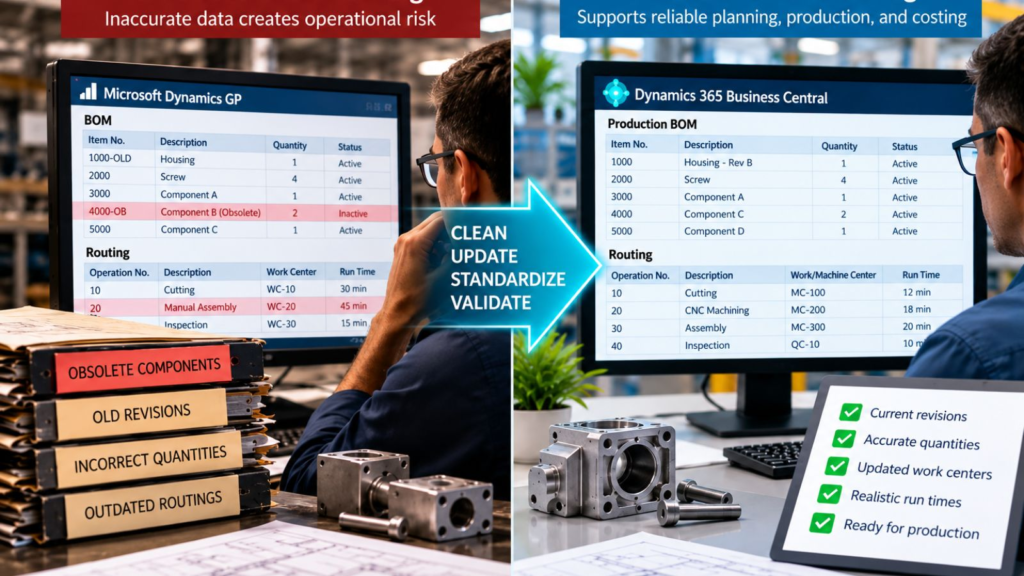
Cleaning BOM and routing data before migration helps ensure Business Central reflects how products are actually manufactured, including current components, quantities, operations, work centers, and run times.
This is also where ERP modernization can reveal something valuable.
Sometimes the migration project discovers that the most accurate version of a manufacturing process is not in the ERP at all.
It is in someone's head.
That is not merely a migration problem.
It is an organizational risk.
Who Owns ERP Data Cleanup?
The business should own ERP data cleanup, with IT and the implementation team providing structure, tools, technical support, and migration expertise.
I would not ask IT to decide whether a production BOM accurately reflects how a product is manufactured.
I would not ask operations to determine the company's financial data-retention requirements.
And I would not ask an implementation consultant to decide which customer records still have strategic value.
The people closest to the data usually understand its business meaning best.
Finance should own financial data decisions.
Sales and customer service should help validate customer information.
Purchasing should validate suppliers.
Warehouse and inventory teams should understand locations, items, and inventory-related records.
Manufacturing and engineering should validate BOMs, routings, production resources, and related master data.
IT should help identify data structures, dependencies, extraction requirements, and technical issues.
The implementation partner should help establish the process, identify migration requirements, expose anomalies, and challenge assumptions.
Leadership should make sure ownership is clear.
One question I often encourage executives to ask is:
"Who is willing to sign their name to the accuracy of this data?"
If nobody owns a data domain, that is useful information.
You have identified a governance problem before it becomes a migration problem.
Users often blame the new ERP for problems caused by old data.
Poor data also creates an adoption problem.
If employees open BC after go-live and immediately encounter duplicate items, questionable inventory information, or BOMs they already know are wrong, they may conclude that the new ERP cannot be trusted.
In reality, the problem may have existed for years. The migration simply made it visible.
When Should Data Cleanup Begin?
Dynamics GP data cleanup should begin early enough that business owners can make thoughtful decisions before conversion deadlines create pressure.
There is no universal timeline.
A manufacturer with relatively clean master data and straightforward processes has a very different challenge from a multi-site organization with decades of records, acquisitions, customizations, inconsistent naming standards, and multiple manufacturing models.
What matters is sequencing.
Do not wait until somebody says, "We need the final conversion file next week," to ask whether the item master is accurate.
Data cleanup often requires investigation.
Why do these two vendors appear to be duplicates?
Does anyone still buy this component?
Why does this item use a different unit of measure?
Is this BOM obsolete, or is it used for a customer-specific configuration?
Does the routing reflect current equipment?
Those questions take business knowledge to answer.
And business knowledge is difficult to compress into the final days before conversion.
The most expensive time to discover a data problem is when the project is waiting for someone to decide what to do.
Starting earlier gives the organization something valuable: options.
How Should Clean Data Be Validated?
Validate cleaned data by comparing migrated information with the source, reconciling critical balances and records, reviewing exceptions, and obtaining business-owner approval.
Microsoft's GP cloud migration guidance specifically calls for validating migrated data before completing the migration. It provides migration validation tests to compare source information in Dynamics GP with migrated information in Business Central.
But technical validation is only part of the answer.
A record can migrate accurately and still contain bad business information.
If an obsolete item moves from GP to BC exactly as designed, the migration tool has succeeded.
The data strategy has not.
That is why I separate two questions:
Did the data migrate correctly?
and
Is the data correct for the business?
Manufacturers need both answers.
A sound validation process can include:
- Trial migrations
- Source-to-target reconciliation
- Exception reports
- Record counts where appropriate
- Inventory and financial reconciliation
- Sampling of important master records
- BOM and routing review
- Business-owner validation
- Formal sign-off for critical data domains
People who will use the information after go-live should validate it before go-live.
That creates accountability and builds confidence.
Users are more likely to trust the new system when they recognize the information inside it.
What Questions Should Executives Ask About Data Readiness?
Executives do not need to inspect thousands of records personally.
They do need confidence that the organization has a disciplined data-readiness process.
I would want answers to questions such as:
- Who owns each major data domain?
- How much inactive, duplicate, or obsolete data have we identified?
- Are our active BOMs and routings accurate today?
- Are naming conventions and units of measure consistent enough for the future environment?
- What information must remain accessible for historical, financial, legal, audit, or reporting reasons?
- What data-quality issues are being corrected before migration rather than carried into BC?
- Who validates converted data and who has authority to approve it?
- What will prevent the same data-quality problems from returning after go-live?
That last question matters.
Data cleanup without data governance is temporary.
If five people can create the same item five different ways after go-live, you have not solved the underlying issue.
You have reset the clock.
A Final Thought: Don't Move the Mess
There is a phrase I use when discussing data migration:
Don't move the mess.
It sounds simple, but it reflects a larger leadership principle.
ERP modernization gives manufacturers a rare opportunity to examine information that has accumulated over years and ask whether it still represents the business they are trying to run.
Some data will absolutely need to move, some will need to be corrected, and some will need to be retained differently.
And some may reveal process or governance issues that deserve attention before Business Central ever goes live.
The objective is not a perfectly clean database.
Manufacturing businesses are too dynamic for that.
The objective is a trustworthy operating foundation.
You do not get a clean start simply because you implement a new ERP. You get a clean start when you make deliberate decisions about the processes and information you bring into it.
For the C-Suite, that is the real value of Dynamics GP data cleanup.
It reduces uncertainty.
It improves confidence.
And it helps ensure the organization enters Business Central with information designed to support the business it wants to become, rather than simply reproducing the system it is leaving behind.
Ready to Assess Your Dynamics GP Data?
If your organization is preparing to move from Microsoft Dynamics GP to Business Central, address data readiness before conversion becomes a deadline-driven exercise.
At Liberty Grove Software, we help manufacturers assess their Dynamics GP environment, identify data-quality and migration risks, clarify ownership, and build a practical path toward Business Central.
The goal is not to clean data for the sake of cleaning it.
The goal is to create an ERP foundation your people and leadership team can trust.
Talk with Liberty Grove Software about a Manufacturing ERP Readiness Assessment and determine whether your Dynamics GP data is ready for the next stage of your migration.
What's Next in This Series?
Data cleaning is one part of preparing the Dynamics GP environment for Business Central.
But Dynamics GP rarely operates alone.
MES platforms, WMS solutions, EDI, shipping systems, banking applications, CRM, reporting tools, payroll systems, engineering applications, and custom interfaces may all exchange information with GP.
That creates the next execution question:
What happens to those integrations when GP goes away?
In the next article, "What Happens to Dynamics GP Integrations When Moving to Business Central?", I'll examine how manufacturers can inventory their existing integration ecosystem and decide what should be retained, replaced, redesigned, or retired rather than automatically rebuilding every connection around the new ERP.
Frequently Asked Questions
What data should be cleaned before a Business Central migration?
Manufacturers should review the active master and operational data they have selected for migration, including customers, vendors, items, units of measure, inventory information, BOMs, routings, work and machine centers, dimensions, accounts, and open transactions. The exact scope depends on the manufacturer's processes and migration strategy.
Should old Dynamics GP data be migrated?
Not automatically. Historical data should be evaluated based on business value and operational, financial, audit, legal, compliance, and reporting requirements. Some information may need to remain accessible without becoming part of the active operating dataset in Business Central.
When should Dynamics GP data cleanup begin?
Data cleanup should begin early in migration preparation, before final conversion deadlines. The more complex the Dynamics GP environment, the more time business owners may need to investigate duplicates, obsolete records, inconsistent master data, and manufacturing structures.
Who is responsible for ERP data cleansing?
ERP data cleansing should be a shared business responsibility. Finance, sales, purchasing, manufacturing, warehouse, operations, and other process owners should validate the information they understand, while IT and the implementation partner provide technical and migration support.
Why are BOMs and routings important during migration?
BOMs define the components and subassemblies required to manufacture products, while routings define the operations used to produce them. In Business Central, these structures affect material requirements, scheduling, capacity, production execution, and costing, so accuracy matters most before migration.
How do manufacturers validate data after migrating from Dynamics GP to Business Central?
Manufacturers should combine technical migration validation with business validation. This can include source-to-target comparisons, reconciliation, exception reporting, trial migrations, sampling, BOM and routing review, and formal approval from the business owners responsible for critical data.
About Andrew Good

Andrew Good, CEO, Liberty Grove Software
Andrew Good, CEO of Liberty Grove Software, a leader in digital transformation, directs the company with strategic insights that deliver impactful results. With over two decades of expertise in Microsoft technologies, Andrew has guided businesses through digital transformation across manufacturing, finance, and healthcare.
Andrew's extensive knowledge comes from personal experiences with various companies. His hands-on operational knowledge comes from Engineering, Maintenance, and operational roles at Unilever and Sony Music. Fourteen years of working with Microsoft Dynamics BC/NAV follows successful projects in ERP, Computerized Maintenance Management Systems (EAM), and quality systems.
His passion for technology is matched by his love for sailing, which inspires his leadership. Andrew parallels the precision of navigating the seas and the challenges of steering a successful company. Under his leadership, Liberty Grove Software thrives, offering tailored solutions to empower clients and optimize operations with innovative Microsoft-based systems.
