
What Happens to Dynamics GP Integrations When Moving to Business Central?
For manufacturers, Dynamics GP rarely operates alone.
Over the years, businesses connect their ERP to warehouse systems, manufacturing execution software, EDI platforms, shipping applications, payroll providers, reporting tools, CRM systems, and specialized manufacturing applications.
Some of these connections are well documented.
Others were implemented years ago, modified several times, and are now maintained by someone who may be the only person who fully understands how they work.
Some aren't even recognized as integrations.
They are spreadsheets, scheduled file transfers, database queries, or manual procedures employees rely on every day.
When a manufacturer moves from Dynamics GP to Microsoft Dynamics 365 Business Central, the migration includes all those connections.
The question is not simply:
Can Business Central connect to the same systems?
The better question is:
Which connections does the business still need, which should change, and which should disappear?
I encourage executives to view integration planning as an opportunity to understand how information actually moves through the organization.
A successful ERP modernization project should not simply replace the central system.
It should improve how the business operates around it.
Table of Contents
Why Dynamics GP Integrations Matter During Migration
How to Identify Everything Connected to Dynamics GP
Retain, Replace, Redesign, or Retire?
What Happens to MES, WMS, EDI, and Other Systems?
Should Existing Custom Integrations Be Rebuilt?
How Does Business Central Support Modern Integrations?
Who Should Own Integration Decisions?
How Should Manufacturers Test Integrations?
What Should Executives Ask Before Approving the Integration Strategy?
Building a Better Connected Manufacturing Business
Frequently Asked Questions
Why Dynamics GP Integrations Matter During Migration
Dynamics GP integrations matter because they support business processes that extend beyond the ERP.
For manufacturers, those processes may include customer orders, production planning, shop floor activity, inventory management, shipping, invoicing, and financial reporting.
A connection that seems minor from an IT perspective may be operationally essential.
Consider EDI.
An electronic customer order enters the ERP, creates demand, influences purchasing and production planning, and eventually results in a shipment and invoice.
If that integration fails after migration, the problem is not simply technical.
The company may experience delayed orders, incorrect commitments, manual re-entry, or invoicing disruption.
The same principle applies to MES, WMS, shipping systems, banking applications, and reporting tools.
Integration failures can quickly become business continuity problems.
That is why integration planning deserves executive attention.
The CFO needs confidence that financial transactions remain reliable.
The COO needs confidence that production and fulfillment continue.
The CIO needs an architecture that can be supported and secured.
And the CEO needs confidence that modernization reduces risk rather than creating new complexity.
How to Identify Everything Connected to Dynamics GP
First, build a complete inventory of the systems and processes that exchange information with Dynamics GP.
That sounds straightforward.
It often is not.
Manufacturers may have used GP for 10, 15, or 20 years. During that time, departments may have implemented solutions independently.
Production may rely on shop floor software.
Warehouse teams may use scanners or a WMS.
Finance may use specialized reporting.
Customer service may rely on EDI or order-entry integrations.
Each department understands its own process, but nobody necessarily has the complete picture.
Instead of beginning with:
What applications are connected to GP?
I prefer:
What information enters or leaves GP, and what happens if that information stops moving?
For each integration, document:
- The application or process involved
- The business function it supports
- The information exchanged
- Whether data moves one way or both
- How frequently it moves
- Who owns the process
- What happens when it fails
- Who supports the connection
Do not overlook informal integrations.
A purchasing employee may export information from GP, update a spreadsheet, and upload the results elsewhere.
Technically, that may not be an automated integration.
Operationally, it still creates a dependency.
The inventory needs to reflect how the business actually works.
This connects directly to the previous article in this series, How to Clean Dynamics GP Data Before Migrating to Business Central.
Clean data matters, but it also needs to move reliably between the systems that depend on it.
Retain, Replace, Redesign, or Retire?
I recommend evaluating each integration using four possible decisions:
Retain. Replace. Redesign. Retire.
This prevents the organization from assuming that every existing connection must be recreated exactly as it works today.
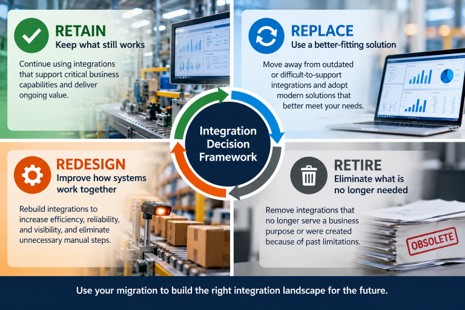
The Retain, Replace, Redesign, or Retire framework helps manufacturers evaluate each Dynamics GP integration based on its future business value rather than automatically recreating the existing environment.
Retain
Some integrations still support important business capabilities and remain appropriate.
A specialized manufacturing application may remain essential.
In that case, the application may stay, but its connection to Business Central may change.
Replace
Some integrations connect GP to outdated or difficult-to-support applications.
The migration creates an opportunity to evaluate alternatives.
A manufacturer might replace a legacy reporting integration with Business Central and Power BI, provided the new solution meets the business requirement.
Microsoft documents supported integration options between Business Central, Power BI, Power Automate, Power Apps, and other Power Platform applications.
Redesign
An integration may still be necessary, but it may no longer work as well.
Perhaps information moves through scheduled files.
Employees may manually reconcile data because the two systems aren't synchronized effectively.
Modernization provides an opportunity to redesign the process rather than reproduce it.
Retire
Some integrations exist because of limitations or processes that no longer apply.
Before investing in rebuilding them, ask whether they still serve a meaningful business purpose.
An integration nobody can explain shouldn't automatically become part of the future architecture.
But don't remove it until you understand its dependencies.
The goal is not to preserve the current integration landscape.
The goal is to build the right one for the future.
What Happens to MES, WMS, EDI, and Other Systems?
Manufacturing execution systems and shop floor applications require particular attention because they connect ERP planning and financial information with physical production activity.
Depending on the manufacturer, they may capture:
- Production output
- Material consumption
- Labor
- Scrap and rework
- Machine activity
- Production status
Those transactions can affect inventory, costing, scheduling, and management reporting.
The migration team needs to define basic ownership questions.
Which system owns the production order?
Where is consumption recorded?
Where is output recorded?
How are errors corrected?
When are financial entries created?
These are not simply technical questions.
They determine whether the ERP accurately reflects manufacturing activity.
The right design also depends on manufacturing DNA.
Make-to-stock, make-to-order, engineer-to-order, and mixed-mode manufacturers may have very different process and integration requirements.
A connection that works well for a make-to-stock manufacturer may not provide the transaction visibility or flexibility an engineer-to-order business requires. The integration strategy must reflect how production is planned, executed, and reported.
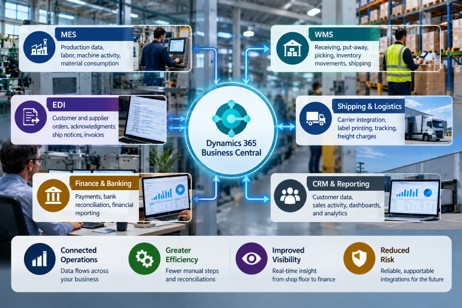
Business Central can serve as the central ERP platform in a connected manufacturing environment, but each MES, WMS, EDI, logistics, finance, CRM, and reporting connection requires a deliberate future-state integration decision.
Warehouse Management
A WMS may manage receiving, put-away, picking, transfers, inventory movements, and shipping.
The future-state design should define which system owns each transaction and how inventory remains synchronized.
If the WMS and BC disagree on inventory, employees may quickly lose confidence in both.
EDI
EDI may support purchase orders, acknowledgments, advance ship notices, invoices, and customer-specific transactions.
Those requirements don't disappear when the ERP changes.
The new environment still needs to support the customer's business rules.
Shipping, Banking, CRM, and Reporting
Evaluate shipping platforms, banking tools, CRM, payroll systems, and reporting applications separately.
Microsoft documents integration scenarios between Business Central and Dynamics 365 Sales, Dataverse, Power Platform, Shopify, and other Microsoft services.
That does not mean every third-party integration is native or automatic.
Each one requires its own decision.
Should Existing Custom Integrations Be Rebuilt?
Not automatically.
Rebuilding every custom integration exactly as it exists today can undermine the point of modernization.
A custom integration may have been created because GP lacked a capability, a third-party system required a particular approach, or a unique business process needed support.
Some of those reasons may still be valid.
Others may not.
I encourage manufacturers to separate business requirements from technical solutions.
Ask:
What business problem was this integration designed to solve?
Then ask:
Is that still the best way to solve it in Business Central?
A custom connection may still be essential.
Another may now be unnecessary.
A third may need redesign because the old technology or process is hard to maintain.
This is where the earlier series article on Dynamics GP customizations and ISV dependencies becomes relevant.
Applications, customizations, and integrations are closely connected, but they are not the same decision.
The key is to avoid recreating technical debt just because it is familiar.
How Does Business Central Support Modern Integrations?
Business Central supports several integration approaches, including REST APIs, Microsoft Power Platform, Dataverse, and supported connections to selected Microsoft and third-party applications.
Microsoft identifies REST APIs as the preferred integration approach for Business Central external systems. Standard APIs are available, and you can create custom APIs when standard endpoints don't meet business requirements.
This gives manufacturers modern integration options.
But an available API does not automatically create a complete business solution.
Integration still requires:
- Business logic
- Security
- Monitoring
- Error handling
- Support ownership
- Testing
Business Central also integrates with Power Automate, Power Apps, and Power BI.
These tools can support workflow automation, applications, and reporting.
The right tool depends on the business scenario.
Executives do not need to choose API endpoints.
They do need confidence that the architecture is understandable and supportable.
I would want clear answers to questions such as:
Where does important data originate?
Which system owns it?
How do we know whether an integration succeeded?
What happens when it fails?
Who responds?
Can the solution be supported without relying on one individual?
A modern architecture should make those answers easier, not harder.
Who Should Own Integration Decisions?
Business process owners, IT leadership, and the implementation team should share integration decisions.
IT should not determine business priorities alone.
Business leaders should not make integration commitments without understanding technical implications.
Operations should define production and warehouse requirements.
Finance should define controls, reconciliation, and financial accuracy requirements.
Sales and customer service should identify customer-facing dependencies.
IT should evaluate security, architecture, supportability, and risk.
The implementation partner should help translate those requirements into a practical BC strategy.
One question I often encourage executives to ask is:
Who will own this integration after the implementation project is finished?
That matters because integrations require ongoing support.
Applications change.
Vendors release updates.
Business processes evolve.
Failures occur.
Without clear ownership, even a technically sound integration can become a long-term operational risk.
How Should Manufacturers Test Integrations?
Manufacturers should test integrations through complete business processes, not simply successful data transfers.
A message moving from one system to another proves the connection works.
It does not prove the business process works.
Consider an EDI customer order.
Did the order arrive correctly?
Did it create the right demand?
Could production or purchasing respond correctly?
Was the shipment processed?
Was the invoice accurate?
Did the financial result post correctly?
That is a meaningful test.
Manufacturers should also test exceptions.
Materials are short.
Production quantities change.
Orders ship partially.
Transactions are rejected.
Inventory requires adjustment.
Testing should establish what happens when information is missing, delayed, duplicated, or incorrect.
And the people who depend on those integrations should participate.
A warehouse supervisor may identify an issue IT would miss.
A planner may notice that information arrives too late.
A controller may identify a reconciliation problem that would otherwise appear at month-end.
That is why integration testing belongs within the broader Business Central UAT process.
A successful integration supports the business process reliably, not just data exchange.
What Should Executives Ask Before Approving the Integration Strategy?
Executives do not need to become integration specialists.
They do need confidence that the organization understands its dependencies.
I would ask:
- Do we have a complete inventory of everything connected to Dynamics GP?
- Which integrations are essential to production, shipping, order processing, or finance?
- Which will we retain, replace, redesign, or retire?
- Have we confirmed that remaining applications can support the proposed BC environment?
- Who owns each critical integration?
- How will we know when an integration fails?
- Have we tested the full business process, including exceptions?
- What is the contingency plan if a critical integration is not ready at go-live?
Those questions bring the discussion back where it belongs.
Business continuity.
Building a Better Connected Manufacturing Business
A Dynamics GP-to-Business Central migration should not be an exercise in reconnecting every application exactly as it worked before.
That may preserve the very complexity the organization wanted modernization to address.
Instead, use the migration to examine how systems support the business.
Which connections are essential?
Which applications still create value?
Which processes depend on manual work?
Where are you carrying technical complexity that no longer serves a purpose?
Where could a better-connected environment improve reliability and visibility?
The answers will differ from one manufacturer to another.
But the principle is consistent.
The goal is not to recreate your Dynamics GP integration environment in Business Central. The goal is to build an integration environment that supports how your manufacturing business needs to operate next.
At Liberty Grove Software, we help manufacturers assess their Dynamics GP environments, identify critical dependencies, and plan Business Central migrations around the processes that matter most.
If your organization is preparing for a GP-to-BC migration, an integration assessment can clarify what needs to stay, what should change, and where the greatest operational risks exist.
Talk with Liberty Grove Software about your Dynamics GP-to-Business Central migration.
What’s Next in This Series?
Once manufacturers have addressed data readiness and integration planning, the next question is whether their critical business processes will actually work in Business Central.
That brings us to testing.
In the next article, How Should Manufacturers Test Business Central Before Go-Live?, I’ll look at how manufacturers can validate real workflows across planning, purchasing, production, inventory, shipping, costing, and financial posting.
The goal of testing is not simply to prove that Business Central works.
It is to prove that your business can work in Business Central.
Frequently Asked Questions
Will our existing Dynamics GP integrations work automatically with Business Central?
Generally, no. Evaluate existing integrations to determine whether they can connect to Business Central, need modification, require replacement, or should be retired.
Do manufacturers need to replace their MES or WMS when moving to Business Central?
Not necessarily. Existing systems may remain if they continue to meet business requirements and can integrate appropriately with Business Central.
Can Business Central integrate with EDI platforms?
Yes. Business Central can participate in EDI solutions through third-party applications, integration platforms, APIs, or custom development. Requirements vary by trading partner and transaction type.
Does Business Central eliminate the need for custom integrations?
No. Business Central provides standard capabilities and modern integration options, but some manufacturers will still require extensions, third-party applications, or custom integrations.
When should integration planning begin during a Dynamics GP migration?
Start integration discovery early enough to identify dependencies, evaluate future-state options, coordinate with vendors, design connections, and test critical processes before go-live.
What is the biggest integration risk when migrating from Dynamics GP to Business Central?
One of the biggest risks is discovering a business-critical dependency late in the project. A thorough integration inventory, clear ownership, and end-to-end testing help reduce that risk.
About Andrew Good

Andrew Good, CEO, Liberty Grove Software
Andrew Good, CEO of Liberty Grove Software, a leader in digital transformation, directs the company with strategic insights that deliver impactful results. With over two decades of expertise in Microsoft technologies, Andrew has guided businesses through digital transformation across manufacturing, finance, and healthcare.
Andrew's extensive knowledge comes from personal experiences with various companies. His hands-on operational knowledge comes from Engineering, Maintenance, and operational roles at Unilever and Sony Music. Fourteen years of working with Microsoft Dynamics BC/NAV follows successful projects in ERP, Computerized Maintenance Management Systems (EAM), and quality systems.
His passion for technology is matched by his love for sailing, which inspires his leadership. Andrew parallels the precision of navigating the seas and the challenges of steering a successful company. Under his leadership, Liberty Grove Software thrives, offering tailored solutions to empower clients and optimize operations with innovative Microsoft-based systems.
